





ppompili
Members
-
Joined
-
Last visited
Everything posted by ppompili
-
Hi @alexthunderstormI rolled back to 10.01. I then locked that into place, so no more updates for now. I'd rather take the risk of an outdated version rather than not being able to log in. I would roll back and then try to update at a later date.
-
Hello all, since the last update (5 days ago) I can't log into my Seafile. I keep getting; (correction, I thought it was the last update, but it turns out that I had to roll back to 10.01, and update from 5 months ago) Forbidden (403) CSRF verification failed. Request aborted. More information is available with DEBUG=True. I rolled back to 10.01 and that fixed it. I guess it's been over 5 months since I've put in my passwords. Anyway, still looking for some advice to keep this up to date while still maintaining access.
-
Hey all, using the instructions provided within the template of Seafile-Official from the Unraid App store worked for me. @emrepolat7 was also very helpful! Thank you,
-
Glad I'm not the only one. Same problem on my end. Was working fine, and then I hadn't logged in for a few weeks. All of a sudden I'm getting the same error as mentioned above. I've tried fresh installs, using a new database, nothing seems to work. In Connection.php line 759: SQLSTATE[HY000]: General error: 1005 Can't create table `akaunting`.`jeg_media` (errno: 121 "Duplicate key on write or update") (SQL: alter table `jeg_media` add constraint `original_media_id` foreign key (`original_medi a_id`) references `jeg_media` (`id`) on delete set null) In Connection.php line 544: SQLSTATE[HY000]: General error: 1005 Can't create table `akaunting`.`jeg_media` (errno: 121 "Duplicate key on write or update")
-
Hello, I am attempting to set up my Only Office Document Server and connect it to Next Cloud. I've 1. Set up the reverse proxy 2. created certificates When I start the document server from Docker, I get this error in the logs. Preparing for shutdown, it can take a lot of time, please wait... * Starting PostgreSQL 12 database server ...done. * Starting RabbitMQ Messaging Server rabbitmq-server ...done. ...done. Starting supervisor: supervisord. * Starting periodic command scheduler cron ...done. * Starting nginx nginx ...done. Generating AllFonts.js, please wait...Done Generating presentation themes, please wait...Done Generating presentation themes, please wait...Done ds:docservice: stopped ds:docservice: started ds:docservice: stopped ds:docservice: started ds:converter: stopped ds:converter: started ds:converter: stopped ds:converter: started * Reloading nginx configuration nginx ...done. ==> /var/log/onlyoffice/documentserver/converter/err.log <== ==> /var/log/onlyoffice/documentserver/converter/out.log <== [2022-02-01T14:51:58.800] [WARN] nodeJS - update cluster with 1 workers [2022-02-01T14:52:42.200] [WARN] nodeJS - update cluster with 1 workers [2022-02-01T14:52:42.208] [WARN] nodeJS - worker 1288 started. [2022-02-01T14:52:42.210] [WARN] nodeJS - update cluster with 1 workers [2022-02-01T14:58:37.033] [WARN] nodeJS - update cluster with 1 workers [2022-02-01T14:58:37.041] [WARN] nodeJS - worker 1144 started. [2022-02-01T14:58:37.044] [WARN] nodeJS - update cluster with 1 workers [2022-02-01T14:59:19.127] [WARN] nodeJS - update cluster with 1 workers [2022-02-01T14:59:19.133] [WARN] nodeJS - worker 1290 started. [2022-02-01T14:59:19.135] [WARN] nodeJS - update cluster with 1 workers ==> /var/log/onlyoffice/documentserver/docservice/err.log <== ==> /var/log/onlyoffice/documentserver/docservice/out.log <== [2022-02-01T14:51:59.247] [WARN] nodeJS - Express server listening on port 8000 in production-linux mode. Version: 7.0.0. Build: 132 [2022-02-01T14:52:40.908] [WARN] nodeJS - Express server starting... [2022-02-01T14:52:40.910] [WARN] nodeJS - Failed to subscribe to plugin folder updates. When changing the list of plugins, you must restart the server. https://nodejs.org/docs/latest/api/fs.html#fs_availability [2022-02-01T14:52:40.935] [WARN] nodeJS - Express server listening on port 8000 in production-linux mode. Version: 7.0.0. Build: 132 [2022-02-01T14:58:37.417] [WARN] nodeJS - Express server starting... [2022-02-01T14:58:37.419] [WARN] nodeJS - Failed to subscribe to plugin folder updates. When changing the list of plugins, you must restart the server. https://nodejs.org/docs/latest/api/fs.html#fs_availability [2022-02-01T14:58:37.454] [WARN] nodeJS - Express server listening on port 8000 in production-linux mode. Version: 7.0.0. Build: 132 [2022-02-01T14:59:17.269] [WARN] nodeJS - Express server starting... [2022-02-01T14:59:17.271] [WARN] nodeJS - Failed to subscribe to plugin folder updates. When changing the list of plugins, you must restart the server. https://nodejs.org/docs/latest/api/fs.html#fs_availability [2022-02-01T14:59:17.297] [WARN] nodeJS - Express server listening on port 8000 in production-linux mode. Version: 7.0.0. Build: 132 ==> /var/log/onlyoffice/documentserver/metrics/err.log <== ==> /var/log/onlyoffice/documentserver/metrics/out.log <== }, sets: {}, pctThreshold: [ 90 ] } 1 Feb 14:40:10 - [1067] reading config file: ./config/config.js 1 Feb 14:40:10 - server is up INFO 1 Feb 14:51:58 - [1102] reading config file: ./config/config.js 1 Feb 14:51:58 - server is up INFO 1 Feb 14:58:36 - [1102] reading config file: ./config/config.js 1 Feb 14:58:36 - server is up INFO ==> /var/log/onlyoffice/documentserver/nginx.error.log <== When I try to connect Only Office within next cloud, I get this error Has anyone had a similar problem and found. solution? I've come to the limit of my trouble shooting expertise. Thank you,

-
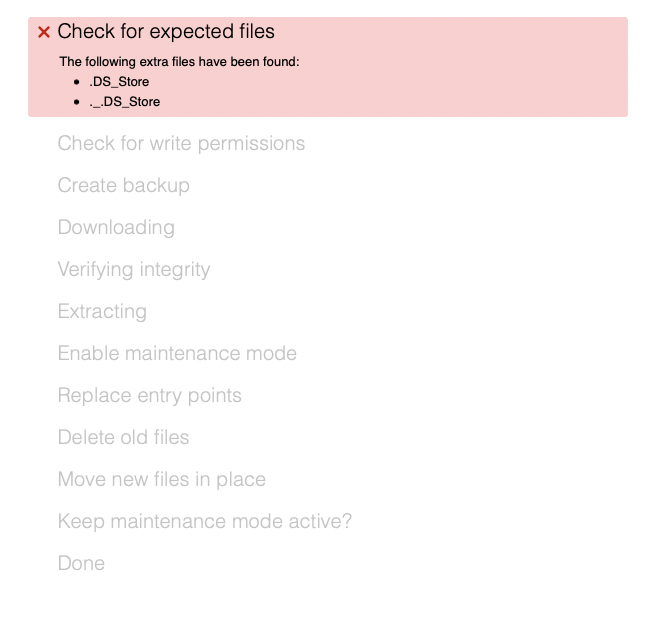
Hello all, I'm having an issue updating my Nextcloud instance. I have found a few posts on this, but am having trouble finding a simple solution, Anyone have a quick fix for this? Cheers,
-
Ok, second and hopefully last Pïwigo question. I am trying to share albums with people outside my network using a link. I googled it and I see that there is a Piwigo plugin that can be installed to do this. When I go to the plugin section on my Piwigo install, that plugin isn't there. I don't see a way to add plugins that aren't on the list. None of the other plugins (with the exception of one called private share) seems to do what I am looking for. How are others sharing albums? Edit: I found this plugin, but not sure that I can just drop it into Piwigo. It is not listed on the version of Piwigo I am using within unRaid (the most current version I imagine)
-
That worked. Thank you!
-
Hello, I am trying to get piwigo to run through my SWAG reverse proxy. Here is how I have the conf file set up; ## Version 2020/12/09 # make sure that your dns has a cname set for piwigo server { listen 443 ssl; listen [::]:443 ssl; server_name photos.*; my cname on my domain is in fact photos include /config/nginx/ssl.conf; client_max_body_size 0; # enable for ldap auth, fill in ldap details in ldap.conf #include /config/nginx/ldap.conf; # enable for Authelia #include /config/nginx/authelia-server.conf; location / { #enable the next two lines for http auth #auth_basic "Restricted"; #auth_basic_user_file /config/nginx/.htpasswd; #enable the next two lines for ldap auth #auth_request /auth; #error_page 401 =200 /ldaplogin; # enable for Authelia #include /config/nginx/authelia-location.conf; include /config/nginx/proxy.conf; resolver 127.0.0.11 valid=30s; set $upstream_app piwigo; set $upstream_port 65; my piwigo runs on port 65 set $upstream_proto https; I changed this to https because http wasn't working proxy_pass $upstream_proto://$upstream_app:$upstream_port; } } Ok, so I've compared this to other .conf files i have that are working properly and I can not find a fault with this (other than to say that I can not access my piwigo from outside the network. I either get 502 bad gateway, or when I've tried to enable http auth, I get Forbidden after typing in the correct user/pass for piwigo. I'm sure there is a glaring error on this conf file, but I for the life of me can not seem to find it. In my SWAG docker, I do have photos in there and a subdomain. All of my other subdomains work. Any advice? Thank you, EDIT, forgot to mention that I do have Piwigo set up on proxtNet vs bridge as with he other dockers I have using the reverse proxy.
-
Hello, I am having the same issue, but when I scroll down in this thread I'm not sure I understand the solution. I also have the exact same 4 points from the quote above. Has anyone else run in to this and been able to fix it? Thank you,
-
Hello all, was considering buying a VR headset to use with Windows running on a VM as well. I noticed that this thread sort of dropped off in July. Has anyone had success?
