





nearcatch
Members
-
Joined
-
Last visited
-
Didn't work. Still the same error. EDIT: Wait I'm a moron, I never updated. Hold on. EDIT2: Working now with 2026.09.11!
-
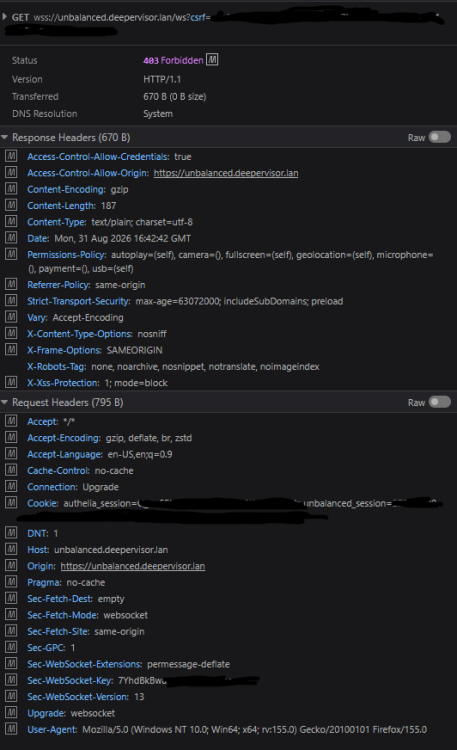
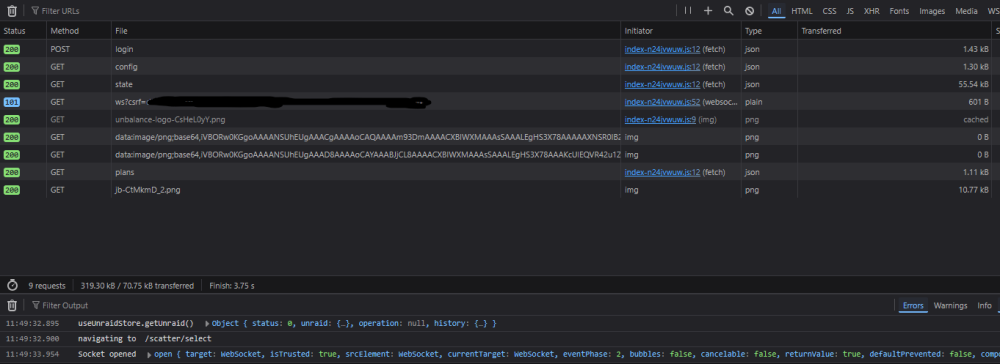
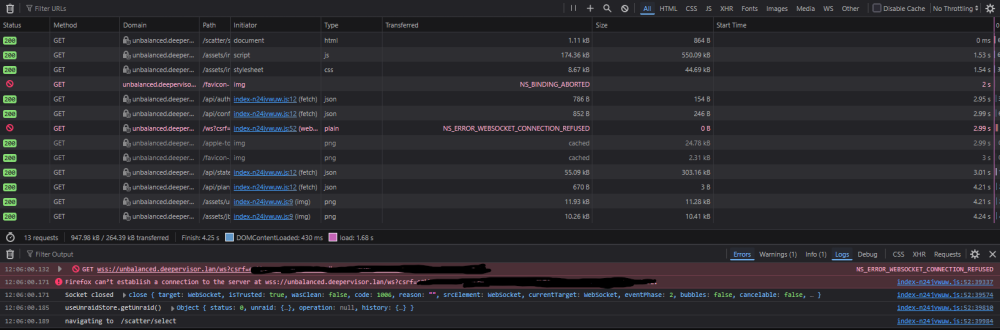
the log at /var/log/unbalanced.log has these lines: 2026/09/10 22:17:49 [info] starting unbalanced 2026.09.10 ... 2026/09/10 22:17:49 [info] started service server (listening http on :7090) ... 2026/09/10 22:17:49 [warn] unable to get free/size data for some mounts: exit status 1 2026/09/10 22:18:19 [warn] rejected websocket auth: reason="invalid websocket origin" origin="https://unbalanced.unraid.lan" allowedOrigin="http://unbalanced.unraid.lan" host="unbalanced.unraid.lan" forwardedHost="unbalanced.unraid.lan" forwardedProto="wss" forwarded="" remoteAddr="x.x.x.x:44036" sessionCookie=true csrfPresent=true csrfMatches=falseI see a mismatch between "origin" and "allowedOrigin", where allowedOrigin is plain http, while the origin is https. My reverse proxy serves an https page to the user, and on the backend connects to unbalanced on the http path. Still not sure why the LAN path specifically fails here, b/c the reverse proxy does this for the external domain too. I thought my configuration would use the exact same settings for either path. But I have to assume this is the cause. Edit: for the sake of completion, here is the yaml I have in my traefik config that controls the routing towards unbalanced. I have also tested this without any middlewares to see if they were an issue. Websocket was still rejected. http: routers: unbalanced-rtr: rule: "Host(`unbalanced.unraid.lan`) || Host(`unbalanced.external.com`)" entryPoints: - websecure middlewares: - chainAuthelia - mwErrorPages@docker service: unbalanced-svc services: unbalanced-svc: loadBalancer: servers: - url: "http://192.x.x.x:7090"
-
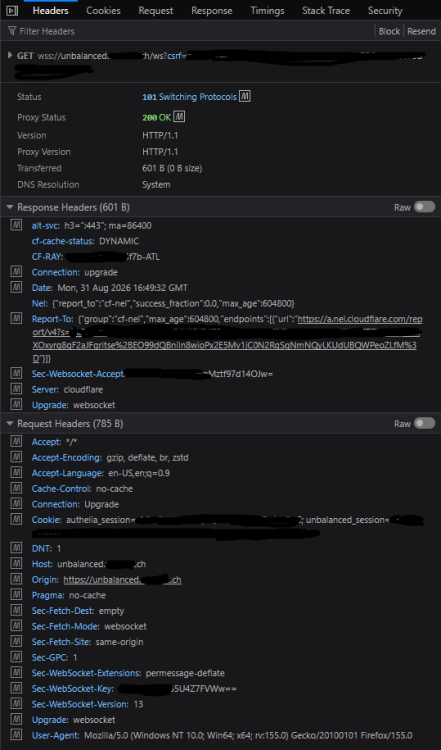
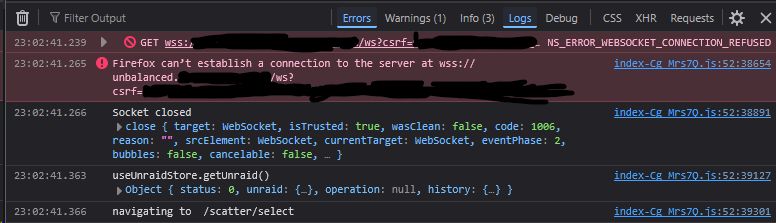
Network tab w/ console for LAN failure: Headers for websocket 403: Success via external domain, if it helps: Headers:
-
I've tested it and authentication works when using my external hostname, but it doesn't work with my local LAN hostname. Not sure why, because without authentication both work. Could be something in my config, but idk what could make authentication break only the LAN path.
-
Does it look like below? I get this error if I have the new authentication enabled in unbalanced's settings. If I disable the authentication, I get the below, and everything works, even behind the reverse proxy (traefik+authelia for me).

-
For an outside solution, in this post I explained how I put unbalanced behind a docker reverse proxy that requires authentication (traefik + authelia, in my case). It should possible for other reverse proxies and authentication providers to do the same thing. If you don't use a reverse proxy, you can still do the iptables step to limit who can access it locally, if your LAN is set up with sticky IP addresses.
-
LSIO isn't the best place to ask about this as you're not using one of their images. The documentation for your image is here: https://dockerfile.readthedocs.io/en/latest/content/DockerImages/dockerfiles/php-nginx.html. A relevant blurb: You can start a container under a different user by adding a user key to the service. The below will use the $UID and $GID from the environment. If they are unset, then it will default to 99:100, which is nobody:users on Unraid. # docker-compose.yaml services: obsidian-vault-api: image: webdevops/php-nginx:8.3-alpine container_name: obsidian-vault-api user: ${UID:-99}:${GID:-100} environment: ...This is a first step (and backup before you do it!), but if it's not working you should also take a look at the SERVICE_SUPERVISOR_USER from the base environment variables section of the above documentation. It is set to root by default. If that doesn't work either, then try your image developer's Slack link: https://webdevops.io/slack/
-
I ran a couple of commands to delete all the disk temperature notifications which brought me from ~14000 notifications to ~4200. Archiving works now. If anyone runs into this in the future, these are the commands I used: # delete all notifications that have "temperature" in the filename rm -v /boot/config/plugins/dynamix/notifications/archive/*temperature*.notify # delete all notifications that have "returned to normal temperature" in the text content grep -lr '/boot/config/plugins/dynamix/notifications/archive/' -e 'returned to normal temperature' | while read -r line ; do rm -v $line done
-
There are definitely a lot of older ones, you can see from my screenshot that there are nearly 14000. I didn't realize that would be an issue, and if it is an issue, I think I would expect Unraid to prune old messages itself instead of storing them indefinitely.
-
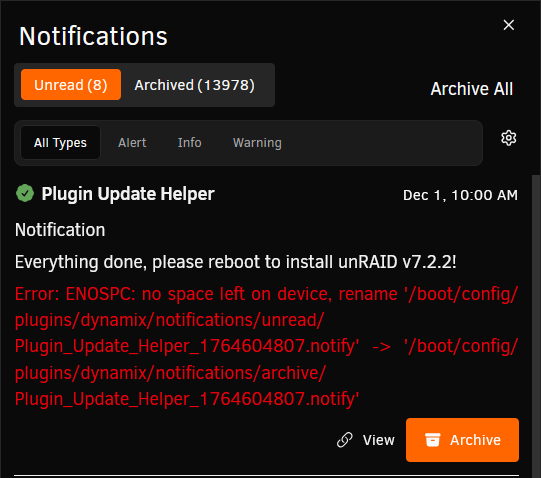
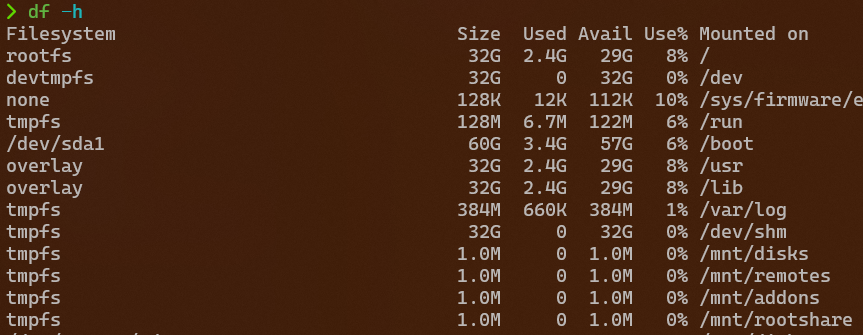
Attached diagnostics right after I attempted to archive a notification. I've also tried navigating to the folder in bash and attempting to move it with mv, and I got the same error.
-
See below. Every time I try to archive something, it says there's no space left on the device. As far as I can tell I have plenty of space left, and I'm not experiencing any other issues that would lead me to believe the flash drive was filling up somehow. Unraid 7.2.2.
-
Has anyone ever run into problems getting Unbalanced to start? I've toggled it on and off a couple of times now, but when I open the Unbalanced dashboard all that shows in my browser are the words "server error".
-
ZFS Master was the odd one out so that's the one I chose to convert to match. Everything else on the Unraid Main page is already SI and it would've been more effort to identify the units in all the different parts of the page. I use Windows primarily as well, so IEC is what I see everywhere else, but I'm just used to seeing SI in Unraid.
-
Sorry to hear about the fires! Thanks for following up. I had the proper attributes set, they just would not run for whatever reason. I finally just moved them into userscripts to run when the array was started or stopped using the userscripts plugin, and now the functionality works again, even if the emhttp events don't.
-
I had the below scripts in 6.12 to spin up/down disks from a command line. They no longer work in 7.0.0. Does anyone know what changes need to be made to get them working, or if there's an alternative in 7.0? spinup() { . /usr/local/emhttp/state/var.ini curl --unix-socket /var/run/emhttpd.socket \ --data-urlencode cmdSpinupAll=apply \ --data-urlencode startState=$mdState \ --data-urlencode csrf_token=$csrf_token \ http://127.0.0.1/update } spindown() { . /usr/local/emhttp/state/var.ini curl --unix-socket /var/run/emhttpd.socket \ --data-urlencode cmdSpindownAll=apply \ --data-urlencode startState=$mdState \ --data-urlencode csrf_token=$csrf_token \ http://127.0.0.1/update }





