





Riverhawk
Members
-
Joined
-
Last visited
Everything posted by Riverhawk
-
I can't thank you enough. So many questions: 1. Are you an LT employee? I see you saving so many people and you're awesome. 2. Have you ever thought about creating/posting a knowledge base workflow? I see you answering questions like this a lot. Like, how did you know to "do this" then this based on the output? Would it beneficial for you to create something as a guide for people to walk through first? 3. You think my SSD is actually failing or is it a known problem that they sometimes only re-appear after a hard shutdown/reboot? 4. If my drive wasn't recoverable, what would my nightly CA backup provide me if anything? Again, thank you for your time.
-
On the step where I re-add the devices and start the array. Should I change the FS from "auto" to "btrfs" since my cache pool was originally a shared-non-raid pool of 4TB total?

-
Do you want to remove the signature? [Y]es/[N]o: N /dev/nvme1n1p1 : 2048 3907029167 (1.8T) Linux /dev/nvme1n1p2: write New situation: Disklabel type: dos Disk identifier: 0xaac9aa1b Device Boot Start End Sectors Size Id Type /dev/nvme1n1p1 2048 3907029167 3907027120 1.8T 83 Linux The partition table has been altered. Calling ioctl() to re-read partition table. Syncing disks. ----- btrfs fi show Label: none uuid: 754b3e32-4ddf-4175-9c82-17006b7525a3 Total devices 2 FS bytes used 163.99GiB devid 1 size 1.82TiB used 133.01GiB path /dev/nvme0n1p1 devid 2 size 1.82TiB used 133.01GiB path /dev/nvme1n1p1
-
sfdisk /dev/nvme1n1 Welcome to sfdisk (util-linux 2.38.1). Changes will remain in memory only, until you decide to write them. Be careful before using the write command. Checking that no-one is using this disk right now ... OK Disk /dev/nvme1n1: 1.82 TiB, 2000398934016 bytes, 3907029168 sectors Disk model: Samsung SSD 990 PRO 2TB Units: sectors of 1 * 512 = 512 bytes Sector size (logical/physical): 512 bytes / 512 bytes I/O size (minimum/optimal): 512 bytes / 512 bytes sfdisk is going to create a new 'dos' disk label. Use 'label: <name>' before you define a first partition to override the default. Type 'help' to get more information. >>> 2048 Created a new DOS disklabel with disk identifier 0xaac9aa1b. Created a new partition 1 of type 'Linux' and of size 1.8 TiB. Partition #1 contains a btrfs signature. Do you want to remove the signature? [Y]es/[N]o: I didn't know if I should remove the signature or not. Still at the prompt.
-
I did both just in case you wanted it: fdisk -l /dev/nvme1n1 Disk /dev/nvme1n1: 1.82 TiB, 2000398934016 bytes, 3907029168 sectors Disk model: Samsung SSD 990 PRO 2TB Units: sectors of 1 * 512 = 512 bytes Sector size (logical/physical): 512 bytes / 512 bytes I/O size (minimum/optimal): 512 bytes / 512 bytes ---- fdisk -l /dev/nvme0n1 Disk /dev/nvme0n1: 1.82 TiB, 2000398934016 bytes, 3907029168 sectors Disk model: Samsung SSD 990 PRO 2TB Units: sectors of 1 * 512 = 512 bytes Sector size (logical/physical): 512 bytes / 512 bytes I/O size (minimum/optimal): 512 bytes / 512 bytes Disklabel type: dos Disk identifier: 0x00000000 Device Boot Start End Sectors Size Id Type /dev/nvme0n1p1 2048 3907029167 3907027120 1.8T 83 Linux
-
I have 2 NVME drives in a pool not in Raid 1(dumb, I know). One seemingly stopped working so I rebooted to see one drive was missing. I then attempted the following steps. Thanks for the help. 1. Started/Stopped the array. 2. Made a new cache pool with the one working drive and started the array. 3. Got the Unmountable error. 4. Hard rebooted the server which came back up and found the missing cache drive. I realize it's probably dying, but I've had this happen before last year. SMART passes on this drive even now. 5. Created a pool with BOTH drives back again. 6. Still got the Unmountable error btrfs fi show Label: none uuid: c21ac1df-edb4-4149-8b0f-b992d5d3f776 Total devices 1 FS bytes used 14.32GiB devid 1 size 20.00GiB used 18.52GiB path /dev/loop2 Label: none uuid: 95ca501b-f019-4e4d-8084-84a0a285b8e2 Total devices 1 FS bytes used 412.00KiB devid 1 size 1.00GiB used 126.38MiB path /dev/loop3 warning, device 2 is missing Label: none uuid: 754b3e32-4ddf-4175-9c82-17006b7525a3 Total devices 2 FS bytes used 163.99GiB devid 1 size 1.82TiB used 133.01GiB path /dev/nvme0n1p1 *** Some devices missing
-
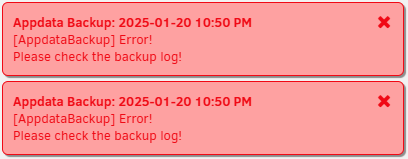
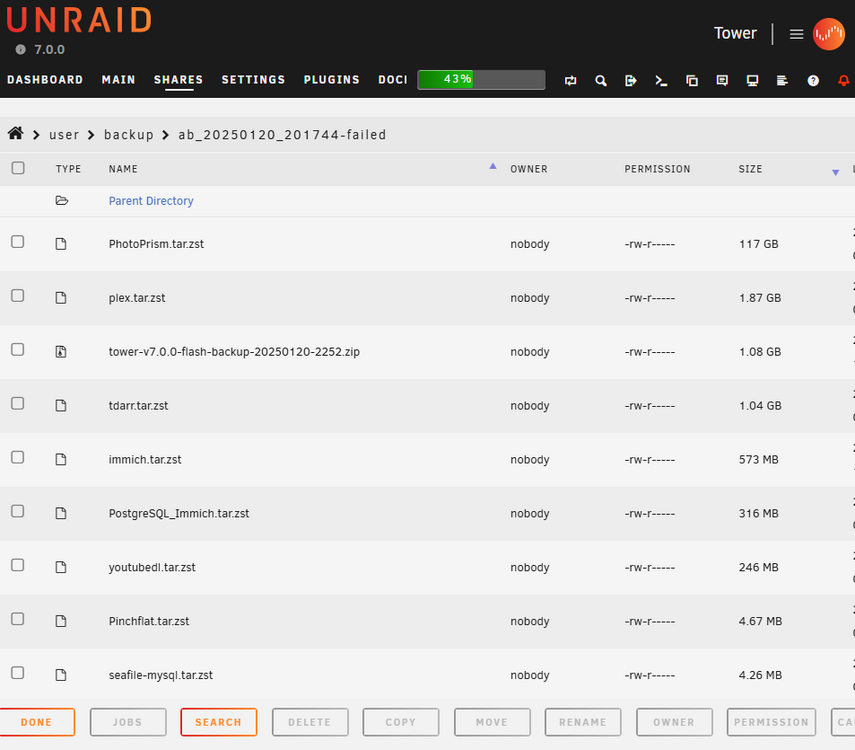
I'm sure this has been answered and I did search the thread. Maybe, my old man eyes or brain isn't working. Sorry and thanks in advance. I'm getting the RETENTION WILL NOT BE CHECKED! [21.01.2025 09:21:39][ℹ️][Main] Backing up the flash drive. [21.01.2025 09:21:51][ℹ️][Main] Flash backup created! [21.01.2025 09:21:51][ℹ️][Main] VM meta backup enabled! Backing up... [21.01.2025 09:21:51][ℹ️][Main] Done! [21.01.2025 09:21:51][ℹ️][Main] Backing up extra files... [21.01.2025 09:25:25][ℹ️][Main] Backup created without issues [21.01.2025 09:25:25][⚠️][Main] An error occurred during backup! RETENTION WILL NOT BE CHECKED! Please review the log. If you need further assistance, ask in the support forum. [21.01.2025 09:25:25][ℹ️][Main] DONE! Thanks for using this plugin and have a safe day ;) [21.01.2025 09:25:25][ℹ️][Main] ❤️ Debug key: ef1bf5b2-ca83-4eda-95b4-af864745e785
-
Works great when I'm away from home, but noticing some network issues since installing a month ago. 1. Sometimes I can't access my Unraid server when I'm on a local machine without tailscale active on the client. Rebooting the Unraid plugin seems to help. 2. Plex users are saying their streams will stop every 20 mins or so. Not sure if it's Tailscale related, but figured I'd upload the diagnostics. Thanks. Hera-tailscale-diag-20230917-101241.zip
-
I spent some time thinking about it and went with this part list. Just finished running memtest overnight and I'm about to load up Unraid. https://pcpartpicker.com/list/Nw4hW4 I think the thing that scared me the most was the Supermicro mobo potentially not supporting the CPU out-of-the-box without a bios update. I also wanted 10GB on the mobo.
-
Will be using it with some normal hard drives(WD Red Pros) not SSDs. There's about an $80 difference on eBay from what I see (already flashed in IT mode). Which should I go with? Also, I keep reading about heat and seeing people rig a 40mm fan directly on it. If performance is the same, meaning given I'm only using spinners...is there a difference in heat? If there is a concern about heat, should I attempt to attach a 40mm fan or find some type of bracket. I have no idea what type of bracket either. Thanks.
-
Whoa, awesome info. Thank you @Hoopster. How come I rarely see Supermicro mentioned for motherboard choices? It's usually Asus, Gigabyte, and ASRock. So with that OCuLink cable, are you saying I won't need a controller then? Am I turning one motherboard SATA port into 4? Does that affect r/w speeds? You think air cooling is good enough for the 13th gen Intel? The gaming folks water cool them. Do we typically need it for a few 4k transcoding streams?
-
I think I'm ready to build my second Unraid server. Some things I'm pretty sure I want: 13th Gen Intel: i9-13900K, i7-13700K or i5-13600K? I dunno...these keep coming up. 10GB network. Reading here 2.5GB isn't great? 2-4TB SSD cache pool. A pool of two drives is faster? Two 2TB Samsungs? 12 SATA drive support(Rosewill chassis has 12 hot swap). A motherboard with enough SATA connections that I would only need 1 additional LSI expander. As in, can someone recommend a motherboard that has 4 SATA connections then I get an expander with 8? LSI expander in IT mode. So much info on these boards and I can't dig my feet into the sand on a choice. Things I don't know much about: Is having a separate network card better than having it built into the motherboard? Does Unraid still have issues with Intel HW transcoding with the 13Gen chips? Is having multiple SSDs in the cache faster than just one for reads/writes? Will hard drives have different speed performances if connected directly to a SATA port on the motherboard vs an expander? I know this is a big ask, but it would greatly be appreciated for some compatible parts I can pull the trigger on. Any similar parts picker lists I can just steal? Thanks.
-
Probably overthinking this, but I'm about to put together a new build to replace my functioning unRAID server. I mysteriously was able to put a build together with the Norco 8 years ago, but I'll be honest when I say backplane talk confuses me and I don't know how the case/sata can limit my system. Replacing all the hardware, but should I reuse the Norco case? Any benefit to buying the Rosewill? I would think copying data to the new drives/build would be easier with less down time. If I reuse the case, I would think I would have to swap my parity with a new larger drive and add the other new drives then unbalance it with the plugin. Then swap the old internals with the new build keeping the new parity and data drives. Thanks for the advice.
-
Thanks for this. Nope, nothing holding me back from updating Unraid. I think Unraid had some bad releases last year which scared me. Plus I haven't updated any of my HW bios...not even sure if that's a factor. Yeah, so I am somewhat concerned about the age of the disks and system. I guess I'm probably just unnecessarily nervous to even get hands on with the current system as it's still working. Family and friends also use it so if I screw up I'll have to answer texts.
-
Gotcha, thanks @trurl and @Kilrah for the clarification and education. Soo...without a magic eight ball...you think 8 years is enough for a NAS? I feel like I don't have much life left(sound about right?), Unraid is running an older version, and I have to keep dupe movie resolutions because it can't HW transcode.
-
LOL, I must have missed this important bit of info. You mean my NAS with parity needs a backup? I assumed if a single disk fails it can be rebuilt? I realize a huge disaster is unrecoverable, but the one-off disk failure isn't covered? Whoops. I hope I'm not getting too off-topic from the original question, but if I were to build a new system with different drives and copy the data(mostly movies) from the current array...do I need to do anything special with the old drives or are they "good enough" to be the backup? Like, is the data split up and unreadable if I were to connect it to an existing PC in case I needed to recover?
-
-
-
I'm assuming the answer will be something like "If it ain't broke then don't fix it", but I wanted to get in front of future issues. My build is 8 years old and I'm afraid to update from 6.8.3. I mostly use it for downloads(deluge), storage and Plex(~5 users). Transcoding is an issue so I keep my 4k rips in a private share duping existing 1080p movies(silly imo). Current build: Intel Xeon E3-1240 @ 3.4Ghz. Samsung SSD for cache. 6-6TB WD Reds for storage with about 2TB left. Norco rack mounted case with slots available...but, I can't even remember how many more slots are actually wired. I'm kicking around the ideas of: 1. Building something again similar to above with a larger parity(12TB?) and can handle transcoding. Copy data over from the 6TB drives to new 12TBs, sell them, and run latest Unraid. 2. Building something again to my original with a larger parity, but don't worry about Plex and buy an i7 NUC as a Plex server. Perform everything mentioned in #1(copying/selling drives, etc). 3. Saving some time/pain(?) and switching to a Synology and an i7 NUC. Thanks
-
^ Disregard. Another Unraid reboot fixed it. Weird.
-
@binhex Hi team. I can't seem to get Deluge up and running again after a planned reboot. Running UnRaid 6.6.3 and the latest version of Deluge(non VPN). It says no update available, but "force update" is clickable. Nothing changed on my router and other dockers seem ok. Thanks for any help. Log: ___. .__ .__ \_ |__ |__| ____ | |__ ____ ___ ___ | __ \| |/ \| | \_/ __ \\ \/ / | \_\ \ | | \ Y \ ___/ > < |___ /__|___| /___| /\___ >__/\_ \ \/ \/ \/ \/ \/ https://hub.docker.com/u/binhex/ 2022-04-12 10:47:15.218921 [info] Host is running unRAID 2022-04-12 10:47:15.240578 [info] System information Linux Zeus 4.19.107-Unraid #1 SMP Thu Mar 5 13:55:57 PST 2020 x86_64 GNU/Linux 2022-04-12 10:47:15.265384 [info] OS_ARCH defined as 'x86-64' 2022-04-12 10:47:15.290459 [warn] PUID not defined (via -e PUID), defaulting to '99' 2022-04-12 10:47:15.320633 [warn] PGID not defined (via -e PGID), defaulting to '100' 2022-04-12 10:47:15.561910 [warn] UMASK not defined (via -e UMASK), defaulting to '000' 2022-04-12 10:47:15.585307 [info] Permissions already set for '/config' 2022-04-12 10:47:15.609859 [info] Deleting files in /tmp (non recursive)... 2022-04-12 10:47:15.636596 [info] DELUGE_DAEMON_LOG_LEVEL not defined,(via -e DELUGE_DAEMON_LOG_LEVEL), defaulting to 'info' 2022-04-12 10:47:15.660396 [info] DELUGE_WEB_LOG_LEVEL not defined,(via -e DELUGE_WEB_LOG_LEVEL), defaulting to 'info' 2022-04-12 10:47:15.684522 [info] Starting Supervisor... 2022-04-12 10:47:15,859 INFO Included extra file "/etc/supervisor/conf.d/deluge.conf" during parsing 2022-04-12 10:47:15,859 INFO Set uid to user 0 succeeded 2022-04-12 10:47:15,860 INFO supervisord started with pid 6 2022-04-12 10:47:16,862 INFO spawned: 'deluge-script' with pid 67 2022-04-12 10:47:16,863 INFO spawned: 'shutdown-script' with pid 68 2022-04-12 10:47:16,864 INFO reaped unknown pid 7 (exit status 0) 2022-04-12 10:47:16,868 DEBG 'deluge-script' stdout output: [info] Deluge config file already exists, skipping copy [info] Attempting to start Deluge... [info] Removing deluge pid file (if it exists)... 2022-04-12 10:47:16,868 INFO success: deluge-script entered RUNNING state, process has stayed up for > than 0 seconds (startsecs) 2022-04-12 10:47:16,868 INFO success: shutdown-script entered RUNNING state, process has stayed up for > than 0 seconds (startsecs) 2022-04-12 10:47:17,206 DEBG 'deluge-script' stdout output: [info] Deluge process started [info] Waiting for Deluge process to start listening on port 58846...
-
Everything runs great. Is it possible to receive a pushbullet notification on torrent completion? I see there is an "execute" plugin where you can run a script, but I'm somewhat lost on how to get a pushbullet notification from a script especially on an unraid server. Thanks.
-
Having some problems with pushbullet notifications. Unraid is on latest and did a fresh install of plexpy. The web gui see my library and sees when people are on since it updated my history/user info. I can test pushbullet in the settings and it sends a notification immediately. On day 2 with different people watching movies. Any suggestions for things I should look for? Thanks. Edit: Got it. Didn't realize you had to click on the icon next to the name of the notification agent in settings to enter another menu.
-
Question on Dropbox behavior. When I make changes on my Dropbox folder from my phone or home computer they propagate fine to my unraid server Dropbox folder via the docker. However, when I make changes on my unraid Dropbox folder they don't appear to go out to my other devices. Does this docker only sync one way?


