





DougCube
Members
-
Joined
-
Last visited
-
I'm not entering in any address. I'm just hitting the buttons "Add Current Origin" and then "Apply". Just by doing this it's signing me out of my acct and erroring out on me.
-
It's not working for me either. And I do have everything updated.
-
"For best results, add the current url to the Unraid API extra origins field below then apply the change." It doesn't work for me. I hit the button "ADD CURRENT ORIGIN" then "APPLY" but nothing happens. The first time I tried it, it worked fine, but it somehow lost the setting and now I've did this like a dozen times but it won't work anymore. I had updated to latest version of hte pluging (2024.01.11.1434).
-
File exists for me, but graph is missing. I'm on version 2.10.7.4.
-
I would like to be able to see the graph with all the drives. I can view it right after benchmarking a drive but then I can't see it again without running a benchmark again. I think this is a bug.
-
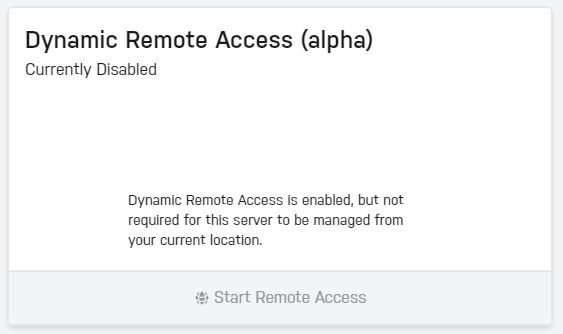
Strange... the problem went away after I rebooted the server. But I still downly like how the button is grayed-out when I open Dashboard locally, but fine when I use it remotely.
-
It started working for me today, after I stopped trying for a few days. I have no idea why. I even eventually got the whole Remote Access to work. I suspect it had to do with using Incognito Chrome tabs but I might have did it on another computer in my LAN. Maybe something bad was cached in the browser, IDK. Using Incognito tabs on the same computer didn't work.
-
I was following the instructions here: https://docs.unraid.net/connect/remote-access/ but don't see this box anymore: At various points prior to getting the "Always On - Manual Port Foward" mode working, this box was appearing and functioning both locally and remotely. (Although I couldn't actually connect remotely due to missing/incorrect port forwarding.)
-
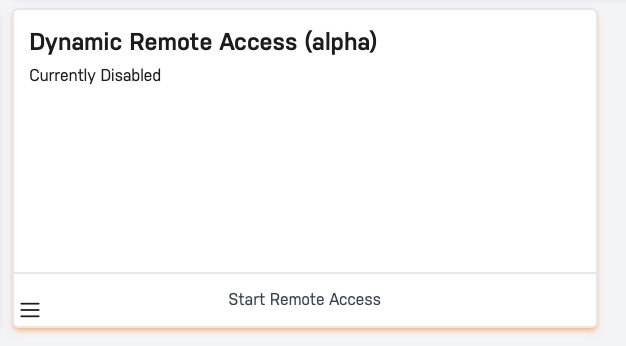
After a few hours of grief, I just got it working when in "Always On - Manual Port Forward" mode (tested with a remote machine). (Turned out, I had several layers of port-forwarding to set.) But when I switch it to "Dynamic - Manual Port Forward" it doesn't work anymore. The box for it in the Server Details doesn't appear anymore (it did previously when nothing was working), which means I can't hit the button for "Start Remote Access." I tried accessing Dashboard from a remote IP and it also doesn't appear. I suspect that because I spent so much time fiddling with it, I might have hit a bug somehow. What I'm seeing doesn't make sense. Related but separate issue, when the box did appear and I accessed it on my LAN, the button for "Start Remote Access" was grayed out but Remote Access was not enabled. However, it was possible to hit when I accessed it on a remote machine. It seems like this was intentionally programmed this way, but I don't like that behavior. I should be able to enable it while on my LAN too. Once enabled, I could disable it on my LAN or the remote machine. Not sure why I can only enable it remotely.
-
I am hitting the same problem. I then tried using Chrome incognito tabs to do the whole process like another user recommended, but that didn't work either. How long is this "performing actions" supposed to take, cuz I leave it for 10 mins and it's still not done. I think it's frozen. I can open up the Connect Dashboard on another tab and I know the the server is connected to the internet (it can check for updates). I wish it would give a useful error message instead of spinning forever like this.
-
I am hitting the same issue right now. But not having to do with udisk.
-
Is there a way to view a log of past/dismissed notifications? If so, how?
-
This is probably obvious but I'm asking to make sure... While booted, I plugged in some new drives to preclear. Now that it's done, is it okay to unplug them while still booted? They are not part of the array of course. The SATA ports are AHCI. (I have a limited number of plugs and want to plug in other new drives to preclear without doing a reboot.) And when I'm ready to use these precleared drives in the future, will Unraid automatically recognize the preclear signatures still? Also, would it work on a different Unraid server than the one used to do the preclear? I've read similar questions but found nothing matching exactly what I described. Btw, are there any utilities in Windows to do a preclear that would make such a compatible signature? I mean without having to VM an Unraid within Windows. (I did see this asked in another thread, but that was 5 years old.) -Doug
-
While the server is up (for days), suddenly the cache drive disappears from the UI. But in the command line, the mount is still accessible, accessing files that I know are on the cache drive via SMB share still works, and running the Mover works fine. Both reads and writes to it seem to work fine. The drive does not appear in the Unassigned Devices section. I did not find anything relevant in the syslogs. I've seen this happen twice now. Rebooting the server fixes it but I'd like to prevent it from happening again. I suspect it may be happening when I update the Unassigned Devices plugin, but I can't be sure. Anyone else see this issue before? Any ideas what's going on here, or how to fix it?
-
Sounds like something went wrong with the preclear. Clicking the X should have no impact. Once the preclear is done, even before the post-read, there would be a signature written to the drive that Unraid picks up on when you later add it to the array so that it doesn't have to clear it again. I've never heard of this happening.
