





lnxd
Members
-
Joined
-
Last visited
Everything posted by lnxd
-
It looks like something is broken somewhere, but this is what I'd try. Make sure you understand each step before you do it. Run docker network ls via Unraid terminal to get a print out of all networks in case there's some the GUI can't see Make sure any network you want to keep is assigned to at least one running docker container by checking the web UI, otherwise you might lose it after the next step Run docker network prune via Unraid terminal to delete all unassigned networks Create the network manually using docker network create via Unraid terminal rather than through the GUI docker network create \ --driver=bridge \ --subnet=172.17.0.0/24 \ --gateway=172.17.0.1 \ br2 It should then (hopefully) be visible when you're setting up a docker container via the GUI. If not, you can always assign it to the container after it's created: docker network connect br2 unifi-controller Where unifi-controller is the container name you're using.
-
Nooooooo. Oh well, I don't think we're going to get much further, because that was pushing the limits from a compatibility standpoint. I'm going to experiment over the next few weeks with TeamRedMiner, I'll let you know if that opens up new possibilities. The only thing that's left for you to try, and it's a long shot because modprobe radeon should have done enough, is similar to what I said in an earlier post. Radeon Kernel Module Specific Per the user guide, you can open up a terminal window via the Unraid WebUI and run this before restarting to unblacklist the host's radeon drivers: touch /boot/config/modprobe.d/radeon.conf And, sometime in the future, if you need to be able to use vfio passthrough with your GPU; you can run this before restarting to undo it: rm /boot/config/modprobe.d/radeon.conf You could then try starting the container again once your server starts back up. Feel free to post your diagnostics zip and I'll take a look in the morning just in case as well. But as long as you didn't miss any steps, there's really nothing else I can think of to get older cards working with this container. If you could also please show me the output you get when you press save after running the container, I'll check that as well. Eg. root@localhost:# /usr/local/emhttp/plugins/dynamix.docker.manager/scripts/docker run -d --name='PhoenixMiner-AMD' --net='bridge' --privileged=true -e TZ="Australia/Sydney" -e HOST_OS="Unraid" -e 'WALLET'='0xe037C6245910EbBbA720514835d31B385D76927f' -e 'POOL'='asia1.ethermine.org:4444' -e 'PASSWORD'='x' -e 'TT'='-75' -e 'TSTOP'='85' -e 'TSTART'='80' -e 'ADDITIONAL'='-amd -retrydelay 1 -gt 64,15 -ftime 55 -powlim 25 -clGreen 1 -mclock 1850,0' -p '5450:5450/tcp' --device='/dev/dri:/dev/dri' 'lnxd/phoenixminer' 1f4152332f574ec26dbc339f21d6ef27215f414438e4ad4c8eb732a613b7142b The command finished successfully!
-
Thanks for trying that build for me mate. 5 hours into development I'm a bit of a zombie, but I got a build working in an Ubuntu 14.04 container with the correct drivers. If this one doesn't work I'm completely stumped. I'm just going to clean up my code and get a build on DockerHub, should be about another 20 mins, I'll tag you in a post. EDIT: @Lobsi all ready. Same process as usual, should just take an update, and then confirm it shows Ubuntu 14.04.02 in the logs. It's wayyy too many layers but that's why it took me more than 20 minutes, every time I started merging them I'd break something. Fingers crossed it sees your card! Yup, mine's sitting at 4318.41mb. It could be an error with my container but I'm getting the same hash rate as I was running it in a VM, I've never really noticed that it doesn't fill it up. EDIT: Sorry I'm half asleep 😂 that's around the current DAG size, so it's a good thing our memory is only half utilised otherwise we wouldn't be able to mine Eth for much longer.
-
No problem at all! Spot on mate, that build I got you to try was still using 20.04. My development process lets me iron out any of the bugs until it all looks fine. The thing I can't try is seeing whether it can see the card, so that's when I pinged you last time. Sadly the 14.04 version didn't get that far 😂 We're just at that point again now too, if you could please force the container to update and try running it again with the same lnxd/phoenixminer:radeon tag, the logs should show Debian Bullseye as the base if you're successful. Please let me know if this build can see your card 🙃
-
Thanks for trying for me. Well, the default container in theory could support your card via the mesa open source drivers if we were using a different host. What I just got you to test was something that forced an update to the newer open source drivers from a different PPA. The most recent version of the official radeon drivers for your GPU I could find (Crimson Edition 15.12) were made for Ubuntu 14.04, so I used that as a base, installed the drivers and then of course I ran into a compatibility issue with PhoenixMiner. It depends on libraries that just weren't available back then, and haven't been backported. As one final shot, I'm gonna see if I can get PhoenixMiner running on another base, probably something that is compatible with either Crimson Edition 15.12.
-
Thanks @Lobsi, can I please get you to make sure you've completed steps 1 - 7 in OP (except 3 because Radeon TOP won't work for your card). Once you've done that jump into an Unraid WebUI terminal or SSH into your server and run: modprobe radeon && sleep 1 && chmod -R 777 /dev/dri Then edit the PhoenixMiner-AMD docker, and change Repository from lnxd/phoenixminer to lnxd/phoenixminer:radeon Then try running the container again and tell me if you get the same error. There's a real chance you will because this is just a preliminary test, but here's hoping I haven't missed anything 😅
-
Hi @Lobsi, it was going to happen! Someone found one that's still worthwhile to mine with 😅 Let me do some research and see if I can get this working for you somehow. It's not supported in this container as it stands currently, you'll need a specific build that includes different drivers and you'll probably need to unblacklist radeon. But I'm sure it's possible. EDIT: @Lobsi In your signature, it says your "AMD Radeon R9 270X" is in Server 1 which is running "unRaid 6.2 RC2"! That's not going to work. Are you on a more up to date version now?
-
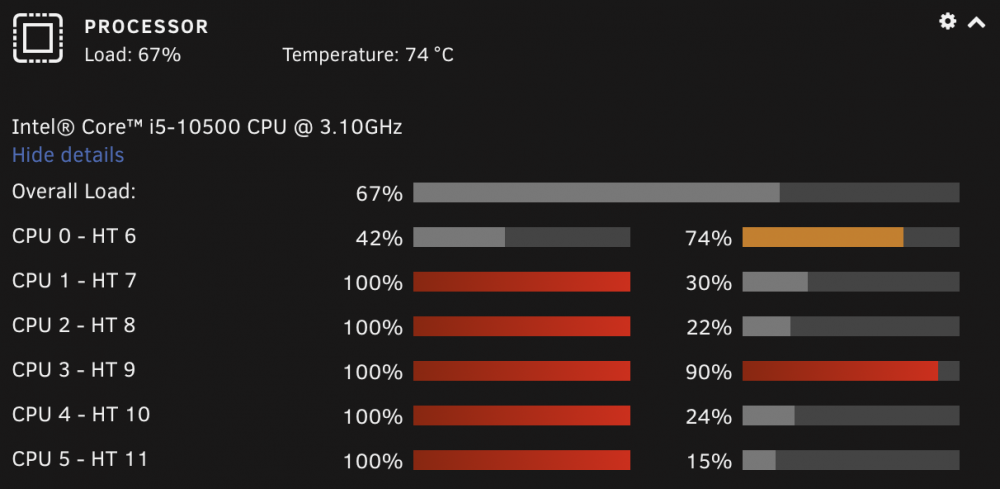
Thanks man, I'm glad you like it all. Hopefully people get some use out of it and make some money. I'll play with the idea and see if I can come up with anything. I think you found a good option there. I'm sure there's an effective way to do it, yeah. I tinkered with it on my M1 MacBook Pro. When I plugged it in for the night it'd automatically mine, so I'd just leave it leaning on the glass window so it could maintain its temperature. They can make around $3AUD a month after electricity, so after 110 years of mining while I sleep (at current difficulty and XMR price) it could pay itself off 😂 This is xmrig mining with 6 threads from a container on my server just now with the side off. Could be worse temp wise but it's less profitable than my MacBook Pro:
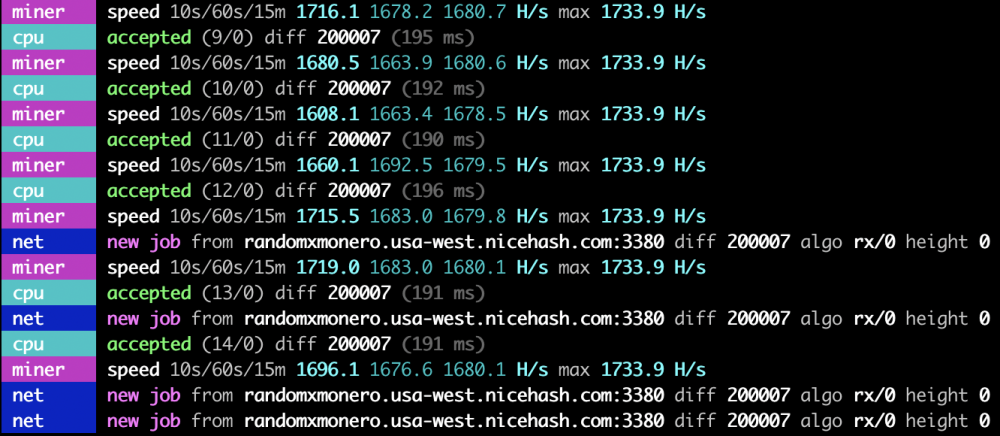
-
This is almost a theological question 😂 there's probably a more definitive answer somewhere but my understanding is that it depends on everything from the silicon lottery to the environment it's used in. A lot of miners will mine with them for a year or two and on-sell them when they're no longer profitable for mining to gamers who then use them the way they're meant to. Unless you're letting your card get to extreme temperatures you're probably more likely to have problems with the fans (being mechanical) than the actual GPU, and that's a replaceable (and reasonably cheap) part. Never, might not be valid but I see it like cars that are shared between Taxi drivers and basically run for 24h a day and rack up 500,000+ KM on the Odometer and never have an issue vs. people who drive their cars to and from work/the supermarket that are forever having to replace the battery. For cars it's the start / stopping that causes a lot of problems, for GPUs, I think it'd be large temperature fluctuations that'd do more harm than good. You can't mine with RAM, but you do need some RAM for CPU mining. It's probably profitable for you to mine Monero with your CPU, I containerised xmrig before I did PhoenixMiner but my Noctua NH-U12S chromax.black couldn't cope with the heat. If you think you can handle the heat, let me know and I can put a container on CA. PhoenixStats should be working now by the way, you just need to Check for Updates > Update Now. Just don't port forward it to the internet because I have to work out what's wrong in the .htaccess file.
-
Mine are on the higher side, don't get too comfortable, but you're well within the safe operating ranges. Just keep an eye on your hard drives as well, those don't do well at higher temperatures. Uhhhhhh it should definitely look like the screenshot. I just noticed a last second change I made at like 1am last night broke it, a fix will be coming shortly 😅 Thanks for letting me know. Thanks! As you know, I didn't develop PhoenixMiner (I wish I did based on their dev wallets) or even do the ground work for PhoenixStats (it was built on top of someone's monitor from like 2 years ago), but a surprising amount of RnD goes in to even building on top of other people's work so I appreciate the thanks. I completely get the fun aspect of mining as well, that's half the reason I started. With those numbers (25-28MH/s) you should get around 0.04293eth - 0.04809eth per month at current difficulty ($68.72 - $76.97 USD) after PhoenixMiner (0.65%) and Ethermine's (1%) fees are taken into account (I get nothing). At the very least it will make otherwise static hardware profitable. That's exactly right. I tried a few and eventually settled with Ethermine. I had similarly good results with Nanopool. You're going to get pretty similar results no matter which (popular) pool you pick, just keep in mind that they all (except NiceHash, but that's a different concept) have minimum payouts, and there is a small fee for each payout. Ideally you'd find a good one and stick with it. Apart from your results over time (income) the main number to pay attention to when determining if you're with a suitable pool is the actual hash rate vs your reported hash rate. For me, the reported hash rate in PhoenixMiner has been pretty consistent with the actual hash rate visible from Ethermine. Right now, your reported hash rate to Ethermine is 27.9MH/s but your actual hash rate (what they're paying you for) is 31.8MH/s. You can see all this at your metrics link on Ethermine, including your calculated profit based on your mining performance over the last 24h.
-
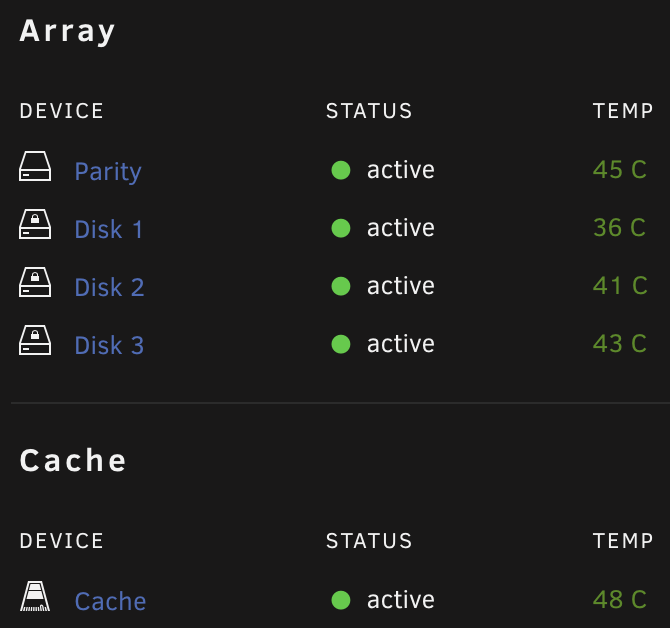
Very good call. My i5-10500 sits at around 60c-65c under avg. 50% load (my server is always under load because my whole family uses it). My M2 970 Evo Plus cache drive hovers between 45c-50c, but sometimes hits like 65c-70c under load. I've forgotten my pre-mining temps, but I can't safely put the tempered glass side back on my server while it's mining since I added in the 5500xt. My other drives usually sit between 35c-45c, but they're not in my PC case, they're in a separate enclosure. My UPS shows 555w power draw for most of the day, but that's with all my networking equipment connected to it as well. I gave up on fan noise, I'm used to my office having an idle hum to it now. At least it covers the sound of my Ironwolf Pro parity drive 😂
-
It runs the fan depending on -tt (Target Temperature) and your GPU's fan curves. I have my fan speed set to a fixed value due to temperature fluctuations in the room it's in. The -tstop (Stop Temperature) is a cutoff temperature for the GPU., ie. you have yours set so that if the GPU reaches 70c, it will stop mining until it cools down to the -tstart (Resume Temperature). 70c is probably a little low for the Stop Temperature on an RX580 if you're on stock bios. They can handle up to around 100c for short bursts, but that's detrimental for your other hardware. I'd set the Stop Temperature to around 80c-85c, and Start Temperature to 75c-80c. Keep in mind it shouldn't be hitting these ranges unless you have an airflow problem.
-
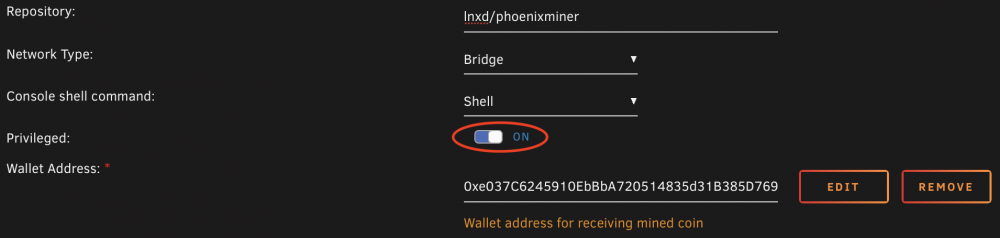
Perfect! It's on by default, so you should be fine unless you turned it off.
-
Wow that looks beautiful, doesn't it? I'm so proud. Just kidding. I just updated the template a few seconds ago to make it more generic, you've left the default settings so it's trying to connect to my server IP which doesn't exist on your local network. You'll need to edit the docker container and add in your own server IP as the Miner Host which appears to be 192.168.1.103, you can also add in a Server Name eg. Unraid
-
Wooh! Congrats. In the short term, you can see it in the docker logs. In the long term, probably PhoenixStats in CA.
-
Overview: Support thread for lnxd/github-backup in CA. Application: https://github.com/abusesa/github-backup Docker Hub: https://hub.docker.com/r/lnxd/github-backup GitHub: https://github.com/lnxd/docker-github-backup This container contains a script, backup.py, for backing up GitHub repositories. The script requires a GitHub token and a destination directory. It then uses the token to populate the destination directory with clones of all the repositories the token can access. It is possible to set it to run on a schedule, and repeated runs only update the already existing backups and add new repositories, if any. Instructions: Installation can be completed via CA. All you need to do is grab a token from here and fill out the template. Feel free to comment here if you need any assistance.
-
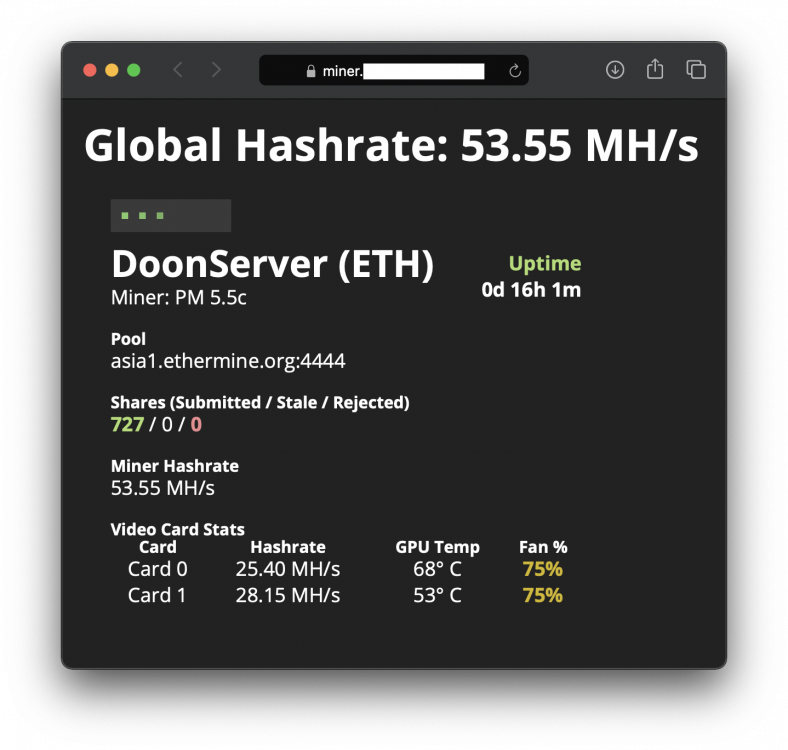
Yup, that's your problem. Your wallet address should be 0xF46DAdD92001db24CCD681D0b73aF9ad3dDf2774 Basically it's trying to run: ./phoenixminer -pool us1.ethermine.org:4444 -wal 0xF4 6DAd D920 01db 24CCD 681D 0b73 aF9a d3dD f2774.x -tt 68 -tstop 75 -tstart 50 -cdm 1 -cdmport 5450 -amd So PhoenixMiner thinks your address is 0xF4 and that 6DAd is another instruction from you that it doesn't understand. I'd also set -tt (Target Temperature) to a fixed speed like -65, 68 is a good target temperature but it's unlikely your default fan curve will let that happen. When you get the hang of it you can start playing around with other arguments like pairing -tt with -fanmin, etc. but if your card is in a closed case it's better to be on the safe side. I decided to just take the side off my case and let the GPUs warm my office, luckily for me we're coming into winter. Once you're up and going you can check your stats by entering your address on ethermine.org. I also added another container last night called PhoenixStats so you can directly monitor your miner via http instead of having to scroll through the logs to see the per GPU hash rates and temperatures. Screenshot:
-
Morning @SPOautos, that pool address is valid and ethermine is a good option. This is correct for ethermine. Wallet addresses don't have spaces in them so I'm thinking that's the problem. It will probably just start and then quit because it will think each part of your address is a different argument. Feel free to share the logs from the container if you're not sure.
-
No worries. Depends a little bit on which country you’re in and your level of comfort with storing your cash. There’s hosted wallets (where someone else keeps the keys), local wallets (where you keep the keys) and hardware wallets (where the wallet is the key). Easiest to set up is a hosted wallet, I’m not sure where you’re located but an example of this in Australia would be CoinJar, and an example in the US would be Coinbase. Just make sure if you take this path you find a company you trust and turn on two factor authentication. Personally I mine to a local wallet, but if you’re a windows user you’ll probably get bombarded with AV detections. I use MyCrypto and CoinJar. Ethereum have an official list of wallets, any of those should be fine https://ethereum.org/en/wallets/find-wallet/
-
No need to enable the radeon module, that is for older cards. I’m pretty sure none of the cards that are supported by that will be worth it to mine with these days. Your RX580 will work with the amdgpu module just fine.
-
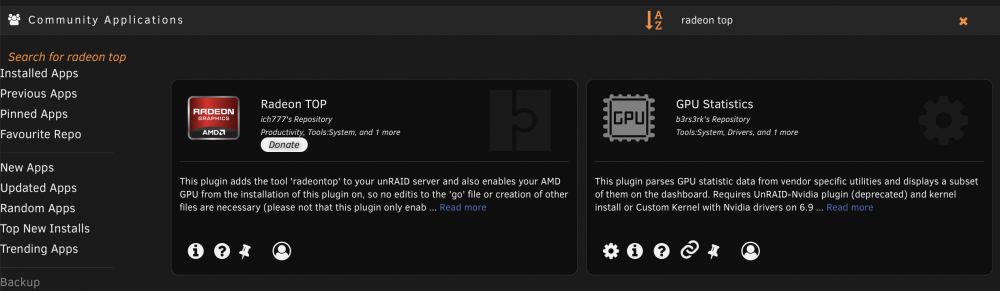
I can see why that'd be confusing. 😂 You don't need Radeon Top specifically, but you need to let the Unraid host load the drivers, which is why this relies on 6.9.0 or later. As long as Unraid is up to date on your host, you should be able to see it in there. It looks like the only requirement for the plug-in set by ich777 is 6.9.0. If you're going top-down through the steps, I'm guessing you're already on 6.9.1. I would very strongly recommend installing this plug-in. It might be worth visiting settings from the sidebar in CA and temporarily setting "Hide Incompatible Applications" to No, and doing another search to see if that turns it up. Best to make sure you change it back afterwards. If you feel like you've exhausted everything, you can try one of the following: Option 1: Per the user guide, you can open up a terminal window via the Unraid WebUI and run this before restarting to unblacklist the host's amdgpu drivers: touch /boot/config/modprobe.d/amdgpu.conf And, sometime in the future, if you need to be able to use vfio passthrough with your GPU; you can run this before restarting to undo it: rm /boot/config/modprobe.d/amdgpu.conf Option 2: The concept for this is stolen from ich777's plug-in, and it's more of a temporary option that doesn't require a reboot but will need to be re-run after each boot. You could set it up as a User Script, but it is much cleaner to use the plug-in. Jump into a terminal window on the host and run: modprobe amdgpu && sleep 1 && chmod -R 777 /dev/dri Thanks for your question @SPOautos, I've updated the OP and readme to be more clear.
-
Hey @DGPugliese, not as far as I know but this error is to do with DAG generation. How much RAM does your GPU have? Thanks for the warning to the community. It triggered a lot of people on the NiceHash subreddit and YouTube when they published that. The general consensus as far as I know is that NiceHash took advantage of a bad situation for the developer (Mega removing all Mining related binaries) and advertised their own Excavator miner using fear tactics. This is the developer's response. A lot of people have similar concerns about using NiceHash as the FBI have a warrant out for the arrest of their founder due to his involvement in the creation of a botnet, and he was recently detained in Germany for 8 months. This post definitely crossed my mind when making this but this container pulls the binary from the PhoenixMiner's developer's official GitHub repo, and if the developer had taken advantage of some kind of baked in exit strategy why would they still be working on it? We can't know for sure, but if I got as good a hash rate from TeamRedMiner I would've containerised that instead 😅 No worries at all! 😁
-
Thanks for the feedback. I'm glad to see someone else is going to get some use out of it! Let me know if anything comes up that gets you stuck. I have the same concern; luckily, in my case, I still have the iGPU on my i5 10500. One day when I get some time, I might take a shot at passing that through.
-
^^^ This was exactly my reasoning when posting the poll. That said, it served its purpose and it's on CA now if anyone is interested. Support thread and instructions are here.
-
It's basically impossible here (in Australia) as well. AMD GPUs are completely sold out everywhere, the only thing you can get are entry level Nvidia cards. I managed to get the 5500 XT overpriced and it's now worth more used than what I paid for it. I got into it back in around 2012-2013, but ASICs killed that. I came back to it just in the past few months now that it is profitable again but it's too late to get GPUs now. You aren't proving your point 😉 EDIT: @ich777 I tried using your bullseye container as a base image last night, forcing an install of the latest mesa drivers and then pulling PhoenixMiner in. It looked promising but PhoenixMiner couldn't see any cards (that rely on amdgpu or radeon), even though I could see them from the container. It was expedited because @Lobsi has an R9 270x that they wanted to try mining with. I then built a container on Ubuntu 14.04 with the 15.12 Radeon drivers to no avail. I'm pretty sure PhoenixMiner can only see cards using certain drivers but I just wanted to say thanks for the tip! Would have been nice if it worked with the open source drivers, not only would they (theoretically) be faster but the image could be so much smaller and more efficient. I'm going to see if I have more luck with a different miner.




