





Rysz
Community Developer
-
Joined
Everything posted by Rysz
-
Thanks for the nice words and feedback, I'll put it on the TO-DO list. 🙂
-
It's not a problem, the plugin is designed to use an existing Tmux installation if one is present. It's likely there as part of the Preclear plugin, if you have that installed, or you installed it via NerdTools at some point. In any case, it's not a problem. 🙂
-
Thanks a lot for the nice words, Barry! Great idea and timing of your post too, as I was just working on an update and this is now included. 🙂
-
What Python are you using and from where did you install it? The NerdTools/NerdPack packages are broken on 7.0, so I'd recommend using instead:
-
It's a great idea, thanks, and I've implemented this as a setting on my plugin's side now. 🙂
-
@tjb_altf4: I haven't had time to check out the Docker terminal yet, I'm afraid, hopefully I'll get to it in the next weeks. But I've just added the setting to kill array-accessing sessions when the array stops, which would otherwise block array shutdown.
-
This will try to build screen on the Unraid system, likely fails due to unmet build dependencies. As @bmartino1 pointed out, you'd need a pre-compiled package to use it "out of the box". 🙂 Otherwise I can recommend to check out my new plugin: "Tmux Terminal Manager (TTM)" which lets you create persistent terminals from the GUI. And it also provides tmux for command-line use, which is a more featureful alternative to screen. https://forums.unraid.net/topic/183427-plugin-tmux-terminal-manager-ttm/
-
I'm afraid I'm not sure, but it shouldn't be a problem. SMB and/or NFS also create files with the connected username and not nobody. The default permissions set also ensure that the files have the correct Unraid permissions.
-
Welcome, good to have you on board! 🙂
-
I've turned the topic into a feature request for better visibility, seeing as this seems to be a design decision. Please stop bumping and/or re-opening the bug report continuously if there's no new information/participation.
-
I can take a look, what would be your use case to keep open a persistent terminal session into a Docker container?
-
SnapRAID doesn't care about encryption as long as your drives are unlocked when it's running. It only operates on the files, it doesn't care about filesystem or where/how your data is stored. 🙂 You could mount the extra disks direct or using e.g. Unassigned Devices and use SnapRAID to parity protect them. mergerFS could pool those SnapRAID-protected extra drives and then you'd set up a custom network share for that pool.
-
Apologies for the late reply on the recent posts as I've been more caught up with daily life. Unfortunately most if not all of these issues are (backend) driver and not plugin related, so they are essentially out of my control as the plugin (and not backend) developer - I can only suggest reading up more on connection issues and possible fixes here: ... or take your issue to the NUT developers on GitHub: https://github.com/networkupstools/nut/issues
-
Please tone it down on the attitude and stay on-topic from now on. I've hidden the posts in question.
-
Not exactly sure what you mean, this is a GUI for/around Tmux and not a Tmux plugin. It will use an existing Tmux installation if there's one (e.g. by the Preclear plugin). Perfectly fine if you don't need it, but it's not "just Tmux", it's a GUI integration for Tmux.
-
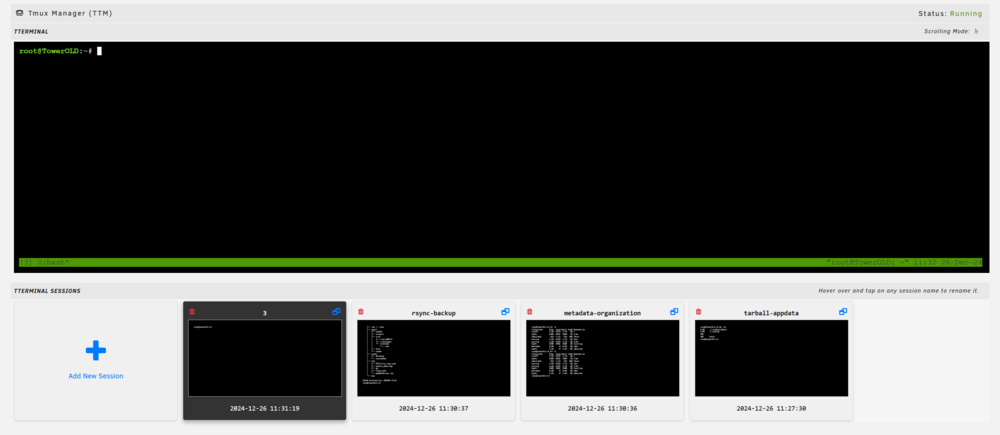
Tmux Terminal Manager (TTM) Tmux for people who don't do Tmux, integrated into Unraid OS. Installs Tmux, if not already present on your system, and otherwise uses the existing Tmux. Easily open and manage multiple persistent terminal sessions in the Unraid Web GUI. Leave your terminals and come back at any later time to check on your long-running operations. This plugin acts as a frontend / GUI to Tmux, so you won't need to interact with Tmux at all. Installable via Community Applications

-
Unfortunately there's not really much else I can suggest here other than what's posted in: Common reasons have included broken USB cables (could attempt new USB cable), USB ports (could attempt a different USB port), USB buses (either on the host system or the UPS itself) and/or overall instability of the UPS driver in combination with a specific USB bus (could attempt PCIe USB card, could try on another PC).
-
It's the same logfile, if you click on the book icon, you'll see both the logs from before the reboot and after.
-
These kind of instabilities are very hard to diagnose, read here about possible reasons: The other possible solution, you can try putting this option at the end of ups.conf (after line 8) : pollonly using the NUT Configuration Editor on NUT Settings page. Afterwards save the changes and restart NUT. Make sure that the extra option is still there after NUT was restarted. 🙂
-
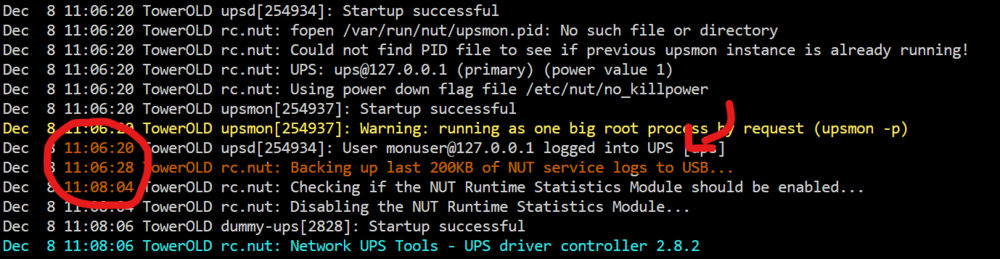
Yes. Unraid log files are rotated at 1MB and 200KB is around 2000 medium-length log lines, which leaves enough room for new log lines after a system reboot.
-
If you read a few lines above you'll see: So it's normal and there's nothing to fix.
-
Both features are implemented now in the latest update. 🙂
-
Looks good, let me know if it loses the connection again, then we can try another solution. 🙂
-
Do you have another USB port you can try? This looks a bit like a USB port problem - 2.0 ports usually behave better. You can also try switching the backend to "preview (latest build)" in NUT Settings (requires reinstall of NUT or reboot of server) as we've introduced some APC patches recently that might also help here. Please let me know how it goes, I've got another thing we can try afterwards.
-
That APC BX series is known to suffer from this (what we believe to be) firmware issue and we've put patches in place to suppress this unwanted behaviour on the UPS side. Here's how you can set it up: Go to NUT Settings. Set Network UPS Tools Backend Switch to preview (latest build). Apply settings and either reinstall NUT or reboot the machine. Confirm the Network UPS Tools Backend now has "master" in the name. Using the NUT Configuration Editor (in NUT Settings) put at the end of ups.conf (after line 8 or later): pollonly lbrb_log_delay_sec = 3 lbrb_log_delay_without_calibrating Save the configuration file and restart NUT. After reloading the NUT Settings page, confirm the made changes are still present in ups.conf. Please let us know if the process worked out for you or if you have any additional questions. 🙂





