





xyzeratul
Members
-
Joined
-
Last visited
Everything posted by xyzeratul
-
前面被小螃蟹的2.5G网卡整了下,不过总体还算顺利,升级了两天目前没发现什么问题。
-
I did a clean install and the onborad nic show up in network settings, so that means my old config must have something mess up. edit: found it, in /config/modprobe.d there is a config file blacklist the 8169 driver, I think it's leftover from the patch, delete it and the nic is back
-
no, I mean I didn't uninstall the patch before upgrade, nor re-install it after the upgrade.
-
Yes, this patch only replace these file: I think after upgrading to 6.12, these will also be replaced, so I didn't remove them.
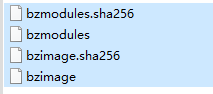
-
When I was on 6.11.5, I used this patch: but mainly for put i350 T2 in another group so I can bind one of it to my VM, not sure it's related or not. I check my network.cfg file, the old settings are still there: # Generated settings: IFNAME[0]="eth0" DHCP_KEEPRESOLV="yes" DNS_SERVER1="1.1.1.1" DNS_SERVER2="8.8.8.8" DNS_SERVER3="114.114.114.114" DHCP6_KEEPRESOLV="no" DESCRIPTION[0]="Onboard" PROTOCOL[0]="ipv4" USE_DHCP[0]="no" IPADDR[0]="192.168.1.200" NETMASK[0]="255.255.255.0" GATEWAY[0]="192.168.1.1" METRIC[0]="1" USE_DHCP6[0]="yes" IFNAME[1]="eth1" PROTOCOL[1]="ipv4" METRIC[1]="1" MTU[1]="1500" IFNAME[2]="eth2" DESCRIPTION[2]="Onboard 2.5G" PROTOCOL[2]="ipv4" USE_DHCP[2]="no" IPADDR[2]="10.10.10.1" NETMASK[2]="255.255.255.0" MTU[2]="9000" SYSNICS="3"
-
nvm, this did nothing on my nas, I'll just uninstall it.
-
here is the diags, not install the driver app as MAM59 mentioned 185409-diagnostics-20230617-1937.zip
-
I went back to 6.11.5, will try upgrade again tonight to get diags
-
I tried this, after reboot the onboard nic still not showing up in network setting, but I didn't reboot twice edit: reboot twice, still the nic not showing up
-
Just upgrade from 6.11.5 to 6.12, I have a Intel i350 T2 card install and also has an onboard rlt 8125 card, all working fine in 6.11.5, in system devices, it show all 3 nic, but in network settings, only the 2 nic from Intel i350 T2 card show up as eth0, 1. a bit more detail: My unraid manage port is one of the nic on that i350 T2 card, the onboard 2.5G nic port I use to directly connect to my PC for faster file transfer. So without the 2.5G nic showing up in the network setting, my direct drive mapping connecting to my PC is gone, but I can still mange my unraid server with local lan.
-
Thx, I think they need to add this function, I'd rather have local storage for this.
-
But why the manual update is fine? I don't understand dockerman's logic behind this.
-
I am using custom icon for each docker container, which stored in /mnt/user/isos/icons, pair with auto update plugin But every time my docker auto update new imagine, my custom icon disappear, but if I do it manually, it's fine, is this a bug or some setting I mess up?
-
??? 市面上主流机箱都是支持MATX的,而且不比只支持ITX的小机箱贵。 如果不在乎外观或者其他功能,你只要考虑自己需要装多少硬盘进去和什么型号的电源就行了。
-
Recently I am looking into 10G SFP+ upgrade for my office setup, I have: One Unraid server, running with 8125b 2.5G nic, and one windows desktop running the same 8125b 2.5G nic, one laptop with a USB 8156b nic, a 8 port 2.5G with 2 port 10G switch My plan is to install one 10G SFP+ nic for unraid and one for the desktop, talking to my local "IT guy", he told me he can get me a bunch of these cards left over from server upgrade, but the one support RDMA is 30% more expensive. From what can I find online, I still don't know how much the difference does RDMA make in my daily work, should I pay more to get this?
-
的确会出现这种情况,我也觉得这个设计很傻。
-
因为跨境传输本来就是玄学,我在非洲,中东和大洋洲的不同国家都试过,有些国家能跑满我家里NAS的上传,有些最多50kb/s, 和你本地网络没啥关系。
-
Thx, Multi-Gen LRU does sound nice, never thought Unraid would support it so soon, anyway where can I find the full list feature of this upgrade?
-
Me not really into the whole ZFS upgrade, so is there anything else interesting in 6.12?
-
谢谢已经解决了,怎么说呢,算半个BUG吧,同样为6.11.5环境下测试,也是Openclash的http代理: 因为前面我也是按照那篇文章自己修改的,后面用你这个插件后,没有先清理自己修改的文件,导致你的插件修改代理地址失败,重新手动清理掉文件后,再用你的插件修改,成功了。🤣
-
Background: Running Unraid with onboard realtek 8125b nic as ETH0, running tho customize gateway(192.168.1.10) Installed a Intel i350 nic as ETH1, setup running in a default gateway(192.168.1.1) I would like to setup Unraid to run all the system traiffic tho ETH0, and running some specific dockers tho ETH, is this possible? if so how do I setup this? I search around but seems find nothing on this.
-
目前机器上有一张空闲intel i350-T2的网卡,想做以下功能,但又不知道怎么弄: 想让特定的几个docker容器所有网络流量走这个网卡 其他的容器和Unraid系统自身的流量还是走板载的原网卡 目前在使用旁路游透明网关,板载网卡为eth0,网关为透明网关地址,i350的网卡为eth1,网关地址设置为主路由地址,在特定docker里面指定使用eth1。 但我不太清楚的是,Unraid系统的流量具体会走那个网卡,是需要怎么设置?
-
-
holy s#########, I think I found out the reason, it's the proxy setting behind all these I am using this plugin to set system and CA go tho proxy, so it would modife my go file, so even in safe mode, the go file has the proxy setting, remove all the setting in go file, no more emhttp errors
-
一般来说SATA这个占用比网卡的要高很多,网卡就算直通也不会真正解决问题。 如果要直通SATA控制器,几种办法: 最好是自己加一个PCI-E的SATA控制器再直通,那玩意也不贵,百来块就能拿下 用IT模式的SAS直通卡,不过那东西好像发热很猛,放小机箱可能有点问题,好处是硬盘背板支持的情况下接线很方便 有些主板上原生SATA口不够,本身都加了额外的控制芯片,直通那个芯片就行了,比如前段时间很火的什么N5105,6143之类的妖版,不过要先搞清楚你硬盘接的是哪个上面的。

