




.png.18314773a21e506e5ec17684895a0cd5.png)
gamerkonks
Members
-
Joined
-
Last visited
-
Hi there, I'm still having on going issues with unassigned devices on my system. I've been doing some testing and have found the following issues. Issue 1 - Device settings overwrite other device sections Changing one setting removes existing settings and even removes other device sections. Example 1 Enable Auto Mount for WD: [WDC_WUH7218] automount="yes" Then enable NTFS3: [WDC_WUH7218] ntfs3_driver.1="yes" Example 2 Enable Auto Mount on a completely different disk: [TOSHIBA_MG03ACA400_Y4ADK4GFF] automount="yes" The entire WDC_WUH7218 section disappears from: /boot/config/plugins/unassigned.devices/unassigned.devices.cfg Issue 2 - /tmp/unassigned.devices disappears after startup Expected After boot: /tmp/unassigned.devices/ ├── config/ ├── logs/ ├── scripts/ should remain available. Actual After boot the directory exists. A short time later: ls -ld /tmp/unassigned.devices returns: No such file or directory find /tmp -maxdepth 1 -name '*unassigned*' returns nothing. The entire runtime directory disappears. Issue 3 - Used / Free space becomes 0 B Symptoms Mounted disk displays: Size = 1 TB Used = 0 B Free = 0 B while mounted. After Investigation When /tmp/unassigned.devices is missing, /var/state/unassigned.devices/df_status.json disappears or is not rebuilt. Manual recreation of mkdir -p /tmp/unassigned.devices immediately allows df_status.json to be recreated again. Example: { "/mnt/disks/s850": { "timestamp": 1784264465, "stats": "976760828 800037192 176723636" } } appeared immediately after recreating /tmp/unassigned.devices without reinstalling UD or rebooting. Additional Observation A disk rescan appears to clear: /var/state/unassigned.devices/df_status.json and if /tmp/unassigned.devices is missing afterwards, Used/Free values remain at 0 B until the directory is recreated. Issue 4 - UI does not reflect saved device settings Settings can be written to /boot/config/plugins/unassigned.devices/unassigned.devices.cfg but are not reflected in the UI. Example After saving: [WDC_WUH7218] ntfs3_driver.1="yes" reopening Device Settings shows: Use NTFS3 Driver? No even though /boot/config/plugins/unassigned.devices/unassigned.devices.cfg keeps [WDC_WUH7218] ntfs3_driver.1="yes" Diagnostics attached. Any help appreciated. discovery-diagnostics-20260717-1525.zip
-
7.2.4 has been released.
-
That seems to have done it, thanks. I checked what was in the shares config directory before running the clean up, and there were a lot of random share config files there.
-
cache/.sync.ffs_db.f44a.ffs_tmp It's related to FreeFileSync. I'll try and fix that. root@Discovery:~# ls -l /boot/config/shares total 208 -rw------- 1 root root 469 May 14 20:57 Data.cfg -rw------- 1 root root 523 Jun 23 2022 Media.cfg -rw------- 1 root root 479 Apr 27 2021 Pictures.cfg -rw------- 1 root root 462 Jul 17 2023 __public.cfg -rw------- 1 root root 470 Mar 4 2025 appdata.cfg -rw------- 1 root root 491 Nov 4 15:49 downloads.cfg -rw------- 1 root root 444 Aug 8 2023 swap.cfg -rw------- 1 root root 443 Oct 7 2022 syslog.cfg -rw------- 1 root root 467 Jun 29 2022 system.cfg -rw------- 1 root root 482 May 16 12:40 temp.cfg -rw------- 1 root root 467 Jun 13 22:55 time_machine.cfg -rw------- 1 root root 461 Jul 17 2023 virtual_machines.cfg
-
I'm unable to enable destructive mode again. I've updated to 7.2 and rebooted, so maybe it broke again after the reboot? uninstall / delete / reinstall fixes it again but annoying having to do it again. Diagnostics attached. discovery-diagnostics-20251104-2018.zip
-
discovery-diagnostics-20251104-1954.zip
-
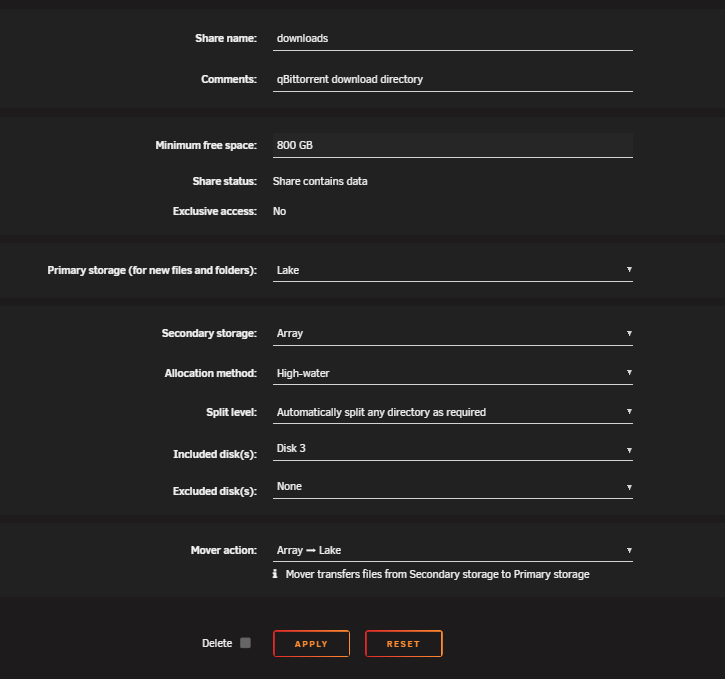
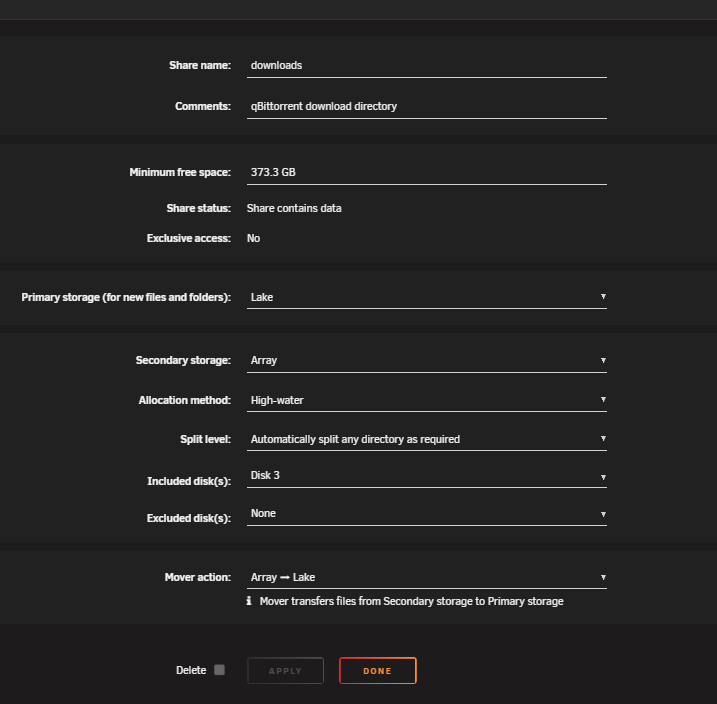
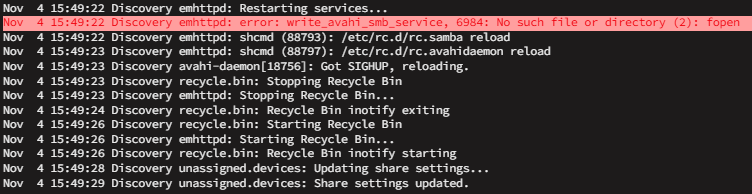
I'm trying to increase the Minimum free space of my downloads share to 800 GB. When I click apply, it changes back to 373.3GB. There is an error in the log when I click apply, indicating it is unable to find a file. emhttpd: error: write_avahi_smb_service, 6984: No such file or directory (2): fopen
-
Not sure. I'll see it I can experiment and find a pattern.
-
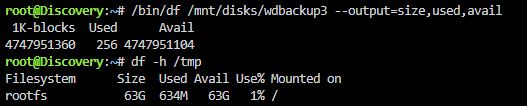
Thanks, that seems to have fixed being able to change settings. I'm also having an issue where sometimes the USED and FREE values are incorrect, i.e both 0 B. Any ideas what could be causing this?

-
Need some help. I'm unable to change UD settings. I get the following log message when I hit apply after making a change to settings. Nov 2 12:34:10 Discovery webgui: File_put_contents_atomic failed to write / rename /tmp/unassigned.devices/config/unassigned.devices.cfg I'm also having external drives come up as ARRAY and unable to mount until rebooting. Even drives I've previously mounted using UD. Nov 2 12:41:26 Discovery kernel: usb 4-5: new SuperSpeed USB device number 4 using xhci_hcd Nov 2 12:41:26 Discovery kernel: usb-storage 4-5:1.0: USB Mass Storage device detected Nov 2 12:41:26 Discovery kernel: scsi host13: usb-storage 4-5:1.0 Nov 2 12:41:27 Discovery kernel: scsi 13:0:0:0: Direct-Access WD Elements 2667 2007 PQ: 0 ANSI: 6 Nov 2 12:41:27 Discovery kernel: sd 13:0:0:0: Attached scsi generic sg11 type 0 Nov 2 12:41:27 Discovery kernel: sd 13:0:0:0: [sdk] Spinning up disk... Nov 2 12:41:27 Discovery kernel: scsi 13:0:0:1: Enclosure WD SES Device 2007 PQ: 0 ANSI: 6 Nov 2 12:41:27 Discovery kernel: ses 13:0:0:1: Attached Enclosure device Nov 2 12:41:27 Discovery kernel: ses 13:0:0:1: Attached scsi generic sg12 type 13 Nov 2 12:41:27 Discovery kernel: ses 13:0:0:1: Wrong diagnostic page; asked for 1 got 8 Nov 2 12:41:27 Discovery kernel: ses 13:0:0:1: Failed to get diagnostic page 0x1 Nov 2 12:41:27 Discovery kernel: ses 13:0:0:1: Failed to bind enclosure -19 Nov 2 12:41:33 Discovery kernel: ......ready Nov 2 12:41:33 Discovery kernel: sd 13:0:0:0: [sdk] Very big device. Trying to use READ CAPACITY(16). Nov 2 12:41:33 Discovery kernel: sd 13:0:0:0: [sdk] 9767475200 512-byte logical blocks: (5.00 TB/4.55 TiB) Nov 2 12:41:33 Discovery kernel: sd 13:0:0:0: [sdk] 4096-byte physical blocks Nov 2 12:41:33 Discovery kernel: sd 13:0:0:0: [sdk] Write Protect is off Nov 2 12:41:33 Discovery kernel: sd 13:0:0:0: [sdk] Mode Sense: 3f 00 10 00 Nov 2 12:41:33 Discovery kernel: sd 13:0:0:0: [sdk] No Caching mode page found Nov 2 12:41:33 Discovery kernel: sd 13:0:0:0: [sdk] Assuming drive cache: write through Nov 2 12:41:33 Discovery kernel: sdk: sdk1 Nov 2 12:41:33 Discovery kernel: sd 13:0:0:0: [sdk] Attached SCSI disk Nov 2 12:41:35 Discovery unassigned.devices: Disk with ID 'WD_Elements_2667_57584432444231363130534E-0:0 ()' is not set to auto mount.
-
Also, would it be possible to use the highest temperature of a selection of sensors to control the fan speed? I have a Dell PE R730 which has a bank of 6 fans near the front of the case which does all the cooling and would like it to ramp up if anything starts heating up.
-
Hi there, I seem to be missing a sensor in Global Available Sensors. When I run ipmitool sensor I see a sensor called Pwr Consumption. In Config Editor -> Sensors, there is a section Section 99_Pwr_Consumption. In Global Available Sensors, the list mostly lines up with the output of ipmitool sensor, except in the place where Pwr Consumption is, instead I have HDD temperature, which doesn't exist in the ipmitool sensor list. Anyone know how I can get Pwr Consumption?
-
I'm updating to 7.0.1 now and it's downloading at ~125kB/s (1Mbps). I'm also in Australia. Updating using the WebUI.
-
Running the command in terminal got it enabled. tailscale up --ssh
-
I'm having trouble enabling the Tailscale SSH server on my unraid server. I go to myUnraidUrl/Settings/Tailscale, click Viewing and then Sign in. Then after signing in on the new tab, I click Tailscale SSH server. Then I click "Run Tailscale SSH server", to toggle it on, but it immediately toggles off and I get an error message in the bottom right which reads "Failed to update node preference". I'm running unraid 7.0.0 and Tailscale 1.80.0-t4f4686503-gccb3ce01b Does anyone know what's causing this?
.thumb.png.17851aece2a22632d74cf27bdb68bec5.png)


