





SelfHoster
Members
-
Joined
-
Last visited
-
So I just forced updated the container to see if the issue was resolved, and it appears it was fixed. @TheCarlough @pistolpete give it a try and see if it resolves on your end.
-
Well, good to know I am not alone and likely not doing anything wrong, but hopefully we'll get a response. One thing I did notice is the directory it pulls from is returning a '404' error from this link: https://registry.gitlab.com/bockiii/deemix-docker
-
Deemix fails to run, even after clean install I'm having an issue with Deemix. It seems it won't boot into the UI even with the container running, logs are showing this error: Error: Cannot find module '/deemix-gui/server/dist/app.js' at Function.Module._resolveFilename (node:internal/modules/cjs/loader:933:15) at Function.Module._load (node:internal/modules/cjs/loader:778:27) at Function.executeUserEntryPoint [as runMain] (node:internal/modules/run_main:81:12) at node:internal/main/run_main_module:17:47 { code: 'MODULE_NOT_FOUND', requireStack: [] } error Command failed with exit code 1. info Visit https://yarnpkg.com/en/docs/cli/run for documentation about this command. [services.d] Starting Deemix yarn run v1.22.17 $ node dist/app.js --host 0.0.0.0 --port 6595 node:internal/modules/cjs/loader:936 throw err; ^ I have tried clearing the appdata and pulling the container down fresh to reinstall it no avail.
-
After a few more hours of work not really sure what the deal was so I gave up trying to restore and since I have my docker instance on a dedicated SSD with the app data backed up I reformatted the SSD and then reinstalled the appdata (which was backed up) and pulled down the containers. After remapping each container to the new app data path everything came back!
-
Came home this afternoon to "Docker Service Failed to Start" I've been poking around the forums and help guides and not getting anywhere. Looking for some direction. Seems I should be able to delete the docker.img file and reload everything but that doesn't seem to be an option I have in the docker settings in following the help docs. I tried moving it out of the directory it is stored in in hopes a new one would be created if it was missing and no luck. belden-diagnostics-20220206-1815.zip
-
128GB DDR4 with Intel i9 10900. I build once for the long term with minor updates along the way. Overkill for now, but won't be in a few years!
-
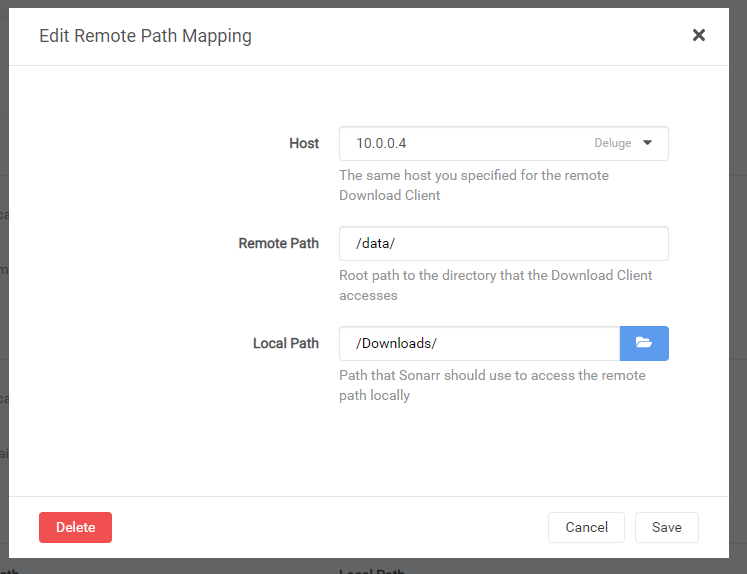
Looks like I need to do a remote path mapping. I tried and failed, headed over to the Sonarr container support thread there. TY for fixing some of the issue!
-
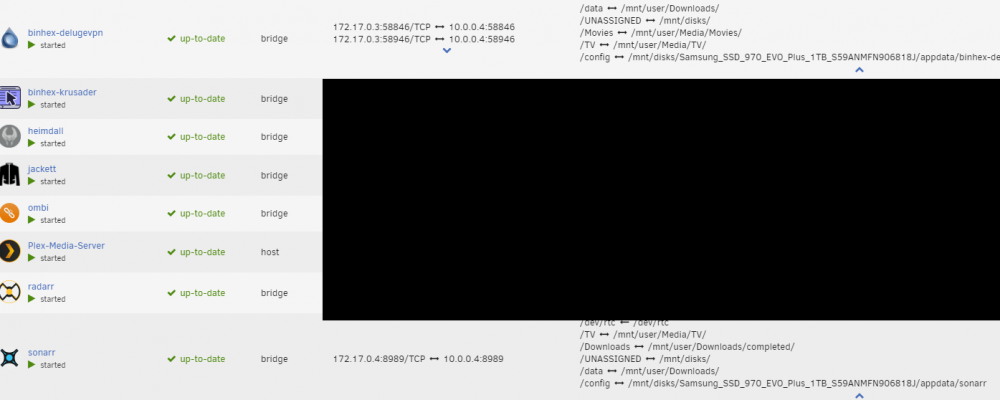
Remote path issue? I'm using Deluge and everything is working with Sonarr triggering downloads and labeling but I'm having an issue having the completed files get picked up and moved to the final folder where my TV shows are by Sonarr. Sonar can see the most recent download in the completed downloads folder but won't import it and is throwing the error: Import failed, path does not exist or is not accessible by Sonarr: /Downloads/completed/Real.Time.with.Bill.Maher.S18E34.720p.WEB.H264-JEBAITED[TGx]. Ensure the path exists and the user running Sonarr has the correct permissions to access this file/folder From research I believe I need to do a remote path mapping and have set that up but something is still not right. I've attached my settings for the remote path mapping in Sonarr and Docker setups.
-
I did that in the Deluge setup in Sonarr and Radarr, activated the labels plugin in Deluge and they appeared in Deluge under labels and torrents intiated by Sonarr or Radarr have the tag pulling through correctly. I think the issue is I am telling Deluge to move the completed files with those tags to the directory of the TV or Movie folders instead of leaving them in "Completed" to be picked up and moved. I just deleted the label setting in Deluge to move completed files with these tags to the TV or Movie folders and instead leaving them in Completed. Hopefully they will pick them up now. Going to run another test and will report back.
-
A mismatched downloads folder appears to have been the issue. The github article was extremely helpful in sorting this out and also understanding host and container settings. I had to align the host and container paths in Deluge, Sonarr and Radarr in the docker settings. I tested two torrents and once completed they changed to "100% - Seeding" status and moved to the Completed folder. I also setup a label in Deluge to move Sonarr to the TV folder and Radarr to the Movie folder which also occured. So the Deluge setup is finally working correctly! The only issue that remains is that Sonarr and Radarr are not renaming and moving the files to the correct show and season folders after they are moved into the TV folder or Movie folder respectively. The folder as downloaded by Deluge remains as is. I'll have to check my settings there.
-
Yes, I have this option selected, as well as in the label plugin for labeled torrents to move to certain folders based on label (i.e TV for Sonarr, Movies for Radarr)
-
I do have some mismatches it seems. I'll make the changes suggested in the article and see what happens and report back.
-
Hello, Just about done installing my new UnRaid server and have several containers running well. The one that is tripping me up is Binhex Deluge VPN. I have everything configured correctly - NordVPN is working, files are downloading when triggered by Sonarr and Radarr but the issue is when the download finishes in Deluge. As torrents are downloading they are going to an "incomplete folder" but once the torrent completes downloading it goes into a "queued 100%" state and the completed file stays in "incomplete" and does not move to "completed" or to the assigned folder I have for files tagged with Sonarr and Radar Labels. I can manually move the file from incomplete to the desired directory via Krusader and it is in fact complete, but something is not right that it is "queued 100%" in Deluge and just sits in "incomplete". I've searched exensively on this topic and see others have had this issue, but a solution did not emerge and I am stumped. Some things I have tried: -Reinstalling container and wiping app data -Setting parameters not to seed/upload -Ensuring folder paths are correct in the WebUI for complete files and for the Sonarr and Radarr labels I figure it has to be something simple. Hopefully there are some ideas here. Thanks in advance.


