





CurlyBen
Members
-
Joined
-
Last visited
Everything posted by CurlyBen
-
Annoyingly my server is half an hour away and I don't know if that drive is on a SATA-SATA cable or SAS-SATA! This might be a good time to rethink how I'm allocating drives anyway. A number of my array drives are 5+ years old now.
-
It looks like that might be what's happened, I've attached the diagnostics file but the key bit seems to be here and the read errors precede the write errors: The extended SMART test passed, so I think I'll re-enable the drive. I've ordered two new drives so when they arrive I'll retire this drive to be used as a bit of a dumping ground rather than part of the array. This is where I'd really like multiple arrays - a high value array with my irreplaceable data and newest drives, plus a second array with older drives, which may have thrown an error or two, but which only holds films, music and other replaceable media (but still with a parity drive so a single drive failure isn't a big deal). tower-diagnostics-20260213-0901.zip
-
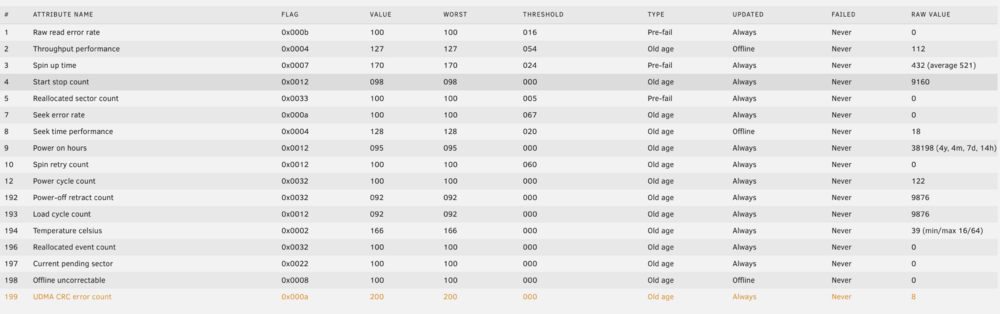
Interesting. I've only got a CRC error count of 8, so nowhere near those numbers, but useful to know that I can't entirely discount them as the cause. From the notifications I've had the disk is disabled due to a read error rather than a write error. Hopefully the extended SMART test will throw a little more light on the issue!
-
Hi all I got a notification from my sever a couple of days ago that disk3 is in error state (disk dsbl), along with another notification stating that the array has 1 disk with read errors (disk3 - errors 16). I've run a short SMART test with no errors, and now the extended test is running. Looking at disk 3's attributes I see this: To my untrained eye nothing looks horrendously abnormal and none of the attributes has 16 errors. The only line that's highlighted is the UDMA CRC error count, but in my experience previously that's just issued a warning and not disabled the drive. Has the behaviour changed in UnRAID or do I need to keep looking for the cause of the disk being disabled? Cheers
-
I've just re-installed the file integrity plugin, as it had disappeared for some reason! However, I'm not able to select blake3 as the hashing method. I understand that it's disabled if the processor doesn't support it, but I still have the blake3 hashes from when it was previously installed so I can only assume the CPU does support it! It's an Intel 12600k. Is there another reason for blake3 to be disabled?
-
Hi all. A couple of times in the last week my server has become unresponsive - unable to login to the GUI or the dashboard only partially loads. After a reboot it's responsive but is showing 100% log file usage, which I think is what caused the unresponsiveness in the first place. The culprit is a 130mb log file called graphql-api.log, which appears to be related to the Unraid Connect plugin (see link and link). The log file seems to be mostly gibberish, with '\u0000' repeated thousands and thousands of times. It seems to have taken about 3 days for the log file to have grown to this size, and the first issue was about 3 days after installing Unraid Connect 2025.04.24.1328. Is this a known issue?
-
Update: after a reboot I was able to remove the pool and start the array
-
I've just upgraded to 7.0.0 and after rebooting I can't start my array. I get an error warning of invalid configuration of one of my pools ("backup - too many wrong or missing devices"). I created a pool some time ago to use for backing up my desktop and laptop. It was a single drive which was slightly suspect and it started to make strange noises so I removed it. Obviously the pool became unusable, but otherwise everything worked as normal. After upgrading to 7.0.0 it won't allow the array to start without a valid configuration for this pool. No problem, I'll remove the pool - but every time I click remove pool it takes me back to the main GUI page and the pool is still present and the array still cannot be started!
-
Does the Wallabag container need an external database? This article says that it should work without requiring changes to the template, but I get an error saying the database connection can't be established. The log file from my Wallabag installation is below:
-
Just for completeness, I rebooted my server today and the BIOS error messages had all gone. It's definitely not something I've come across before but at least it was an easy fix!
-
Fantastic, thanks a lot for your help (again!). It was actually sdd (my parity drive), I misread which device the error message related to. All seems to be fixed now though - I haven't tried a reboot though as I'm working away this week and I'd rather be there in case I need to attach a keyboard and monitor. It's certainly interesting that the BIOS checks this, but also a bit frustrating - I wasted a lot of time removing sticks of memory etc. as I assumed it was a hardware issue that was preventing it from booting.
-
Thanks, I ran fdisk -l and under /dev/sdc1 there's a message saying "the backup GPT is corrupt, but the primary appears OK, so that will be used". Presumably there's some way to overwrite the backup with the primary? It's an array drive so I'd rather not mess it up!
-
Sorry, I wasn't very clear! It's a message from the BIOS, almost immediately after turning on. I can't post a photo at the moment but it's very similar to the one I linked to above - obviously the processor details are different, but it's at that same point just after POST. I haven't received any errors from Unraid.
-
Today I finally got round to upgrading my server! I've gone from a 3570k to a 12600k on an Asus Z690 motherboard. However, when I boot I get a message stating that GPT header corruption has been found, and to check SATA mode or attempt to repair the boot sector (this isn't my computer, but the wording here is the same or very similar). If I enter setup and immediately quit then my server will boot and Unraid seems to be operating with no issues. However, it's a bit of a pain as I normally run the server headless, and I have to attach monitor and keyboard to be able to boot at the moment. Is there any way to check the GPT headers using Unraid? I don't want to run a tool that 'fixes' the headers only to make the drives unreadable to Unraid. I don't think there's any useful info, but I've attached my diagnostics file. tower-diagnostics-20221002-1634.zip
-
I'm about 95% sure the filesystem corruption didn't occur immediately - I think I was able to load some files from the emulated disk1 when I first started the array with disk1 removed. I could be wrong but I'm fairly confident that was the case I've run one parity check with all four drives in the array, no errors, and I'm about 75% through a second check with no errors so far. Are there any other steps that can help in the meantime? I'm considering running the Dynamix File Integrity plugin, although I've not yet read enough to fully understand how it works. I may also bring forward my plans to upgrade my server's hardware. I don't really have the budget for it at the moment but I don't have time to be dealing with data loss either! Does ECC memory prevent issues like this? (Assuming it is the memory) Thanks for all your help!
-
There is, but there's also about 2TB more free space than there was previously on the drive Sorry, which bit? I'm not really clear why data loss was expected Yes, I copied everything off the actual disk1. At this stage I don't think I've suffered any real unrecoverable data loss, but my array has lost 2tb of data and possibly corrupted more without any indication as to a cause. A server I can't trust is more or less useless. Can you suggest next steps for identifying the cause?
-
I've rebuilt disk1 and I've now started a parity check. It looks as though approx. 2tb of data has been lost since disk1 was removed though, including some entire mounts. I think all that data is replicated elsewhere, but I'm more than a little nervous as I have absolutely no idea what's causing these problems!
-
I've now copied all the data off the physical disk1 (although comparing it with what I copied off the array when problems started there seem to be some discrepancies... joy...). Is there any reason not to re-assign it to the array and start a rebuild? It potentially gives me a little redundancy while I try and figure what data is good and what's bad. I'll potentially then run a file integrity plugin so at least that way if anything else goes bad I can see what it is, as I still don't have any good indication of where the problem is.
-
Thanks, I did that. Now I can see disk1 (emulated), but I have a new "lost+found" folder and some of the mount directories that are on the physical disk1 are missing on the emulated disk1. This is turning into a bit of a nightmare, I'm starting to regret having a parity drive! At least that way I wouldn't know there's anything wrong...
-
It says "Disk 1 Not installed xfs unmountable:not mounted"
-
Thanks. Is it possible to browse the emulated disk1? I've just opened up mc and I can see disk2, disk3, user etc. but I'd like to be able to take a copy of just the emulated disk1. Is there a way to do that or do I have to figure it out from what's in user but not disk2 or disk3?
-
I believe so, but I haven't done a full comparison. I'm in the process of making a full copy of the data from the actual disk1 and I can probably find enough space to copy the data from the emulated disk1, so I'll do that and compare - it'll take a while though!
-
I think I've misunderstood something - I thought your suggestion was to do a new config without disk1, i.e. parity, disk2, disk3, and rebuild parity - which would then lose the emulated disk1? Then add back disk1 after confirming there are no parity issues with those 3 disks? I don't have a spare disk at the moment, although I could buy one. I'm sure it will get filled at some point!
-
Yes, although with the caveat that I didn't check many files and it may have been coincidence (all the files were copied to the array at the same time and haven't been accessed since). I assume that whenever they were corrupted was prior to the last successful parity check, as the emulated files match the ones copied from the array before disk1 was removed. I'll do a little more digging and see if the errors are limited to disk1. It's perhaps also relevant to say that disk1 shouldn't have seen much write activity for the last few months, as my array was at about 90% capacity until I added another drive a few months ago. I didn't rebalance but files have slowly been removed from disk1 (and disk2) as I've moved stuff around. My concern with this - and it might be an issue with my understanding - is that, assuming disk1 is failing in some way which is causing the parity errors, those errors are potentially limited to disk1. At the moment, I can rebuild disk1 using the remaining disks in the array, but if I rebuild parity then I lose this ability. Is that correct?
-
I'm having some problems with my server! I posted a couple of weeks ago about errors that occurred when running a parity check, but the situation has evolved a bit since then. Apologies for the bullet points, but I wanted to try and keep things clear and as brief as possible. I've attached the latest logs, although the server has been shut down since the last parity check. Probably irrelevant, but in the few days prior to the problems being detected I have moved a lot of relatively large (1-3gb) files around, mostly using MC through the terminal About two weeks ago a parity check ran after I shut down my server to remove two drives (unassigned devices) The check found lots of parity errors (about 650,000) The previous parity check (February) found no errors All drives passed extended SMART checks with no errors. 2 drives have CRC errors from several months ago, none since changing cables/HBA Unraid’s memtest wouldn’t run (when selected the machine restarted), but I downloaded memtest86 (free version, limited to 4 passes) to a different USB stick and it completed 4 passes with no errors No power loss or crash induced hard shutdowns since the last successful parity check, although I now realise Unraid’s ‘clean’ shutdown may not have been clean due to issues stopping the array - but it seems unlikely that a hard shutdown would cause so many parity issues I copied the most important data off the array when parity check started showing errors I used FreeFileSync to compare the copied data to partial backups – mostly identical. Some large (GoPro) video files were different, with the copy on the array corrupted. I looked at a few files on the array to see which disk they were on, and all I checked were on disk 1 Removed disk 1, started array with disk 1 emulated, copied off some of the files that were identified in the last step – ran a file comparison and they were identical to the files copied off after the parity errors started, which I assume means they were corrupt before the parity issues started (from a quick binary comparison it looks as though the files go blank about halfway through) Reinstalled disk 1 but it didn’t come back into the array – I can assign it to the array, but it appears as a new disk, i.e. needs to be initialised I didn’t make any changes to the array while I had disk 1 removed, but docker was running and may have made changes (although I have a cache disk and I think all shares on the array use it) I’ve mounted disk 1 as an unassigned device and I’m copying all the data off it to a spare hard drive Questions: What could have caused the parity errors? How can I prevent this occurring in the future? Why is disk 1 seen as new? Is it because data was written to the array while it was simulated, or just because the array was started while it was missing? Do I have any other sensible options other than assigning disk 1 to the array again then rebuilding? Hardware Intel i5-3570K Gigabyte Z77-D3H 9gb RAM (Odd, I know, but I had a 1gb stick of ECC RAM which I installed last year to see if the motherboard supports ECC and I never got round to removing it!) 4x 8tb Western Digital HDs for the array (1x parity) 1x 500gb Samsung Evo SSD (cache drive) 2x Blu Ray drives 1x Marvell HBA. I understand this can cause problems, but the array drives are all connected to the motherboard SATA controller. The Blu Ray drives and an unassigned drive (now removed) are connected to the HBA I think that's everything! tower-diagnostics-20220521-1015.zip

