





Alias_ZA
Members
-
Joined
-
Last visited
Everything posted by Alias_ZA
-
Hi all, hoping someone more intellegent than me could create a app template for Stump - it's an ebook / manga media server: https://www.stumpapp.dev Thanks in advance!
-
Figured my issue out. Seems my whole config reset, including password and default folders. Any idea why this happens?
-
Heya, Container won't start for me all of a sudden, has been working fine all week. Error I get: 2023-08-19 14:54:15.619603 [info] Host is running unRAID 2023-08-19 14:54:15.638155 [info] System information Linux 45f93a930e14 6.1.38-Unraid #2 SMP PREEMPT_DYNAMIC Mon Jul 10 09:50:25 PDT 2023 x86_64 GNU/Linux 2023-08-19 14:54:15.660715 [info] OS_ARCH defined as 'x86-64' 2023-08-19 14:54:15.681645 [info] PUID defined as '99' 2023-08-19 14:54:15.718547 [info] PGID defined as '100' 2023-08-19 14:54:15.759454 [info] UMASK defined as '000' 2023-08-19 14:54:15.779683 [info] Permissions already set for '/config' 2023-08-19 14:54:15.801727 [info] Deleting files in /tmp (non recursive)... 2023-08-19 14:54:15.827788 [info] VPN_ENABLED defined as 'yes' 2023-08-19 14:54:15.848815 [info] VPN_CLIENT defined as 'wireguard' 2023-08-19 14:54:15.869467 [info] VPN_PROV defined as 'custom' 2023-08-19 14:54:15.897223 [info] WireGuard config file (conf extension) is located at /config/wireguard/wg0.conf 2023-08-19 14:54:15.928502 [crit] VPN configuration file /config/wireguard/wg0.conf does not contain 'Endpoint' line, showing contents of file before exit... ** Press ANY KEY to close this window ** It's not showing contents of file before exit if that helps. my wg0.conf file looks like this: [Interface] # Device: Just Moth PrivateKey = *** Address = 10.67.102.237/32 DNS = 10.64.0.1 [Peer] PublicKey = *** AllowedIPs = 0.0.0.0/0 Endpoint = 154.47.30.143:51820 Any help would be great!
-
Hi All, I hope someone can point me in the right direction. I have followed all the guides I can find, and searched the forums but I cannot for the life of me get a Plex Docker to be accessible remotely via the built-in VPN function in Unraid. I have setup the VPN connection with MullVAD, created a port forward on the MullVAD site and spun the Plex docker up in the VPN network (wg0). I have tried to add the port forward port to the docker template and in Plex network settings but no joy. Has anyone done this with success? Reason I need to do this is my fibre provider has me on CGNAT and there is no way around this. I have tried the CF CDN route but I don't want to violate TOS limits. MullVAD VPN seems to be my best option. Any help would be greatly appreciated.
-
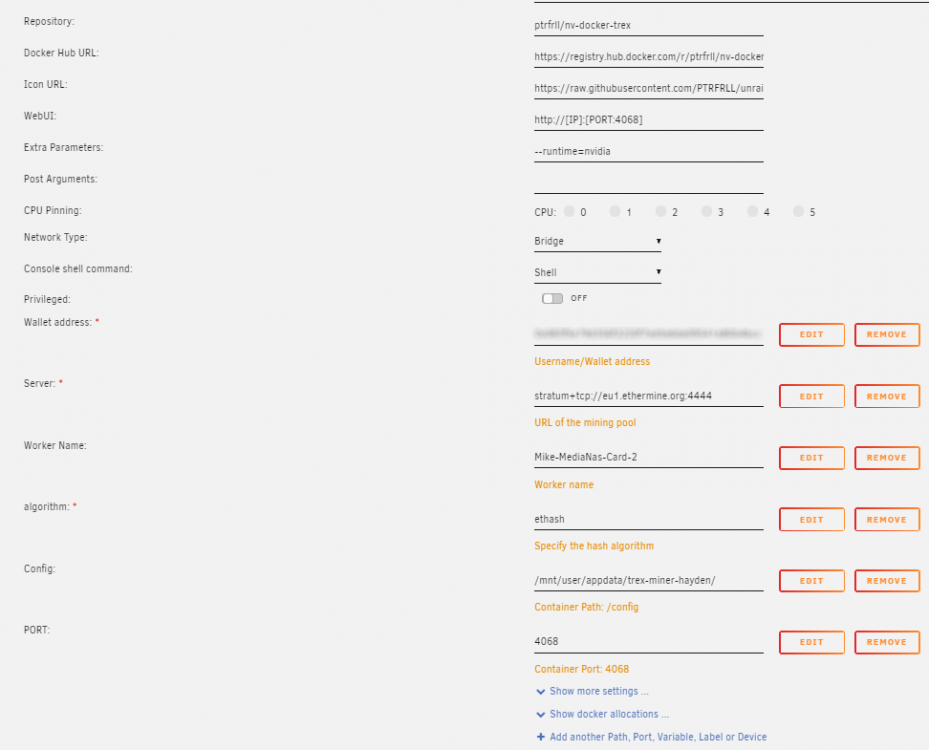
Hi, Can someone help me setup two instances of this in docker? I already have them running but instance 2 is using the config file of instance 1 even though the appdata paths are set correctly. I think something might be hard coded somewhere? Below is the Unraid side - I want it to use the config file in /mnt/user/appdata/trex-miner-hayden/ but instead it seems to be using /mnt/user/appdata/trex-miner/ which is the first instance. Any ideas?
-
Hi Guys, Hoping someone can help. I'm running Ombi on Docker (Synology NAS). I was able to install and run v3 without a problem but when I wanted to try the v4 (v4-preview) I get the following error at the bottom of the logs: We are running on http://*:3579,, i, System.IO.FileNotFoundException: Could not find file '/opt/ombi/Swagger.xml'., File name: '/opt/ombi/Swagger.xml', I have tried deleting and starting from scratch but no joy. Any ideas for me to try?

