





JimmyGerms
Members
-
Joined
-
Last visited
Everything posted by JimmyGerms
-
Whew, thought I may have messed up my template! Last question before I derail this thread any further. What are your temps like with the 2288G running a VM? I'm sitting at ~46C when my 6 core VM is idle. I feel like this is a bit too high for something like this. I'm so paranoid with temps and if I got good thermal paste coverage every time I build a PC. Thanks for all the help @Hoopster! I've learned so much from this thread and building this machine!
-
Server upgrades went well! The new USB card works well with this MB and in the VM. I did have one question though, do you see the same devices listed in the "safely remove device" section @Hoopster? How can I remove these from the eject list? Have I messed up the VM setup?
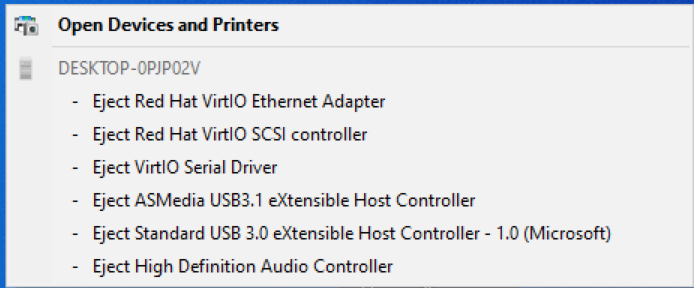
-
Just bought a StarTech PEXUSB312EIC 5 port USB 3.1 card. I'll update the thread and let everyone know how well it does on this mobo in a VM!
-
Hey @Hoopster I was curious since you've setup a VM are you passing any USB controllers through on the E3C246D4U? I'm trying to learn this currently and I think I'm coming to the conclusion that there is only one controller on the board. This is an issue since the unraid usb key is on this controller. Am I mistaken here or are am I understanding pass-through wrong.

-
I've gotten it once so far. I'm still on L2.32 BIOS getting ready to update. I ended up shutting the server down, power cycling and it seemed to go away after that. Have not hit it since but I'm pretty sure it will happen again sometime in the future.
-
Since we're talking about all the other dockers in here I was wondering if I could get some info on a question I posted within the Jackett thread. Just want to make sure I'm doing this right?
-
Second attempt at clarifying what I'm after haha. So, with the changes to the binhex VPN dockers I wanted to verify if I was utilizing Jackett properly. Sonarr and Radarr are currently configured to tunnel through the VPN and have been updated with the proper host setting: 'localhost'. Now, within Jackett these buttons are still using 192.168.1.x causing Sonarr and Radarr to error while grabbing indexers. To fix this, within Sonarr/Radarr I edited what the "Copy Torznab Feed" gives me and replaced 192.168.1.x with 'localhost'. With this, both dockers pass while checking the indexers! Is this the correct way to update these settings? Can I set something up within Jackett so I do not have to manually change the ip address when adding a new indexer? Thanks again for your help and time. I'm learning quite a bit!


-
Sorry, I ended up deleting that post and moved it to the proper thread. Didn't mean to bog down the thread. I can explain a bit more over there maybe? But for now I've just replaced the '192.168.1.blah' with 'localhost' after clicking on the copy buttons. Think we're back! Thank you so much for the help! I get it a bit more now.
-
Well...I feel like a fool. localhost worked for me. Could you give a quick breakdown of why that is? Networking is confusing as f to me.
-
This what you mean? I think you can guess the normal setup for the Host but I'm paranoid so...yeah haha. But I pass with this setup on the previous version.
-
Sounds like you've got it! Sonarr and Radarr are using the IP from DelugeVPN but cannot communicate with the deluge docker itself. Rolling back to 2.0.4.dev38+g23a48dd01-3-01 I'm up and running again.
-
Yes, sorry for the confusion there. I meant the ui's for Sonarr and Radarr were still accessible. The two dockers were just throwing an issue about connecting to Deluge during "test connection". Running "curl ifconfig.io" in sonarr and radarr's docker terminals are using the same IP as Deluge but for some reason those two programs have issues linking back up to the download client. I'll try and grab some logs later today!
-
I tried setting up Privoxy as well thinking the '--net=container:binhex-delugevpn' argument may be the culprit but still no luck. For now I've rolled back to 2.0.4.dev38+g23a48dd01-3-01 and I'm able to sync back up with the deluge download client 😕
-
@binhex Updated to the latest but even with the ports added to ADDITIONAL_PORTS everything connected to the VPN times out and I get a: Unknown exception: The operation has timed out.: 'http://[redacted]:8112/json' Sonarr and Radarr can not connect to the DelugeVPN. I am using "container:binhex-delugevpn" for the network setup. Would this be an issue? EDIT: I'm also able to get to the Web-UIs with no issue, just cannot connect to deluge.
-
I don't believe it's as random as I'm thinking. It seems to reset every time this error pops up in the logs: usbhid-ups[3459]: nut_libusb_get_report: Input/Output Error. I cannot find much on google about this. What I've done for now is setup a raspberry pie to be the netserver and I've had no issues so far. Thanks for the tutorial. It helped me get to where I needed to go!
-
Hi there! I posted a bit on another tread about a CyberPower CP1500PFCLCD UPS and some issues I was running into and wanted to post here on what I found. The goal is to edit my shutdown and start times for the CyberPower UPS because it does not play nice with "Turn off UPS after shutdown". Problem: This is what I just tried: ups.conf: [CP1500] driver = usbhid-ups port = auto offdelay = 300 ondelay = 0 ignorelb override.battery.charge.low = 50 override.battery.charge.warning = 60 "Start Network UPS Tools service"=No (Because Yes would not start on reboot) "Enable Manual Config Only"=Yes Edited "/boot/config/go" to contain: bash /etc/rc.d/rc.nut start Upon a power outage the server will shutdown cleanly and the CP1500PFCLCD will count down from 5 min and remain off when done. When power is restored I see it counting down from 10 seconds and then it turns itself back on. Exactly what I want...EXCEPT...NUT will reset ups.delay.shutdown and ups.delay.start to their default values of 20 and 30 blowing the whole setup randomly. When I noticed the reset I saw this in the logs: usbhid-ups[16281]: nut_libusb_get_string: Pipe error. usbhid-ups[16281]: nut_libusb_get_report: Input/Output Error. Any help would be much appreciated. I would love to get my CyberPower UPS to shutdown and restart upon power loss/restore if possible! Thanks! EDIT: After watching and reading the logs the reset is caused by whatever this error is doing: usbhid-ups[3459]: nut_libusb_get_report: Input/Output Error. Google is coming up with this thread and not much else around this error.
-
Hi everyone! So I've been Googling my brains out on this and even read the code line by line on GitHub for the Rebuild-DNDC.sh file. The issue is Rebuild-DNDC constantly restarts my vpn docker (bubuntux/nordvpn) with the report of: # MASTER CONTAINER INFO - CONTAINER-NAME: nordvpn - ENDPOINT-ID: 12345---edited for safety? - NETMODE-ID: 12345---edited for safety? - CONNECTIVITY: BROKEN ---- restarting nordvpn container ---- nordvpn restarted Based on the code, it matches up some long endpoint-id's that I've visually matched from this terminal output docker inspect nordvpn --format="{{ .NetworkSettings.EndpointID }}" to the mastercontepid.tmp file that it writes out but for some reason it NEVER considers them a match. I followed this tutorial and updated where needed accounting for docker updates but my setup is nearly similar (Rebuild-DNDC config is exactly the same as the screenshot). In summary, this tool never finds a match for nordvpn docker and restarts every 5 min or whatever is set for the cron variable and I never see "SKIPPING: MASTER CONTAINER ENDPOINTID IS CURRENT" in the logs. Would anyone happen to know what I'm doing wrong?

