





Fuzzydamnt
Members
-
Joined
-
Last visited
Everything posted by Fuzzydamnt
-
Yeah . . . ok, so . . . it was firefox. I finally thought to try with a different browser (edge in this case) and it worked immediately thanks for reading (eyeroll)
-
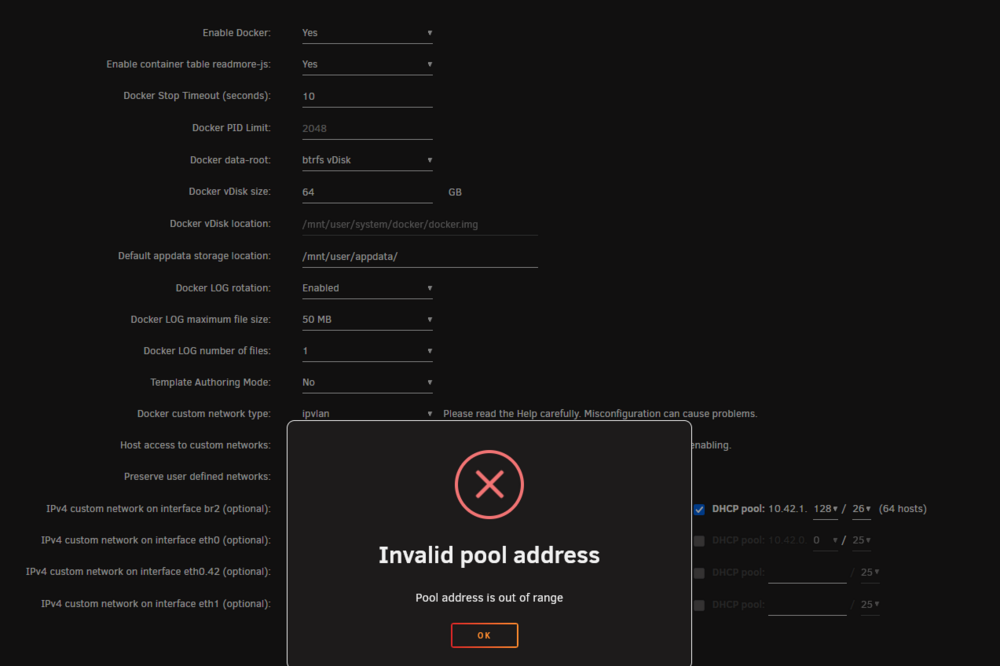
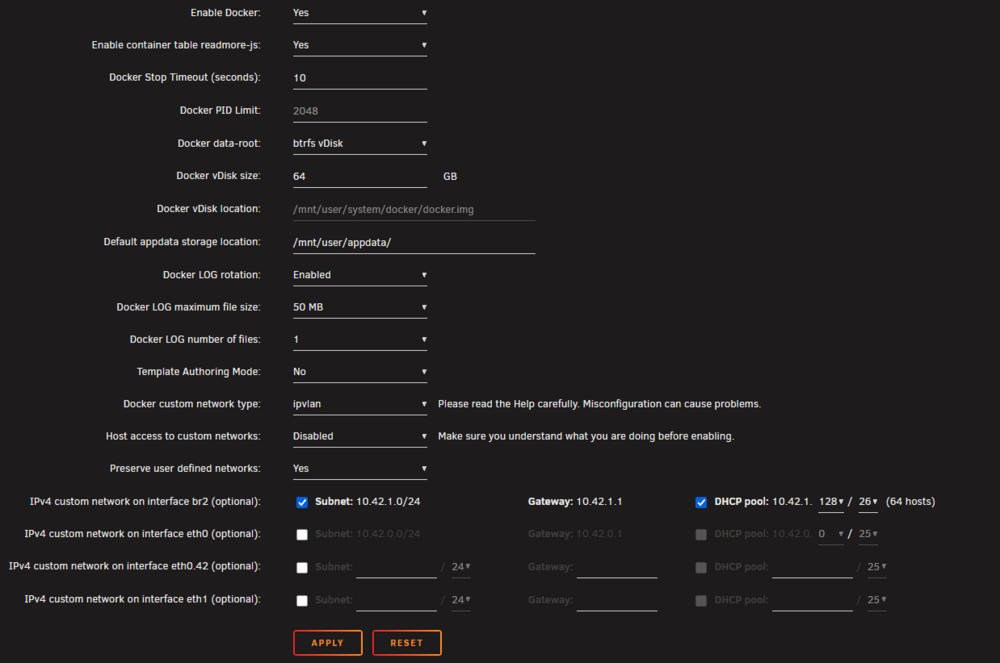
I have been making a lot of changes to my server - and something I did seems to have broken Docker. When attempting to 'Enable Docker' from settings this is what I see. Open the Docker settings, and select yes in the first drop down, then when i click Apply at the bottom, the screen just 'blinks?' a litlte? (in attached image Screenshot 2025-10-19 202419.png something refreshes / changes in those last three lines - 2nd image) then I click apply again and i see the message in the image: Screenshot 2025-10-19 202034.png (1st image) I have also attached my diagnostics report. Any help at all would be appreciated! *disclaimer - I am fully willing to admin that this could be something dumb i did . . . :D unraid2-diagnostics-20251019-1950.zip
-
any update? Is non-functional for me :( lmk if i can send any logs / whatever
-
Hi - I am unable to connect to the web ui of my container. Please see the attached cry for help For me, I had to run the container with VPN NOT enabled at first - then I could get in, turns out that VPN was not connecting - switching to wireguard seems to have fixed that. also had to manually set the initial admin password for some reason. this equals 'adminadmin' if anyone needs it WebUI\Password_PBKDF2="@ByteArray(ARQ77eY1NUZaQsuDHbIMCA==:0WMRkYTUWVT9wVvdDtHAjU9b3b7uB8NR1Gur2hmQCvCDpm39Q+PsJRJPaCU51dEiz+dTzh8qbPsL8WkFljQYFQ==)" goes in the qBittorrent.conf file . . .
-
Help Launching ATM9 - the Logs from the docker launch reads as shown below - and I cannot connect to the server (as the logs seem to indicate) any help? Exception in thread "main" java.io.UncheckedIOException: java.io.IOException: Invalid paths argument, contained no existing paths: [libraries/net/minecraft/server/1.20.1-20230612.114412/server-1.20.1-20230612.114412-extra.jar] at cpw.mods.securejarhandler/cpw.mods.jarhandling.impl.Jar.<init>(Jar.java:82) at cpw.mods.securejarhandler/cpw.mods.jarhandling.SecureJar.from(SecureJar.java:70) at cpw.mods.securejarhandler/cpw.mods.jarhandling.SecureJar.from(SecureJar.java:62) at cpw.mods.securejarhandler/cpw.mods.jarhandling.SecureJar.from(SecureJar.java:54) at MC-BOOTSTRAP/[email protected]/net.minecraftforge.fml.loading.targets.CommonServerLaunchHandler.getMinecraftPaths(CommonServerLaunchHandler.java:35) at MC-BOOTSTRAP/[email protected]/net.minecraftforge.fml.loading.moddiscovery.MinecraftLocator.scanMods(MinecraftLocator.java:36) at MC-BOOTSTRAP/[email protected]/net.minecraftforge.fml.loading.moddiscovery.ModDiscoverer.discoverMods(ModDiscoverer.java:75) at MC-BOOTSTRAP/[email protected]/net.minecraftforge.fml.loading.FMLLoader.beginModScan(FMLLoader.java:164) at MC-BOOTSTRAP/[email protected]/net.minecraftforge.fml.loading.FMLServiceProvider.beginScanning(FMLServiceProvider.java:86) at MC-BOOTSTRAP/[email protected]/cpw.mods.modlauncher.TransformationServiceDecorator.runScan(TransformationServiceDecorator.java:112) at MC-BOOTSTRAP/[email protected]/cpw.mods.modlauncher.TransformationServicesHandler.lambda$runScanningTransformationServices$8(TransformationServicesHandler.java:100) at java.base/java.util.stream.ReferencePipeline$3$1.accept(ReferencePipeline.java:197) at java.base/java.util.HashMap$ValueSpliterator.forEachRemaining(HashMap.java:1779) at java.base/java.util.stream.AbstractPipeline.copyInto(AbstractPipeline.java:509) at java.base/java.util.stream.AbstractPipeline.wrapAndCopyInto(AbstractPipeline.java:499) at java.base/java.util.stream.AbstractPipeline.evaluate(AbstractPipeline.java:575) at java.base/java.util.stream.AbstractPipeline.evaluateToArrayNode(AbstractPipeline.java:260) at java.base/java.util.stream.ReferencePipeline.toArray(ReferencePipeline.java:616) at java.base/java.util.stream.ReferencePipeline.toArray(ReferencePipeline.java:622) at java.base/java.util.stream.ReferencePipeline.toList(ReferencePipeline.java:627) at MC-BOOTSTRAP/[email protected]/cpw.mods.modlauncher.TransformationServicesHandler.runScanningTransformationServices(TransformationServicesHandler.java:102) at MC-BOOTSTRAP/[email protected]/cpw.mods.modlauncher.TransformationServicesHandler.initializeTransformationServices(TransformationServicesHandler.java:55) at MC-BOOTSTRAP/[email protected]/cpw.mods.modlauncher.Launcher.run(Launcher.java:88) at MC-BOOTSTRAP/[email protected]/cpw.mods.modlauncher.Launcher.main(Launcher.java:78) at MC-BOOTSTRAP/[email protected]/cpw.mods.modlauncher.BootstrapLaunchConsumer.accept(BootstrapLaunchConsumer.java:26) at MC-BOOTSTRAP/[email protected]/cpw.mods.modlauncher.BootstrapLaunchConsumer.accept(BootstrapLaunchConsumer.java:23) at [email protected]/cpw.mods.bootstraplauncher.BootstrapLauncher.main(BootstrapLauncher.java:141) Caused by: java.io.IOException: Invalid paths argument, contained no existing paths: [libraries/net/minecraft/server/1.20.1-20230612.114412/server-1.20.1-20230612.114412-extra.jar] ... 27 more 2024-06-22 11:43:19,385 main WARN Advanced terminal features are not available in this environment [11:43:19] [main/INFO] [cp.mo.mo.Launcher/MODLAUNCHER]: ModLauncher running: args [--launchTarget, forgeserver, --fml.forgeVersion, 47.2.20, --fml.mcVersion, 1.20.1, --fml.forgeGroup, net.minecraftforge, --fml.mcpVersion, 20230612.114412] [11:43:19] [main/INFO] [cp.mo.mo.Launcher/MODLAUNCHER]: ModLauncher 10.0.9+10.0.9+main.dcd20f30 starting: java version 17.0.2 by Oracle Corporation; OS Linux arch amd64 version 6.1.79-Unraid [11:43:26] [main/INFO] [ne.mi.fm.lo.ImmediateWindowHandler/]: ImmediateWindowProvider not loading because launch target is forgeserver [11:43:26] [main/INFO] [mixin/]: SpongePowered MIXIN Subsystem Version=0.8.5 Source=union:/data/libraries/org/spongepowered/mixin/0.8.5/mixin-0.8.5.jar%2364!/ Service=ModLauncher Env=SERVER 2024-06-22 11:46:45,010 main WARN Advanced terminal features are not available in this environment [11:46:45] [main/INFO] [cp.mo.mo.Launcher/MODLAUNCHER]: ModLauncher running: args [--launchTarget, forgeserver, --fml.forgeVersion, 47.2.20, --fml.mcVersion, 1.20.1, --fml.forgeGroup, net.minecraftforge, --fml.mcpVersion, 20230612.114412] [11:46:45] [main/INFO] [cp.mo.mo.Launcher/MODLAUNCHER]: ModLauncher 10.0.9+10.0.9+main.dcd20f30 starting: java version 17.0.2 by Oracle Corporation; OS Linux arch amd64 version 6.1.79-Unraid [11:46:51] [main/INFO] [ne.mi.fm.lo.ImmediateWindowHandler/]: ImmediateWindowProvider not loading because launch target is forgeserver [11:46:51] [main/INFO] [mixin/]: SpongePowered MIXIN Subsystem Version=0.8.5 Source=union:/data/libraries/org/spongepowered/mixin/0.8.5/mixin-0.8.5.jar%2364!/ Service=ModLauncher Env=SERVER
-
Can't get to the web interface at all any more, shares are functional, the docker apps that are there are running (PiHole mostly) and I can interact with the console, but the web interface login page won't even load now.
-
Will add diagnostics in a moment (.zip not allowed? - so need to figure out what I am doing wrong) Updated 6.12 a bit ago all was fine - but with shiny new ZFS avail - I wanted to try that on my system - so i backed up and / or moved my data then wiped out the old pool and spun up a new ZFS one. Server was weird about that at first - when the 'you must format' prompt came up ALL or the disks were in there 😒 so i restarted and that seems to correct that - so ZFS pool built. added a share to that pool and tried to restore (Duplicity) but only got the 'can't create preferences .duplicity file in media/ (share name is media) looking at the permissions of that share through the console shows so chmod 777 so I could grab that file and to that directory - but the web interface is completely unresponsive now? any ideas? unraid2-diagnostics-20230619-0756.zip

-
Seeing this after a server halt and reset: Feb 20 11:01:08 unraid1 kernel: CPU: 17 PID: 2239 Comm: kworker/17:2 Not tainted 5.10.28-Unraid #1 Feb 20 11:01:08 unraid1 kernel: Hardware name: empty empty/ S7050 , BIOS V1.09 07/01/2014 Feb 20 11:01:08 unraid1 kernel: Workqueue: events macvlan_process_broadcast [macvlan] Feb 20 11:01:08 unraid1 kernel: RIP: 0010:__nf_conntrack_confirm+0x9b/0x1e6 [nf_conntrack] Feb 20 11:01:08 unraid1 kernel: Code: e8 dc f8 ff ff 44 89 fa 89 c6 41 89 c4 48 c1 eb 20 89 df 41 89 de e8 36 f6 ff ff 84 c0 75 bb 48 8b 85 80 00 00 00 a8 08 74 18 <0f> 0b 89 df 44 89 e6 31 db e8 6d f3 ff ff e8 35 f5 ff ff e9 22 01 Feb 20 11:01:08 unraid1 kernel: RSP: 0018:ffffc90006740dd8 EFLAGS: 00010202 Feb 20 11:01:08 unraid1 kernel: RAX: 0000000000000188 RBX: 0000000000009958 RCX: 00000000543248e6 Feb 20 11:01:08 unraid1 kernel: RDX: 0000000000000000 RSI: 0000000000000000 RDI: ffffffffa00d9760 Feb 20 11:01:08 unraid1 kernel: RBP: ffff8883866788c0 R08: 00000000f01bcf21 R09: 0000000000000000 Feb 20 11:01:08 unraid1 kernel: R10: 0000000000000098 R11: ffff88811efe9400 R12: 0000000000005c24 Feb 20 11:01:08 unraid1 kernel: R13: ffffffff8210b440 R14: 0000000000009958 R15: 0000000000000000 Feb 20 11:01:08 unraid1 kernel: FS: 0000000000000000(0000) GS:ffff88903fcc0000(0000) knlGS:0000000000000000 Feb 20 11:01:08 unraid1 kernel: CS: 0010 DS: 0000 ES: 0000 CR0: 0000000080050033 Feb 20 11:01:08 unraid1 kernel: CR2: 0000152b19cdf020 CR3: 000000000200a004 CR4: 00000000000626e0 Feb 20 11:01:08 unraid1 kernel: Call Trace: Feb 20 11:01:08 unraid1 kernel: <IRQ> Feb 20 11:01:08 unraid1 kernel: nf_conntrack_confirm+0x2f/0x36 [nf_conntrack] Feb 20 11:01:08 unraid1 kernel: nf_hook_slow+0x39/0x8e Feb 20 11:01:08 unraid1 kernel: nf_hook.constprop.0+0xb1/0xd8 Feb 20 11:01:08 unraid1 kernel: ? ip_protocol_deliver_rcu+0xfe/0xfe Feb 20 11:01:08 unraid1 kernel: ip_local_deliver+0x49/0x75 Feb 20 11:01:08 unraid1 kernel: __netif_receive_skb_one_core+0x74/0x95 Feb 20 11:01:08 unraid1 kernel: process_backlog+0xa3/0x13b Feb 20 11:01:08 unraid1 kernel: net_rx_action+0xf4/0x29d Feb 20 11:01:08 unraid1 kernel: __do_softirq+0xc4/0x1c2 Feb 20 11:01:08 unraid1 kernel: asm_call_irq_on_stack+0x12/0x20 Feb 20 11:01:08 unraid1 kernel: </IRQ> Feb 20 11:01:08 unraid1 kernel: do_softirq_own_stack+0x2c/0x39 Feb 20 11:01:08 unraid1 kernel: do_softirq+0x3a/0x44 Feb 20 11:01:08 unraid1 kernel: netif_rx_ni+0x1c/0x22 Feb 20 11:01:08 unraid1 kernel: macvlan_broadcast+0x10e/0x13c [macvlan] Feb 20 11:01:08 unraid1 kernel: macvlan_process_broadcast+0xf8/0x143 [macvlan] Feb 20 11:01:08 unraid1 kernel: process_one_work+0x13c/0x1d5 Feb 20 11:01:08 unraid1 kernel: worker_thread+0x18b/0x22f Feb 20 11:01:08 unraid1 kernel: ? process_scheduled_works+0x27/0x27 Feb 20 11:01:08 unraid1 kernel: kthread+0xe5/0xea Feb 20 11:01:08 unraid1 kernel: ? __kthread_bind_mask+0x57/0x57 Feb 20 11:01:08 unraid1 kernel: ret_from_fork+0x22/0x30 Feb 20 11:01:08 unraid1 kernel: ---[ end trace adb94111a3fb6545 ]--- Can anyone tell by looking at that what is going on? I see "OS Critical Stop" and "Run-Timei Critical Stop - Asserted" is the IMPI event logs. and no timei is not a typo
-
@StrandedPirate - I to must join in with the throngs of people signing your praises and thanking you profusely! This was my issue also! Thanks for writting it up!
-
Did you ever figure this out - having same issue right now


