





betaman
Members
-
Joined
-
Last visited
Everything posted by betaman
-
+1 on this. Recently corrupted a vm and prefer not to go through having to set it up again.
-
No, it just says it's locked. I used the command prompt to try rebuilding the BCD but it doesn't find a partition with Windows on it. Not a good sign. I could just rebuild the vm but I'm pretty sure I used a Win 8 license to upgrade to Win 10. I'll have to see if that license will work on a Win 10 iso for install but I'm not optimistic...
-
Ok, setting the ISO to boot order 1 got me into the tool. As expected, it says it couldn't repair my drive. When I went to the reset options (keep my files), it says my drive is locked?
-
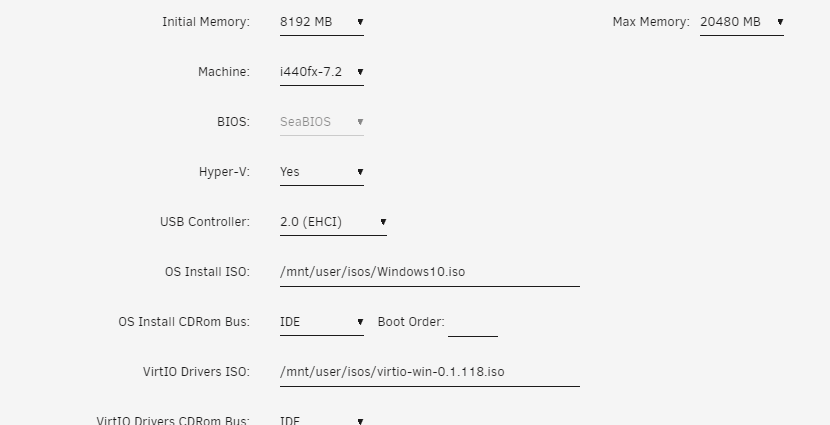
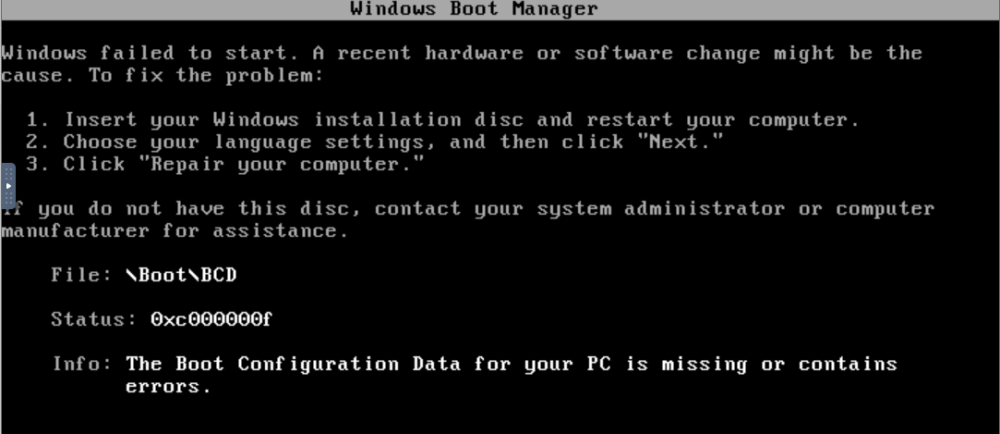
Yeah, that's where I have the Windows 10 ISO selected: However, it doesn't boot into the repair tool screen. I just get the first screen I posted above:
-
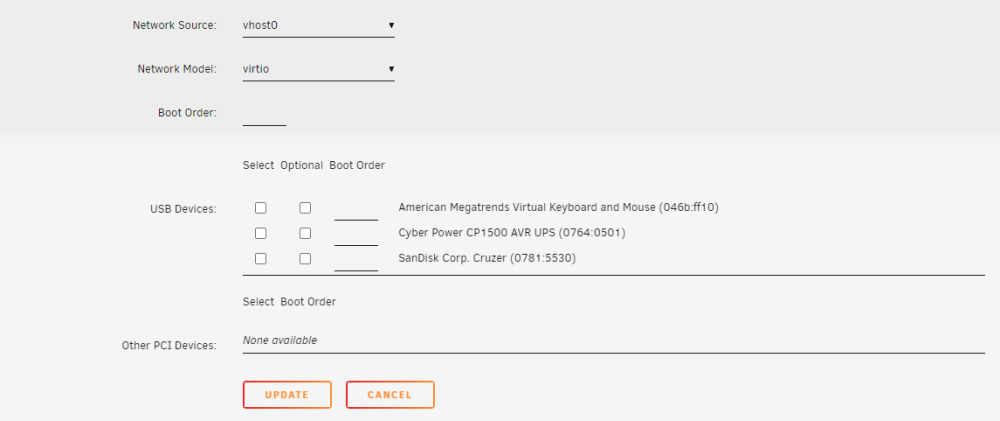
Thanks for the response. Sorry, but I'm a little confused by the first part - "Put the windows install ISO back into the list of drives"? I've added the Windows 10 ISO as a share via unassigned devices in UnRAID: But I'm unclear how to point the vm to Windows 10 iso as the boot device in the vm settings? As far as boot devices, all I can see is connected USB devices:

-
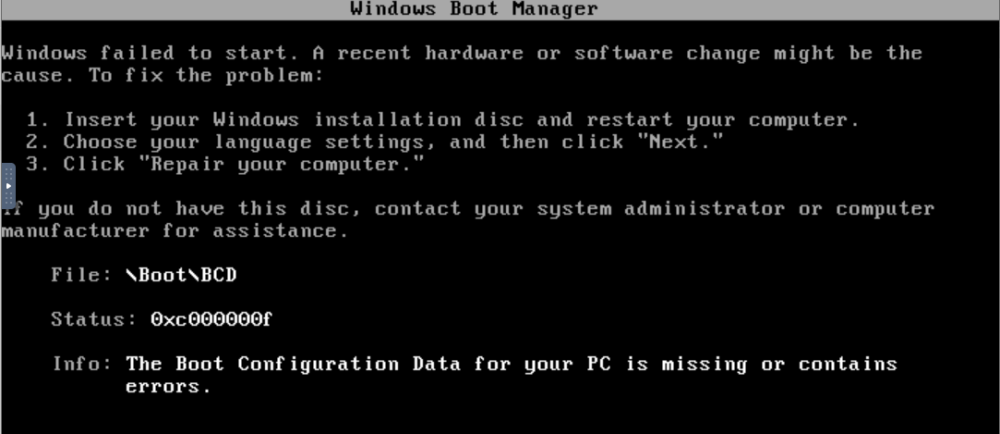
So I thought it would be a simple process to increase the size of my VM disk from 50G to 100G as I was running low on space inside my Windows environment. Increasing the vdisk size in UnRAID was no problem. The issues started as I tried to extend my Windows 10 VM C:. First issue was the recovery volume being adjacent to the C:. Easy enough fix - used the built in Windows disk manager to delete this partition and then I was able to extend the size of my Windows 10 C drive to the full 100GB. Everything looked good until I had to reboot my vm. Now I'm presented with this screen: I'm assuming I need to create a bootable Win 10 USB drive but I'm unclear how to make this the boot device for my vm so I can repair the vm disk with the Win 10 repair utility (assuming that even works)? VM Log.txt
-
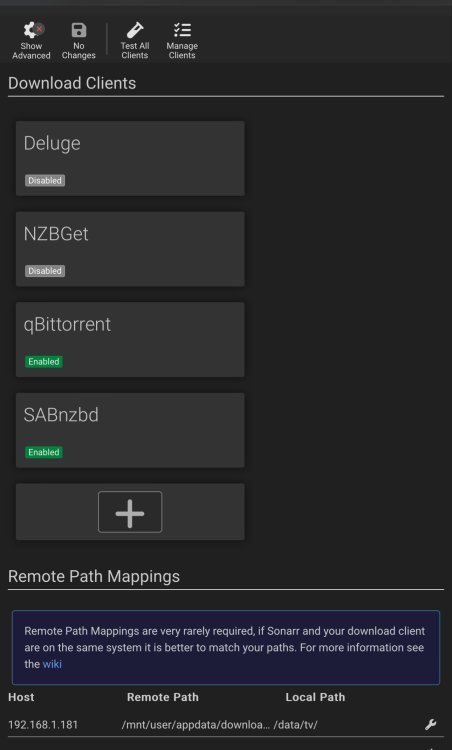
Something like this In Sonarr (/data/movies in Radar):
-
That’s why I told you that you need a remote path setting in the download clients settings page.
-
The root path to your “downloads” folder (eg /mnt/user/appdata/downloads/). If you match this in all of your dockers your life will be a lot easier. Like I said, binhex uses /data in all of his dockers.
-
You should use categories in both your *arr dockers and have the download clients setup with category paths to match the docker path. Setup your "downloads" folder the same for both. If you use binhex dockers then make them the /data container path with root path to where you want them to go. Do this for all dockers (Plex is really separate and all of the metadata work can be done with the files in their final resting location). If /media is where you store your "completed" files then I would create a separate directory for "in process" downloads. I use /data/incomplete for in process, /data for completed and then I have /data/tv and /data/movies setup for the categories. You'll need to remote path map the category directories in the *arr download clients settings page as well. Make sure all of your download clients are setup with the same categories (e.g. I have both tv and movies categories setup in both qBittorrent and SABnzbd. Radarr monitors /data/movies and Sonarr /data/tv. Finally, I would consider a cache drive for all the in process work and keep the heavy lifting out of the array (i.e. last process is to move the completed download from your category directory on the cache drive to the /media location in the array).
-
Anyone else using PIA with this docker? My speeds are severly limited when VPN is enabled. Goes from 100 MB/s to about 18 MB/s if the VPN is enabled. I'm currently using Switzerland server in my ovpn config. I don't have this issue with NZBget (other issues with rar and obfuscation is why I abandoned it). @binhex I know you said TLS is active with newsreaders but I'm just wondering if there's another workaround to get my speeds up without disabling?
-
Sorry, should’ve reminded you about our exchange. It was related to switching from Deluge to Qbittorrent. I only use torrents when it’s an older tv show not readily available via nzb.
-
You jinxed me…well not really. I had disabled VPN during Troubleshooting and forgot to re-enable…🤦🏼♂️
-
Ok, for PIA there’s also some cert files. Not sure what else to tell you but maybe check the log.
-
So there’s something wrong with your openvpn config. Which provider are you using and did you add their config file to your openvpn folder inside the docker config directory?
-
Did you try disabling the VPN option (set to no in docker setup) to see if the webgui responds?
-
I switched to qbittorrent (vpn, binhex image) and torrents are working again for me. Can't explain it...
-
Ok, so first thing is I'm using all of your dockers (*arr, deluge, nzbget, sabnzbd etc). All of the containers are setup with /data and they all point to my downloads folder (/mnt/user/appdata/downloads) in the respective container setup. I've been using categories to keep movies and tv separate so the categories are setup as /mnt/user/appdata/downloads/movies and /mnt/user/appdata/downloads/tv). I was remote mapping the category directories in the *arr containers within each program under the download client setting (/mnt/user/appdata/downloads/tv to /data/tv) but I think this step was unnecessary. Having said that, Radarr currently has this setup and is working correctly with imports while Sonarr is not and I "think" I have them setup the same (i.e. remote mapping in both). I removed remote mapping in Sonarr but still same behavior. Haven't tried Radarr yet.
-
I don’t know that I want too! I’m just trying to figure out why all of the sudden Deluge downloads aren’t being picked up by Sonarr? When I check Sonarr the downloads are gone from the queue and I (personally) can’t see anything in the logs indicating what happened? The only difference I could find between Deluge and the other download clients is the file permissions.
-
So i've been using this docker for years along with Sonarr. Recently, I noticed downloads from Deluge were not being picked up by Sonarr in my tv categories folder. I think I've narrowed down the issue to permissions on the actual files inside the download folders. I'm using a UMASK setting of 100 in the config so I'm expecting to see a rwxrwxrwx file permission but instead see rw-rw-rw-. When I checked NZBget or SABnzbd downloaded files with the same UMASK setting they show rwxrwxrwx and are imported correctly. Is this the correct diagnosis and if so, how do I fix it? Thanks in advance.

-
Haha! I’ve only ever had an issue once with DMCA and it was torrent related. Home Box…
-
Thanks for the response. I did get it working less vpn for now. What do you use for nzb’s?
-
I switched to NZBget a while ago due to obfuscation issues with SABnzbd. Now I'm running into issues with downloads failing to repair (seems to be a known issue with ParPar recovery files?). Anyway, seems like this docker is still being supported by @binhex so I assume the obfuscation issues from several years ago are gone? Just want to confirm before I go thru the effort of setting up this docker. Thanks.
-
Can anyone recommend the most current working endpoint for PIA? Montreal and Toronto were my "go-to" endpoints but once configured, I'm not getting any ip address returned when doing "curl ipconfig.io" from nzbget docker console window. EDIT: Montreal appears to be working right now. Really curious if there's another setting or something I need to configure to keep the connection active?
-
Ok, looks like I actually had 25s set in the tunnel already. Thanks anyway!


