s449
Members
-
Joined
-
Last visited
-
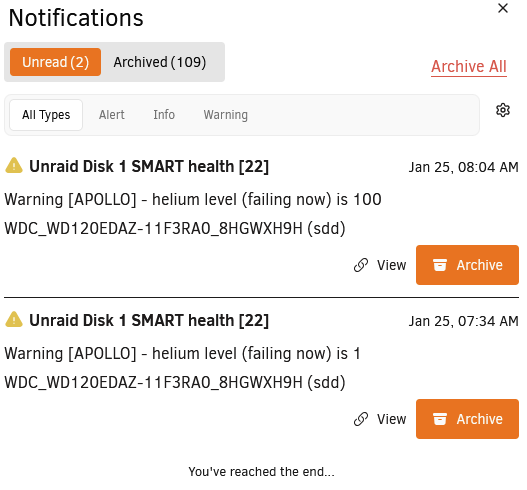
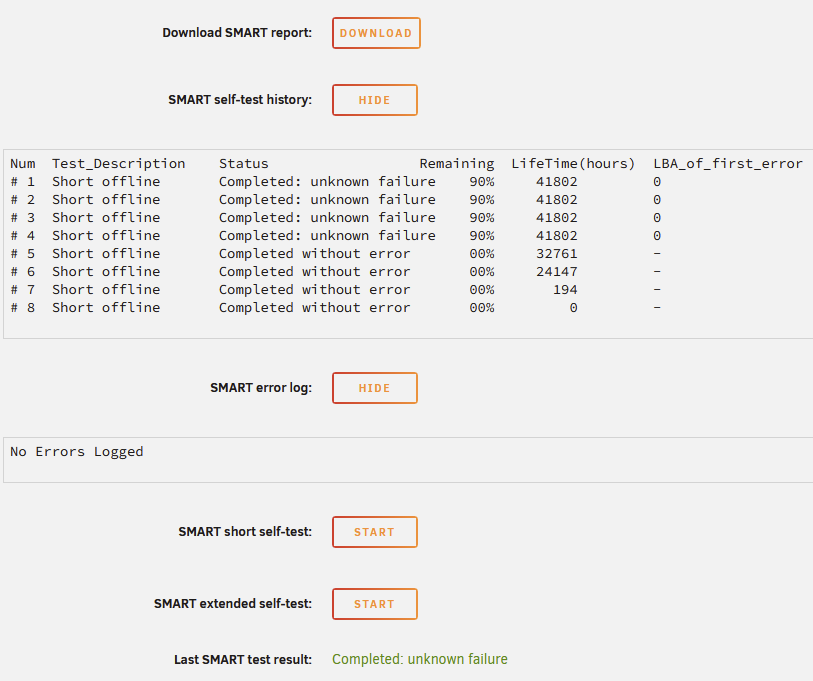
Woke up today to 2 notifications from Unraid: Which is confusing because 100 would be a good value. On the SMART report the raw value is 100 but it's still marked as FAILING. And the report says "Drive failure expected in less than 24 hours. SAVE ALL DATA." I panic bought another drive which was frustrating with the current market prices, but I then did some research and it seems like it could still work? I'm reading a lot of threads about failing helium levels but a drive still functioning for months or years after. I do have 1 parity drive and anything super important is redundancy backed up elsewhere. The drive is 5+ years old and out of warranty, so RMA'ing it isn't possible. My speculation is it's just a sensor failure if it reported 1 then 100? But if I try to run a SMART Short Test it just immediately fails: Anyway, I've attached the full SMART report to this thread. What is the risk if I cancel my order and keep this drive going? I just shouldn't really be spending $250 right now if I don't have to. But I know having a hot swap replacement is a good idea also. WDC_WD120EDAZ-11F3RA0_8HGWXH9H-20260125-1010.txt
-
I've been running a server for the last 5 years. And the past 2 years or so it's been unstable. It feels ambiguous but I'm constantly forced to do unclean shutdowns and my uptime hasn't gone past a month. This week I got a new issue where my Docker service crashes after a day or two even after reboots and rebuilding the docker.img file. For what it's worth, right now I'm ruling out hardware issues by running my system off Ultimate Boot CD and doing memtest86 (so far so good) then I will do extensive SMART tests with GSmartControl on my cache and drives. But in general, does anyone have any tips for finding more clarity on what causes issues? How to monitor your server better (but still passively)? And how to make your Unraid server rock solid? --- My one complaint about my server is I never know what caused an issue. My entire server will be unresponsive, I'll have to hard reboot or if I'm lucky soft reboot (although those usually still get detected as unclean shutdowns), and when I'm back up it's like nothing happened. My only option is posting my logs to the forums and get no clear answer. I think the main culprits have to be my Docker containers. I don't run VMs and I run just basic plugins. I don't configure any new dockers. My best guess is I could have what I'd call "tech dust", just 5 years of old docker composes, config files, and databases.
-
Sorry if this is too general of a question or not pertinent to this docker container. I've been pinned to 4.3.9 since the 4.4.0 issues which took days for me to fix. I see they're already up to 5.0.2. Has anyone had any experience upgrading their 4.3.9 instance? Did any issues arise? Was it worth it? Right now I'm operating on if it isn't broken, don't fix it. But would be curious if there's any security risks or QOL features I'm missing out on.
-
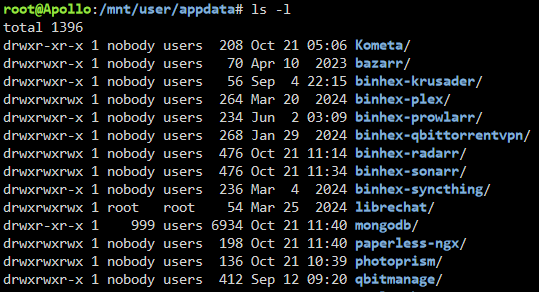
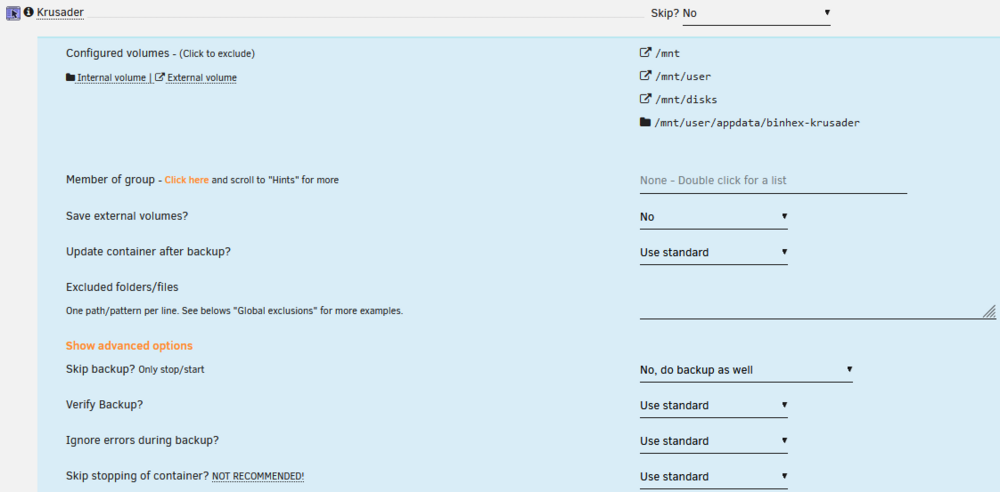
You're right! I just had /mnt/user/appdata/, so I added /mnt/cache/appdata/: You're also right, binhex-shared was also hidden under "show more" in the docker compose. I just added it to the excluded list for Krusader: I also just found another thread about this issue: https://www.reddit.com/r/unRAID/comments/1f0z4zl/backup_warning_for_binhexshared/ I'll have to wait for the next scheduled backup to test if this works but I'm optimistic this will solve these issues. Thank you so much for the help!


-
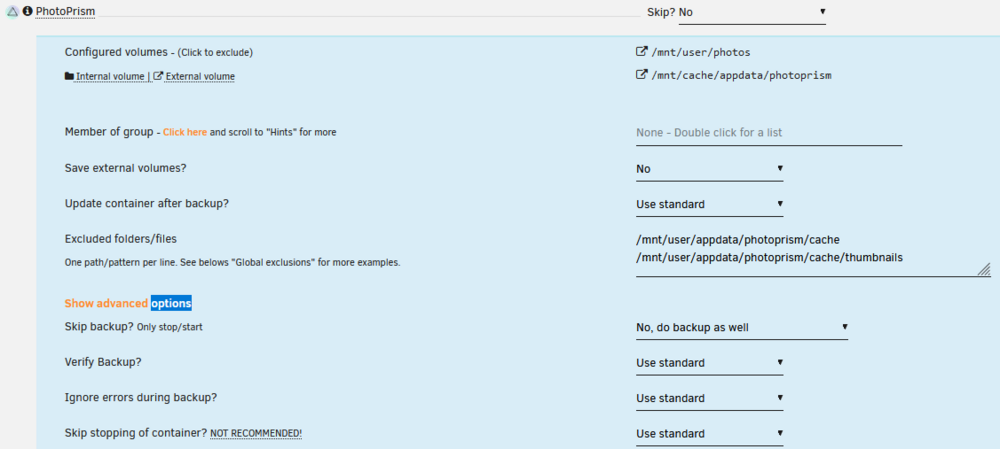
Getting 1 warning and 1 error that I can't figure out. First the warning: [20.10.2024 03:07:18][⚠️][PhotoPrism] PhotoPrism does not have any volume to back up! Skipping. Please consider ignoring this container. But it does have a volume to back up? So I'm not sure why it's saying there isn't one. Second the error: [20.10.2024 03:07:18][❌][Krusader] 'binhex-shared' does NOT exist! Please check your mappings! Skipping it for now. There's no `binhex-shared` on my Krusader docker config either. So I'm not sure what it's referring to.
-
The past few years my server's growth has stalled, which is good! I think I've learned that I don't need too much in an Unraid server. I currently run the Fractal Design Node 804, a 4c/8T Xeon CPU, 2x SSD cache, 6x HDD array, Quadro M2000, a SAS card, and a Seasonic Focus 550W PSU. I haven't needed to add storage in well over a year and I have 14 TB free. My server's primary use is Plex and cold storage. The reason I don't like the Node 804 is it's too bulky and takes up too much surface area. I can't really hide it behind a desk or TV stand so it sits on an end table next to my TV. I also hate the HDD bays. It's a pretty quiet case, though. The only time I hear it is when the HDDs are under load. My goals are: Replace the Quadro M2000 with an Intel QuickSync CPU. For performance, power efficiency, and simplicity. Move the 2xSSD cache to 2xNVMe drives for performance and less cables. One of my SSDs is already showing signs of old age (CRC error count is now 1). If possible, avoid using a SAS card. Just would be nice to have 1 less point of failure and a PCI slot free just in case. 2.5gbps Ethernet. Reduce the physical footprint. Energy efficiency if possible. I don't think I need ECC or dual Ethernet, which I have now but would be okay without. I actually couldn't find any tower-style cases that could hide behind a desk or TV stand that support 6+ 3.5" drive bays in a <40L size. The Fractal Design Define Mini seems to be able to do that but it's not sold anymore and the Define Mini C doesn't support 6+ 3.5" drives. Here's the two I'm looking at. For reference, the Node 804 is 41.1L. Fractal Design Node 304 (19.5 L) This is an mITX case. I found only 1 mITX motherboard, the ASUS ROG Strix B760-I mITX that has 2.5gbps Ethernet, 2x M.2 slots, but only 4x SATA. So I would need to use the only PCIe slot for my SAS card just to run 2 more drives. It has 2.5gbps Ethernet and is much smaller. Although it's more of a shoebox design which may be harder to put behind a TV stand or desk. It seems to be often modded, I saw a mod where you can install a 3D printed 200mm fan bracket for low noise which seems cool. U-NAS NSC-810A (17.1 L) Apparently this case can fit an mATX motherboard and has 8 hot swap-able HDDs. I'm sure I could find an mATX motherboard that has 2x M.2 slots and 6x SATA ports. If I wanted to use the full 8 HDD slots, I can just use a SAS card and mATX should leave me room for another PCIe slot. The only issue is price ($330+tax with a 350W 1U Flex Power Supply) and just the potential quality of the power supply. Is it energy efficient? Is it any good? Anyone have any idea? I also would have concerns that the case would be noisy. Does anyone have any opinions or recommendations on which case would be better? Or anything else I may not be thinking of?
-
Found a solution following the instructions in this answer: https://stackoverflow.com/a/46789939 However, I'm still anticipating they get reverted back. If they do, I'll try to report what might have caused it.
-
Just got this running successfully, everything seems to work great. This may be a dumb question, but why doesn't this have an appdata folder? Do I need one? Is it not storing anything outside of the MongoDB database? I looked around the MongoDB database and yeah, the users and all the messages are stored there.
-
This is mildly Unraid related, but my Firefox favicons usually work, but every once in a while they seem to get reverted to just the Unraid logo. Currently they look like this: Not sure why Radarr and Sonarr are okay. All of these do have Favicons, so I'm not sure why they're not updating. I don't do any reverse proxy, so all of these point to: https://[local ip]:[port] Anyone else with the same experience? How do you manage it?

-
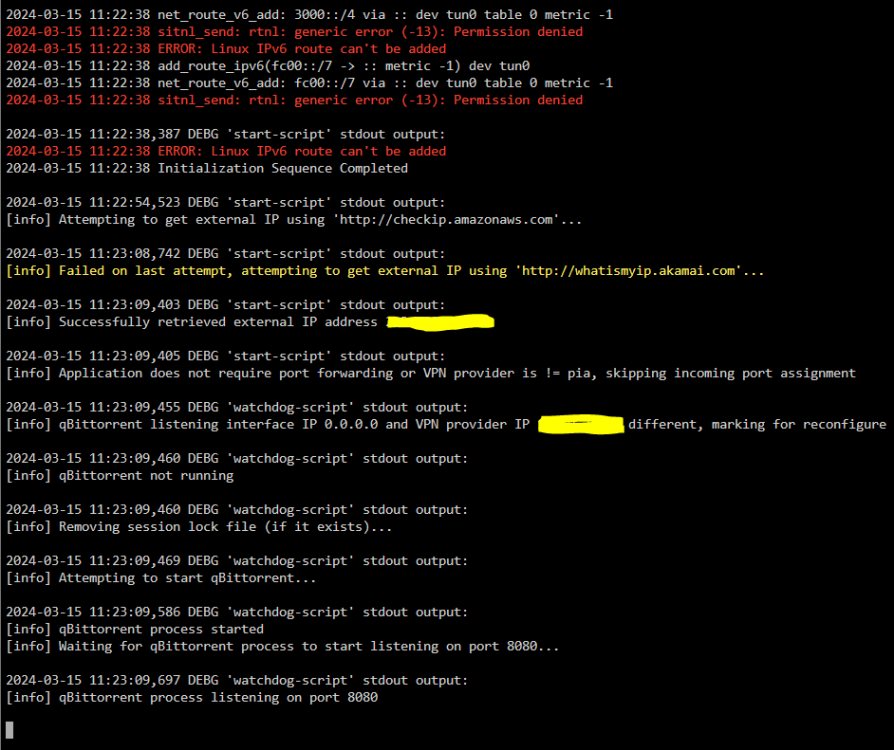
Is there any way to diagnose why qBittorrentVPN is spiking my CPU? It keeps jumping from 1% -> 40% -> 2% -> 30%, etc. As far as my Unraid Processor load shows, it kind of sit around 25-30%. Here's what my "docker stats" shows: 2024-03-15 11-34-27.mp4 This is with 0 active torrents. My CPU is: Intel Xeon E3-1230 v3 @ 3.30GHz (full specs in signature). Using qBittorrent v4.3.9, Unraid 6.12.6, docker is pinned to 2 cores, 4 threads. Using AirVPN as my VPN client, if relevant. I assume the issue is that I have 3126 torrents in my client. I actually had 5000 but just yesterday got them down. But the general higher-than-expected idle CPU load has been an issue for a few months now. I only now figured I should debug it. Nothing seemingly out of the ordinary in my qBittorrentVPN logs: Any insight would be appreciated! Or if it's clearly just my high torrent count, I'll accept that. I'll try to dwindle it down.
-
That makes sense! The torrent client version should be approved, I'm on 4.3.9. But good idea to check if the VPN server itself is being blocked or rate limited of some kind. I'm going to try switching VPN servers. Thanks for the reply, I appreciate it!
-
Lately I've been often having the issue of a lot of private trackers being stuck on the status "Updating..." New torrents are always affected by this and can take up to 30 minutes to start after adding. Completed torrents seem to be random in which have the tracker status stuck at "Updating..." and which are "Working". Public trackers work great, they instantly start downloading and seem to be extremely connectable. Ratio on those torrents can be in the hundreds after only a week or so. I double checked my forwarded port and everything seems to be okay. My best guess at this point is I have 5464 torrents in my client right now, pinned to 2 cores and 4 threads on my machine, and it's just being bottlenecked somehow. Could this be the case? Or any ideas what could possibly be causing the issue?
-
I just started using a script with the cron schedule 0 2 * * * (every day at 2am). Looking at my Pushover logs it happened at 5am. My best guess is I recently moved from PST time to EST time and 2am PST would be 5am EST. Going to /Settings/DateTime on my Unraid dashboard does say I'm in Eastern Time, however. Is it possible the plugin is still stuck on the old timezone? Thank you!
-
My server runs on a Super Micro X10SLL-F board which has dual 1 gbps Ethernet. I'm looking to upgrade my main Windows desktop to one with a motherboard that has 2.5 gbps Ethernet. I'm seeing some very affordable dual 2.5 gbps PCI-e network cards but I'm skeptical of their reliability. I saw TP-Link has a single 2.5 gbps network card (TX201) which is well reviewed. Maybe this is more of a question for the General Support forum, but is there a way to have my main computer only communicate with my server through that dedicated 2.5 gbps Ethernet port? If so, it seems like it could be nice to have a dedicated LAN connection while also continuing to have the WAN reliability of dual 1 gbps Ethernet directly on the motherboard.
-
I've been noticing the docker has been stopping randomly. It's not too annoying since the rare chance I need to upload or retrieve documents I just spin it up. My best guess is it's the Redis or Paperless docker doing a weekly update that causes it, since they rely on each other. Does that sound right? Is there a way to fix this besides a User Script that just routinely checks if Paperless is running, if not, starts it? Here are the logs from the stopped container: [2023-04-02 04:00:00,450] [INFO] [celery.app.trace] Task paperless_mail.tasks.process_mail_accounts[50e61c75-e7f7-4e23-aff8-ee65d73cfca9] succeeded in 0.031346329022198915s: 'No new documents were added.' [2023-04-02 04:00:17,470] [INFO] [paperless.management.consumer] Received SIGINT, stopping inotify worker: Warm shutdown (MainProcess) [2023-04-02 04:00:18 -0700] [318] [INFO] Handling signal: term [2023-04-02 04:00:19 -0700] [318] [INFO] Shutting down: Master 2023-04-02 04:00:16,468 WARN received SIGTERM indicating exit request 2023-04-02 04:00:16,468 INFO waiting for gunicorn, celery, celery-beat, consumer to die 2023-04-02 04:00:17,820 INFO stopped: consumer (exit status 0) celery beat v5.2.7 (dawn-chorus) is starting. __ - ... __ - _ LocalTime -> 2023-04-01 08:06:56 Configuration -> . broker -> redis://192.168.1.200:6379// . loader -> celery.loaders.app.AppLoader . scheduler -> celery.beat.PersistentScheduler . db -> /usr/src/paperless/data/celerybeat-schedule.db . logfile -> [stderr]@%INFO . maxinterval -> 5.00 minutes (300s) 2023-04-02 04:00:18,106 INFO stopped: celery-beat (exit status 0) 2023-04-02 04:00:18,902 INFO stopped: celery (exit status 0) 2023-04-02 04:00:19,649 INFO stopped: gunicorn (exit status 0) Paperless-ngx docker container starting... Installing languages... Hit:1 http://deb.debian.org/debian bullseye InRelease Get:2 http://deb.debian.org/debian-security bullseye-security InRelease [48.4 kB] Get:3 http://deb.debian.org/debian bullseye-updates InRelease [44.1 kB] Fetched 92.4 kB in 1s (158 kB/s) Reading package lists... Package tesseract-ocr-ara already installed! Creating directory /tmp/paperless Adjusting permissions of paperless files. This may take a while. Waiting for Redis... Redis ping #0 failed. Error: Error 111 connecting to 192.168.1.200:6379. Connection refused.. Waiting 5s Redis ping #1 failed. Error: Error 111 connecting to 192.168.1.200:6379. Connection refused.. Waiting 5s Redis ping #2 failed. Error: Error 111 connecting to 192.168.1.200:6379. Connection refused.. Waiting 5s Redis ping #3 failed. Error: Error 111 connecting to 192.168.1.200:6379. Connection refused.. Waiting 5s Redis ping #4 failed. Error: Error 111 connecting to 192.168.1.200:6379. Connection refused.. Waiting 5s Failed to connect to redis using environment variable PAPERLESS_REDIS. ** Press ANY KEY to close this window **