




.jpg.cd0ee2faf0b1ddf75893cc24e561601d.jpg)
ZappyZap
Members
-
Joined
Everything posted by ZappyZap
-
interesting can you open a issue to the dev ? thanks
-
Let me know please
-
that's weird, i could not reproduce which version ?
-
Updated. let me know
-
sure the repo : https://github.com/devzwf/unraid-docker-templates Thanks
-
sorry misunderstood .... works flawless for me behind swag can you post your swag file for speedtest ?
-
Hello, In the template i do not expose the port 80, only port 443 So add a port mapping to port 80 and try again. let me know
-
Yup https://github.com/devzwf/pihole-dot-doh
-
debian 12 work great , i dont do GUI install ( i am an old Bear ) ubuntu as well i tried few others .... Note: an alternative is netboot.xyz
-
i have not much experience with windows.... the only time i ply with it i use netboot.xyz i am sorry i am not able help more here , i have to confess windows is far far from being my usual OS
-
here you go :
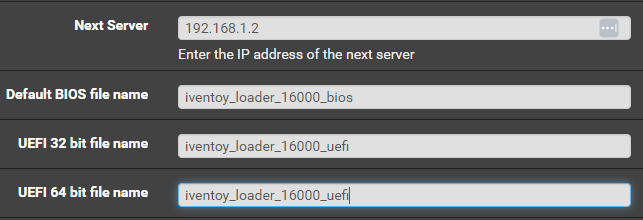
-
could be let me double check You was totally right..... i have fix it Thanks for the report
-
Reserving this first comment
-
Overview: Support for Docker image iVentoy Application Name: iVentoy Application: https://www.iventoy.com/en/index.html Documentation: https://www.iventoy.com/en/index.html Overview : iVentoy is an enhanced version of the PXE server. With iVentoy you can boot and install OS on multiple machines at the same time through the network. iVentoy is extremely easy to use, without complicated configuration, just put the ISO file in the specified location and select PXE boot in the client machine. iVentoy supports x86 Legacy BIOS, IA32 UEFI, x86_64 UEFI and ARM64 UEFI mode at the same time. iVentoy support 110+ common types of OS (Windows/WinPE/Linux/VMware) Make sure to look at the complete documentation Please post any questions/issues relating to this docker template you have in this thread.
-
yes should have but in your log : Check also your mysql/mariadb host ....
-
look like for me a permission or directory missing , nothing to do with the APP_KEY please make sure all the directory are correct and permission as well
-
unless i misunderstand your issue : "Key used to encrypt and decrypt data. To create your own key to persist run php artisan key:generate --show from within the running container. Currently not used and generated at random on startup of the container." what your log is saying ?
-
i will see what i can do did you found a correct replacement for the icon ?
-
Hello, Thanks for the comment. I did write this blob, and just copy the definition the dev of the tools write, i just make the template for unraid. I think you should probably let them know if you think it is wrongly worded. Thanks
-
Overview: Support for Docker image wallos Application Name: wallos Application: https://github.com/ellite/Wallos Documentation: https://github.com/ellite/Wallos Overview : Wallos: Open-Source Personal Subscription Tracker Wallos is a powerful, open-source, and self-hostable web application designed to empower you in managing your finances with ease. Say goodbye to complicated spreadsheets and expensive financial software – Wallos simplifies the process of tracking expenses and helps you gain better control over your financial life. Make sure to look at the complete documentation Please post any questions/issues relating to this docker template you have in this thread.
-
Reserving this first comment
-
Overview: Support for Docker image Speedtest-tracker Application Name: Juicepass2mqtt (juicepassproxy) Application: https://github.com/snicker/juicepassproxy Documentation: https://github.com/snicker/juicepassproxy Overview : This tool will publish Juicebox data from a UDP proxy to MQTT discoverable by HomeAssistant. Hopefully we won't need this if EnelX fixes their API! It is required that both your JuiceBox and the machine you are running juicepassproxy on have internal static IPs on your intranet. Make sure to look at the complete documentation Note: while the software seems to work , there is still stuff to polish , specially in the template and docker container Please post any questions/issues relating to this docker template you have in this thread.
-
APP_KEY should be in the Key
-
The log seems clear.... unable to read "/etc/proxmox-backup/authkey.pub" - Permission denied (os error 13) the container cannot read this file , who is mounted in the container from your Unraid what is the output of ls -al /etc/proxmox-backup/
-
check you permissions.
.thumb.jpg.bec61e4e919a9235cc4475f8cb53d5e3.jpg)


