




.jpg.cd0ee2faf0b1ddf75893cc24e561601d.jpg)
ZappyZap
Members
-
Joined
Everything posted by ZappyZap
-
Oh and i found the culprit : it is the template from "Mavrag's Repository" Same app name , but really not same template Mine is maintain and widely use thanks
-
BTW i am sorry that you delete a dir in use with your setup, but it is not this template to blame.
-
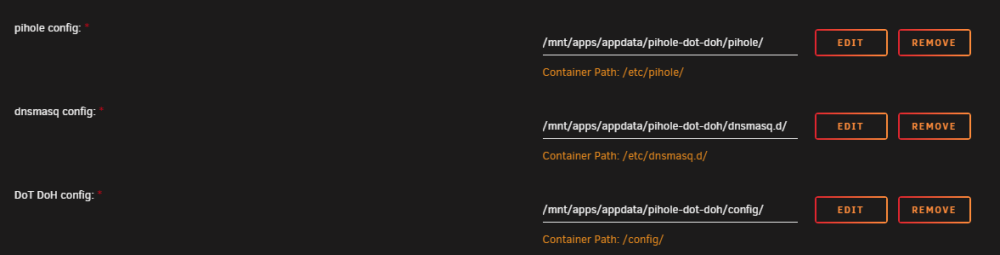
I do like when people claim things without checking but that's ok .... what i can say it is not the template who make this : <Config Name="pihole config" Target="/etc/pihole/" Default="/mnt/user/appdata/pihole-dot-doh/pihole/" Mode="rw,slave" Description="" Type="Path" Display="always" Required="true" Mask="false">/mnt/user/appdata/pihole-dot-doh/pihole/</Config> <Config Name="dnsmasq config" Target="/etc/dnsmasq.d/" Default="/mnt/user/appdata/pihole-dot-doh/dnsmasq.d/" Mode="rw,slave" Description="" Type="Path" Display="always" Required="true" Mask="false">/mnt/user/appdata/pihole-dot-doh/dnsmasq.d/</Config> <Config Name="DoT DoH config" Target="/config/" Default="/mnt/user/appdata/pihole-dot-doh/config/" Mode="rw,slave" Description="" Type="Path" Display="always" Required="true" Mask="false">/mnt/user/appdata/pihole-dot-doh/config/</Config>
-
Excellent thanks for the update
-
this happen only from android ? can you do a test from and other system ? like dig +noall +ans google.com @<IP_of_your_pihole>
-
Hello, the time in the id is always UTC
-
please post on the github in the issue i link Thanks
-
ok what kind of filesystem are you using ? are you using xfs ? check : https://github.com/ayufan/pve-backup-server-dockerfiles/issues/27
-
Ok can you show the perm and content of /mnt/user/appdata/pbs/ /mnt/user/appdata/pbs/etc Thanks
-
Please post your template config
-
Nice to hear @geekazoid make a great job on this guide. please submit a PR Thanks for the update.
-
what do you mean ?
-
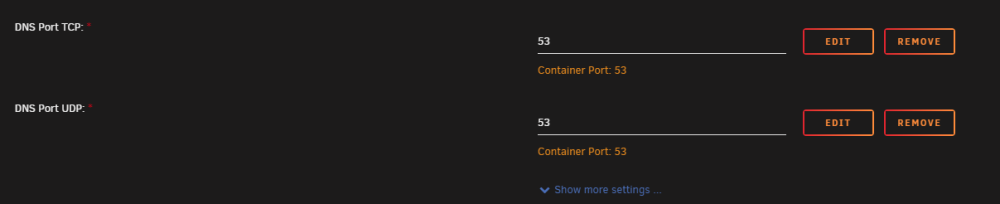
thanks for letting me know but i dont have this issue : What kind of error are you getting ?
-
Overview: Support for Blocky Application Name: Blocky Application: https://github.com/0xERR0R/blocky Documentation: https://0xERR0R.github.io/blocky/ Blocky is a DNS proxy and ad-blocker for the local network written in Go Make sure to look at the complete documentation Please post any questions/issues relating to this template in this thread.
-
Overview: Support for ESPHome-LibreTuya Application Name: ESPHome-LibreTuya Application: https://github.com/kuba2k2/libretuya-esphome Documentation: https://docs.libretuya.ml/ Because ESPHome does not natively support running on non-ESP chips, you need to use a fork of the project. and until the esphome devs merge this PR : https://github.com/esphome/esphome/pull/3509 This will be deprecated when the merge happen. Feel free to add your vote to let the esphome devs know this would be a great move ..... There are two basic ways to install and use LibreTuya-ESPHome. You can choose the option that best suits you: command line (CLI) - for more experienced users; compilation using CLI commands, somewhat easier to troubleshoot ESPHome Dashboard (GUI) - for new users, might be an easy way to go; config management & compilation using web-based dashboard Make sure to look at the complete documentation Please post any questions/issues relating to this template in this thread.Hmmm cannot reproduce i am also on 0.11.12 and no issue here
 this is not part of the container , but part of PBS itself ....i think it is there :
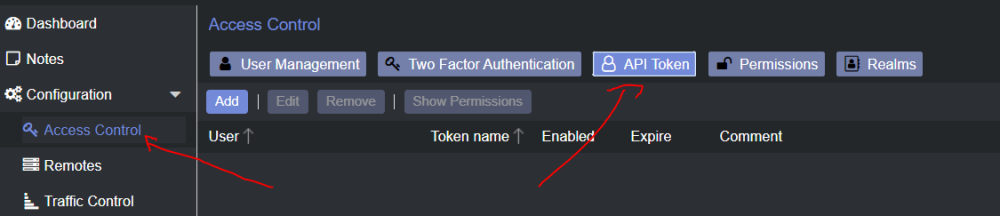 in the dashboard check the Datastore this should reflet the space available to store your backup..... assuming ou create one Also in the datastore menu you should have that as wellPlease the "Backup Dir:" path in the template. Create a share in your Pool and use this share.That the size of your docker images. not the size of your datastorethis is specially build on docker container. you can try gravity-sync.... or just install docker on the pishould be ready this week, life keep me busyyes in one of my site i am running master on unraid and slave on other instance on a docker host.
.thumb.jpg.bec61e4e919a9235cc4475f8cb53d5e3.jpg)




