





007craft
Members
-
Joined
-
Last visited
Everything posted by 007craft
-
Yes you need to delete the VM (Just the VM, not the disks) and remake it. But the easiest way to do it is just to edit the current VM. Click the VM, then edit. At the top, hit the "form view" button to slide it over to XML view. Now navigate to \appdata\macinabox\macinabox and find the file called Macinabox BigSur_original.xml. Copy the contents of this file and paste it into the XML for your VM that youre editing. Look at all the paths in the code, make sure everything lines up with how your setup is. Now save it and run the userscript again which edits the XML. Should be fixed now.
-
Is there anyway to use my mouses back and forward buttons while using Guac? When I RDP directly onto my computer at Home, I can use Back and forward buttons on my mouse to go back and forth on folders while browsing in windows or when using the web browser on the remote computer. However if I'm using Guac, bushing back just exits the guac session, as I go back on my browser in the local computer instead of having the commands go to the remote computer. Im losing productivity here without mouse button shortcuts in guac, but need guac for the ssl security for my remote connection.
-
I have my Mac Big Sur Vm up and running without issue, but once I switch to my Graphcis card, how exactly do I view the VM? Web Gui is now gone now that I'm not using VNC

-
That was a typo. /mnt/user as used throughout the rest of my post. I edited the post.
-
Just a heads up for anybody, do NOT follow the first part of the tutorial if your VM path is not the default in /mnt/user/. The video briefly mentions to change a few paths if you do not use the default, but fails to mention that if you do not use the default paths, even if you have changed all the paths to where yours are in the template, the user script will still fail as no matter what, the script is set to work with the default path. So here's what you do. Setup everything in the video up to the 7:50 marker. Make sure you swapped out all the custom paths fields. These are: VM Images Location: VM Images Location again: Isos Share Location: Isos Share Location again: custom ovmf location: (It says dont change this, but change it anyway, because if you run Vms off an unassigned drive or cache drive, you wont have a /mnt/user/system folder) appdata: Macinabox only data: Basesystem: (This is just a temp folder, you dont need to change it but I did anyway) First off, you might not see any user scripts appear because they are set to appear AFTER the download for some reason. The best way to check on the download progress is to navigate to /Whatever.disk.or.path.your.app.data.folder.is.in/appdata/macinabox/basesystem . Take a look and a file in there will be growing in filesize. Once its done that file will disappear and the user scripts will appear. Now ignore the macinabox_vmready_notify.sh user script. Not only is the path for your appdata location going to be wrong, (which is why you were never notified on completion), but there's no point to it anyway because you know you're done downloading. Now you need to edit the macinabox_helper_userscript.sh file. You can do this in userscripts by selecting the gear icon and hitting edit. Change the line NAME="put the name of the vm from template here" to NAME="Macinabox Big Sur" Now read through the script and edit all the paths to your custom paths. So like /mnt/user/appdata becomes /Whatever.disk.or.path.your.app.data.folder.is.in/appdata and /mnt/user/system/custom_ovmf/ becomes /Whatever.disk.or.path.your.custom_ovmf.folder.is etc etc. Now run the script. Hopefully it worked and you can head over to the VM tab and see your VM. If it fails for whatever reason, navigate to your /appdata/macinabox/macinabox folder and look for the file Macinabox BigSur_original.xml. Open it up and change any paths inside to match your paths. Now select all the text and hit copy. Now goto the VM tab in unraid - Add New - Custom, and paste in the contents of that xml. That should be it. The VM should now be there and you can continue to follow the video. Took me a while to figure all this out, hope it helps somebody else.
-
Thanks I reinstalled the plugin with the new updated version and now my SMB extras file is populated with: #vfs_recycle_start #Recycle bin configuration [global] syslog only = No syslog = 0 logging = 0 log level = 0 vfs:0 #vfs_recycle_end I also went ahead and removed the "vfs objects=" line. It seems to be working now. Thanks! I guess the only thing I noticed not working is if I make a new file, and delete it right away, it doesnt show up in the recycle bin. I'm assuming thats because when I make a new file its actually making it on cache and files on cache wouldnt goto the bin. So the plugin works, as long as the file has had its chance to be moved over by mover.
-
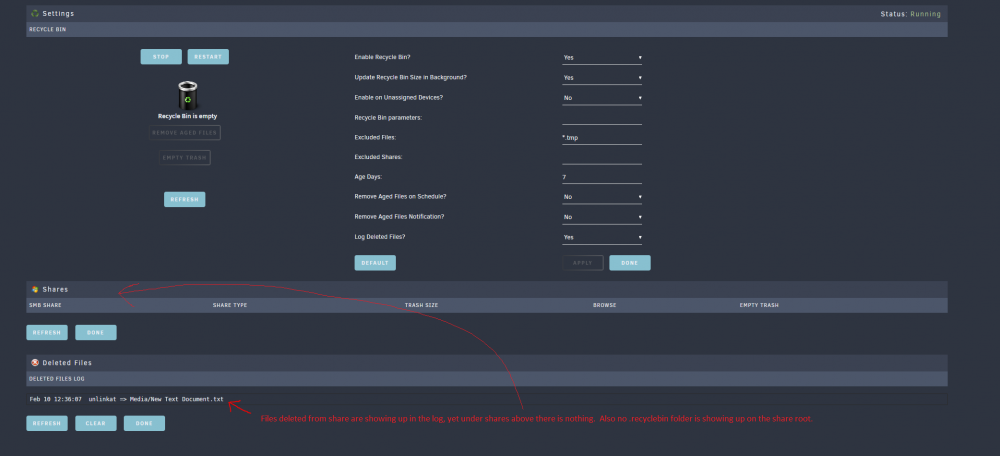
After trying to troubleshoot my Issue with recycle bin not working on non unassigned drives I reinstalled the plkugin but this time payed attention to the process. I get this exact same error. Looks like the plugin is failing to update the contents of the sbm-extra.conf file, thus it wont work with any unraid Samba shares. So looks like the plugin is currently broken. Can somebody advise a fix? If I turn on file deletion logging, that will even detect files being deleted from share, yet still no share or recycle object shows up (see screenshot)
-
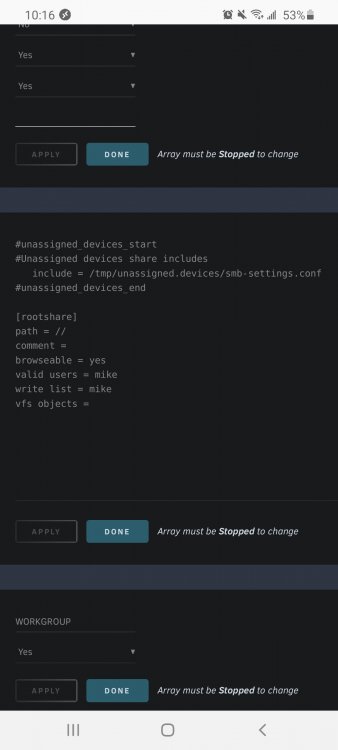
I'm deleting files from my windows machine. So yes SMB share. In this particular case its the "files" smb share. Located at \\unraid\files (which is actually /mnt/user/files on the unraod machine. Here's a picture of the smb extra settings if it helps. Im not sure if this plugin has an intent to add anything extra to it?
-
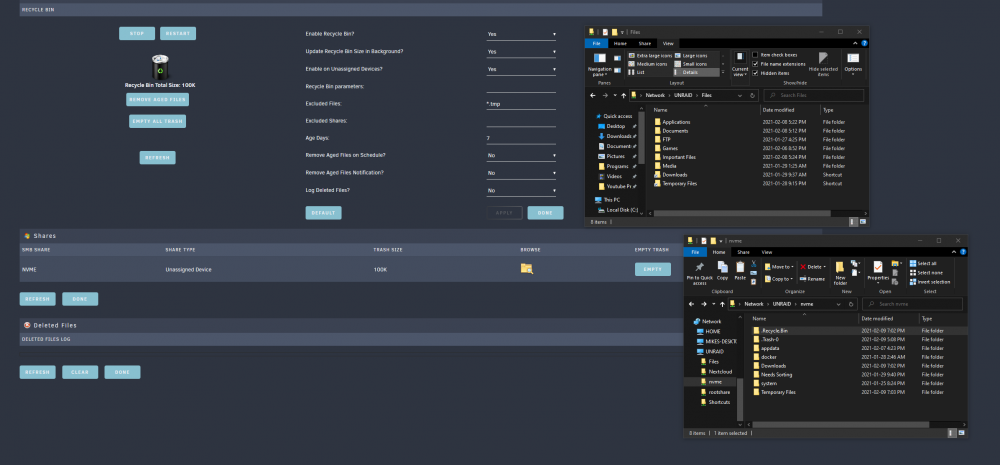
I have installed this plugin but it does not add a .recycle bin to any of my Unraid shares. It only adds it to my Unassigned drive share (Which I also want). Is there something I need to configure? See screenshot below on how my "files share" (Which is on the array) does not get a .recycle.bin when my "NVME" share (Which is on an unassigned drive) does. Ive also tested deleting a file from the array and it does not appear goto this recycle bin plugin.
-
How do I update this to be version 4? I'm only getting Version 3 and I need the Jellyfin integration that been added to v4
-
I'm getting a ton of errors in my unraid log Feb 4 16:00:25 UnRAID smbd[23484]: [2021/02/04 16:00:25.952344, 0] ../../source3/lib/sysquotas.c:565(sys_get_quota) Feb 4 16:00:25 UnRAID smbd[23484]: sys_path_to_bdev() failed for path [.]! Feb 4 16:00:25 UnRAID smbd[23484]: [2021/02/04 16:00:25.952400, 0] ../../source3/lib/sysquotas.c:565(sys_get_quota) Feb 4 16:00:25 UnRAID smbd[23484]: sys_path_to_bdev() failed for path [.]! Feb 4 16:00:25 UnRAID smbd[23484]: [2021/02/04 16:00:25.952429, 0] ../../source3/lib/sysquotas.c:565(sys_get_quota) Feb 4 16:00:25 UnRAID smbd[23484]: sys_path_to_bdev() failed for path [.]! Feb 4 16:00:25 UnRAID smbd[23484]: [2021/02/04 16:00:25.952456, 0] ../../source3/lib/sysquotas.c:565(sys_get_quota) Feb 4 16:00:25 UnRAID smbd[23484]: sys_path_to_bdev() failed for path [.]! Feb 4 16:00:30 UnRAID smbd[23484]: [2021/02/04 16:00:30.916828, 0] ../../source3/lib/sysquotas.c:565(sys_get_quota) Feb 4 16:00:30 UnRAID smbd[23484]: sys_path_to_bdev() failed for path [.]! Feb 4 16:00:30 UnRAID smbd[23484]: [2021/02/04 16:00:30.916882, 0] ../../source3/lib/sysquotas.c:565(sys_get_quota) Feb 4 16:00:30 UnRAID smbd[23484]: sys_path_to_bdev() failed for path [.]! Feb 4 16:00:30 UnRAID smbd[23484]: [2021/02/04 16:00:30.916909, 0] ../../source3/lib/sysquotas.c:565(sys_get_quota) Feb 4 16:00:30 UnRAID smbd[23484]: sys_path_to_bdev() failed for path [.]! Feb 4 16:00:30 UnRAID smbd[23484]: [2021/02/04 16:00:30.916935, 0] ../../source3/lib/sysquotas.c:565(sys_get_quota) Feb 4 16:00:30 UnRAID smbd[23484]: sys_path_to_bdev() failed for path [.]! Feb 4 16:00:34 UnRAID smbd[23484]: [2021/02/04 16:00:34.727308, 0] ../../source3/lib/sysquotas.c:565(sys_get_quota) Feb 4 16:00:34 UnRAID smbd[23484]: sys_path_to_bdev() failed for path [.]! Feb 4 16:00:34 UnRAID smbd[23484]: [2021/02/04 16:00:34.727380, 0] ../../source3/lib/sysquotas.c:565(sys_get_quota) Feb 4 16:00:34 UnRAID smbd[23484]: sys_path_to_bdev() failed for path [.]! Feb 4 16:00:34 UnRAID smbd[23484]: [2021/02/04 16:00:34.727414, 0] ../../source3/lib/sysquotas.c:565(sys_get_quota) Feb 4 16:00:34 UnRAID smbd[23484]: sys_path_to_bdev() failed for path [.]! Feb 4 16:00:34 UnRAID smbd[23484]: [2021/02/04 16:00:34.727443, 0] ../../source3/lib/sysquotas.c:565(sys_get_quota) Feb 4 16:00:34 UnRAID smbd[23484]: sys_path_to_bdev() failed for path [.]! and of the errors just continue. How can I troubeshoot this? Running Unraid OS version 6.9.0-rc2
-
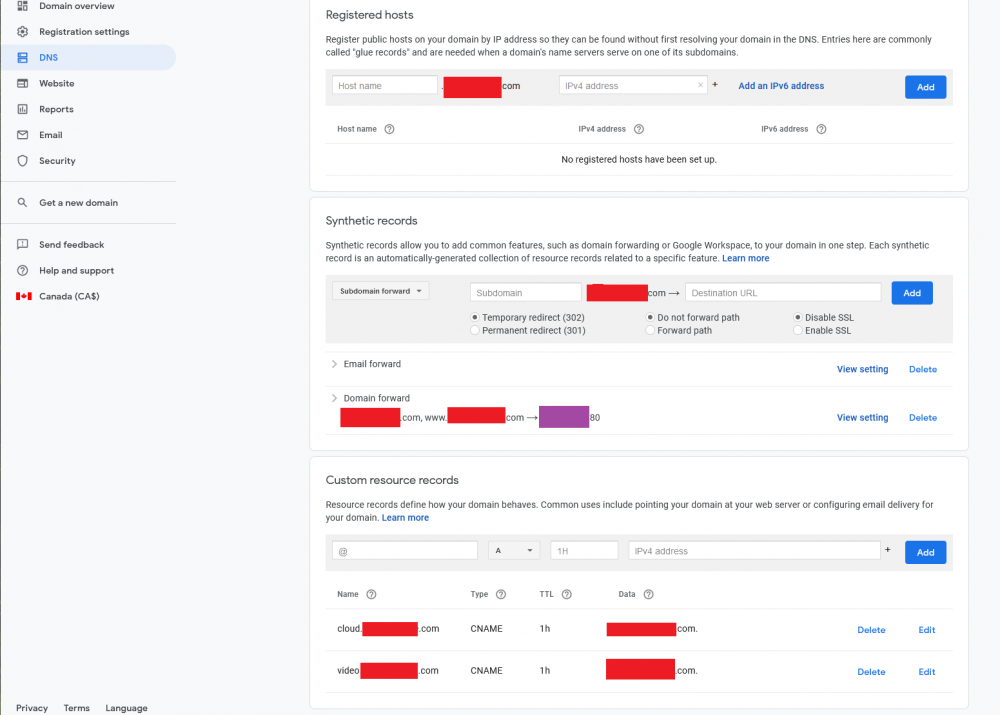
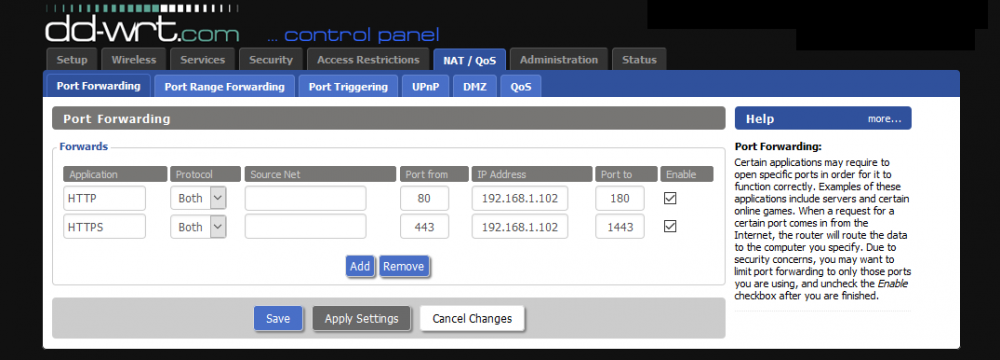
Hi. I was wondering if somebody could help me as I am getting a cert does not exist error. I've so far followed SpaceInvader Ones youtube video up to the point of setting up my DNS Cname records, and forwarding my ports (see pictures below). I am using Google domains as my registar. I am not using duckdns at all. I have a static IP. The red boxes in the picture are all mydomain.com and the purple box is my wan IP. Capture.thumb.PNG.b5c23f40859812d065621b51163fa46d.PNG If I try to RDP into my Windows machine using mydomain.com:3389 or www.mydomain.com:3389 , which are both forwaarded to my IP as "A" records, it works. If I try cloud.mydomain.com:3389 it just fails. Do I need to create an "A" record for cloud. and video. as well? I suppose there was a bit of a disconnect here since the video guide space invader one made talks about using duck DNS, which i'm not using, and im guessing his duckdns config somehow has that setup already for him? Here is my picture of my port forwarding on my router Capture2.thumb.PNG.46b5151a2509e9eb0e2f478676641d2b.PNG Edit: I figured it out. In case anybody sees this in the future, you need to also forward your subdomains to your IP (which is basically creating A records for each, but through the forwarding options on google domains, rather than the custom resource records options), as well as making the Cname records in the custom resource records options, which point to the main domain.
-
Where exactly is this /config/plugins folder? Im looking on my unraid server and I see /config/plugins located in /boot. But if I put the files in there I dont see anything in preferences/plugins after I restart the container Also, which version of python is this using? The plugin Im trying to install is (https://forum.deluge-torrent.org/viewtopic.php?t=55733) and it comes in python version 3.6,3.7, or 3.8
-
Ive done that, and also fixed a remote mapping I had in my Radarr docker container (Not sure if that matters) and it looks like the issue is resolved for now. I do see 3 files now in that folder (2 are empty .cfg files) but the other unassigned.devices.cfg is populated. Thanks. I wonder why this happened.
-
cat: /tmp/unassigned.devices/config/samba_mount.cfg: No such file or directory I have a tmp/unassigned.devices/config/ directory but there are no files inside.
-
unraid-diagnostics-20210201-1639.zip
-
I just invoked mover and It worked Its happening again. This is my log before it started. How do I make it stop and keep it from doing it again? Feb 1 12:25:24 UnRAID emhttpd: cmd: /usr/local/emhttp/plugins/dynamix/scripts/tail_log syslog Feb 1 12:26:03 UnRAID kernel: docker0: port 1(veth5f9d4a4) entered blocking state Feb 1 12:26:03 UnRAID kernel: docker0: port 1(veth5f9d4a4) entered disabled state Feb 1 12:26:03 UnRAID kernel: device veth5f9d4a4 entered promiscuous mode Feb 1 12:26:03 UnRAID kernel: docker0: port 1(veth5f9d4a4) entered blocking state Feb 1 12:26:03 UnRAID kernel: docker0: port 1(veth5f9d4a4) entered forwarding state Feb 1 12:26:03 UnRAID kernel: docker0: port 1(veth5f9d4a4) entered disabled state Feb 1 12:26:03 UnRAID kernel: cgroup: cgroup: disabling cgroup2 socket matching due to net_prio or net_cls activation Feb 1 12:26:03 UnRAID kernel: eth0: renamed from veth5e0aa70 Feb 1 12:26:03 UnRAID kernel: IPv6: ADDRCONF(NETDEV_CHANGE): veth5f9d4a4: link becomes ready Feb 1 12:26:03 UnRAID kernel: docker0: port 1(veth5f9d4a4) entered blocking state Feb 1 12:26:03 UnRAID kernel: docker0: port 1(veth5f9d4a4) entered forwarding state Feb 1 12:26:03 UnRAID kernel: IPv6: ADDRCONF(NETDEV_CHANGE): docker0: link becomes ready Feb 1 12:26:04 UnRAID avahi-daemon[10066]: Joining mDNS multicast group on interface veth5f9d4a4.IPv6 with address fe80::2033:94ff:fec7:853c. Feb 1 12:26:04 UnRAID avahi-daemon[10066]: New relevant interface veth5f9d4a4.IPv6 for mDNS. Feb 1 12:26:04 UnRAID avahi-daemon[10066]: Registering new address record for fe80::2033:94ff:fec7:853c on veth5f9d4a4.*. Feb 1 12:26:05 UnRAID avahi-daemon[10066]: Joining mDNS multicast group on interface docker0.IPv6 with address fe80::42:aaff:fe64:b332. Feb 1 12:26:05 UnRAID avahi-daemon[10066]: New relevant interface docker0.IPv6 for mDNS. Feb 1 12:26:05 UnRAID avahi-daemon[10066]: Registering new address record for fe80::42:aaff:fe64:b332 on docker0.*. Feb 1 12:26:07 UnRAID kernel: docker0: port 2(vethbb2d1ab) entered blocking state Feb 1 12:26:07 UnRAID kernel: docker0: port 2(vethbb2d1ab) entered disabled state Feb 1 12:26:07 UnRAID kernel: device vethbb2d1ab entered promiscuous mode Feb 1 12:26:07 UnRAID kernel: docker0: port 2(vethbb2d1ab) entered blocking state Feb 1 12:26:07 UnRAID kernel: docker0: port 2(vethbb2d1ab) entered forwarding state Feb 1 12:26:07 UnRAID kernel: docker0: port 2(vethbb2d1ab) entered disabled state Feb 1 12:26:07 UnRAID kernel: eth0: renamed from vethf9d76d7 Feb 1 12:26:07 UnRAID kernel: IPv6: ADDRCONF(NETDEV_CHANGE): vethbb2d1ab: link becomes ready Feb 1 12:26:07 UnRAID kernel: docker0: port 2(vethbb2d1ab) entered blocking state Feb 1 12:26:07 UnRAID kernel: docker0: port 2(vethbb2d1ab) entered forwarding state Feb 1 12:26:08 UnRAID avahi-daemon[10066]: Joining mDNS multicast group on interface vethbb2d1ab.IPv6 with address fe80::bc58:2dff:fe12:310d. Feb 1 12:26:08 UnRAID avahi-daemon[10066]: New relevant interface vethbb2d1ab.IPv6 for mDNS. Feb 1 12:26:08 UnRAID avahi-daemon[10066]: Registering new address record for fe80::bc58:2dff:fe12:310d on vethbb2d1ab.*. Feb 1 12:26:10 UnRAID kernel: docker0: port 3(vethc63c41e) entered blocking state Feb 1 12:26:10 UnRAID kernel: docker0: port 3(vethc63c41e) entered disabled state Feb 1 12:26:10 UnRAID kernel: device vethc63c41e entered promiscuous mode Feb 1 12:26:10 UnRAID kernel: docker0: port 3(vethc63c41e) entered blocking state Feb 1 12:26:10 UnRAID kernel: docker0: port 3(vethc63c41e) entered forwarding state Feb 1 12:26:10 UnRAID kernel: docker0: port 3(vethc63c41e) entered disabled state Feb 1 12:26:10 UnRAID kernel: eth0: renamed from veth28e68c4 Feb 1 12:26:10 UnRAID kernel: IPv6: ADDRCONF(NETDEV_CHANGE): vethc63c41e: link becomes ready Feb 1 12:26:10 UnRAID kernel: docker0: port 3(vethc63c41e) entered blocking state Feb 1 12:26:10 UnRAID kernel: docker0: port 3(vethc63c41e) entered forwarding state Feb 1 12:26:10 UnRAID kernel: resource sanity check: requesting [mem 0x000c0000-0x000fffff], which spans more than PCI Bus 0000:00 [mem 0x000c0000-0x000dffff window] Feb 1 12:26:10 UnRAID kernel: caller _nv000709rm+0x1af/0x200 [nvidia] mapping multiple BARs Feb 1 12:26:11 UnRAID avahi-daemon[10066]: Joining mDNS multicast group on interface vethc63c41e.IPv6 with address fe80::e4f1:c5ff:fe55:24f9. Feb 1 12:26:11 UnRAID avahi-daemon[10066]: New relevant interface vethc63c41e.IPv6 for mDNS. Feb 1 12:26:11 UnRAID avahi-daemon[10066]: Registering new address record for fe80::e4f1:c5ff:fe55:24f9 on vethc63c41e.*. Feb 1 12:26:21 UnRAID unassigned.devices: Error: unable to get the samba mounts. Feb 1 12:26:21 UnRAID unassigned.devices: Error: unable to get the ISO mounts. Feb 1 12:26:21 UnRAID unassigned.devices: Error: unable to get the samba mounts. Feb 1 12:26:21 UnRAID unassigned.devices: Error: unable to get the ISO mounts. Feb 1 12:26:24 UnRAID unassigned.devices: Error: unable to get the samba mounts. Feb 1 12:26:24 UnRAID unassigned.devices: Error: unable to get the ISO mounts. Feb 1 12:26:27 UnRAID unassigned.devices: Error: unable to get the samba mounts. Feb 1 12:26:27 UnRAID unassigned.devices: Error: unable to get the ISO mounts. Feb 1 12:26:30 UnRAID unassigned.devices: Error: unable to get the samba mounts. Feb 1 12:26:30 UnRAID unassigned.devices: Error: unable to get the ISO mounts. Feb 1 12:26:33 UnRAID unassigned.devices: Error: unable to get the samba mounts. Feb 1 12:26:33 UnRAID unassigned.devices: Error: unable to get the ISO mounts. Feb 1 12:26:36 UnRAID unassigned.devices: Error: unable to get the samba mounts. Feb 1 12:26:36 UnRAID unassigned.devices: Error: unable to get the ISO mounts. Feb 1 12:26:39 UnRAID unassigned.devices: Error: unable to get the samba mounts. Feb 1 12:26:39 UnRAID unassigned.devices: Error: unable to get the ISO mounts. Feb 1 12:26:43 UnRAID unassigned.devices: Error: unable to get the samba mounts. Feb 1 12:26:43 UnRAID unassigned.devices: Error: unable to get the ISO mounts. Feb 1 12:26:46 UnRAID unassigned.devices: Error: unable to get the samba mounts. Feb 1 12:26:46 UnRAID unassigned.devices: Error: unable to get the ISO mounts. Feb 1 12:26:49 UnRAID unassigned.devices: Error: unable to get the samba mounts. Feb 1 12:26:49 UnRAID unassigned.devices: Error: unable to get the ISO mounts. Feb 1 12:26:52 UnRAID unassigned.devices: Error: unable to get the samba mounts. Feb 1 12:26:52 UnRAID unassigned.devices: Error: unable to get the ISO mounts. Feb 1 12:26:55 UnRAID unassigned.devices: Error: unable to get the samba mounts. Feb 1 12:26:55 UnRAID unassigned.devices: Error: unable to get the ISO mounts. Feb 1 12:26:58 UnRAID unassigned.devices: Error: unable to get the samba mounts. Feb 1 12:26:58 UnRAID unassigned.devices: Error: unable to get the ISO mounts. Feb 1 16:19:57 UnRAID webGUI: Successful login user root from 192.168.1.100 Feb 1 16:19:57 UnRAID unassigned.devices: Error: unable to get the samba mounts. Feb 1 16:19:57 UnRAID unassigned.devices: Error: unable to get the ISO mounts. Feb 1 16:19:57 UnRAID unassigned.devices: Error: unable to get the samba mounts. Feb 1 16:19:57 UnRAID unassigned.devices: Error: unable to get the ISO mounts. Feb 1 16:19:58 UnRAID emhttpd: cmd: /usr/local/emhttp/plugins/dynamix/scripts/tail_log syslog Feb 1 16:20:00 UnRAID unassigned.devices: Error: unable to get the samba mounts. Feb 1 16:20:00 UnRAID unassigned.devices: Error: unable to get the ISO mounts. Feb 1 16:20:03 UnRAID unassigned.devices: Error: unable to get the samba mounts. Feb 1 16:20:03 UnRAID unassigned.devices: Error: unable to get the ISO mounts. Feb 1 16:20:06 UnRAID unassigned.devices: Error: unable to get the samba mounts. Feb 1 16:20:06 UnRAID unassigned.devices: Error: unable to get the ISO mounts. Feb 1 16:20:09 UnRAID unassigned.devices: Error: unable to get the samba mounts. Feb 1 16:20:09 UnRAID unassigned.devices: Error: unable to get the ISO mounts. Feb 1 16:20:12 UnRAID unassigned.devices: Error: unable to get the samba mounts. Feb 1 16:20:12 UnRAID unassigned.devices: Error: unable to get the ISO mounts. Feb 1 16:20:15 UnRAID unassigned.devices: Error: unable to get the samba mounts. Feb 1 16:20:15 UnRAID unassigned.devices: Error: unable to get the ISO mounts. Feb 1 16:21:35 UnRAID kernel: resource sanity check: requesting [mem 0x000c0000-0x000fffff], which spans more than PCI Bus 0000:00 [mem 0x000c0000-0x000dffff window] Feb 1 16:21:35 UnRAID kernel: caller _nv000709rm+0x1af/0x200 [nvidia] mapping multiple BARs Feb 1 16:21:36 UnRAID kernel: resource sanity check: requesting [mem 0x000c0000-0x000fffff], which spans more than PCI Bus 0000:00 [mem 0x000c0000-0x000dffff window] Feb 1 16:21:36 UnRAID kernel: caller _nv000709rm+0x1af/0x200 [nvidia] mapping multiple BARs Feb 1 16:21:36 UnRAID unassigned.devices: Error: unable to get the samba mounts. Feb 1 16:21:36 UnRAID unassigned.devices: Error: unable to get the ISO mounts. Feb 1 16:21:36 UnRAID unassigned.devices: Error: unable to get the samba mounts. Feb 1 16:21:36 UnRAID unassigned.devices: Error: unable to get the ISO mounts. Feb 1 16:21:39 UnRAID unassigned.devices: Error: unable to get the samba mounts. Feb 1 16:21:39 UnRAID unassigned.devices: Error: unable to get the ISO mounts. Feb 1 16:21:42 UnRAID unassigned.devices: Error: unable to get the samba mounts. Feb 1 16:21:42 UnRAID unassigned.devices: Error: unable to get the ISO mounts. Feb 1 16:21:43 UnRAID emhttpd: cmd: /usr/local/emhttp/plugins/dynamix/scripts/tail_log syslog Feb 1 16:21:44 UnRAID emhttpd: cmd: /usr/local/emhttp/plugins/dynamix/scripts/tail_log syslog Feb 1 16:21:45 UnRAID unassigned.devices: Error: unable to get the samba mounts. Feb 1 16:21:45 UnRAID unassigned.devices: Error: unable to get the ISO mounts. Feb 1 16:21:48 UnRAID unassigned.devices: Error: unable to get the samba mounts. Feb 1 16:21:48 UnRAID unassigned.devices: Error: unable to get the ISO mounts. Feb 1 16:21:51 UnRAID unassigned.devices: Error: unable to get the samba mounts. Feb 1 16:21:51 UnRAID unassigned.devices: Error: unable to get the ISO mounts. Feb 1 16:21:54 UnRAID unassigned.devices: Error: unable to get the samba mounts. Feb 1 16:21:54 UnRAID unassigned.devices: Error: unable to get the ISO mounts. Feb 1 16:21:57 UnRAID unassigned.devices: Error: unable to get the samba mounts. Feb 1 16:21:57 UnRAID unassigned.devices: Error: unable to get the ISO mounts. Feb 1 16:22:00 UnRAID unassigned.devices: Error: unable to get the samba mounts. Feb 1 16:22:00 UnRAID unassigned.devices: Error: unable to get the ISO mounts. Feb 1 16:22:03 UnRAID unassigned.devices: Error: unable to get the samba mounts.
-
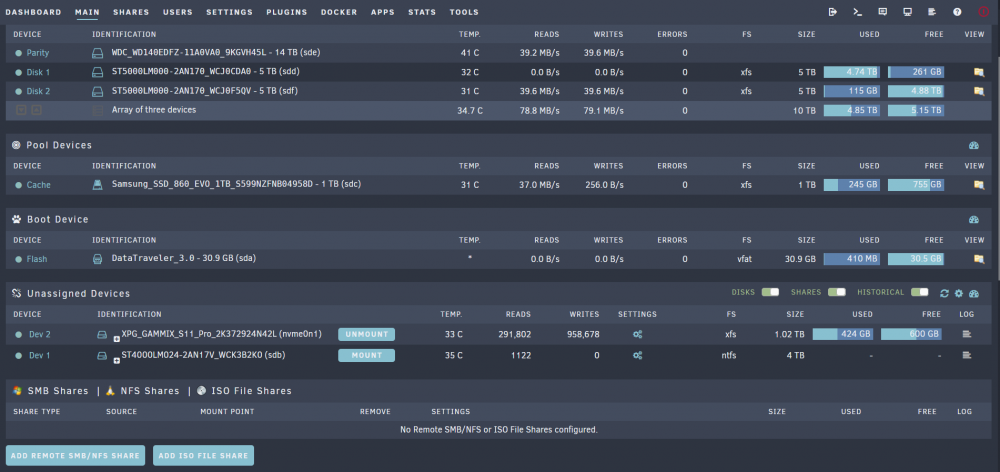
My Unraid log is filled with errors. Im getting the same 2 errors every 4 seconds. What is this about? Everything on my server is working and I can access all my shares on my windows machine. I stopped all my dockers and im still getting the errors. I have NO remote iso points or SMB external mappings with Unassigned devicess. Feb 1 11:20:16 UnRAID unassigned.devices: Error: unable to get the samba mounts. Feb 1 11:20:16 UnRAID unassigned.devices: Error: unable to get the ISO mounts. Feb 1 11:20:20 UnRAID unassigned.devices: Error: unable to get the samba mounts. Feb 1 11:20:20 UnRAID unassigned.devices: Error: unable to get the ISO mounts. Feb 1 11:20:24 UnRAID unassigned.devices: Error: unable to get the samba mounts. Feb 1 11:20:24 UnRAID unassigned.devices: Error: unable to get the ISO mounts. Feb 1 11:20:28 UnRAID unassigned.devices: Error: unable to get the samba mounts. Feb 1 11:20:28 UnRAID unassigned.devices: Error: unable to get the ISO mounts. Feb 1 11:20:32 UnRAID unassigned.devices: Error: unable to get the samba mounts. Edit: Tried to restart the server and it just hung. Even all log entries disappeared. Something strange for sure was going on but after hol down the power button I did a forceful reboot and now the errors are gone.
-
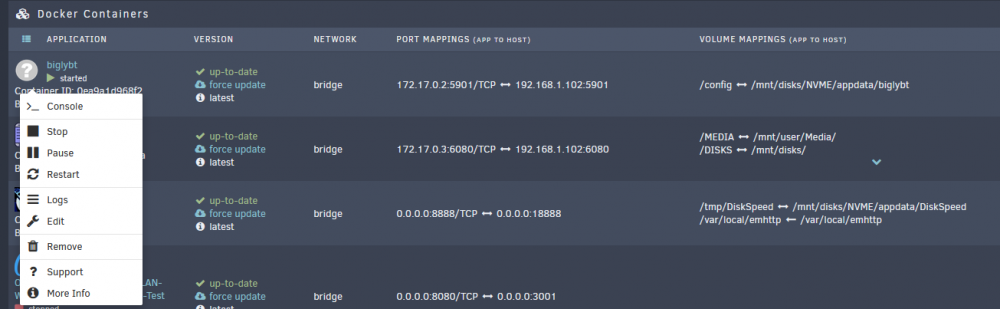
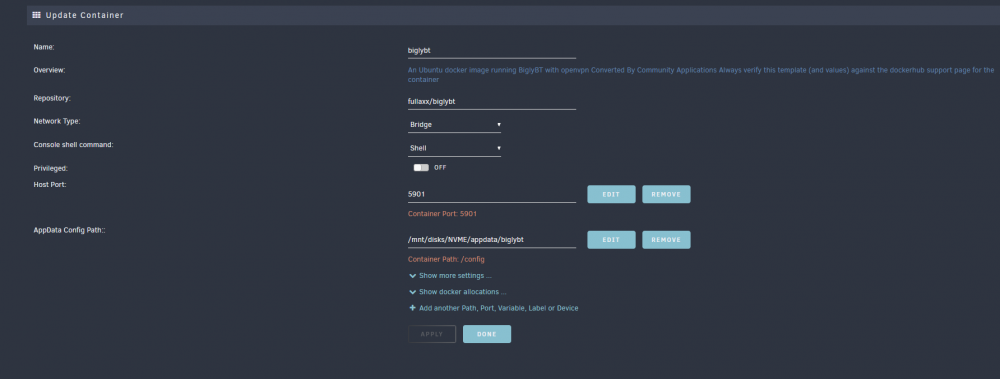
Ok so I tried to give this a shot. 1st step was to enable searching on docker hub through community apps. I did this and found the already created docker image file of biglybt (as shown here ( https://hub.docker.com/r/fullaxx/biglybt/). After I hit Install it seemed to go in correctly. So I then went to edit the template and changed 2 things. First was to point /config to my appdata folder. I'm not sure if this did anything tho but I noticed my other dockers like Krusader have that setting. The second thing I did was setup the port mapping. Now I need to try accessing BiglyBT via VNC. Unlike with Krusader, I do not see a webUI or start option. I only see >_Console. It looks like Unraid has noVNC built in as I use it when accessing Krusader so I took a look at the URL I was going to. It was http://192.168.1.102:6060/vnc.html?resize=remote&host=192.168.1.102&port=6060&autoconnect=1 for Krusader so I simply replaced the ports with my BiglyBT ports to get http://192.168.1.102:5901/vnc.html?resize=remote&host=192.168.1.102&port=5901&autoconnect=1. Then I get a connection (Which is good news because it looks like its running) however all I get is a white page that says RFB 003.008. I googled this error and it sounds like it has something to do with authentication with Java (Biglybt uses Java) when trying to VNC. Can anybody who knows coding and understands dockers and unraid better help me get this working? Thank you EDIT: I managed to VNC in using VNCViewer on my windows machine by using the address of 192.168.1.102::5901 (needed 2 colans). So Biglybt is up and working, but its less then ideal as I cannot use novnc to access it via web browser. I already added a fancy web_gui button to the unraid template so it would be convenient to get this working.
-
The whole reason I went with Unraid is because it was easy. I do enough troubleshooting and management in my life that any extra effort is never "fun" haha. I want to use BiglyBT because it is the open source fork of Vuze and Ive been using vuze and BiglyBT for 15 years now and do not want to switch to something else. I also went with unraid because Im installing a jellyfin server and it supports it easily, vs NAS setups. Ideally I prefer to use windows as a server but unaid seamed more reliable and easy to use than setting up a windows with raid. I already did a google search for biglybt and unraid and results are pretty much non existent. I guess is there a guide somewhere on installing any generic linux app on unraid by creating a docker container?
-
Edit: I've changed the title of this thread to reflect what I'm trying to achieve, which is getting dcker hub repository of the biglybt bit torrent client working on unraid (as there is no unraid template for it). Skip below to my 3rd post here to see my steps and where I am stuck with it I finally built my long wanted media\unraid server, horray. I'm excited to get it setup and right now I'm waiting on a large pre-clear for my array! Anyway, my plan was to setup Sonarr and Radarr with a bittorrent client and run Jellyfin. The problem I'm finding is all the guides online call for running deluge as a bit torrent client. The bit torrent client I want to use however (BiglyBT) does not appear to be available for unraid. I cant find and install for it, not any guides talking about it. There is a linux version however on their website. So 2 questions: 1. Am I able to install BiglyBT easily to unraid? If so are there any instructions I can find for this? my linux is terrible and anything I do in it is always just following guides because I have no idea what most of the commands I enter do (since guides hardly ever explain what the code is doing) 2. Alternatively I have a tiny fanless PC (i3, 7th gen, 8 gb ram) which runs windows (very easy for me to use) that runs some home automation software. I could install sonarr, radarr and BiglyBT for windows easily. Could I then simply point my working directories to my unraid server (SMB shares) and have it work normally? I assume zonarr and radarr are not too resource intensive that my i3 couldnt handle them (i've never used them before). Jellyfin I would run off Unraid of course (I currently have Jellyfin running on the i3 but can really only server 1 stream at a time, but my unraid server was built to run jellyfin with at least 15 streams) Thanks




