





jinlife
Community Developer
-
Joined
-
Last visited
Everything posted by jinlife
-
https://docs.fileflows.com/guides/unraid/nvidia-setup
-
赞,支持。可惜没硬件可以测试。
-
去U盘删掉这个文件,重启就行了。 如果是已有服务器,有数据了,那不建议用什么rc测试版,不稳定,除非你想帮官方做测试,没什么重要数据。
-
RC测试版,暂时没兴趣弄。等个稳定版再说。 如果你没有IOMMU分组的需求,可以装个原版,然后装个R8152的plugin,也能测试的。
-
Awesome, it is a good news. He is a reliable maintainer and I can relax. But frankly speaking, the network driver should be unraid official responsibility since it is a paid software, it should not be ours.
-
192.168.1.x is just an example, it should be your 192.168.50.0/24 which is outside network. pfSense and unraid should be connected with real network cable and they cannot share interface eth0. Like my point 1 and 2 said, you will need an eth1. Maybe you can add a RTL8156 USB network card, then assign it to Unraid, or passthrough to pfSense.
-
I'm not expert so here is just my experiences, maybe wrong. Most of your expectations are correct. 1. The MAC for direct interface is the current VM's mac to the outer world. Your router will allocate local network IP to this MAC, such as 192.168.1.105. But please aware Unraid or other VMs cannot access this IP if they share the interface eth0. 2. Unless you pass through a physical interface eth1 to another VM, then this VM can access 192.168.1.105 directly. Other independent devices can access this IP as well, even from the DDNS. 3. The MAC for bridge interface is the VM's mac to inner world, this network is only exist in virbr0 which is used between the Unraid and all other VM who is sharing eth0, the IP could be 192.168.122.5. So if you created a Synology VM, and want to add its share in Unraid, you need to use IP 192.168.122.5 or Synology network name. The MAC can be any one since it only exist in virbr0, it is a super small local subnet. You can use virsh to control it. 4. PCI is just virtual configuration to VM, if the slot is occupied, then you can just use any other available number. So the Synology VM will have two network interfaces, one is direct and another is bridge, it has two IPs, 192.168.1.105 and 192.168.122.5. They have different scope and purpose. Hope it answers your question.
-
USB在Unraid里面使用,是用的Unraid带的驱动。直通到群晖里面用,是用的群晖带的驱动,两边的驱动都得靠谱才行。另外你这个断网,估计有好几个方面的原因: 1. 群晖里面的驱动不够新,群晖内USB R8156这网卡的bb-qq的套件,也不是蛮灵,经常要重新启动几次套件才行。最好是编译群晖的loader的时候就把R8156的驱动编译进去。不会编译的话,那建议用巴西人的arpl这个loader。 2. 网卡硬件有问题,有些USB网卡过热就会断网,散热还不好。除了换个品牌的网卡,没什么办法。加风扇都不一定有用,质量问题。 3. 不要热插拔USB网卡,插好就别动了,重启Unraid和群晖才能正常使用。Unraid对热插拔USB网卡的支持不咋地。
-
已经带了,驱动名称里面有RSS的字样的。
-
老bug了,Unraid自带的GUI模式,里面自带firefox就看不了中文。 这bug也应该不只是中文有,估计Unicode语言都不行。 参考如下帖子繁体字的解决办法。
-
只看芯片型号,不管在哪。这个RTL8125肯定支持,即使不用补丁,原生的Unraid老驱动也支持的。 RTL8156可能更需要这个补丁些。
-
This is just a network card patch, it cannot impact VM. I think you issue was caused by upgradation to Unraid 6.11.5. (6.9.15?) The web content might be changed for VNC, you need to clear the cached session or data of browser, especially for the google chrome browser.
-
ico可以下载到本地appdata里面用。图标路径: localhost/mnt/user/appdata/icon/xxx.png
-
Maybe it is incompatible, maybe there is other issue. My rtl8156b is working fine, I have no idea what is wrong according to this log.
-
貌似用8代U比较原生支持, 新一点的9代和10代U需要打核显补丁。打完核显补丁还得打解码补丁,这时候VideoStation才能硬解。 人脸识别就靠我那个CPU识别的补丁吧,能用就行。
-
Unraid的内核比较难搞的,我拿着那个适配PVE的源代码没编译通过,之前的6.10也有问题。估计要改代码才能编译通过, 一时半会搞不定了。 想追新还是用PVE吧,Unraid不开源,比较封闭,不好改。等哪天inte库l的代码内核更新上来了可能好改点。
-
This is really a smart setting. Just tried, problem solved! Thanks a lot.
-
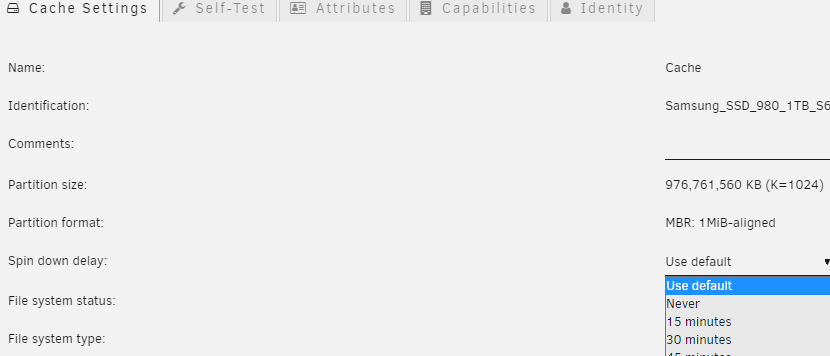
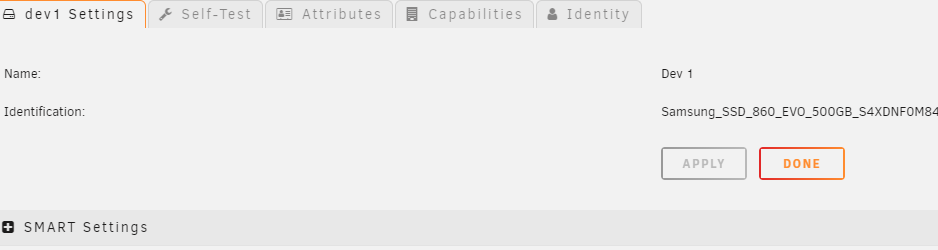
Thanks for reminding, I cannot find this setting, it looks like the setting does not exist for unassigned disk or passed through disk. This is a normal cache setting: This is unassigned disk Dev 1, all settings are missing.
-
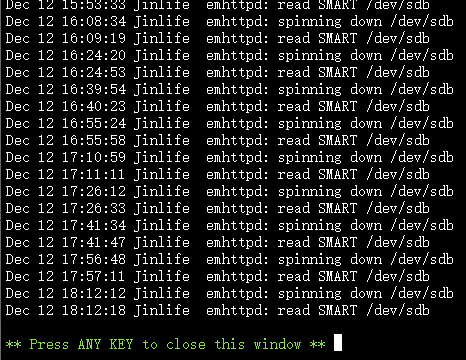
Unexpected spin down in Unraid 6.11.5 Scenario: 1. Insert one Sata SSD and pass through this disk to a Synology VM. 2. Mark the SSD as passed through in UD settings. But Unraid alway spin down this SSD disk intervally and VM will spin it up right away. This is very anony. It seems there is no disk activity from Unraid OS, so unraid will spin it down every 15 min (which is my disk setting) Is it possible to ignore the spin down of this passed through disk? I have no need to spin it down and just want to keep it running. Thanks. @dlandon

-
你可以到U盘看看有没有把i915弄成黑名单了。或者是不是直通了。直通之后Unraid自己就用不了核显了。除非用老的gvt-g或者正在开发中的SR-IOV虚拟技术才能共用。 6.11.5有非常新的内核,支持12400应该没问题的。 建议做个干净的Unraid启动盘看看情况。
-
Two ways: 1. Insert Unraid flash drive to Windows PC, then copy the files, just like any other USB disk. 2. Change flash shared permission to public in Unraid Web, then you can navigate to the shared folder: \\unraid_IP\flash, copy the files. But hey, please make sure you need this patch. There is known issue 2 in the first post. You can translate it by google. Thanks.
-
Just download the patch, extract and overwrite the files in the Unraid USB flash disk, reboot Unraid. If you don't like the patch, then overwriting these files again with official ones will recover it, after another reboot.
-
Intel 225 is a good choice for PCI card although the driver is not stable enough too. If you want to use the USB 2.5GB(Realtek) which could be R8156 chip, then it should only work with the patch in this first post. Just download the patch, extract and overwrite the files in the Unraid USB flash disk, reboot Unraid. It seems Unraid has dropped support for the R8156 for the new version although 6.9.2 already support it.
-
这个问题挺严重,专门查了下。恢复数据最好不能有格式化硬盘,rebuild就行了。不知道是不是格式化硬盘的原因,可以按如下步骤再试试。 https://wiki.unraid.net/Replacing_a_Data_Drive 1. Stop the array 2. Unassign the old drive if still assigned (to unassign, set it to No Device) 3. Power down 4. [ Optional ] Pull the old drive (you may want to leave it installed for Preclearing or testing) 5. Install the new drive 6. Power on 7. Assign the new drive in the slot of the old drive 8. Go to the Main -> Array Operation section 9. Put a check in the Yes, I'm sure checkbox (next to the information indicating the drive will be rebuilt), and click the Start button 10. The rebuild will begin, with hefty disk activity on all drives, lots of writes on the new drive and lots of reads on all other drives All of the contents of the old drive will be copied onto the new drive, making it an exact replacement, except possibly with more capacity than the old drive. 1.停止阵列 2.如果仍然分配旧盘,则取消分配(取消分配,将其设置为无设备) 3. 断电 4. [ 可选 ] 拉出旧盘(您可能希望保留它安装以进行预清除或测试) 5.安装新盘 6.开机 7.在旧盘的插槽中分配新盘 8. 转到 Main -> Array Operation 部分 9. 勾选 Yes, I'm sure 复选框(在指示将重建驱动器的信息旁边),然后单击 Start 按钮 10. 重建将开始,所有驱动器上的大量磁盘活动,新驱动器上的大量写入和所有其他驱动器上的大量读取 旧驱动器的所有内容都将复制到新驱动器上,使其成为完全替代品,但容量可能比旧驱动器大。
-
估计悬,这两硬件上就是共享的,如果补丁分不开那就是不支持了。迫击炮这个共享带宽的设计挺坑,建议用华擎或华硕的主板组NAS。 迫击炮可以插第一个插槽,用VM的DownStream模式,也可以网卡分组。


