





tcharron
Members
-
Joined
-
Last visited
Everything posted by tcharron
-
Yeah... I removed the PCIe NIC but am now only using the motherboard NIC. I run the machine headless so haven't tried to check what is configurable in the firmware. I might be able to change the power settings (ASPM), but will need to physically move the machine to hook it to a monitor and keyboard. It's an old build so I honestly felt I'd be 'safe' not being able to easily connect it to a monitor! guess not.
-
I am now on 6.12.10, and am now experiencing shutdowns around every 24-36 hours. One recent trace is attached. My logs show frequent issues with the r8169 driver as well (see the last line below). I removed a second network card and am only using the on-board ethernet port now. The docker and VM services are running, but there are no dockers or VM instances running. Traces all include this: "RIP: 0010:dev_watchdog+0x14e/0x1c0" Any ideas? Jul 12 11:17:23 BadAxe2 kernel: ------------[ cut here ]------------ Jul 12 11:17:23 BadAxe2 kernel: NETDEV WATCHDOG: eth0 (r8169): transmit queue 0 timed out Jul 12 11:17:23 BadAxe2 kernel: WARNING: CPU: 6 PID: 0 at net/sched/sch_generic.c:525 dev_watchdog+0x14e/0x1c0 Jul 12 11:17:23 BadAxe2 kernel: Modules linked in: reiserfs cmac cifs asn1_decoder cifs_arc4 cifs_md4 dns_resolver xt_CHECKSUM ipt_REJECT nf_reject_ipv4 xt_tcpudp ip6table_mangle ip6table_nat iptable_mangle vhost_net tun vhost vhost_iotlb tap xt_conntrack xt_MASQUERADE nf_conntrack_netlink nfnetlink xfrm_user xfrm_algo iptable_nat nf_nat nf_conntrack nf_defrag_ipv6 nf_defrag_ipv4 xt_addrtype br_netfilter xfs nfsd auth_rpcgss oid_registry lockd grace sunrpc md_mod zfs(PO) zunicode(PO) zzstd(O) zlua(O) zavl(PO) icp(PO) zcommon(PO) znvpair(PO) spl(O) tcp_diag inet_diag nct6775 nct6775_core hwmon_vid corefreqk(O) ip6table_filter ip6_tables iptable_filter ip_tables x_tables af_packet 8021q garp mrp bridge stp llc r8169 realtek intel_rapl_msr intel_rapl_common x86_pkg_temp_thermal intel_powerclamp coretemp i915 kvm_intel kvm iosf_mbi drm_buddy i2c_algo_bit ttm drm_display_helper crct10dif_pclmul crc32_pclmul crc32c_intel ghash_clmulni_intel sha512_ssse3 sha256_ssse3 sha1_ssse3 drm_kms_helper aesni_intel Jul 12 11:17:23 BadAxe2 kernel: crypto_simd mei_hdcp mei_pxp drm cryptd mpt3sas intel_gtt rapl agpgart wmi_bmof i2c_i801 intel_cstate mei_me i2c_smbus ahci raid_class mxm_wmi i2c_core syscopyarea sysfillrect mei libahci scsi_transport_sas intel_uncore sysimgblt fb_sys_fops thermal fan video backlight wmi button acpi_pad unix [last unloaded: realtek] Jul 12 11:17:23 BadAxe2 kernel: CPU: 6 PID: 0 Comm: swapper/6 Tainted: P O 6.1.79-Unraid #1 Jul 12 11:17:23 BadAxe2 kernel: Hardware name: ASUS All Series/H97-PLUS, BIOS 2504 05/20/2015 Jul 12 11:17:23 BadAxe2 kernel: RIP: 0010:dev_watchdog+0x14e/0x1c0 Jul 12 11:17:23 BadAxe2 kernel: Code: 86 c5 00 00 75 26 48 89 ef c6 05 26 86 c5 00 01 e8 11 23 fc ff 44 89 f1 48 89 ee 48 c7 c7 bc 8e 15 82 48 89 c2 e8 cf 54 93 ff <0f> 0b 48 89 ef e8 32 fb ff ff 48 8b 83 88 fc ff ff 48 89 ef 44 89 Jul 12 11:17:23 BadAxe2 kernel: RSP: 0018:ffffc90000230ea8 EFLAGS: 00010282 Jul 12 11:17:23 BadAxe2 kernel: RAX: 0000000000000000 RBX: ffff888105ec4448 RCX: 0000000000000027 Jul 12 11:17:23 BadAxe2 kernel: RDX: 0000000000000104 RSI: ffffffff820d8b42 RDI: 00000000ffffffff Jul 12 11:17:23 BadAxe2 kernel: RBP: ffff888105ec4000 R08: 0000000000000000 R09: ffffffff82245f70 Jul 12 11:17:23 BadAxe2 kernel: R10: 00007fffffffffff R11: ffffffff82965079 R12: 0000000000000000 Jul 12 11:17:23 BadAxe2 kernel: R13: ffff888105ec439c R14: 0000000000000000 R15: 0000000000000001 Jul 12 11:17:23 BadAxe2 kernel: FS: 0000000000000000(0000) GS:ffff8887fff80000(0000) knlGS:0000000000000000 Jul 12 11:17:23 BadAxe2 kernel: CS: 0010 DS: 0000 ES: 0000 CR0: 0000000080050033 Jul 12 11:17:23 BadAxe2 kernel: CR2: 000014c27a97c484 CR3: 000000000220a004 CR4: 00000000001706e0 Jul 12 11:17:23 BadAxe2 kernel: Call Trace: Jul 12 11:17:23 BadAxe2 kernel: <IRQ> Jul 12 11:17:23 BadAxe2 kernel: ? __warn+0xab/0x122 Jul 12 11:17:23 BadAxe2 kernel: ? report_bug+0x109/0x17e Jul 12 11:17:23 BadAxe2 kernel: ? dev_watchdog+0x14e/0x1c0 Jul 12 11:17:23 BadAxe2 kernel: ? handle_bug+0x41/0x6f Jul 12 11:17:23 BadAxe2 kernel: ? exc_invalid_op+0x13/0x60 Jul 12 11:17:23 BadAxe2 kernel: ? asm_exc_invalid_op+0x16/0x20 Jul 12 11:17:23 BadAxe2 kernel: ? dev_watchdog+0x14e/0x1c0 Jul 12 11:17:23 BadAxe2 kernel: ? dev_watchdog+0x14e/0x1c0 Jul 12 11:17:23 BadAxe2 kernel: ? psched_ppscfg_precompute+0x57/0x57 Jul 12 11:17:23 BadAxe2 kernel: ? psched_ppscfg_precompute+0x57/0x57 Jul 12 11:17:23 BadAxe2 kernel: call_timer_fn+0x6f/0x10d Jul 12 11:17:23 BadAxe2 kernel: __run_timers+0x144/0x184 Jul 12 11:17:23 BadAxe2 kernel: ? timerqueue_add+0x6a/0x76 Jul 12 11:17:23 BadAxe2 kernel: ? enqueue_hrtimer+0x7f/0x8a Jul 12 11:17:23 BadAxe2 kernel: ? __hrtimer_next_event_base+0x27/0x81 Jul 12 11:17:23 BadAxe2 kernel: run_timer_softirq+0x2b/0x43 Jul 12 11:17:23 BadAxe2 kernel: __do_softirq+0x129/0x288 Jul 12 11:17:23 BadAxe2 kernel: __irq_exit_rcu+0x5e/0xb8 Jul 12 11:17:23 BadAxe2 kernel: sysvec_apic_timer_interrupt+0x85/0xa6 Jul 12 11:17:23 BadAxe2 kernel: </IRQ> Jul 12 11:17:23 BadAxe2 kernel: <TASK> Jul 12 11:17:23 BadAxe2 kernel: asm_sysvec_apic_timer_interrupt+0x16/0x20 Jul 12 11:17:23 BadAxe2 kernel: RIP: 0010:cpuidle_enter_state+0x11d/0x202 Jul 12 11:17:23 BadAxe2 kernel: Code: ed e3 9f ff 45 84 ff 74 1b 9c 58 0f 1f 40 00 0f ba e0 09 73 08 0f 0b fa 0f 1f 44 00 00 31 ff e8 4e a1 a4 ff fb 0f 1f 44 00 00 <45> 85 e4 0f 88 ba 00 00 00 48 8b 04 24 49 63 cc 48 6b d1 68 49 29 Jul 12 11:17:23 BadAxe2 kernel: RSP: 0018:ffffc900000e7e98 EFLAGS: 00000246 Jul 12 11:17:23 BadAxe2 kernel: RAX: ffff8887fff80000 RBX: ffff8887fffb6f00 RCX: 0000000000000000 Jul 12 11:17:23 BadAxe2 kernel: RDX: 00000aa582d6a2aa RSI: ffffffff820d8b42 RDI: ffffffff820d904b Jul 12 11:17:23 BadAxe2 kernel: RBP: 0000000000000001 R08: 0000000000000002 R09: 0000000000000002 Jul 12 11:17:23 BadAxe2 kernel: R10: 0000000000000020 R11: 0000000000000013 R12: 0000000000000001 Jul 12 11:17:23 BadAxe2 kernel: R13: ffffffff823206e0 R14: 00000aa582d6a2aa R15: 0000000000000000 Jul 12 11:17:23 BadAxe2 kernel: ? cpuidle_enter_state+0xf7/0x202 Jul 12 11:17:23 BadAxe2 kernel: cpuidle_enter+0x2a/0x38 Jul 12 11:17:23 BadAxe2 kernel: do_idle+0x18d/0x1fb Jul 12 11:17:23 BadAxe2 kernel: cpu_startup_entry+0x2a/0x2c Jul 12 11:17:23 BadAxe2 kernel: start_secondary+0x101/0x101 Jul 12 11:17:23 BadAxe2 kernel: secondary_startup_64_no_verify+0xce/0xdb Jul 12 11:17:23 BadAxe2 kernel: </TASK> Jul 12 11:17:23 BadAxe2 kernel: ---[ end trace 0000000000000000 ]--- Jul 12 11:17:23 BadAxe2 kernel: r8169 0000:03:00.0: can't disable ASPM; OS doesn't have ASPM control
-
My m1015 card was working properly after all. The weird thing is -- it doesn't cause any output to be shown on the display. On the prior machine that it was installed in, it would show the drives connected to it as it enumerated them, and there was a way to access its configuration page. There is a setting in the bios to specify the initial display output. The default setting was PCIe 1, but given I don't have a dedicated graphics card, I changed that to iGFX. Maybe the bios is not respecting that setting. Now that it's installed in this machine, I don't know how I would enter the m1015 configuration page if ever needed.
-
Thanks...that helped. The stock image worked so I had a look at my key. Turns out that at some point I had renamed the EFI directory to "EFI-". Renaming it back allowed my key to boot. I'm moving from a third gen Intel CPU to 13th gen, so I guess a few things have changed! My next problem will be reinstalling m101 and try to get it to boot properly.
-
I replaced my motherboard, and now I can't get it to boot from the USB key. In the BIOS, I see my SATA drives that are connected, but they do not show up as boot options. The only option I have is the USB key, but when I try to boot with that, it just boots into the BIOS. My USB key is reported as: "UEFI: KingstonDT 100 G2 1.00, Partition 1 (Kingston DT 100 G2 1.00)" I am unable to enable CSM support -- I think this may be because I am using integrated graphics instead of a dedicated card (but am not sure). I was also not able to get it to boot (even into the BIOS) when I installed my M1015 card. I removed that for now, just to get to the boot process. Any advice is appreciated.
-
I have found issues with getting Plex to run well. Sure I could probably get it going, but Serviio was just too familiar to me. I still run serviio on my unraid. I put this into /boot/config/setup-riftbit.sh docker pull riftbit/serviio docker run --name serviio_r -d --network host -p 23423:23423/tcp -p 23424:23424/tcp -p 8895:8895/tcp -p 1900:1900/udp -v /etc/localtime:/etc/localtime:ro -v /mnt/myapps/Serviio-riftbit/library:/opt/serviio/library:rw -v /mnt/user/unraid/Videos/Movies:/media/Movies:rw -v /mnt/user/unraid/Videos/Movies_Viewed:/media/Movies_Viewed:rw -v /mnt/user/unraid/Videos/Kids:/media/Kids:rw -v /mnt/user/unraid/videos_tv:/media/videos_tv:ro riftbit/serviio Then run it: /boot/config/setup-riftbit.sh The only downside is that it can't be configured from the docker page (even though it shows up there). If you ever want to change the setup, just destroy the container, edit the file, and run it again. Update: Here's a small script that will destroy the old container, update the image and then restart it: docker stop serviio_r docker rm serviio_r docker pull riftbit/serviio docker run --name serviio_r -d --network host -p 23423:23423/tcp -p 23424:23424/tcp -p 8895:8895/tcp -p 1900:1900/udp -v /etc/localtime:/etc/localtime:ro -v /mnt/myapps/Serviio-riftbit/library:/opt/serviio/library:rw -v /mnt/user/unraid/Videos/Movies:/media/Movies:rw -v /mnt/user/unraid/Videos/Movies_Viewed:/media/Movies_Viewed:rw -v /mnt/user/unraid/Videos/Kids:/media/Kids:rw -v /mnt/user/unraid/videos_tv:/media/videos_tv:ro riftbit/serviio
-
I got Serviio 2.0 working on my unraid (with my Sony Bravia TV). I based all of this on the riftbit serviio container. That has been updated 9 months ago (not sure if it will be supported beyond that, but it is 2.0). That container is described here (you don't need anything from this page -- it's just an fyi). https://registry.hub.docker.com/r/riftbit/serviio 1) Create a directory on your server that can be used to store library data. I chose to use /mnt/myapps/Serviio-riftbit. You should create a directory on your server before continuing. 2) Run the following commands. Replace the reference to the directory from step 1 with whatever directory you created. For each "-v" section below, map each of your media directories (I hope this part is self evident). The format is "-v [source directory]:[docker directory]:rw". You can probably use :ro at the end, but I haven't tried that to see if it causes any errors. I use RW since serviio can be configured to download metadata and subtitles etc docker pull riftbit/serviio docker run --name serviio_r -d --network host -p 23423:23423/tcp -p 23424:23424/tcp -p 8895:8895/tcp -p 1900:1900/udp -v /etc/localtime:/etc/localtime:ro -v /mnt/myapps/Serviio-riftbit/library:/opt/serviio/library:rw -v /mnt/user/unraid/Videos/Movies:/media/Movies:rw -v /mnt/user/unraid/Videos/Movies_Viewed:/media/Movies_Viewed:rw -v /mnt/user/unraid/Videos/Kids:/media/Kids:rw -v /mnt/user/unraid/videos_tv:/media/videos_tv:ro riftbit/serviio 3) Go to the docker page within your server. You will see a new "serviio_r" docker there. Disable any other serviio instances, or anything that uses conflicting ports (8895, 23424,23423) stop and restart the "serviio_r" docker 4) Navigate your browser to "[your unraid server]:23423/console 5) Configure serviio. In particular, add each of the media paths to the shared folders under the "Library" section. Note that the docker can not be configured or updated within the Unraid docker page. It can only be stopped/started/deleted (or the console accessed) from that page. If you want to make a change (for example, adding a new media directory), edit your command from step 2 (the first line is not needed again), delete the "serviio_r" docker (via the unraid Docker page), edit your script from step 2, and run it again. My experience is that Serviio configuration settings survive when I do this (although I have only tried it once or twice). I hope that this helps others! I'm not really intending to support this, but will try to do my best to help if I can. If I had more time and energy, the next logical step is to make this all configurable from within Unraid, without requiring the script. Tim
-
If you log in to your account at https://www.crashplanpro.com/app/#/console/ , what does it say? I wonder if somehow you have ended up with recent backups being somehow identified as a new device.
-
I am not trying to back up a network share. I am trying to back up local drives TO a network share. So effectively there is no way to use CrashPlan to back up local machines to my unraid server, even if I pay for CrashPlan.
-
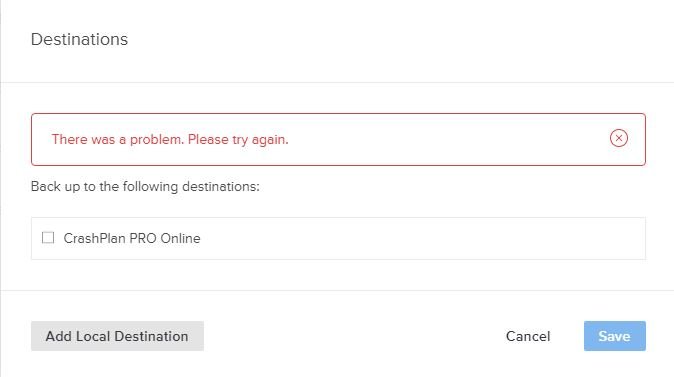
I just installed CrashPlan Small Business on a windows machine, and this docker on my unraid box. For the life of me, I can't see how to establish a backup of the windows box to the unraid box. The only destination options I can see are "CrashPlan PRO Online" and "Add Local Destination". When I use the local destination option, I get an error if I select a network drive. I know that the peer to peer support has disappeared, but can't I at least back up to a network destination now? By the way, The OS in the logs reports as: /mnt/user/appdata/CrashPlanPRO/log/app.log:OS = Linux (4.15.0-60-generic, amd64) grep: /mnt/user/appdata/CrashPlanPRO/log/service.log: No such file or directory
-
Yeah... as soon as I saw it I knew what was going on. I think that the entire idea of having things auto-installed from my flash drive via auto_install and a line in my go file was probably something that I added 5 years ago or so. It worked well for a very long time, and then was was long forgotten but survived the various upgrades along the way. My point in sharing it here was just to help anyone else figure it out, as I found a few threads with similar problems. The generallly accepted solution was to do a clean install to a new USB key -- neither of which is required with the above knowledge.
-
Old topic, but it just bit me. For me, the problem was gcc-4.8.2-x86_64-1.txz.auto_install, which was located in my /boot/packages directory. A line in my go file was installing it, and it was the file preventing my machine from booting. I was able to verify this by just trying to install it manually after my system finally booted properly... Verifying package gcc-4.8.2-x86_64-1.txz. Installing package gcc-4.8.2-x86_64-1.txz: PACKAGE DESCRIPTION: # gcc (Base GCC package with C support) # # GCC is the GNU Compiler Collection. # # This package contains those parts of the compiler collection needed to # compile C code. Other packages add C++, Fortran, Objective-C, and # Java support to the compiler core. # Executing install script for gcc-4.8.2-x86_64-1.txz. Package gcc-4.8.2-x86_64-1.txz installed. Verifying package glibc-2.17-x86_64-7.txz. Installing package glibc-2.17-x86_64-7.txz: PACKAGE DESCRIPTION: # glibc (GNU C libraries) # # This package contains the GNU C libraries and header files. The GNU # C library was written originally by Roland McGrath, and is currently # maintained by Ulrich Drepper. Some parts of the library were # contributed or worked on by other people. # # You'll need this package to compile programs. # Executing install script for glibc-2.17-x86_64-7.txz. cp: /lib64/libc.so.6: version `GLIBC_2.25' not found (required by cp) /sbin/ldconfig: Cannot lstat ld-2.17.so: No such file or directory /bin/bash: line 56: /usr/bin/basename: No such file or directory /bin/bash: line 56: /usr/bin/rm: No such file or directory /bin/bash: line 57: /usr/bin/basename: No such file or directory /bin/bash: line 57: /usr/bin/cp: No such file or directory /bin/bash: line 58: /usr/bin/basename: No such file or directory /bin/bash: line 59: /usr/bin/rm: No such file or directory ...
-
I'm not sure I understand what this script is doing in the second pass. Take the results that are posted in the reply before this one. The first pass identifies a sync_window of 1792 as optimal (test # 11). The second pass examines the range between test 10 and test 11 (sync_window 1672-1792) more closely. Why doesn't it also look at the range of 1792-1920? Isn't the optimal spot as likely to be beyond 1792 as before it? Also, just a nit, but the range selection has "1-14" in it. That should be "1-19" now, with the addition of ranges up to 2944.

