





Viking
Members
-
Joined
Everything posted by Viking
-
Damn, I feel like an idiot! ^^' Thx so much for your quick reply!
-
Hi everyone, I noticed a small problem during this week's backup. Recently, I changed all my docker paths from "mnt/user/appdata" to "mnt/cache/appdata". Since then, the plugin read all these paths as "external volumes" and no longer backup by default. Is this problem fixable? Should I wait for an upgrade? Or should I enable external volume backups and manage exceptions? On a by Docker basis ? Thanks in advance for your help!
-
Hi ! Thanks for this great project! I just tested it on a fresh unraid install (uptodate) For the moment with an Intel iGPU for proof of concept. If it works, he'll get an nvidia. Anyway, the install works, the docker launches: but it's impossible to log into the webUI. What a miss ?! Neko : I have access to the webUI, but I can't login. "Invalid password". What should I do? VNC : I get a page not found error. docker run -d --name='steam-headless' --net='host' --privileged=true -e TZ="America/Los_Angeles" -e HOST_OS="Unraid" -e HOST_HOSTNAME="Serveur" -e HOST_CONTAINERNAME="steam-headless" -e 'USER_PASSWORD'='*******************' -e 'TZ'='Europe/Paris' -e 'USER_LOCALES'='fr_FR.UTF-8 UTF-8' -e 'NVIDIA_PATCH_VERSION'='' -e 'WEB_UI_MODE'='neko' -e 'NVIDIA_VISIBLE_DEVICES'='all' -e 'NVIDIA_DRIVER_CAPABILITIES'='all' -e 'DISPLAY'=':0' -e 'MODE'='primary' -e 'PORT_NOVNC_WEB'='8083' -e 'ENABLE_VNC_AUDIO'='false' -e 'ENABLE_EVDEV_INPUTS'='true' -l net.unraid.docker.managed=dockerman -l net.unraid.docker.webui='http://[IP]:[PORT:8083]/' -l net.unraid.docker.icon='https://raw.githubusercontent.com/Josh5/docker-steam-headless/master/images/steam-icon.png' -v '/mnt/user/appdata/steam-headless':'/home/default':'rw' -v '/mnt/user/Gaming/':'/mnt/games':'rw' --hostname='SteamHeadless' --add-host='SteamHeadless:127.0.0.1' --restart='unless-stopped' --shm-size='2G' --ipc='host' -v '/tmp/.X11-unix/':'/tmp/.X11-unix/':'rw' -v '/tmp/tmp/pulse/':'/tmp/tmp/pulse/':'rw' --ulimit='nofile=1024:524288' --device='/dev/fuse' --device='/dev/uinput' --device-cgroup-rule='c 13:* rmw' --cap-add='NET_ADMIN' --cap-add='SYS_ADMIN' --cap-add='SYS_NICE' --security-opt='seccomp=unconfined' 'josh5/steam-headless:latest' 1dad834005135f44abad486b3212bd052736d7cfcc191c85bf9caa294bb52de7 And the log : cat: '/sys/class/drm/card*/status': No such file or directory [ /etc/cont-init.d/70-configure_desktop.sh: executing... ] **** Configure Desktop **** - Enable Desktop service. - Ensure home directory template is owned by the default user. - Installing default home directory template DONE [ /etc/cont-init.d/70-configure_xorg.sh: executing... ] **** Generate default xorg.conf **** /etc/cont-init.d/90-configure_neko.sh: line 17: ip: command not found - Configure Xwrapper.config - Configure container as primary the X server - Enabling evdev input class on pointers, keyboards, touchpads, touch screens, etc. - No monitors connected. Installing dummy xorg.conf DONE [ /etc/cont-init.d/80-configure_flatpak.sh: executing... ] **** Configure Flatpak **** - Flatpak configured for running inside a Docker container DONE [ /etc/cont-init.d/90-configure_neko.sh: executing... ] **** Configure Neko **** - Enable Neko server - Setting NEKO_NAT1TO1= DONE [ /etc/cont-init.d/90-configure_steam.sh: executing... ] **** Configure Steam **** - Enable Steam auto-start script DONE [ /etc/cont-init.d/90-configure_sunshine.sh: executing... ] **** Configure Sunshine **** - Enable Sunshine server DONE [ /etc/cont-init.d/90-configure_vnc.sh: executing... ] **** Configure VNC **** - Configure VNC service port '32036' - Configure pulseaudio encoded stream port '32037' - Disable VNC server DONE [ /etc/cont-init.d/95-setup_wol.sh: executing... ] **** Configure WoL Manager **** - Disable WoL Manager service. **** Starting supervisord **** - Logging all root services to '/var/log/supervisor/' - Logging all user services to '/home/default/.cache/log/'
-
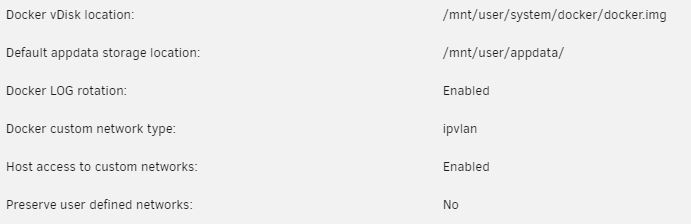
thx @JorgeB I've switched my dockers to ipvlan and everything's working fine. 👍 I only use custom networks and custom VPN networks. I don't know if that helps! On the other hand, Fix Common Problems leaves me with the error "macvlan call traces found", despite my rescan. Is it a question of cache or do I still have a problem?
-
Hi everyone! Update from 6.11.5 to 6.12.4. No problems so far. (15min up time only ^^) All my dockers work, including those behind a VPN. Just "Fix Common Problems" reporting "macvlan call traces found". My system has 2 network onboard motherboard. (1G + 2.5G) Only 2.5G unsed. What do you recommend? Should I switch to ipvlan? Or stay with macvlan?

