





Joshndroid
Members
-
Joined
-
Last visited
Everything posted by Joshndroid
-
I have the same issue. Random, what I believe, is Plex Docker Crashes. It seems to cause the system to hang and fall off the network. It is still powered on, but i can't get into it and it doesn't respond to a power button press (to initiate a safe shutdown) Only a forced power cycle fixes it. This then triggers a parity check. I have C-States disabled already in my x99 system 5820k, 32Gb ram, SSD cache drive i have a Nvidia 1650 as my Transcode pass-through GPU. This has been a somewhat regular occurrence for months. Edit - I am already running IPVLAN
-
Yep, good call. I'll add it now. Cheers.
-
Nitter Update It would appears that nitter is having issues much like other apps in relation to all the API changes that are occurring at Twitter in order to most likely allow them to concentrate their market and keep their users on their platform rather than through 3rd party apps, etc. It would all amount to trying to limit others taking ad revenue and pump their numbers to advertisers. My suggestion at this time would be utilise nitter's RSS feed for each page you follow and post those for each page into an RSS reader such as the open source app 'feeder' on android/android subsystem (not a mac/apple user for others out there). It could be seen as janky, but allows me to essentially do what i was already doing with the multi user inline with the URL.
-
I have always just used my phone to start the initial sync... In that when i first imported my contacts i imported them in my phone then using davx5 synced it to my baikal server. For doing what you trying to achieve i see various issues in their github over the years regarding importing, so your likely not alone. Maybe putting an issue into their github project may assist your further.
-
I am curious if it might be easier to import the contacts via your phone using something like davx5 to do the 'syncing' I have always done my things this way and havn't had too much of an issue. My other thought is maybe with thunderbird or outlook and using their contacts sync ability with your instance. caldav sync, etc.
-
Also have a broken GPU stat on AMD dedicated GPU 6600xt.
-
I thought I had a bit of an understanding on how docker mounting works (i guess i don't) however it seems that every now and then when I am trying to spin up a new docker container that is not part of the community apps, i have issues with mounting. This then causes the container to constantly reboot as it flat out doesn't work. I have tried to add a the various ID's as variables with no difference. I have tried creating the appdata folder manually first, with no difference to if the docker container creates the folders. I have tried to change the access mode and nothing seems to fix it. I was wondering if anyone has tips for getting this working more reliably? For reference i am looking at deploying the privacy focused simplexchat and it requires the config folder to be mounted. I attempt to mount this to I do note that in their docs that they have this listed volume mount with a :z I am aware that unraid doesn't handle :z but could this be what is causing my issues? I end up with this error in the docker as it reboots. Essentially its not being mounted so that file is not being created Cheers all
-
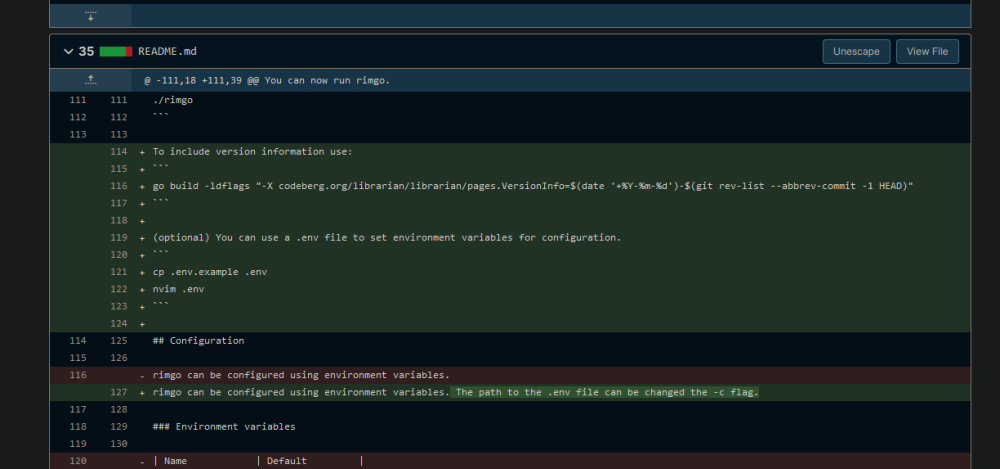
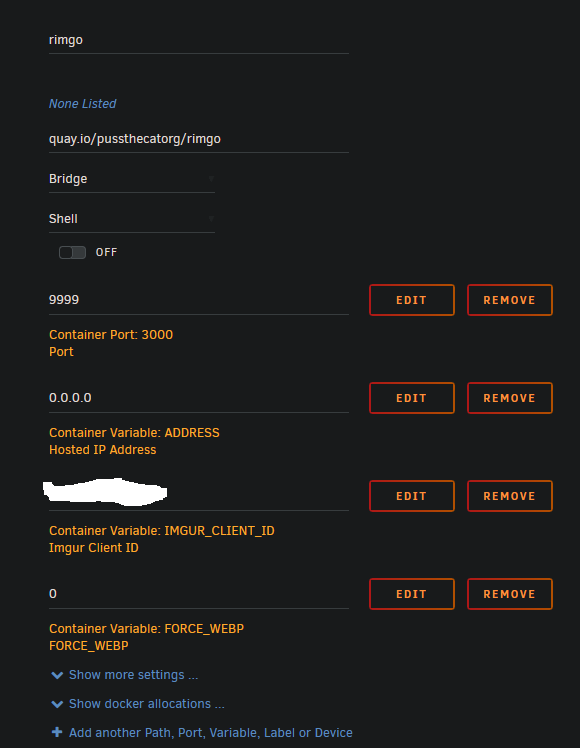
Rimgo only needs the .env to set configuration during deployment. We are setting the environment flags within the template. This is the commit where it was added to the source. We have no need for the -c flag... we are running the prebuilt docker image. For sanity I have nuked my rimgo, deleted everything and redeployed... Nil issue running and home page listed is the same as the official listed instances. Looking above... is your listed IP address correct for your 'Hosted IP address'? I am also running as a 'bridge' network. I have mine set as 0.0.0.0
-
Hello, I would try nuking your rimgo instance and starting again from scratch. If you have issues you could try and create the /mnt/appdata/rimgo folder first... THEN install the docker. It could be possible that your having some sort of permission issue with the folder structure when the docker first runs. I dont have the appdata folder exposed as I never actually needed it.. FWIW the config.yml file that the docker uses contains this; RIMGU_PORT: 3000 RIMGU_HOST: localhost RIMGU_ADDRESS: 0.0.0.0 RIMGU_IMGUR_CLIENT_ID: YOUR-ID-NUMBER-HERE
-
Another thing that I have noticed is that once you have sync setup from a proxy manager standpoint and you can access it within the task setup area, the best way for it to work is to have the server side empty.... have the files locally on your device and then start up a sync task for your first sync. If i had files on the server first, it would error out. If I had the same files on both the server and locally it would error out.
-
After 4 days i've got it working In the advanced section in NPM add this ``` location / { # Uncomment this to enable gRPC and thus be able to use cells-sync if ($http_content_type = "application/grpc") { grpc_pass grpcs://hosted-ip-add:hosted-webgui-port; } proxy_pass https://hosted-ip-add:hosted-webgui-port; } ``` The IP and the port needed to be the same, not different as indicated in the previous post
-
After 4 days i've got it working In the advanced section in NPM add this ``` location / { # Uncomment this to enable gRPC and thus be able to use cells-sync if ($http_content_type = "application/grpc") { grpc_pass grpcs://hosted-ip-add:hosted-webgui-port; } proxy_pass https://hosted-ip-add:hosted-webgui-port; } ``` The IP and the port needed to be the same, not different as indicated in the previous post
-
Hello, I am wondering how I add further 'scheme' to my proxy host. I am not sure even if this is correct. I am trying to setup cells-sync with pydio-cells container. Within that there is a further port open called grpc which is 33060 It seems to use the grpc scheme. I have found that i require this to work with their desktop sync software as here - https://forum.pydio.com/t/cells-server-closed-the-stream-without-sending-trailers/3851 I seem to require this section added somewhere, but have no real idea on how to add it. ``` location / { proxy_pass https://localhost:8008; grpc_pass grpcs://localhost:8008; # This is the important one!! Replace this port as necessary to match your proxy_pass. } ``` I require the grpc_pass bit Any ideas on how to get this working?
-
Hello, I am wondering how I add further 'scheme' to my proxy host. I am not sure even if this is correct. I am trying to setup cells-sync with pydio-cells container. Within that there is a further port open called grpc which is 33060 It seems to use the grpc scheme. I have found that i require this to work with their desktop sync software as here - https://forum.pydio.com/t/cells-server-closed-the-stream-without-sending-trailers/3851 I seem to require this section added somewhere, but have no real idea on how to add it. ``` location / { proxy_pass https://localhost:8008; grpc_pass grpcs://localhost:8008; # This is the important one!! Replace this port as necessary to match your proxy_pass. } ``` I require the grpc_pass bit Any ideas on how to get this working?
-
I'll take a look and add it there. I can't say I've noticed that box, maybe it's a newer thing with 6.11 In any event good to hear it's working
-
I have just done a fresh install... I am currently on 6.11.1 BEFORE you install Baikal from the docker template go into the unraid terminal and type these commands. You can copy and paste if you wish each line. mkdir /mnt/user/appdata/baikal mkdir /mnt/user/appdata/baikal/specific mkdir /mnt/user/appdata/baikal/specific/db mkdir /mnt/user/appdata/baikal/config Then install the baikal via the template. You should not get the error on startup about the permissions in the initialization phase. You should also be able to then create an instance with a sqlite database.
-
I am using an external mariadb connection to host the database, mainly so that I can backup/migrate without killing everything using the sqlite database. I can't really nuke my whole setup to test. From what I understand i believe there should be a /db folder inside specific. Is it possible that this is not being created somewhere down the line and therefore the it doesn't create the sqlite databse file within it? You could use the main terminal (not the docker's terminal) to create the folder go to /mnt/user/appdata/baikal/specific/ and create a db folder and try again?
-
interesting... what did you need to change the folder too to get it working?
-
Microbin - I have added a newly developed, lightweight pastebin alternative to the templates. Its pretty cool and easy to setup The source of it is listed here - https://github.com/szabodanika/microbin
-
Came here after seeing these temp spikes for months and even with a cooler on it. Its only used to boot VM's and is idle 90% of the time when a VM is not running, so i have set the temp values to 85 warn and 86 crit and will see how it goes... "if he dies.... he dies..."
-
Bibliogram update - App has been discontinued by the developer so the template has been removed from my repo. Instagram stikes again.
-
Tried multiple times rebooting and nuking data before and just left it alone. Now magically it just worked. I tried it on mobile this time. Dunno if it was something wacky with my desktop browser or something. Odd The docker gods are pleased with the time sacrifice... Lol Good to hear it worked tho, even through a couple nukes. Gives hope that my instructions are still working as intended
-
I would suggest that maybe if you cant get your backup to work... maybe shelf the container and spin up a new postgres with a different container name and see if that works out... yes its a tad more painful however if the appdata backup for that original container is borked for whatever reason that could be part of your issue. Out of all the containers that i have got running since starting unraid journey, invidious was the hardest to get up and running by far with the mucking about required for the database however it has been the most stable for just setting and forgetting once I did get it working as expected.
-
I just created a new user on my setup which worked, i got the clock captcha it did have in the hint that it was on H:MM:SS yet the time was 10.... which worked as expected. I wasn't prompted for any sort of token, etc. If invidious is working... i am curious if you check your logs are you having issues that mention anything about 'users' or 'useers.sql' or something... wondering if you had made a small mistake somewhere in setup of the container with the users bit.
-
Maybe you could share your config.yml (with any sort of personal identifying information substituted out)?? What version of postgres are you trying to use? There has been issues with 14 at present, so i am currently using 12.5 for my invidious container (i believe the team is using 13 for their setup) As a side note you could get the appdata backup/restore from community apps working and have it do a weekly backup or whatever to your hard disk of your /appdata folder. It has saved my bacon twice now... 1st time was user error and second time was a dead cache ssd.


