





Evilernie
Members
-
Joined
-
Last visited
Everything posted by Evilernie
-
ja, suche ein oder zwei HDDs die preiswert sind. Tausche eigentlich nach 4 Jahren so oder so aus. Wäre schön mit Herstellergarantie, aber bringt ja auch nichts, wenn die HDD den doppelten Preis kostet
-
kennt jemand einen "etwas" vertrauenswürdigen Händler mit aktuell 18TB HDDs (recertified) und vielleicht voller Gewährleistung von 5 Jahren.
-
brauche auch mal wieder ein paar HDDs. Konnte dieses Jahr nicht richtiges im Angebot zum Black Friday finden. Übersehen oder gibt es noch gute Angebote für 18GB+ HDDs? Hatte wohl zu lange Auge auf Angebote gewartet und nicht gesehen, möglichst mit voller Herstellergarantie
-
Dachte, ich sei mal ganz schlau und wollte eine Festplatte im Array ersetzten und dann die neue Festplatte schon auf ZFS zu ändern. Soweit so gut, Array wird wieder aufgebaut....aber er scheint die 8. Festplatte einfach als neue und leere Festplatte ins Array zu setzten. Habe ich nun noch eine Möglichkeit, die alte XFS Festplatte auszulesen und per Hand auf die neue Festplatte im Array zu kopieren?
-
Nein, war noch bei .9 Werde ich heute Abend mal durchlaufen lassen
-
Gleiche Problem habe ich auch. Muss man immer noch auf english umstellen oder gibt es eine andere Möglichkeit? Flash-Sicherung steht auch immer die ganze Zeit auf "Wird geladen". Bis September oder Oktober 2023 ging es und es war (ist) eine Sicherung Online. Ist natürlich jetzt leider schon recht alt
-
nimmt man da die X20 oder die X18?
-
Aktuell gibt es die WD 770 2TB und Samsung 970 EVO Plus zum gleichen Preis. Lohnt sich die WD770, wenn man mal PCIE 4.0 später bekommt?
-
Bei mir reicht V3. Habe das W480M VISION W und einen I3 10xxx. Da bin ich mir wegen V4 nicht sicher. Dachte da nicht mehr an die 970 Evo plus. Die hatte ja schon einige Jahre auf dem Buckel. Aber wenn die die Stromsparfunktionen kann, wäre die ja okay. Gab es ja vor kurzen für 85Euro in der 2TB Version
-
Welche 1/2 TB SSD würdet ihr aktuell für den Cache empfehlen? Sollte möglichst ASPM können, leistungsstark sein und wenig kosten. Da waren sie wieder die Probleme 🤕
-
Hallo, ich habe z.Z. noch ein paar Kingston A1000 NVMEs im Verbund (Pool) und habe von denen alles (Appdata usw) auf ein Verbund von SSDs verschoben (Pool), die reichen dafür. Jetzt würde ich gerne die beiden NVMEs aufbrechen und eine für den Cache nutzen und eine speziell für meine RAW Bilder )für die Lightroom Entwicklung). Die alten Kingston würde ich in der nächsten Zeit gegen 2TB NVMEs austauschen, die auch in den Sleep Modus gehen (aber andere Sache). Eine 2TB NVME soll dann als Cache dienen und die andere 2TB NVME als Cache explizit für die Bilder. Also sollen die Bilder auch mit dem Modus "Bevorzugt" auf die NVME... ABER ich würde gerne die Bilder natürlich auch auf den die Festplatte sichern, möglichst 1 x am Tag. Aber wie mache ich das oder was muss ich da machen oder gibt es einen Cache Modus, wo die Dateien im Cache sind und auf einem Verzeichnis verbleiben, bis was geändert wird? Gibt es dafür schon ein Programm oder die Möglichkeit beim Cache den Datenbestand auf dem NVME Cache und dem Verzeichnis zu haben? Also ich möchte schnell die Bilder bearbeiten (NVME Cache), aber auch die Sicherungen auf HDD. Wie mache ich das?
-
Habe noch zwei Kingston NV 1TB NVME und da geht glaube ich der Server nicht mehr als C2 runter. Gibt es eine gute und preiswerte 2TB NVME als Cache Gerät? Möglichst schnell, möglichst wenig Energie, möglichst hohen C State möglich und möglichst preiswert
-
Update all 2 days. I have 10 Backups, so I hope one new and not corrupted
-
okay, can I rename the appdata, after stopping docker, use a Backup from Backup/Restore Appdata and then delete the npm folder and then restart the docker? Or must I delete the docker image too?
-
I used Backup/Restore Appdata The Problem with SSL update was befor the backup. Okay, wenn there is a problem, with a new setup it was not running, what can I do? The owner was my account, I changed it to "nobody", permissions are "drwxrwxrwx"
-
at the moment, yesterday i wanted to transfer the cache drive, but there was a failure. So I needed to backup it. I made a new docker without the Backup to eliminate the problem, start and make it new, but with this I could not reach a host, I use the same settings but I could not reach the sites. So I used the Backup and I can reach my sides, but no new ssl. What do you mean with file even missing. Was the hole backup
-
1. 022-11-19 01:05:45,409:DEBUG:certbot._internal.main:certbot version: 1.31.0 2022-11-19 01:05:45,409:DEBUG:certbot._internal.main:certbot version: 1.31.0 2022-11-19 01:05:45,409:DEBUG:certbot._internal.main:Location of certbot entry point: /usr/bin/certbot 2022-11-19 01:05:45,409:DEBUG:certbot._internal.main:Arguments: ['--force-renewal', '--config', '/etc/letsencrypt.ini', '--cert-name', 'npm-22', '--preferred-challenges', 'dns,http', '--no-random-sleep-on-renew', '--disable-hook-validation'] 2022-11-19 01:05:45,409:DEBUG:certbot._internal.main:Discovered plugins: PluginsRegistry(PluginEntryPoint#manual,PluginEntryPoint#null,PluginEntryPoint#standalone,PluginEntryPoint#webroot) 2022-11-19 01:05:45,417:DEBUG:certbot._internal.log:Root logging level set at 30 2022-11-19 01:05:45,419:DEBUG:certbot._internal.display.obj:Notifying user: Processing /etc/letsencrypt/renewal/npm-22.conf 2022-11-19 01:05:45,421:ERROR:certbot._internal.renewal:Renewal configuration file /etc/letsencrypt/renewal/npm-22.conf is broken. 2022-11-19 01:05:45,421:ERROR:certbot._internal.renewal:The error was: expected /etc/letsencrypt/live/npm-22/cert.pem to be a symlink Skipping. 2022-11-19 01:05:45,421:DEBUG:certbot._internal.renewal:Traceback was: Traceback (most recent call last): File "/opt/certbot/lib/python3.7/site-packages/certbot/_internal/renewal.py", line 77, in _reconstitute renewal_candidate = storage.RenewableCert(full_path, config) File "/opt/certbot/lib/python3.7/site-packages/certbot/_internal/storage.py", line 504, in __init__ self._check_symlinks() File "/opt/certbot/lib/python3.7/site-packages/certbot/_internal/storage.py", line 578, in _check_symlinks "expected {0} to be a symlink".format(link)) certbot.errors.CertStorageError: expected /etc/letsencrypt/live/npm-22/cert.pem to be a symlink 2022-11-19 01:05:45,421:DEBUG:certbot._internal.display.obj:Notifying user: - - - - - - - - - - - - - - - - - - - - - - - - - - - - - - - - - - - - - - - - 2022-11-19 01:05:45,422:DEBUG:certbot._internal.display.obj:Notifying user: No renewals were attempted. 2022-11-19 01:05:45,422:DEBUG:certbot._internal.display.obj:Notifying user: Additionally, the following renewal configurations were invalid: 2022-11-19 01:05:45,422:DEBUG:certbot._internal.display.obj:Notifying user: /etc/letsencrypt/renewal/npm-22.conf (parsefail) 2022-11-19 01:05:45,422:DEBUG:certbot._internal.display.obj:Notifying user: - - - - - - - - - - - - - - - - - - - - - - - - - - - - - - - - - - - - - - - - 2022-11-19 01:05:45,422:DEBUG:certbot._internal.log:Exiting abnormally: Traceback (most recent call last): File "/usr/bin/certbot", line 8, in <module> sys.exit(main()) File "/opt/certbot/lib/python3.7/site-packages/certbot/main.py", line 19, in main return internal_main.main(cli_args) File "/opt/certbot/lib/python3.7/site-packages/certbot/_internal/main.py", line 1744, in main return config.func(config, plugins) File "/opt/certbot/lib/python3.7/site-packages/certbot/_internal/main.py", line 1630, in renew renewal.handle_renewal_request(config) File "/opt/certbot/lib/python3.7/site-packages/certbot/_internal/renewal.py", line 511, in handle_renewal_request f"{len(renew_failures)} renew failure(s), {len(parse_failures)} parse failure(s)") certbot.errors.Error: 0 renew failure(s), 1 parse failure(s) : 2. # cat /var/log/letsencrypt/letsencrypt.log 2022-11-19 01:05:45,409:DEBUG:certbot._internal.main:certbot version: 1.31.0 2022-11-19 01:05:45,409:DEBUG:certbot._internal.main:Location of certbot entry point: /usr/bin/certbot 2022-11-19 01:05:45,409:DEBUG:certbot._internal.main:Arguments: ['--force-renewal', '--config', '/etc/letsencrypt.ini', '--cert-name', 'npm-22', '--preferred-challenges', 'dns,http', '--no-random-sleep-on-renew', '--disable-hook-validation'] 2022-11-19 01:05:45,409:DEBUG:certbot._internal.main:Discovered plugins: PluginsRegistry(PluginEntryPoint#manual,PluginEntryPoint#null,PluginEntryPoint#standalone,PluginEntryPoint#webroot) 2022-11-19 01:05:45,417:DEBUG:certbot._internal.log:Root logging level set at 30 2022-11-19 01:05:45,419:DEBUG:certbot._internal.display.obj:Notifying user: Processing /etc/letsencrypt/renewal/npm-22.conf 2022-11-19 01:05:45,421:ERROR:certbot._internal.renewal:Renewal configuration file /etc/letsencrypt/renewal/npm-22.conf is broken. 2022-11-19 01:05:45,421:ERROR:certbot._internal.renewal:The error was: expected /etc/letsencrypt/live/npm-22/cert.pem to be a symlink Skipping. 2022-11-19 01:05:45,421:DEBUG:certbot._internal.renewal:Traceback was: Traceback (most recent call last): File "/opt/certbot/lib/python3.7/site-packages/certbot/_internal/renewal.py", line 77, in _reconstitute renewal_candidate = storage.RenewableCert(full_path, config) File "/opt/certbot/lib/python3.7/site-packages/certbot/_internal/storage.py", line 504, in __init__ self._check_symlinks() File "/opt/certbot/lib/python3.7/site-packages/certbot/_internal/storage.py", line 578, in _check_symlinks "expected {0} to be a symlink".format(link)) certbot.errors.CertStorageError: expected /etc/letsencrypt/live/npm-22/cert.pem to be a symlink 2022-11-19 01:05:45,421:DEBUG:certbot._internal.display.obj:Notifying user: - - - - - - - - - - - - - - - - - - - - - - - - - - - - - - - - - - - - - - - - 2022-11-19 01:05:45,422:DEBUG:certbot._internal.display.obj:Notifying user: No renewals were attempted. 2022-11-19 01:05:45,422:DEBUG:certbot._internal.display.obj:Notifying user: Additionally, the following renewal configurations were invalid: 2022-11-19 01:05:45,422:DEBUG:certbot._internal.display.obj:Notifying user: /etc/letsencrypt/renewal/npm-22.conf (parsefail) 2022-11-19 01:05:45,422:DEBUG:certbot._internal.display.obj:Notifying user: - - - - - - - - - - - - - - - - - - - - - - - - - - - - - - - - - - - - - - - - 2022-11-19 01:05:45,422:DEBUG:certbot._internal.log:Exiting abnormally: Traceback (most recent call last): File "/usr/bin/certbot", line 8, in <module> sys.exit(main()) File "/opt/certbot/lib/python3.7/site-packages/certbot/main.py", line 19, in main return internal_main.main(cli_args) File "/opt/certbot/lib/python3.7/site-packages/certbot/_internal/main.py", line 1744, in main return config.func(config, plugins) File "/opt/certbot/lib/python3.7/site-packages/certbot/_internal/main.py", line 1630, in renew renewal.handle_renewal_request(config) File "/opt/certbot/lib/python3.7/site-packages/certbot/_internal/renewal.py", line 511, in handle_renewal_request f"{len(renew_failures)} renew failure(s), {len(parse_failures)} parse failure(s)") certbot.errors.Error: 0 renew failure(s), 1 parse failure(s) 2022-11-19 01:05:45,422:ERROR:certbot._internal.log:0 renew failure(s), 1 parse failure(s) #
-
I have a Problem with NPM and letsencrypt. My first SSL certifacates work fine, but after the 90 days he can`t renew the SSL. When I make a new Proxy Hosts, i cant generate a new SSL cerificate. What is wrong? Message for a new SSL (yyy.xxx.de is changed) [11/15/2022] [11:07:29 PM] [Nginx ] › ℹ info Reloading Nginx [11/15/2022] [11:07:34 PM] [SSL ] › ℹ info Requesting Let'sEncrypt certificates for Cert #44: yyy.xxx.de [11/15/2022] [11:07:34 PM] [SSL ] › ℹ info Command: certbot certonly --config "/etc/letsencrypt.ini" --cert-name "npm-44" --agree-tos --authenticator webroot --email "[email protected]" --preferred-challenges "dns,http" --domains "yyy.xxx.de" [11/15/2022] [11:08:11 PM] [Nginx ] › ℹ info Reloading Nginx [11/15/2022] [11:08:11 PM] [Express ] › ⚠ warning Command failed: certbot certonly --config "/etc/letsencrypt.ini" --cert-name "npm-44" --agree-tos --authenticator webroot --email "[email protected]" --preferred-challenges "dns,http" --domains "yyy.xxx.de" Saving debug log to /var/log/letsencrypt/letsencrypt.log Some challenges have failed. Ask for help or search for solutions at https://community.letsencrypt.org. See the logfile /var/log/letsencrypt/letsencrypt.log or re-run Certbot with -v for more details. with a SSL to renew (yyy.xxx.de is changed) [11/15/2022] [11:39:32 PM] [SSL ] › ℹ info Renewing Let'sEncrypt certificates for Cert #23: yyy.xxx.de [11/15/2022] [11:39:32 PM] [SSL ] › ℹ info Command: certbot renew --force-renewal --config "/etc/letsencrypt.ini" --cert-name "npm-23" --preferred-challenges "dns,http" --no-random-sleep-on-renew --disable-hook-validation [11/15/2022] [11:40:09 PM] [Express ] › ⚠ warning Command failed: certbot renew --force-renewal --config "/etc/letsencrypt.ini" --cert-name "npm-23" --preferred-challenges "dns,http" --no-random-sleep-on-renew --disable-hook-validation Saving debug log to /var/log/letsencrypt/letsencrypt.log Failed to renew certificate npm-23 with error: Some challenges have failed. All renewals failed. The following certificates could not be renewed: /etc/letsencrypt/live/npm-23/fullchain.pem (failure) 1 renew failure(s), 0 parse failure(s) Ask for help or search for solutions at https://community.letsencrypt.org. See the logfile /var/log/letsencrypt/letsencrypt.log or re-run Certbot with -v for more details. I can use the NPM docker, add host. All is running from Internet. But the SSL certificates are not updating
-
but why was it running with br0 till yesterday?
-
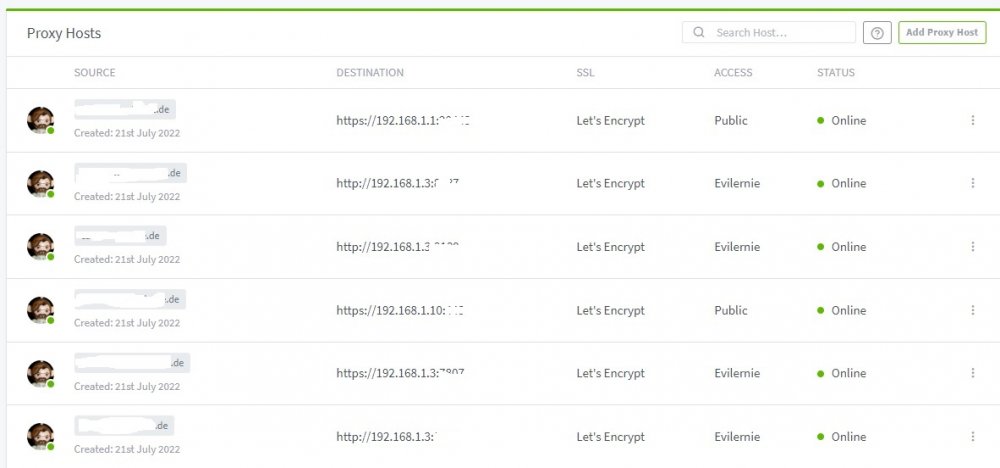
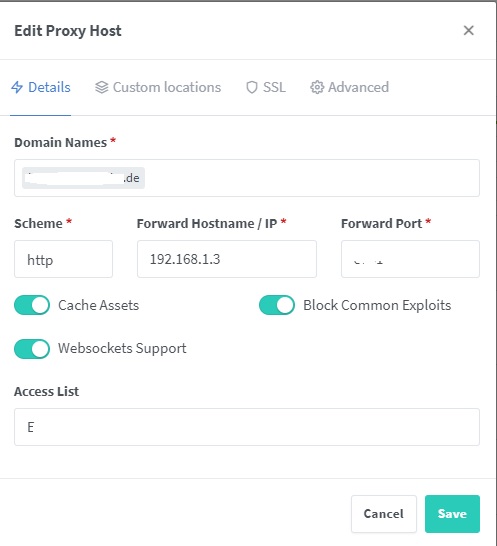
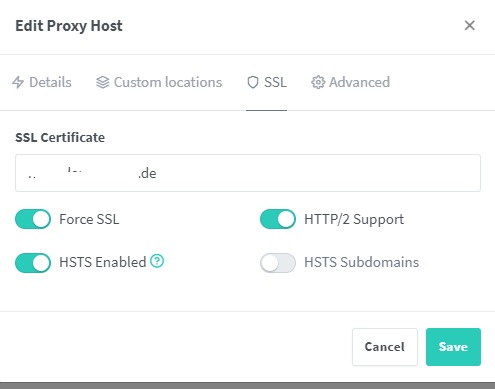
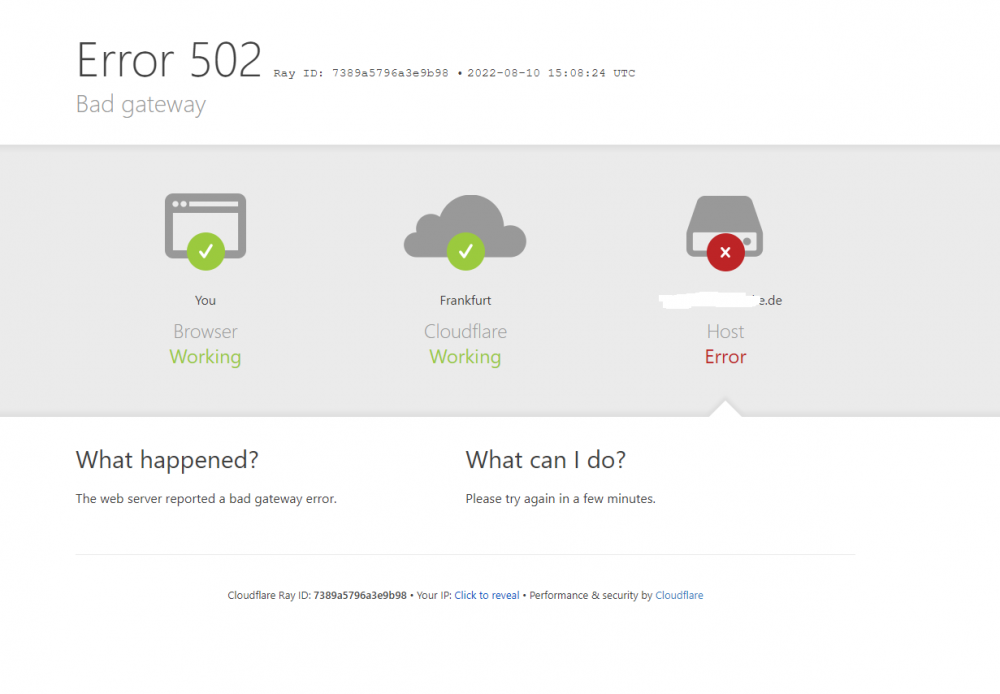
since yesterday a got problems with the internal routing and I don`t find the problem. Yesterday all was running very well, but today I can`t access the sites. I will get the Error since today but only the sites on the Unraid Server. Nothing changed at the Ports or so. Wenn I use my FritzBox, there is no problem and I can go there. Als things go to 192.168.1.3 are not working and I get the 502 Error. When I use the other sites (like 192.168.1.1 oder .10, that are other Server) it runs like befor. Like I said, yesterday was all okay. Today Error 503. Ping is possible and I got the right IP Where can the problem that I can´t come on my Dockers on the Unraid Server Update: I changed from br0 to bridge, changed the router and it worked again. But why not with bridge?
-
okay, bei Filmen eigentlich unwichtig, aber der schreibt dann das Datum mit rein und sortiert die sofort richtig ein. Wenn ich aber Serien rippe, dann habe ich da immer gerne den Folgennamen im File oder Unterordner für Staffeln. Das macht dann auch TimyMM direkt, so wie früher Filebot. So schaue ich nochmals drüber und kann sie dann verschieben.
-
Also 1. Problem ist, ich rippe auf die letzte HDD, die ist nur 4TB. Also muss ich da mal platz schaffen. Nach dem rippen bearbeite ich noch mit TinyMM, da Filebot leider nicht mehr kostenlos ist. Ist alles fertig, soll es auf das Film oder Serien Laufwerk gehen und von Plex indexiert werden
-
sorry, es geht um verschieben. Es sollen auf einem Order (z.B. Fertig) im Array X die Filme automatisch auf das Array Filme und da in den Ordner Y (z.B. Fertig) verschoben werden. Dieses würde ich gerne 1 x am Tag machen, würde reichen.
-
also ich würde einfach stumpf vom Laufwerk, wo ich die gerippten BluRays bearbeitet habe einfach in das fertige Array mit Filmen bekommen. Also würde gerne zu einer Zeit x den Inhalt vom Ordner x auf Array xy auf Array Film und dort Ordner y verschieben.
-
werde ich mir mal ansehen, danke

