





stev067
Members
-
Joined
-
Last visited
Everything posted by stev067
-
I am trying to manually edit some HA core files in the storage folder, but I'm having trouble accessing them due to this VM in a box setup. I've tried using the file editor add-on, but I can't use it while the application is stopped, and the changes just revert if I edit the files while HA is running. The files don't seem accessible through Krusader. Any tips? My goal is to delete an orphaned device, and this is my last resort.
-
And this seems to be resolved now. Thank you for your guidance in this thread and others.
-
I am getting "Umountable: unsupported or no filesystem" when trying to re-start the array, after removing and re-adding the pool. Edit: I found another forum post where it was suggested (by you) to re-format the drive at this point. I have done that, and am copying files back to the drive now. It defaulted to btrfs, and the capacity is back to normal. If docker and VM work fine after the file copy, all will be good.
-
Apologies, trying this now.
-
I am not intentionally using dedupe or any clones. How can I check and un-do that?
-
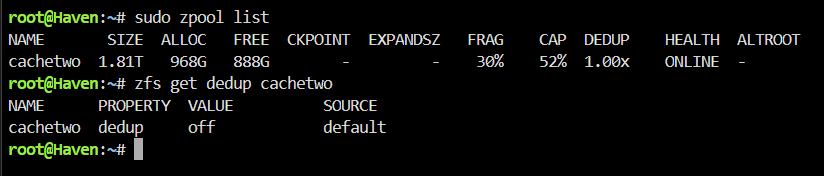
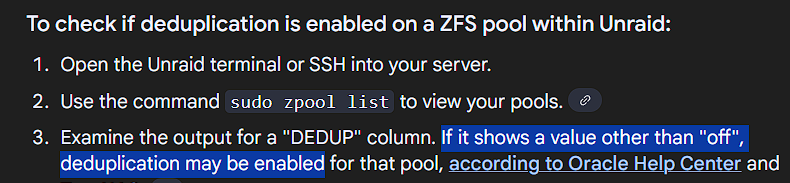
Is the below output strange, though? According to this guidance I found, the column 'DEDUP' should not exist if DEDUP is disabled for this pool. I really appreciate you looking at this. Whatever I did, if I caused this, I would just like to change it back to normal, where the capacity shows as 2TB.
-
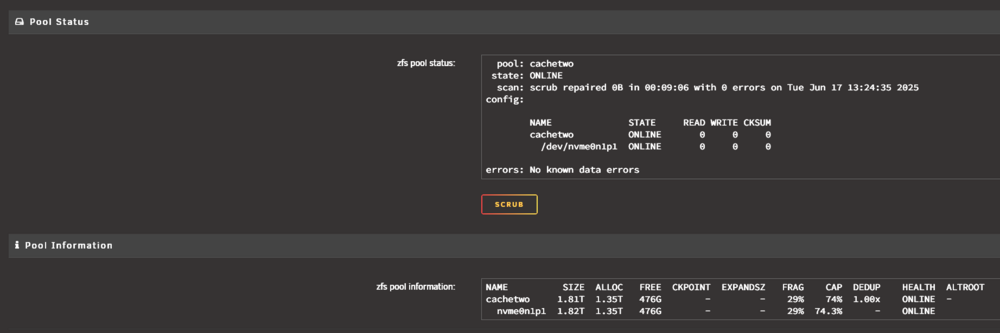
I'm not familiar with dedup, but I recognize seeing that word when I was investigating the drive (see attached image). It does seem that the 2.6TB reported capacity is coming from the sum of the allocations, which were both 1.30 earlier. Maybe a clue, I seem to remember seeing a button that "upgraded" the drive to ZFS or something to that effect, while I was investigating another issue recently, and cilcked it. There were no immediate problems after that though, so I'm not sure if that would be related.
-
cachetwo 1.91T 443G 144K /mnt/cachetwo cachetwo/Handbrake 1.28T 443G 1.28T /mnt/cachetwo/Handbrake cachetwo/Unsorted 11.7G 443G 11.7G /mnt/cachetwo/Unsorted cachetwo/appdata 5.78G 443G 5.78G /mnt/cachetwo/appdata cachetwo/backups 5.78G 443G 5.78G /mnt/cachetwo/backups cachetwo/domains 168G 443G 168G /mnt/cachetwo/domains cachetwo/isos 5.07G 443G 5.07G /mnt/cachetwo/isos cachetwo/media 10.4G 443G 10.4G /mnt/cachetwo/media cachetwo/public 152K 443G 152K /mnt/cachetwo/public cachetwo/system 24.4G 443G 24.4G /mnt/cachetwo/system cachetwo/personal 416G 443G 416G /mnt/cachetwo/personal
-
After more digging in the forums, I found this proposed solution. After performing the steps, the issue is not resolved, and I have attached new diags. haven-diagnostics-20250617-1717.zip
-
Hello - I have just 1 cache pool, with 1 cache drive in it. It is a 2TB NVMe drive. Today, I noticed that the main page is listing this as a 2.6TB capacity drive, with more than 2TB currently used. This may have something to do with an issue I experienced the other day, where this drive had become full without my knowledge, and it was preventing VMs and docker services from starting. I ended up having to manually transfer files off of this drive to another build, using terminal. I am not sure whether I bumped something during that process, or what. I also had recently updated to the latest Unraid. Thanks, Steve haven-diagnostics-20250617-1538.zip
-
Well I answered my own question. The dummy plug did resolve the issue.
-
Hello, I'm replacing the GT 710 in my rig with a Quadro T400, and had some questions. For now, I have only been passing through the GT 710 to a Windows 11 VM, so that I could use Moonlight / Sunshine, to interact with the VM from other devices in my house, with higher resolution. My thought with the T400 is that I could go up to 4k, and probably start using it for transcoding as well. With the GT710 I never needed any kind of dummy plug, but the T400 is acting similarly to my 6900xt, where, when I remote into that machine, if the connected monitor isn't turned on, or there isn't a dummy plug, interacting with the windows is all terrible. Do I need to grab a dummy plug for the T400?
-
They're 4-pin, here's the model: Noctua NF-A4x10 PWM. I can't remember or see where I have them plugged in, because the wires are tucked back, but I'm pretty sure I have them running full blast 24/7.
-
Thanks, I was able to locate a fairly recent backup on my cache drive, and take the plugins folder from it, and added it to the mix. Back to normal now, and activated the flash backups from unraid connect.
-
If I restore everything but the plugins folder, I can get it to boot up and access it. Any idea what in there might be causing problems?
-
Something in the config folder seems to be the problem, and it's not /ssh, /ssl, or network.cfg, because I overwrote the entire /config with that of my backup, minus those I mentioned, on a fresh flash, and that makes the difference between booting or not.
-
Is it supposed to re-create network.cfg? It's getting to the login line, but not creating a new network.cfg, and still no access to GUI over the network. tower-diagnostics-20230826-0441.zip
-
It was stopping and hanging at various lines depending on which boot method I chose, and never reaching a login line. I just did replace the config folder onto a clean boot, and was able to finally pull diagnostics. I can see that it boots to the login line, but am still unable to reach the GUI from my local network. I booted the clean flash once before replacing the config folder, and was able to reach the GUI, which tells me my network is fine, and the issue is on the server side. tower-diagnostics-20230825-1112.zip
-
Ok I was able to get a monitor going, forgot it had to be connected to a GPU instead of the mobo. Looks like it wasn't completing boot. Also looks like I don't have a flash backup on unraid connect. I know I set up backup somewhere. I put a clean install of unraid on the flash, and now have to try and figure out how to restore the old flash.
-
Sorry I know this is probably trivial... Just moved to a new house, and I had successfully connected my server and windows PC. I was able to access it via the local network for a few days. Then yesterday I noticed a warning in the upper right corner but didn't address it. At some point, I was no longer able to access the server GUI. I have rebooted the server and my PC, and power cycled the network switches. I'm able to ping it from my PC, but still cannot access the GUI. I'm having trouble connecting via SSH or even getting a display out to a monitor. Where should I start? I'm using the same address that has always worked.
-
Intel RES2CV240. I kinda addressed this earlier, so I'll just point to that previous post.
-
Just over 2 years in. Zero failures across the board. Very happy with the setup, and Handbrake has been churning nearly 24/7.
-
Strange...even after re-binding those and rebooting, I still get those errors, and they don't show as bound in system devices. And I haven't moved the GPU at all. Edit: Scratch that, I was able to get it to stick. Had to clear it out and reboot and then remake it. Now it's sticking. Edit 2: It's working now! Thanks for your help!
-
Here ya go, thanks for taking a look. haven-diagnostics-20230505-1231.zip
-
That doesn't seem to do the trick. In fact, the 'alias name' lines don't stick. I add them, update the VM, and when I go back they're gone. I've kept the slot and function of the sound card as you and Hulk put it though, because apparently I missed that. Still getting the code 43 though.


