





stev067
Members
-
Joined
-
Last visited
Everything posted by stev067
-
Hey! So I have one of those IR thermal temp guns where you just point it. This one. I'm not sure if there is an onboard sensor on the LSI cards, but I know that the Dynanix system temperature plugin didn't see one. Regarding the SATA ports, I might not have really considered it haha. For me, it was sort of an exercise in learning about HBA's and expanders, wanting to have the IO to expand to another enclosure in the future, if necessary. Also I didn't really like the idea of having HDDs in the same array but on mixed interfaces. Cleanest to keep everything on the same single PCIe slot.
-
Hey yeah I didn't get a pic of the dock, but it's in the front top slot. This blocks the top 2 HDD tray slots, which I don't need yet. I haven't been able to get the dock to work with hot plugging. A drive is only recognized if it was detected on boot, which kind of makes it pointless to me. Maybe it can be fixed but I haven't needed it yet. Probably in the long term, I will end up taking this out, so I can add 2 more drives to the top trays.
-
Just wanted to report back. I tried playing with firewall rules, and got frustrated with it. I plugged in an old laptop to one of the VLAN ports, and verified that even when I set the IP to the same subnet as the rest of my network, it does not see anything else there, so it is truly limited to what's plugged into the VLAN. That was really my main concern, and I decided it wasn't worth the time I was spending to try and limit port IO. If someone were to plug into the ethernet cable powering one of my cameras, all they would maybe be able to attack is that VM and nothing else.
-
Just to follow up on my issue, I tried changing the "niceness" to give this docker highest priority and that didn't make a difference. I ended up dedicating fewer cores, and now those remaining cores are going in the 90%+ range. So I guess I have more CPU than handbrake knows what to do with?
-
Huh thanks. Is there anyone with a ryzen cpu who can confirm I should be getting higher CPU utilization than 60-80% per core? Edit: Doesn't seem to have anything to do with temps or my cooler. When I run cinebench, it pegs all my cores at 100% and temps hold around 84c. It shouldn't have anything to do with storage speeds either, since Handbrake is reading from and writing to an nvme drive.
-
So but when you run the handbrake docker, what do the core utilizations look like?
-
Are you talking 80-90% cpu usage, or 80-90C temps? I'm more wondering if it's normal that the cores aren't maxing out their potential. My cooler is a corsair h115i people say it's good for this CPU.
-
Hey guys, Firstly thank you for creating and maintaining this docker. I upgraded my CPU to a ryzen 5950x to speed up a tens-of-terabytes size reduction project using handbrake. I'm pinning 14 of the 16 cores to this container, to leave the remaining 2 for my blueiris VM. What I'm finding, is that the cores all hover around 60-85% and rarely go into the 90%+ range, and really never peg 100%. I have an AIO on my CPU, and I am seeing the temp usually around 81C. I'm really just wondering if what I'm seeing is normal. Should I be looking into unlocking the unused processing power, or is this typical behavior? Thanks.
-
Alright thanks for all your help. I will research windows firewall rules.
-
Ok I used wireshark, and it looks like the only communication on br0.101 is between port 1935 of the camera IP, to another single port of the VM IP (both directions). Can I create one rule that allows communication between these 2 ports while blocking everything else on this adapter? Do I have to delete/change any of the existing rules? Maybe you have an example what this looks like in the firewall rules.
-
Oh I didn't realize I can add a second virtio adapter on the same VM. This sounds like the way to go. When you say apply firewall rules, you mean within the windows vm? What kind of rules would you suggest? Edit: Ok I got that setup working. I'm really pleased with this. It's basically what I was trying to set up. Thanks both of you for your help. I'm still curious what you recommend for firewall settings, because I don't know what an attacker would be able to do, given this setup.
-
Thanks for taking a look. This networking stuff is all wizardry to me. As for the image, there is another switch between the router and this new switch, but I don't have it set up to do anything special. So the image is accurate besides that. This whole VLAN thing has been very frustrating to set up, and I've just disabled it for now. I'm having a hard time understanding the whole Tag vs Untag, vs non-member thing, and PVID settings. I'd rather not replace my router just for this, or add a second NIC. Is there any way I can manage the traffic from within the VM itself? Otherwise, is there some medium level of safety I can accomplish with what I have, while still being able to network with blue iris?
-
No I tested when the cameras and VM were on the same subnet as the rest of the network, and the cameras were unreachable from another PC on the same subnet. Wasn't that the point of the VLAN? My concern is, if the cameras can reach the VM, and the VM can reach the network, can the cameras somehow reach the network via the VM?
-
Ok so if I change the subnet on the VM and cameras back to match the rest of the network, the VM is no longer isolated. Is there a firewall rule I can specify on the VM that will prevent traffic from the camera ports to the rest of the network besides just the VM?
-
The 10G NIC actually just goes directly to my other computer which also has 10G NIC. I don't have a 10G switch, so it's just p2p. Also, yes my router probably does not have VLAN. It sounds like a lot of work to un-do all of what I just did, especially since I just bought this VLAN switch for this purpose. I don't really mind using VNC for interacting with Blue Iris, but it would be nice if I had access to the HDD I'm passing in to that VM, outside of the VM. Any idea if that's possible?
-
Yep I am only able to access the VM by VNC currently. That might be kind of a problem, because I have no way of viewing the Blue Iris clips, except in VNC, since there is no shared drive and no internet connection. I have to learn more about what you said here:
-
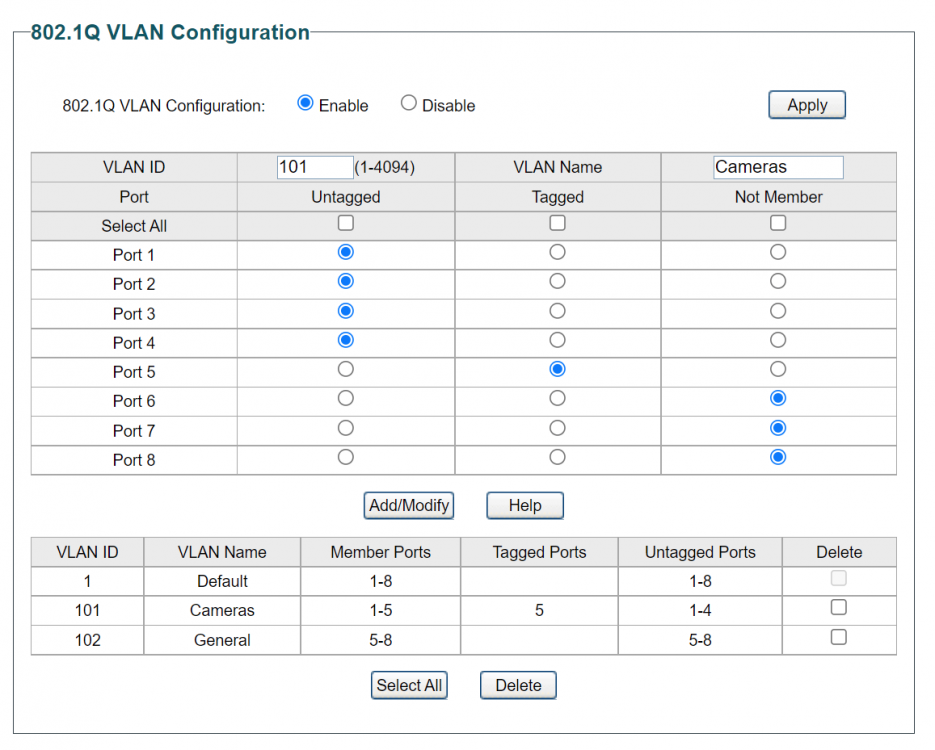
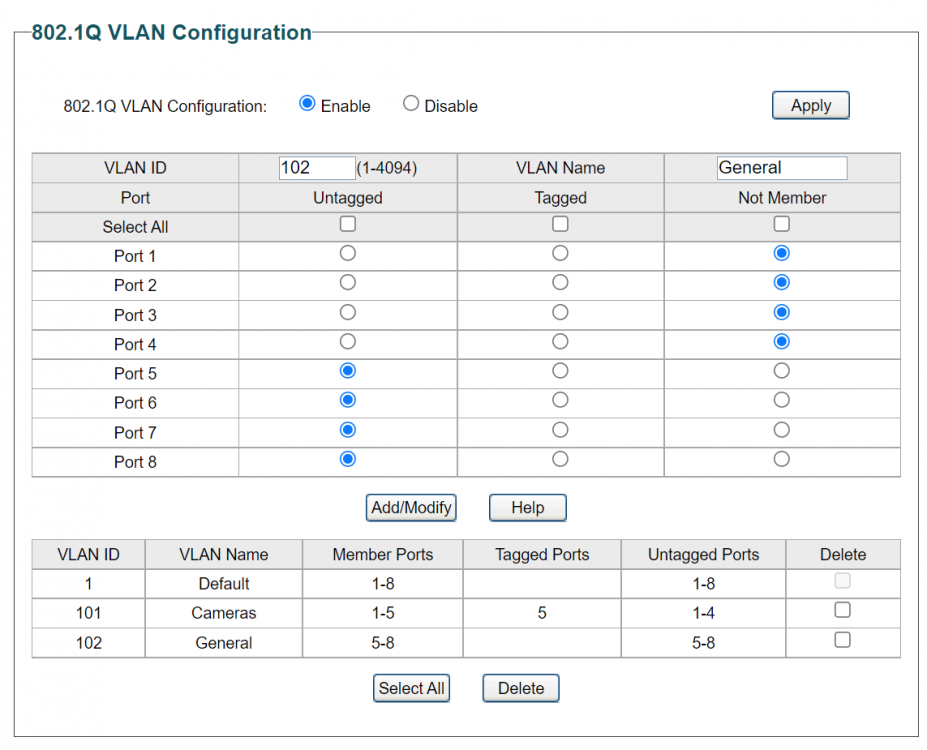
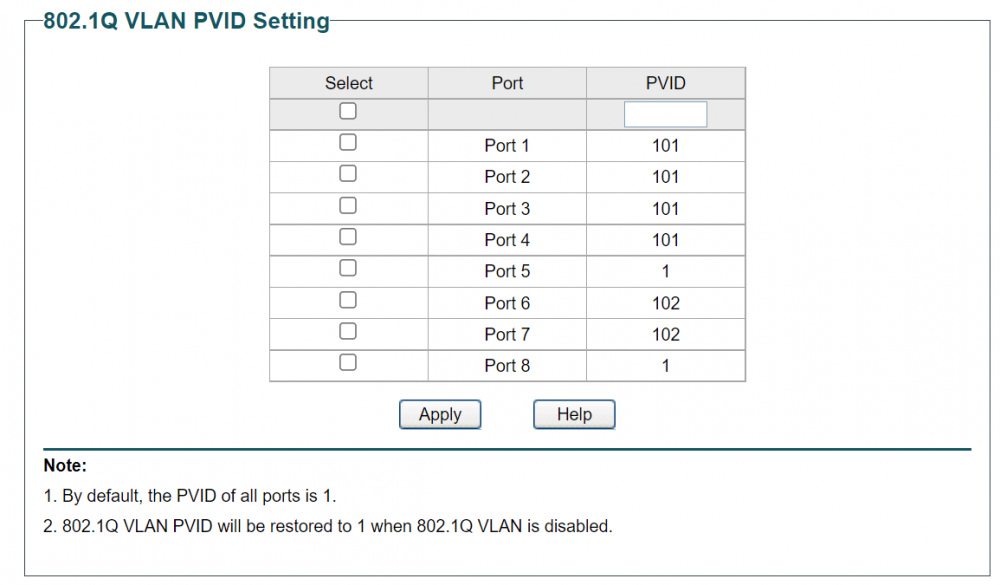
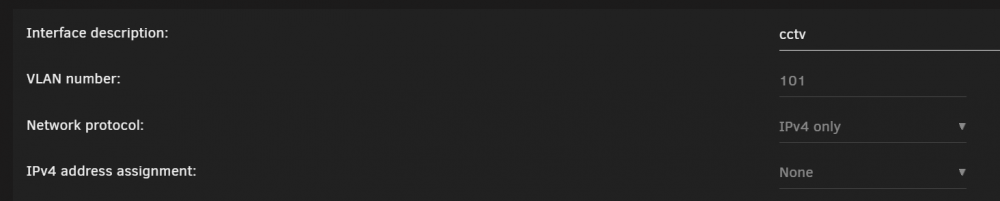
Here are the details of how I did this... The switch is a TL-SG108PE. I'm not certain I did this right. It seems to accomplish what I set out to do, but I am NOT an expert on networking by any means. Ports 1-4 on the switch are for the cameras. Port 5 is my server. Ports 6-7 are empty but will be general purpose. Port 8 connects to the rest of my network via another switch. VLAN group 101 contains the 4 camera ports untagged, as well as the server port tagged. VLAN group 102 contains the server port, the other general ports, and the larger network port untagged. Then here are the PVID settings: Then on my server, I enabled VLAN in network settings, and created 101 (apparently it was important that the number you create matches the VLAN number from the switch. I wanted the VM to be connecting to the VLAN that only includes the cameras and the server, and not the one with access to the rest of the LAN. Hence, 101 per the 1st image above. Then on the VM settings, I change the network bridge to br0.101, which I had just created. Last, in the VM, I set a static IP in Windows, which is different from the rest of my network (ie 192.168.10.X instead of 192.168.1.X). I also changed the IPs of the cameras so they would be on the same group (also 192.168.10.X). Now the VM and cameras seem to be totally isolated from the rest of the network (including the rest of the Unraid server the VM runs in), but are able to access eachother. Any comments/pointers?

-
Hey guys, I have moved my Unraid server onto a new network switch, with VLAN + PoE, so that I can add 4 PoE cameras that I will access through a VM on the server, but are otherwise isolated from my network. Since the camera ends are basically ethernet cables dangling outside of my house, what settings can I use on the Unraid side, so that only the VM I have running Blue Iris is able to communicate with the cameras, so that the server isn't exposed. I enabled VLAN in network settings, and created a BR0.1, but I don't know what to do from here. The way I have it now, I've confirmed I can ping and access a camera from the server, and not from another PC elsewhere on my network, so the cameras are at least currently isolated to this switch. Thanks I appreciate any advice. Edit: I think I made some progress. Now the camera is not pingable from anywhere on my network, except directly from the VM I want it to be used in. My only concern, is that now the VM's IP is pingable from everywhere. Anyone have experience in this area because I'm really stumbling through it... Edit #2: Ok I think I got it the way it should be now. From other devices on the network, I can ping the VM, and not the camera. From within the VM, I can't ping anything except the camera. Seems safe enough but I would still like some input from an expert. I will likely write up exactly what I did, to have someone check my work, and because I couldn't find a single guide for this.
-
That's what I was looking for. Will look into hooks. Thank you.
-
No need to set up a skeleton folder structure on the output side. If you set the "Output Subdirectory" in the template to "SAME_AS_SRC," it does that for you. My concern is, when I put these processed files back into my always-growing library, how do I differentiate between files I've processed before or not. Right now I'm leaning towards just starting a new library for processed files, and slowly migrating everything as I process them.
-
Yep UR docker. Well I don't think I did anything out of the ordinary in the template. Let me know if you were wondering about one specific part. I set up a share that is cache only, on an nvme drive, with an inbox and outbox. That is working fine. I just dropped a subfolder of ~40 videos, 100GB, in the inbox and I'm letting it run now. Once it finishes, it would be nice if I could just put them back into my library without having to keep track of if they've been processed yet or not. For now, if I don't hear of anything better, it sounds like I will be creating a new library and only putting processed files there. It should eventually fully overtake the existing one, to where I'm only processing new files before adding them to this new library.
-
Hey all - I'm just beginning to start converting a large movie collection. I wanted to consider a way of differentiating new un-converted files from those that have already been converted. I tested by running the same file through twice, and was disappointed to see the file being processed again the 2nd time around. Is there a setting to prevent this from happening? Or is there at least a way to have the names of all processed files appended with some kind of tag like adding "-265" to the end like this?: Movie.mp4 -> Movie-265.mkv I guess another option would be to just start a new folder structure for everything that has been processed, and have it slowly overtake the unprocessed stuff. How is everyone else handling this? Thanks!
-
Thanks that's what I figured. I guess I could do a comparison when doing a turbo write too. I'll leave the dual link since I have it, but might be adding a 8087 to 8088 card to expand to an additional drive enclosure in the future. I think my personal max capacity on this case will be 16 drives.
-
Since I can't stop making upgrades, I figured I would keep this thread updated. I decided the best way of beefing up my system was to replace my 3600xt with a 5950x. So I'm running 16 cores now. Part of the reasoning was I added a new windows VM that will be dedicated to running Blue Iris. Once the new PoE/VLAN switch comes, I will be setting up some perimeter cameras on my house which will record to a 4TB WD purple HDD which I plan to add as an unassigned drive, passed into the VM. I also updated my mobo BIOS yesterday around 2:30 PM, and spent the next 7 hours trying to boot back in. The problem just ended up being one of the BIOS settings I was missing. Always save or write down your important BIOS settings, because they don't persist after an update.
-
Hmm I'm not seeing any performance gain from dual-link, when testing with diskspeed. Looks like this only tests one drive at a time though. Wouldn't the benefit of the dual-link bandwidth be more for simultaneous disk RWs?


