






Techspin
Members
-
Joined
-
Last visited
-
Oh snap, missed this. Thanks so much for the fast answer!
-
I've convinced my friend to get into Unraid- we've built and tested the NAS, all good, and the trial has run out. We plan to get the Unleashed level with one year of updates, but is there a path to upgrade to Lifetime down the road? Would we be able to pay the difference if we need this in the future? Thanks! ☺️
-
Disabling Secure boot worked for my new MSI PRO B760-P DDR4 II x i3-12100.
-
Oh okay, I didn't know that could be a thing, thanks for that! I'll sleep easier tonight haha. I checked but didn't see any errors on the main page. Will check again tomorrow. Hope the notification bug gets fixed soon... very worrying for large amounts of data! Thanks again for the super quick reply 👍
-
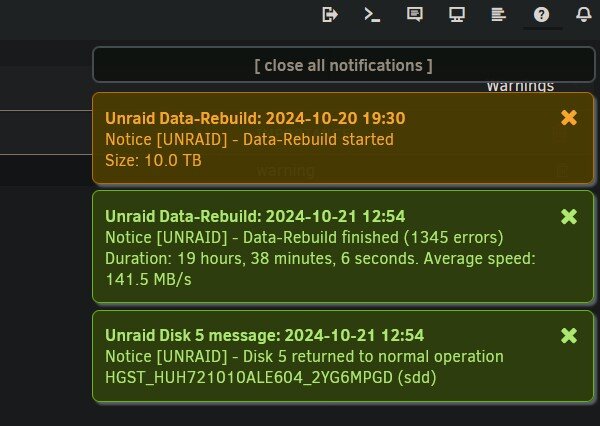
Hi all, just wondering if I should be worried about data integrity after replacing a failing 8TB Seagate (of course, lol) Done a quick SMART test on all drives (all enterprise except failed one), all seemed fine. I'll have to attempt extended tests at a later date. 28TB sized NAS is only on for about 24 hours a month. Unraid 6.12.11 with 2x HGST 10TB parity. Disk3 Toshiba 6 TB, Disk 5 HGST 10TB (new drive), Disk 6 and 7 Toshiba 6 TB. Intel i3-7100, Gigabyte GA-Z170MX-Gaming 5, Kingmax 8GB DDR4-2400, 256GB XPG SX8200 m.2 cache drive Using a Fujitsu D2607-A21 GS 1 dual SAS to SATA PCIe card. Should I be worried about error corruption? I have a secondary NAS backup in case I need to restore from that, also. Did a search and read similar user help requests, so I downloaded and attached Diagnostics. I had a quick look through logs but couldn't identify anything? Any help would be greatly appreciated. Thanks in advance for any help! unraid-diagnostics-20241021-2331.zip
-
Had to really search the documentation to find the link, which had changed since the first help link, here: https://docs.unraid.net/unraid-os/manual/storage-management/#rebuilding-a-drive-onto-itself thanks you @itimpi for pointing me to the walkthrough!
-
Thanks @warpspeed for the lead. However, Tailscale is an install solution with limited users, it doesn't appear to be as on-par and client friendly as my 15(!) year old Synology DS209 which, after a little setup, was simply a URL and password. Unraid is amazing, but is challenging compared to an AIO box, basic functionality like downloading plugins (actually not plugins, but workaround Community Applications, click to get access...) and easy remote connectivity should be in the core from the get-go.
-
You must also be in Advanced view to even see the entry. It would be great if support for fixing issues could be given in clear step-by-step instructions readable by less tech-savvy users, as the current link is not helpful enough for me personally without this instructive post from @taflix Thank you buddy!
-
Need a far easier remote connection setup. I need to be able to access my unraid server remotely, and also give clients login and upload capability, which is beyond my abilities with unraid but a cinch with something like an Asustor unit. Something like a 'simple mode' setup would really be awesome. 😀
-
In the Network Interface, it's really difficult to see that 'General Info' is actually a drop-down menu, as it doesn't follow standard GUI design of a rectangle box with a down arrow... just the arrow. I had to search to see if there was a way to see a graph, and stumbled across the answer on Page 3 of this topic. Also noticed that you can change from bond0 to eth0. My humble suggestion, could we make this more prominent, perhaps by using standard GUI formatting? Thank you for your consideration. 🙂
-
Any instructions/documentation to make things easier for the end user is always better, especially if that can be -inside- the software itself. We're covering unRaid for a NAS-building episode, and how to back up an array is actually pretty daunting even with the Rsync setup- how about an easy backup to local array button? I'm no good with Linux at all, so simplifying backups/making local backups easy would be great for the end user. Personally, we'll use some Win10 sync software over the network with a GUI, it won't operate at on-server speeds but it's a cinch to use. Hopefully the unRaid team can look at this, and this functionality can be improved going forward! -Rick


