bristopher
Members
-
Joined
-
Last visited
-
Thank you!! Looking forward to the update and using this!! My Unraid server always corrupts the flash drive every once and awhile and I've been dying for an all in one solution to rebuild Unraid just in case! Edit: v1.0.3 update fixed it, thank you great work!
-
Love this idea! Unfortunately after initial run with practically default config I get "Docker not available", any ideas? (I don't use Unraid default docker image format but the docker folder format if that helps) Setting up cron job with schedule: 0 2 * * 0 Creating initial configuration... Starting Unraid Config Guardian Web GUI on http://0.0.0.0:8080 Access via: http://your-unraid-ip:7842 INFO: Started server process [1] INFO: Waiting for application startup. INFO: Application startup complete. INFO: Uvicorn running on http://0.0.0.0:8080 (Press CTRL+C to quit) WARNING: Invalid HTTP request received. WARNING: Invalid HTTP request received. WARNING: Invalid HTTP request received. WARNING: Invalid HTTP request received. Docker not available, using mock data: 404 Client Error for http+docker://localhost/v1.47/images/a28adb3c8e0c7cec55c71b42f244a5d12b4391950845a524cfdcdf20d302a3ab/json: Not Found ("No such image: sha256:a28adb3c8e0c7cec55c71b42f244a5d12b4391950845a524cfdcdf20d302a3ab")
-
Struggling to get ownCloud to work with my NginxProxyManager-Official setup, not sure what else to try. I've searched the git repo and tried 2 different solutions that haven't worked out and reinstalled ownCloud multiple times to ensure I have a clean install (deleted local folders as well). ownCloud nginx logs: The top entry is over my NPM instance https://owncloud.domain.domain.org and it displays nothing inside "All Files" in ownCloud ui or it says "You don't have permission to upload or create files here" (initially it said no permission for awhile but now it just always just has a blank 'All Files' page) The bottom entry is when I login over the local connection at https://192.168.1.210 and it successfully shows my files in "All Files" 192.168.1.206 - - [23/Jan/2025:13:24:27 -0000] "PROPFIND /remote.php/dav/files/null/ HTTP/1.1" 404 6571 "-" "{UserAgent}" 192.168.1.235 - - [23/Jan/2025:13:21:56 -0000] "PROPFIND /remote.php/dav/files/testuser/ HTTP/1.1" 207 2979 "-" "{UserAgent}" 192.168.1.206 is NginxProxyManager-Official 192.168.1.235 is my local pc 192.168.1.210 is owncloud ownCloud config.php lines I changed: 'trusted_domains' => array ( 0 => '192.168.1.210', 1 => 'owncloud.domain.domain.org', 2 => '192.168.1.206', ), 'overwrite.cli.url' => 'https://192.168.1.210', As for my NPM instance I disabled "Block Common Exploits" as I saw someone said it gave them an error and that's it. It uses this proxy host below and everything is default except my cert and "Cache Assets". https://192.168.1.210:443 Other than that my NPM install is a little special (that might be the issue) so I could get it to work with AdGuard. It's on bro with its own IP and then in the post-args I add this so it can communicate to my custom network docker network connect customentworkname Nginx-Proxy-Manager-Official Anyone ran into a similar issue or know a possible solution; anything is greatly appreciated!
-
interesting I found a backup of my working NPM folder and now are also having the same issues as everyone, but I use DuckDns and can't set proxy status or anything and stuck looping these errors and can't access GUI because of it oh geez. Trying to figure out how to remove my cert without the GUI Edit: had to use this to link to fix it and use new cert which I got using code below https://github.com/NginxProxyManager/nginx-proxy-manager/issues/396#issuecomment-2409082914 docker exec -it Nginx-Proxy-Manager-Official /bin/sh certbot certonly --webroot -w /data/letsencrypt-acme-challenge -d yourdomain.com or this command certbot certonly --manual --preferred-challenges=dns -d yourdomain.com then using this to fix all the errors as seen here https://github.com/NginxProxyManager/nginx-proxy-manager/issues/4060#issuecomment-2478182722 for file in /mnt/user/appdata/Nginx-Proxy-Manager-Official/data/nginx/proxy_host/*.conf; do sed -i 's/listen 443 ssl http2;/listen 443 ssl;\nhttp2 on;/g' "$file" done and fixed it all but the database still wiped itself womp womp oh well atleast I can create certs again ❯ Starting nginx ... nginx: [warn] the "listen ... http2" directive is deprecated, use the "http2" directive instead in /data/nginx/proxy_host/10.conf:14 nginx: [warn] the "listen ... http2" directive is deprecated, use the "http2" directive instead in /data/nginx/proxy_host/10.conf:15 nginx: [warn] the "listen ... http2" directive is deprecated, use the "http2" directive instead in /data/nginx/proxy_host/13.conf:19 nginx: [warn] protocol options redefined for 0.0.0.0:443 in /data/nginx/proxy_host/13.conf:19 nginx: [warn] the "listen ... http2" directive is deprecated, use the "http2" directive instead in /data/nginx/proxy_host/13.conf:20 nginx: [warn] protocol options redefined for [::]:443 in /data/nginx/proxy_host/13.conf:20 nginx: [warn] the "listen ... http2" directive is deprecated, use the "http2" directive instead in /data/nginx/proxy_host/14.conf:19 nginx: [warn] the "listen ... http2" directive is deprecated, use the "http2" directive instead in /data/nginx/proxy_host/14.conf:20 nginx: [warn] the "listen ... http2" directive is deprecated, use the "http2" directive instead in /data/nginx/proxy_host/15.conf:19 nginx: [warn] the "listen ... http2" directive is deprecated, use the "http2" directive instead in /data/nginx/proxy_host/15.conf:20 nginx: [warn] the "listen ... http2" directive is deprecated, use the "http2" directive instead in /data/nginx/proxy_host/16.conf:14 nginx: [warn] the "listen ... http2" directive is deprecated, use the "http2" directive instead in /data/nginx/proxy_host/16.conf:15 nginx: [warn] the "listen ... http2" directive is deprecated, use the "http2" directive instead in /data/nginx/proxy_host/17.conf:14 nginx: [warn] the "listen ... http2" directive is deprecated, use the "http2" directive instead in /data/nginx/proxy_host/17.conf:15 nginx: [warn] the "listen ... http2" directive is deprecated, use the "http2" directive instead in /data/nginx/proxy_host/18.conf:19 nginx: [warn] the "listen ... http2" directive is deprecated, use the "http2" directive instead in /data/nginx/proxy_host/18.conf:20 nginx: [warn] the "listen ... http2" directive is deprecated, use the "http2" directive instead in /data/nginx/proxy_host/25.conf:19 nginx: [warn] the "listen ... http2" directive is deprecated, use the "http2" directive instead in /data/nginx/proxy_host/25.conf:20 nginx: [warn] the "listen ... http2" directive is deprecated, use the "http2" directive instead in /data/nginx/proxy_host/25old.conf:19 nginx: [warn] the "listen ... http2" directive is deprecated, use the "http2" directive instead in /data/nginx/proxy_host/25old.conf:20 nginx: [warn] the "listen ... http2" directive is deprecated, use the "http2" directive instead in /data/nginx/proxy_host/26.conf:19 nginx: [warn] the "listen ... http2" directive is deprecated, use the "http2" directive instead in /data/nginx/proxy_host/26.conf:20 nginx: [warn] the "listen ... http2" directive is deprecated, use the "http2" directive instead in /data/nginx/proxy_host/28.conf:19 nginx: [warn] the "listen ... http2" directive is deprecated, use the "http2" directive instead in /data/nginx/proxy_host/28.conf:20 nginx: [warn] the "listen ... http2" directive is deprecated, use the "http2" directive instead in /data/nginx/proxy_host/7.conf:14 nginx: [warn] the "listen ... http2" directive is deprecated, use the "http2" directive instead in /data/nginx/proxy_host/7.conf:15 nginx: [warn] the "listen ... http2" directive is deprecated, use the "http2" directive instead in /data/nginx/proxy_host/8.conf:14 nginx: [warn] the "listen ... http2" directive is deprecated, use the "http2" directive instead in /data/nginx/proxy_host/8.conf:15 nginx: [warn] the "listen ... http2" directive is deprecated, use the "http2" directive instead in /data/nginx/proxy_host/9.conf:19 nginx: [warn] the "listen ... http2" directive is deprecated, use the "http2" directive instead in /data/nginx/proxy_host/9.conf:20 nginx: [emerg] cannot load certificate "/etc/letsencrypt/live/npm-5/fullchain.pem": PEM_read_bio_X509_AUX() failed (SSL: error:0480006C:PEM routines::no start line:Expecting: TRUSTED CERTIFICATE) ❯ Starting nginx ...
-
I can ping my subdomain at Duckdns from unraid, but the NPM container doesn't have nmap/ping/dig. There's also no config at Duckdns other than your public ip and sub domain which is correct (and haven't changed) and also updates with a duckdns container I also run on unaird. Really stumpted Edit: did what it said in the link below and also started adding duckdns dns challenge, not sure which fixed it, thanks everybody! https://community.alarmiator.de/t/lets-encrypt-zertifikat-wird-von-nginx-proxy-manager-nicht-aktualisiert/380/3 Source: https://github.com/NginxProxyManager/nginx-proxy-manager/issues/396
-
ah darn Just tried a completely new instance and it still can't find my domain (tested it using nmap and it's up), I can't image what's wrong, recently moved drives/data and it might've fragmented NPM but not sure why the DNS isn't working now with a clean install. The port forwarded ports for NPM seem correct with 443-443 and 80-80 with my docker assignment below I can't think of what could go wrong 192.168.1.XXX:443/TCP192.168.1.XXX:443 192.168.1.XXX:80/TCP192.168.1.XXX:80 192.168.1.XXX:81/TCP192.168.1.XXX:81 [12/12/2024] [11:14:08 AM] [SSL ] › ℹ info Completed SSL cert renew process [12/12/2024] [11:14:52 AM] [Express ] › ⚠ warning invalid signature [12/12/2024] [11:15:24 AM] [SSL ] › ℹ info Testing http challenge for XXX.duckdns.org [12/12/2024] [11:15:34 AM] [SSL ] › ℹ info HTTP challenge test failed for domain XXX.duckdns.org because error was returned: Invalid domain or IP
-
I'm having this same error as well, but didn't change anything regarding DNS. Nginx just randomly also nuked itself and looks like a completely fresh install after probably last time I just restarted docker, so very odd so I tried creating new files and just copying my proxy_host folder but now I get this error and don't know how to move forward. When I even try to fresh start and create a new proxy it can't connect to my domain, so bad DNS makes sense, but I don't know where or what to change. Do I have to just change Nginx DNS server? Thank you for any help! Nginx DNS below: [1;32mdocker-bfcb45c5a4a9:/app]# cat /etc/resolv.conf nameserver 127.0.0.11 options ndots:0 ❯ Starting backend ... ❯ Starting nginx ... [12/11/2024] [11:38:39 AM] [Global ] › ℹ info Using Sqlite: /data/database.sqlite [12/11/2024] [11:38:40 AM] [Migrate ] › ℹ info Current database version: none [12/11/2024] [11:38:40 AM] [Setup ] › ℹ info Logrotate Timer initialized [12/11/2024] [11:38:40 AM] [Global ] › ⬤ debug CMD: logrotate /etc/logrotate.d/nginx-proxy-manager [12/11/2024] [11:38:40 AM] [Setup ] › ℹ info Logrotate completed. [12/11/2024] [11:38:40 AM] [IP Ranges] › ℹ info Fetching IP Ranges from online services... [12/11/2024] [11:38:40 AM] [IP Ranges] › ℹ info Fetching https://ip-ranges.amazonaws.com/ip-ranges.json [12/11/2024] [11:38:40 AM] [IP Ranges] › ℹ info Fetching https://www.cloudflare.com/ips-v4 [12/11/2024] [11:38:40 AM] [IP Ranges] › ℹ info Fetching https://www.cloudflare.com/ips-v6 [12/11/2024] [11:38:40 AM] [SSL ] › ℹ info Let's Encrypt Renewal Timer initialized [12/11/2024] [11:38:40 AM] [SSL ] › ℹ info Renewing SSL certs expiring within 30 days ... [12/11/2024] [11:38:40 AM] [IP Ranges] › ℹ info IP Ranges Renewal Timer initialized [12/11/2024] [11:38:40 AM] [Global ] › ℹ info Backend PID 157 listening on port 3000 ... [12/11/2024] [11:38:40 AM] [SSL ] › ℹ info Completed SSL cert renew process [12/11/2024] [11:38:43 AM] [Express ] › ⚠ warning invalid signature [12/11/2024] [11:39:29 AM] [SSL ] › ℹ info Testing http challenge for XXX.duckdns.org [12/11/2024] [11:39:40 AM] [SSL ] › ℹ info HTTP challenge test failed for domain XXX.duckdns.org because error was returned: Invalid domain or IP [12/11/2024] [11:40:47 AM] [Global ] › ⬤ debug CMD: /usr/sbin/nginx -t -g "error_log off;" [12/11/2024] [11:40:47 AM] [Nginx ] › ℹ info Reloading Nginx [12/11/2024] [11:40:47 AM] [Global ] › ⬤ debug CMD: /usr/sbin/nginx -s reload [12/11/2024] [11:40:53 AM] [SSL ] › ℹ info Requesting Let'sEncrypt certificates for Cert #1: bigweld.duckdns.org [12/11/2024] [11:40:53 AM] [SSL ] › ℹ info Command: certbot certonly --config '/etc/letsencrypt.ini' --work-dir "/tmp/letsencrypt-lib" --logs-dir "/tmp/letsencrypt-log" --cert-name "npm-1" --agree-tos --authenticator webroot --email '[email protected]' --preferred-challenges "dns,http" --domains "XXX.duckdns.org" [12/11/2024] [11:40:53 AM] [Global ] › ⬤ debug CMD: certbot certonly --config '/etc/letsencrypt.ini' --work-dir "/tmp/letsencrypt-lib" --logs-dir "/tmp/letsencrypt-log" --cert-name "npm-1" --agree-tos --authenticator webroot --email '[email protected]' --preferred-challenges "dns,http" --domains "XXX.duckdns.org" [12/11/2024] [11:41:04 AM] [Nginx ] › ⬤ debug Deleting file: /data/nginx/temp/letsencrypt_1.conf [12/11/2024] [11:41:04 AM] [Global ] › ⬤ debug CMD: /usr/sbin/nginx -t -g "error_log off;" [12/11/2024] [11:41:04 AM] [Nginx ] › ℹ info Reloading Nginx [12/11/2024] [11:41:04 AM] [Global ] › ⬤ debug CMD: /usr/sbin/nginx -s reload [12/11/2024] [11:41:04 AM] [Express ] › ⚠ warning Saving debug log to /tmp/letsencrypt-log/letsencrypt.log Some challenges have failed. Ask for help or search for solutions at https://community.letsencrypt.org. See the logfile /tmp/letsencrypt-log/letsencrypt.log or re-run Certbot with -v for more details.
-
Been busy so I just barely got around to it and yep that fixed it. It let me create a flash backup on the spot and I recreated the flash using Unraid USB Creator and I finally don't get that sqlite error. Thanks!
-
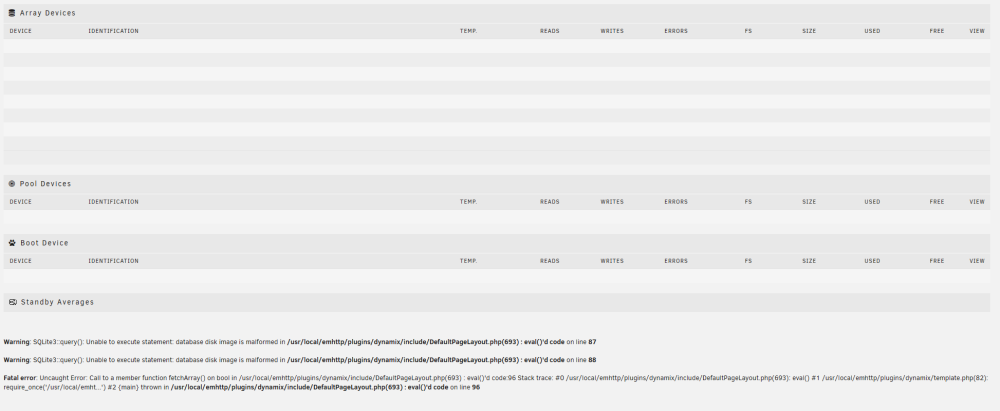
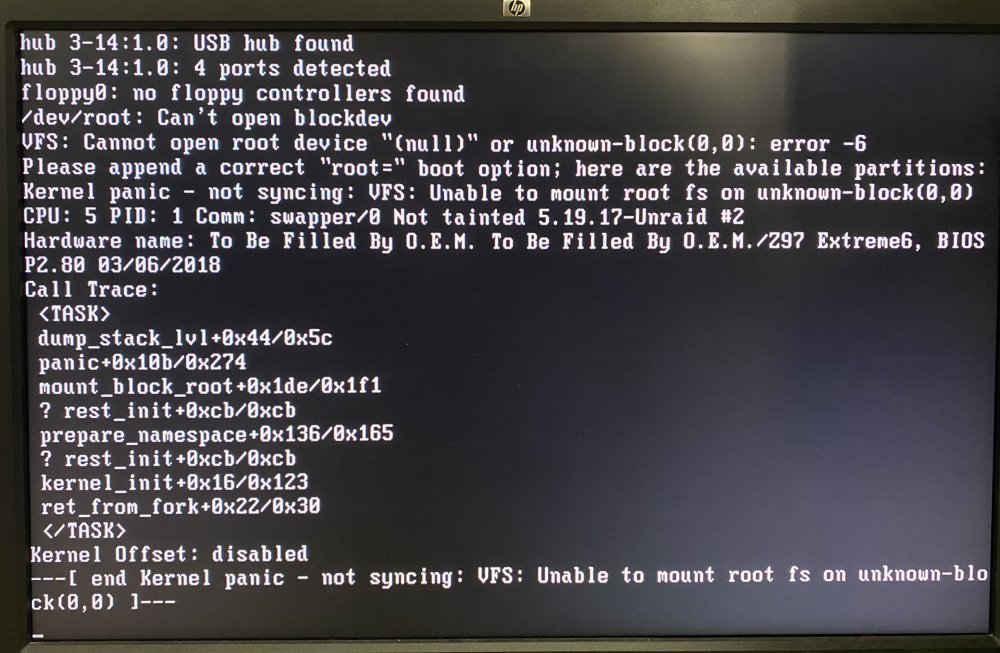
Opened up my Unraid dashboard to this one day and not sure how to fix it, not sure when it occurred exactly because I haven't opened the main page in a while, so not sure how to include logs. I tried to search it up but couldn't find anything too relevant. I've included a picture of my Unraid "Main" page and the error message below. I'm all ears for any ideas to what's happened and where to go from here, thank you! *Update: I just rebooted it and now the machine just boots to a black screen that says "SYSLINUX 6.03 EDD" and rebooted again and now says there's no boot device (should've made a backup before rebooting it smh). I unfortunately only have a Flash backup from 3 months ago so I was wondering if there's anything I could touch on the usb to fix this (but I doubt). *Update 2: I haven't moved the Flash drive in months but for some reason I moved it from a USB 3.0 port to USB 2.0 and it boots but I get a kernel panic *Update 3: Restarted it and now It finally boots again and I'm back with the main page sqlite error, I'm mainly leaving this up for others in a similar situation and also because I'm sure if I reboot it might just kernel panic again because there's something on the flash I have to change.