





CyrIng
Members
-
Joined
-
Last visited
Everything posted by CyrIng
-
This is released in CoreFreq `1.93.1` : One can alter the AMD EPP in firmware mode, as will. So far only supported in the patched kernel CONFIG_CACHY
-
Yes, found this in kernel doc for my Radeon RX 6700 10GB According to AMD PPR datasheets 550 is the lowest frequency and that's something you'll monitor easier with CoreFreq
-
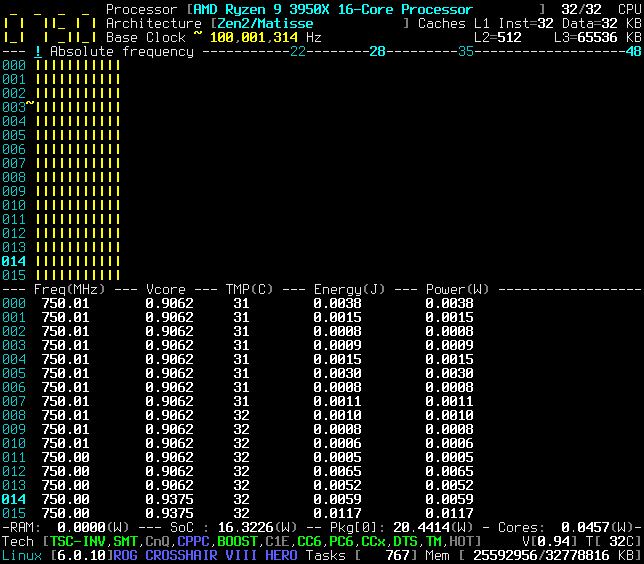
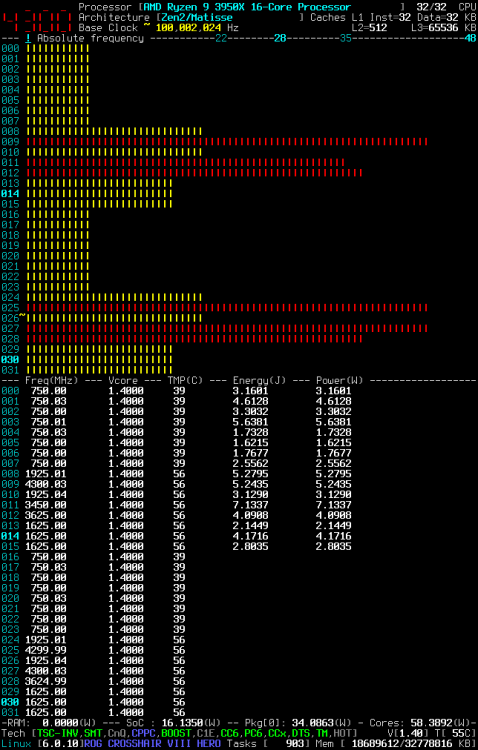
@skies For example, when `amd_pstate` is correctly working, you can see the Core P-States adjusting as a function of the system load. Press `!` to toggle the frequency view in `Absolute`
-
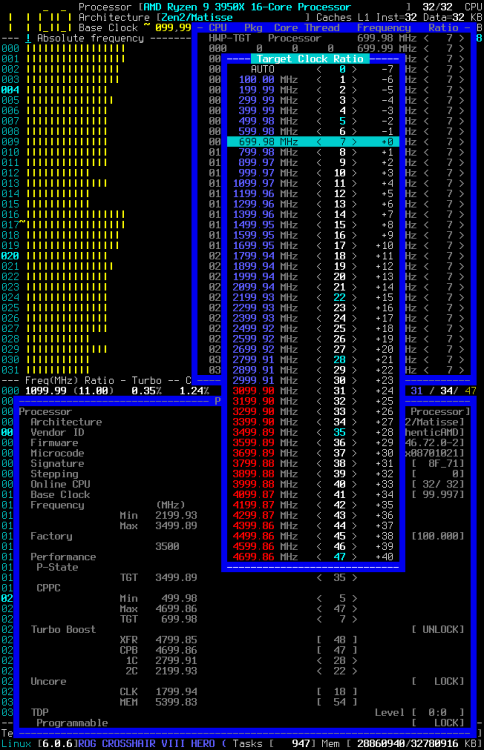
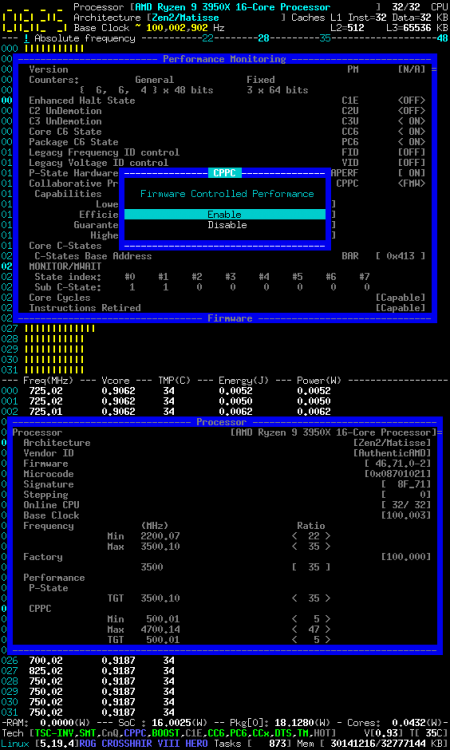
amd_pstate I don't have neither `CPPC` within `lscpu` but after inserting module with `modprobe amd_pstate` then you check with `lsmod | grep pstate`. Driver `amd_pstate` should be listed. If not, give a look into the kernel log for any issue. Your prerequisite look similar to mine: `modprobe.blacklist=acpi_cpufreq amd_pstate.shared_mem=1 idle=halt amdgpu.ppfeaturemask=0xffffffff ` Since kernel 6.0 not using `initcall_blacklist=acpi_cpufreq_init` Next search for the `amd_pstate` driver settings: `sudo du -a /sys | grep amd_pstate` What you want is per CPU the following attributes /sys/devices/system/cpu/cpufreq/policy0/amd_pstate_highest_perf /sys/devices/system/cpu/cpufreq/policy0/amd_pstate_lowest_nonlinear_freq /sys/devices/system/cpu/cpufreq/policy0/amd_pstate_max_freq CoreFreq CoreFreq is indeed an autonomous driver and manages CPPC by itself, whatever the manufacturer and the implementation are: Intel, AMD, Firmware Firmware mode In the `Performance Monitoring` you are getting the capabilities: Performance Monitoring |- Continuous Performance Control _CPC [ ON] |- Collaborative Processor Performance Control CPPC <FMW> |- Capabilities Lowest Efficient Guaranteed Highest |- CPU #0 500.00 ( 5) 3499.99 ( 35) 2400.00 ( 24) 4699.99 ( 47) |- CPU #1 500.00 ( 5) 3499.99 ( 35) 2400.00 ( 24) 4699.99 ( 47) |- CPU #2 500.00 ( 5) 3500.00 ( 35) 2400.00 ( 24) 4599.99 ( 46) |- CPU #3 500.00 ( 5) 3499.99 ( 35) 2400.00 ( 24) 4499.99 ( 45) |- CPU #4 500.00 ( 5) 3499.99 ( 35) 2399.99 ( 24) 4199.99 ( 42) |- CPU #5 500.00 ( 5) 3499.99 ( 35) 2399.99 ( 24) 4399.99 ( 44) |- CPU #6 500.00 ( 5) 3499.99 ( 35) 2399.99 ( 24) 4099.99 ( 41) |- CPU #7 500.00 ( 5) 3499.99 ( 35) 2399.99 ( 24) 4299.98 ( 43) In `Processor` you can view and alter the Target frequency ratios: Processor [AMD Ryzen 9 3950X 16-Core Processor] |- Architecture [Zen2/Matisse] |- Performance |- P-State TGT 3499.99 < 35 > |- CPPC Min 500.00 < 5 > Max 4699.99 < 47 > TGT 4699.99 < 47 > Hardware mode You are getting same as Firmware mode but you can also set the Energy Preference. In `Power, Current & Thermal` you can change the Energy hint in `CPPC Energy Preference` Remark: Intel HWP = AMD CPPC Project: Still a Work in Progress, pull the develop branch or ISO image if you want all of these
-
Anyone to confirm if CoreFreq is working with latest Intel Raptor Lake or AMD Zen4 ?
-
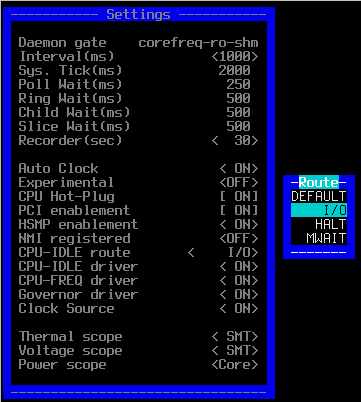
To get Governor registered, as a prerequisite, order matters. So you have to enable from bottom option to the top one, idle route. Processor settings in CoreFreq are driver parameters. You will enter "modinfo corefreqk" to list them. You can express several parameters as "key=value" when loading corefreqk.ko driver. This is the way to make settings permanent. Check your distribution manual, parameters of Linux kernel modules are usually stored into "/etc/modprobe.conf" To sum up, CoreFreq adopts the Linux standards for its settings.
-
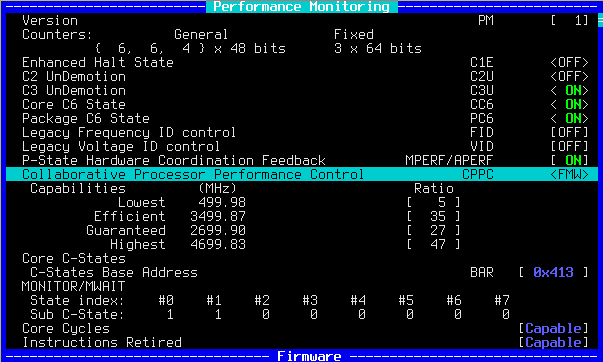
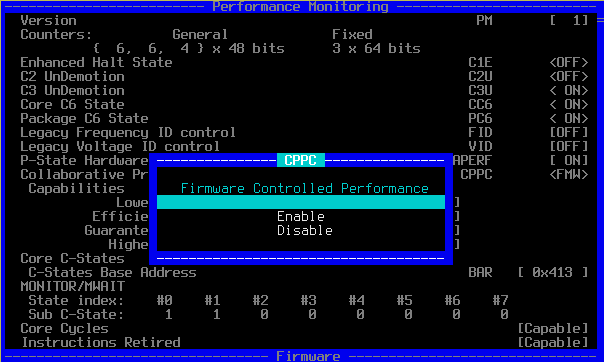
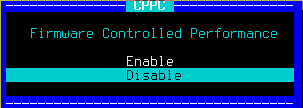
Once Governor, CPU-FREQ, CPU-IDLE, CPU-IDLE route well registered, you can check for CPPC in Performance Monitoring window where you'll read the frequency ratios defined by firmware. You can then as will enable or disable CPPC managed by firmware. You now press shortcut `!` to toggle frequencies in absolute mode. Should be your default base clock. You press `p` for the Processor window and scroll down to CPPC where you can modify the target frequency (TGT) for the whole processor (HWP-TGT) For exemple, here TGT is change to the ratio of 7 for a processor frequency capped to 700 MHz You can restore the Target to the BCLK, mine is ratio 35 Don't forget to disable CPPC when no more in used but be aware last Target is locking frequency. Please restore to BCLK before.
-
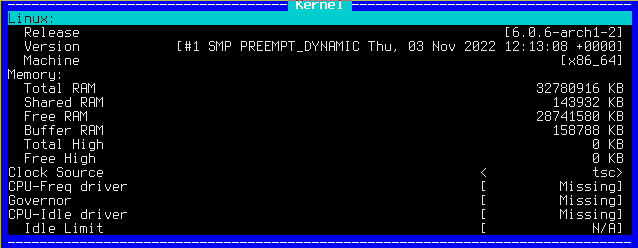
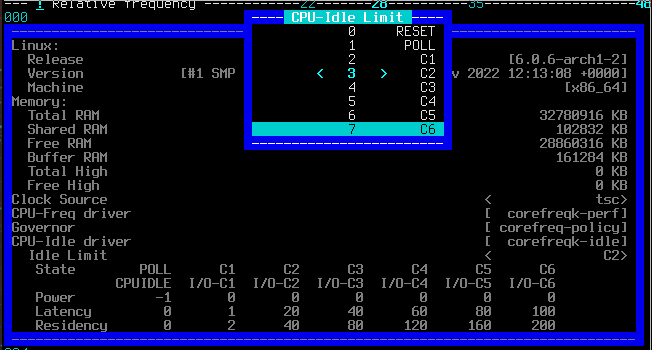
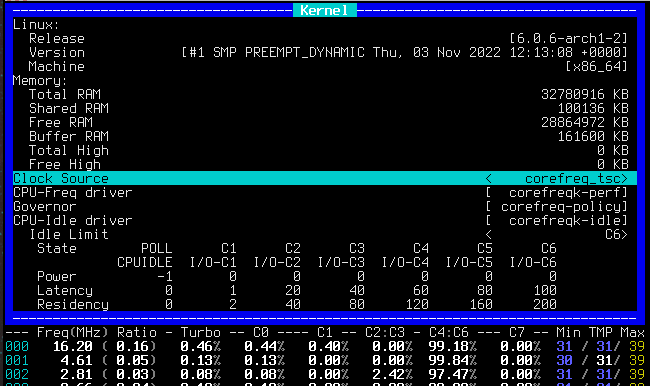
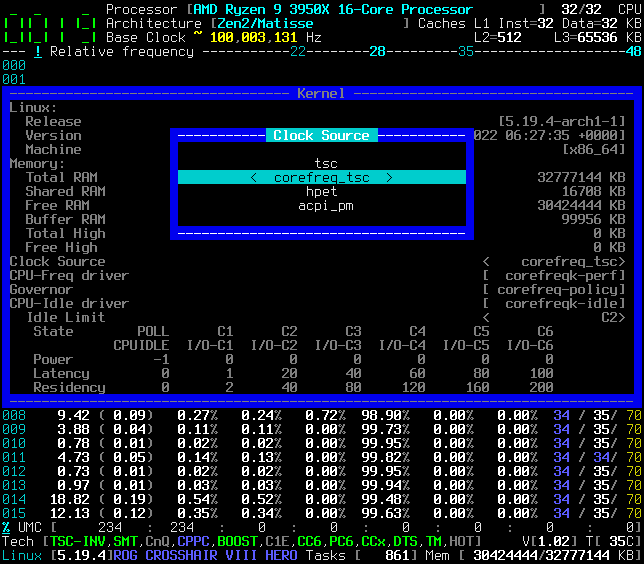
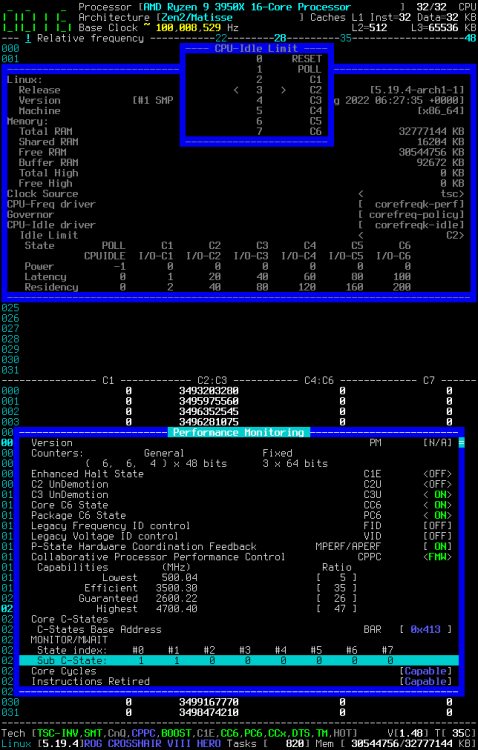
Hello, Here relevant part of my Kernel command line: modprobe.blacklist=pcspkr,k10temp,sp5100_tco,acpi_cpufreq,eeepc_wmi,mxm_wmi,wmi_bmof,asus_wmi,wmi amd_pstate.shared_mem=1 idle=halt It should start empty, at least TSC, as shown in kernel window screenshot Then you register all drivers in Settings window. Select twice CPU-Idle route to <I/O> Once route is <I/O> you will notice C-states happen in C2:C3 You can now go into Kernel window to change limit to C6 Btw you can also select Clock Source as corefreq_tsc rather than Linux kernel TSC As shown, C-States are now up to C6 Cyril

-
Bad news. Received a laptop 6600H based where Rembrandt has no HSMP, most SMU registers I need for voltage Vcore and UMC memory controller are empty. Fortunately legacy p-state, CPUID, Thermal are still monitoring OK. So far I've not found a registers datasheet of this Zen3+ ... and I fear it may be worst with Zen4 (but no test received)
-
That indeed will be nice when the EPP patch gets into mainstream, especially: +EXPORT_SYMBOL_GPL(cppc_get_epp_caps); +EXPORT_SYMBOL_GPL(cppc_set_epp_perf);
-
I have found the HSMP protocol into the EPYC datasheet; and probably also the same specs for ThreadRippers. Except some HEDT Deskop Ryzen 3950X, 5950X, I have also noticed that HSMP is not implemented into Ryzen APU, like my laptop 5300U
-
When you reach that issue, give a look to kernel window to get the current driver name. Then try to unload it or blacklist it from boot. When "Missing" is written, it means the room is empty and CoreFreq can register. It's the same for Idle driver. I'm sorry if I can't make easier but Linux kernel was made that eavy way in some part of its code.
-
Very interesting! What did you do exactly to improve the Power consumed ?
-
Relative frequency is a usage, delta of cycles over a sample period : 1 second Absolute frequency is an immediate reading of current frequency which is made once per period. Indeed absolute mode is the way to get true frequency, especially when system is loaded whereas relative can measure the tiny variations of GHz processors. Relative frequency is the Intel recommandation.
-
Hardware counters: I mean registers like Intel MSR which counts number of cycles elapsed per C-states AMD does not provide information about such registers. NDA or no will. All Zen impacted. My workaround has been to hook kernel idle entries to estimate the cycles delay, from TSC, spent in idle level.
-
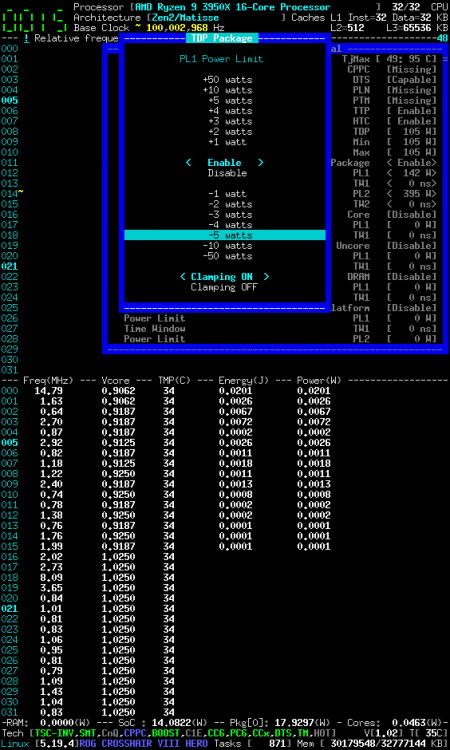
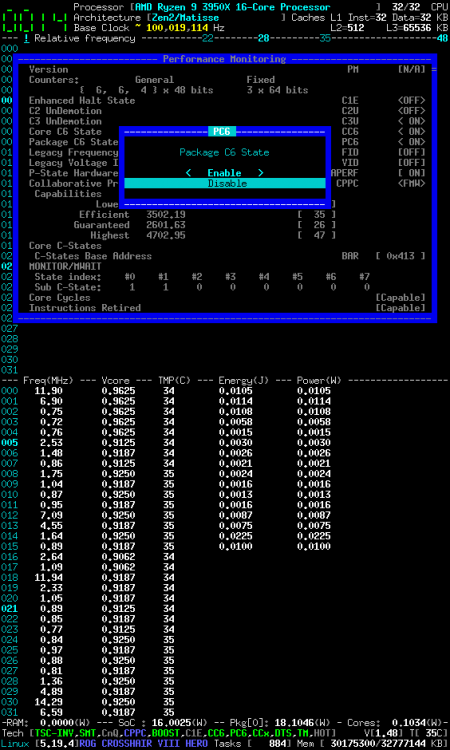
Unfortunately, no hardware counter registers specified with AMD Zen. CoreFreq is thus making virtual counter VPMC per idle level entry. Using 3950X, I have noticed a Package power consumed difference between I/O-WAIT and MWAIT. That's why I/O or HALT is default idle asm instruction suggested in [Settings][CPU-IDLE route] In [Performance Monitoring] window PC6 and CC6 are making a Power difference. In [Power, Current & Thermal] window, when [Settings][HSMP enablement] can be enabled, [Thermal Design Power] can be altered. With 3950X, I can't programmed better than Minus/Plus 5 watts You may also cap the Core frequency (press [!] for Absolute monitoring); enable CPPC and decrease the target [TGT] ratio. With 3950X where CPPC is a firmware implementation, I'm observing a Core Power decreased
-
If Clock Source is not mastered by CoreFreq, you can select it from Kernel window:
-
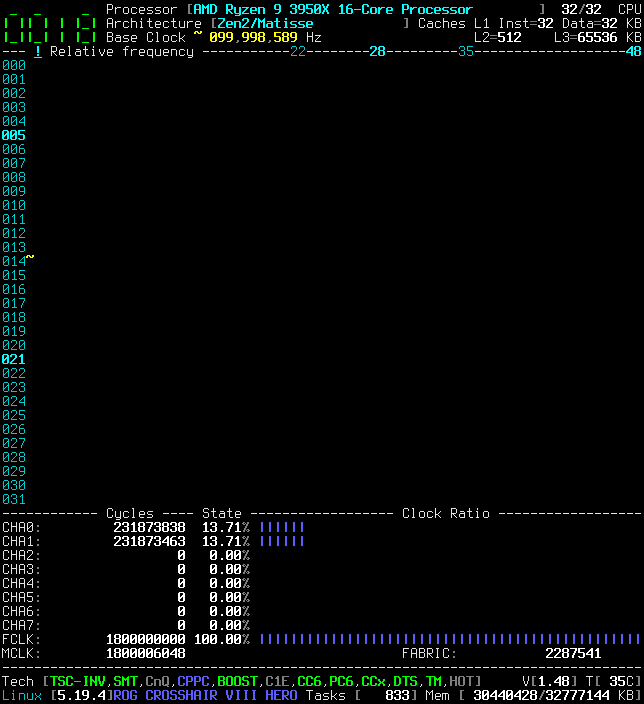
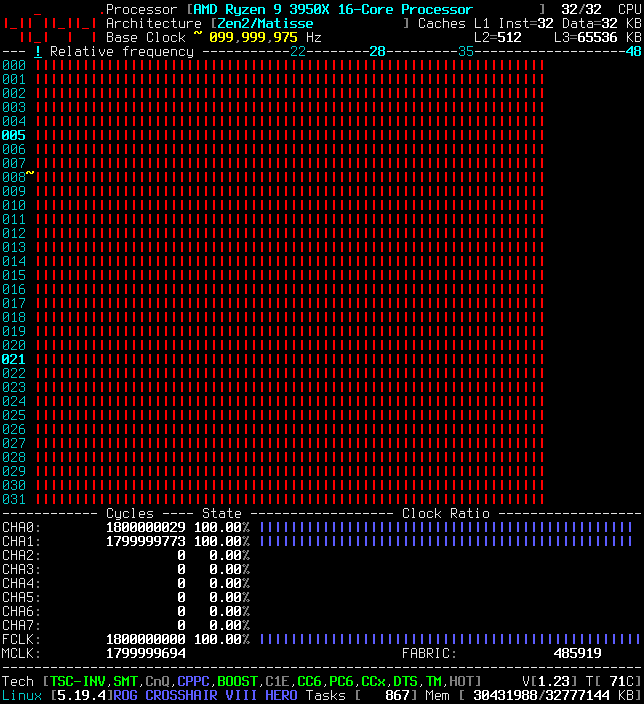
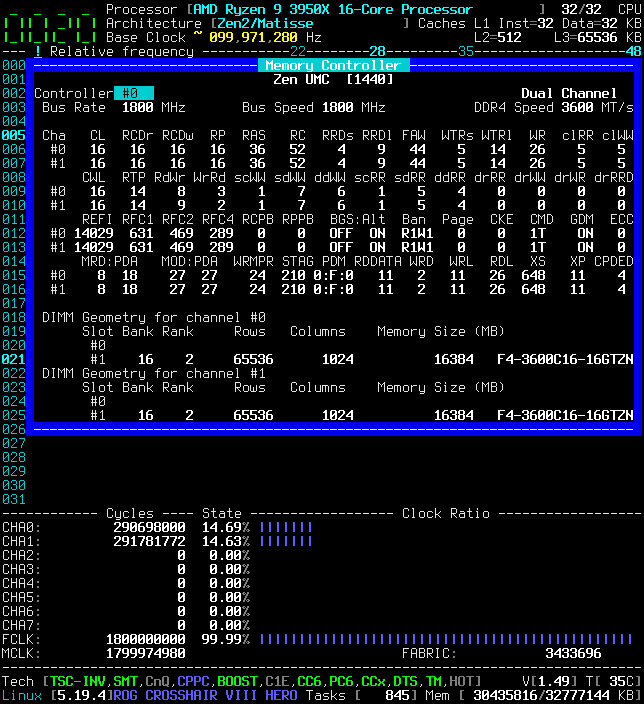
Examples of UMC monitoring DIMMs are set to 3600 and FCLK to 1800 in BIOS Idle and Loaded cycles of Dual channels CHA0 and CHA1
-
DELAY_TSC=1 appears safe, you can include it in your compilation A compilation message will show up to warn that feature is builtin ARCH_PMC=UMC is stable with my 3950X and 5300U but I don't have other reports from other AMDs
-
@Pillendreher Once CPU-Idle registered, you can select other Idle limit. Default limit is a function of Sub C-State provided by architecture
-
@Pillendreher You have to unload or blacklist any drivers ## Boot command line (for a AMD Ryzen 3950X) nmi_watchdog=0 modprobe.blacklist=k10temp,sp5100_tco,acpi_cpufreq amd_pstate.shared_mem=1 idle=halt nowatchdog ## You can also try to unload current ACPI driver modprobe -r acpi-cpufreq ## You can pass Registration and Idle route as parameters insmod corefreqk.ko Idle_Route=1 Register_ClockSource=1 Register_Governor=1 Register_CPU_Freq=1 Register_CPU_Idle=1 ## Or from the UI settings, do all registrations and select again route to "IO" Remarks: ClockSource registration is still a Compilation option; project has to be built as below: make DELAY_TSC=1 UMC Memory Controller channels frequency can be built as below: make ARCH_PMC=UMC And options can be combined: make ARCH_PMC=UMC DELAY_TSC=1
-
@ich777 Hello, Do you have any Unraid plug-in for CoreFreq development version to let @Pillendreher keeps up to date with work in progress ?
-
@Pillendreher EDIT: There are CPPC changes still in the develop branch, not in master yet.
-
@Pillendreher Make sure to have register CoreFreq as P-states driver, but also Governor, and preferably Idle driver. Registration can be done from UI menu Settings or as corefreqk.ko parameters. When is enabled the AMD CPPC, alias Intel HWP, you may find uninitialized Min, Max, Target P-states. You then have to set them. Remarks: Software CPPC is providing Target P-states only, whereas Hardware CPPC, most Zen3 and few Zen2, allow to alter Min, Max, Target P-states. As a general rule, CoreFreq discovers P-states, frequency ratios and many other features states with their current values. Even with the incoherencies. Users are in charge to alter Processor consequently.
-
@chchiyan Could you provide me various CLI screenshots and text outputs like this page They will be added to the project wiki as the i5-12500 CoreFreq support.






