





Eazyeeee
Members
-
Joined
-
Last visited
-
mine is doing the same thing. Does the same thing for me, cancelled but I didn't even cancelled it. prometheus-diagnostics-20240724-1404.zip
-
Hey! I am having issues with it detecting my roms. My file structure seems to be correct because it detects the platforms it is in, but not the roms itself. for example: It detects the Xbox 360 folder and knows what platform it is in, but not the ROM, Lollipop Chainsaw. Is there any troubleshooting steps I am not picking up?
-
Hey guys So I am following space invader's tutorial on how to set up a next cloud. My cloudflare settings is the exact same as his (obviously with my domain) and I checked my cloudflare API, email, and what not for swag. I used DuckDNS to link my IP address to the duckdns and for some reason at first it refused to connect. I get an error like "This site can’t be reached nextcloud.**********.org refused to connect" at first. Now for some reason it just pulls up my unraid web gui on that exact domain. (this happened as I was typing this, ironically) what am I doing wrong? I am redacting lot of my info for privacy reasons but i am simply baffled. Swag is on the custom "swag" network, nextcloud is on it too as well as duckdns
-
even if HTTPS port is always 443? I had this to work long time ago but abandoned SWAG for a bit. When I tried to set this up, some reason it won't allow me to do so.
-
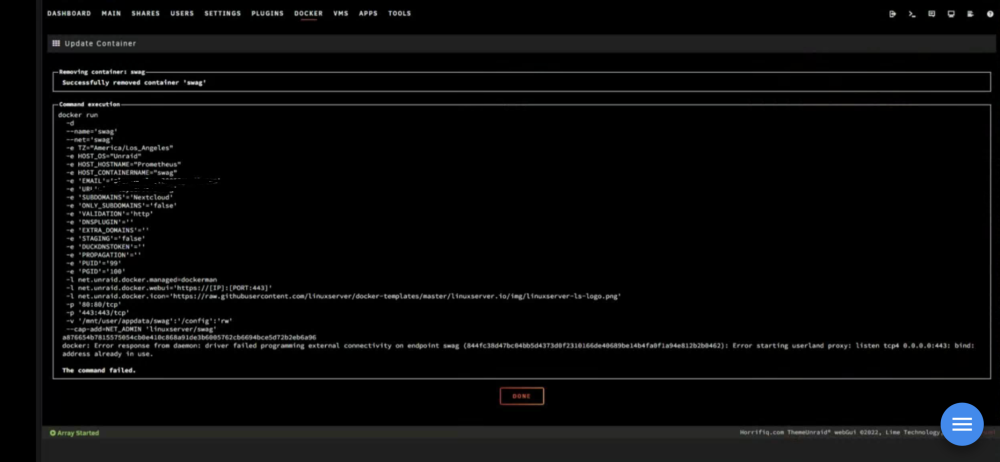
Hey guys. I am trying to utilize my server as my personal cloud storage. The issue atm is trying to figure out what is using Port 443. When doing lsof -i :443, it just shows below (bestest is the name of my personal desktop) root@Prometheus:~# lsof -i :443 COMMAND PID USER FD TYPE DEVICE SIZE/OFF NODE NAME nginx 2058 root 10u IPv4 10738 0t0 TCP *:https (LISTEN) nginx 2058 root 11u IPv6 10739 0t0 TCP *:https (LISTEN) nginx 2059 root 4u IPv4 8875466 0t0 TCP 192.168.1.54:https->BESTEST.local:57788 (ESTABLISHED) nginx 2059 root 10u IPv4 10738 0t0 TCP *:https (LISTEN) nginx 2059 root 11u IPv6 10739 0t0 TCP *:https (LISTEN) nginx 2059 root 19u IPv4 8877249 0t0 TCP 192.168.1.54:https->BESTEST.local:57793 (ESTABLISHED) nginx 2059 root 20u IPv4 8868860 0t0 TCP 192.168.1.54:https->BESTEST.local:57721 (ESTABLISHED) nginx 2059 root 21u IPv4 8884254 0t0 TCP 192.168.1.54:https->BESTEST.local:57853 (ESTABLISHED) nginx 2059 root 22u IPv4 8877334 0t0 TCP 192.168.1.54:https->BESTEST.local:57801 (ESTABLISHED) nginx 2059 root 23u IPv4 8877246 0t0 TCP 192.168.1.54:https->BESTEST.local:57792 (ESTABLISHED) nginx 2059 root 24u IPv4 8883640 0t0 TCP 192.168.1.54:https->BESTEST.local:57876 (ESTABLISHED) The error is posted in picture below. Any advice would be greatly appreciated.
-
no clue. I did change that to -california whenever I set it up.
-
tried and for some reason still on PEI
-
After doing this, this changed my map from a workshop map called California to PEI. What am I doing wrong? here is my Config file cheats enabled owner (mysteamID. didn't think I need to share this) loadout 255/15/15/81/81/18/20/20/121 map California password youregay perspective both welcome balls log yes PVE startup commands -california -normal -sync -pve +InternetServer/Unturned also I noticed it creates another file for the server. It was using Default in appdata/Unturned/Servers but now it created a new one called UV6J83~V
-
I am tryna host a unturned server. for some reason I keep getting this message. Running standalone dedicated server, but launch arguments were not specified on the command-line. Defaulting to Default LAN. Valid command-line dedicated server launch arguments are: +InternetServer/{ID} +LANServer/{ID} I tried fixing it in ExampleServer.sh but it keeps changing it back to +LANServer/example and sends the same message. what do i do?
-
Eazyeeee joined the community
-
How does this update? mine is saying server outdated.
