peter_sm
Community Developer
-
Joined
-
Last visited
Everything posted by peter_sm
-
SF web server and virtualbox + phpvirtualbox works fine on 5.04 //Peter
-
Is there any needs to set up something on unraid to use Teamviewer (Iphone and iPad) ? if so, we maybe shall start a own thread. //Peter
-
s3 script from SF is attached, this one have a lot more settings than the script in this thread. //Peter s3_sleep.txt
-
I have drives outside the array, if they are spinning , the server wont sleep. maybe THIS scrip ignore those drives I have a older S3 script than this you are working with (it's from the SF) and I also have worked on the server on a telnet session, and my server suddenly go to sleep therefore I need a telnet check to avoid sleeping when I log on to my server.
-
please try this version, telnet added, and your error is gone, BUT I maybe done something wrong ;-) please check the code. i also think I made some changing on below line , see the red marking Lockfile='check_LockFile' if [ "$hourMatch" == 0 -a "$Lockfile" == 0 ] then //Peter auto_s3_sleep_work_TELNET.txt
-
Can someone check where I messed it up? TRY ADD [[ ]] instead of [ ..... ] so these 2 line looks like this. if [[ "$hourMatch" -eq 0 -a "$LockFile" -eq 0]] if [[$LockFile -eq 1 ]] Why do you need a lock file? I have not follow all discussions .... //Peter
-
As written, it checks for ssh sessions not but not telnet. But it can also check if a specific ip is pingable and then not sleep in that case, which would be another way to prevent sleep while you have a telnet session open - or, for that matter; ftp, or html (unMENU, SimpleFeatures, etc.). It looks easy to add telnet check as well, maybe I do ir by my self, or you guys add it ? //Peter
-
can this script get a function to avoid sleeping when a telnet / ssh session is established? //Peter
-
I like to see all SF plugins be standalone from the SF core, priority the WEB server if you can Sent from my iPhone using Tapatalk 2
-
Is End-to-End_Error something that I need to be worried about ? == Hitachi HTS541010A9E680 J8100019J1XWJA ** Changed attributes in files: /tmp/smart_start_sdb /tmp/smart_finish_sdb ATTRIBUTE NEW_VAL OLD_VAL FAILURE_THRESHOLD STATUS RAW_VALUE End-to-End_Error = 100 100 97 near_thresh 0 Airflow_Temperature_Cel = 74 76 45 In_the_past 26 No SMART attributes are FAILING_NOW 0 sectors were pending re-allocation before the start of the preclear. 0 sectors were pending re-allocation after pre-read in cycle 1 of 1. 0 sectors were pending re-allocation after zero of disk in cycle 1 of 1. 0 sectors are pending re-allocation at the end of the preclear, the number of sectors pending re-allocation did not change. 0 sectors had been re-allocated before the start of the preclear. 0 sectors are re-allocated at the end of the preclear, the number of sectors re-allocated did not change. SMART status Info for /dev/sdb smartctl 5.40 2010-10-16 r3189 [i486-slackware-linux-gnu] (local build) Copyright (C) 2002-10 by Bruce Allen, http://smartmontools.sourceforge.net === START OF INFORMATION SECTION === Device Model: Hitachi HTS541010A9E680 Serial Number: J8100019J1XWJA Firmware Version: JA0OA4D0 User Capacity: 1,000,204,886,016 bytes Device is: Not in smartctl database [for details use: -P showall] ATA Version is: 8 ATA Standard is: ATA-8-ACS revision 6 Local Time is: Sun Sep 8 07:55:16 2013 CEST SMART support is: Available - device has SMART capability. SMART support is: Enabled === START OF READ SMART DATA SECTION === SMART overall-health self-assessment test result: PASSED See vendor-specific Attribute list for marginal Attributes. General SMART Values: Offline data collection status: (0x00) Offline data collection activity was never started. Auto Offline Data Collection: Disabled. Self-test execution status: ( 247) Self-test routine in progress... 70% of test remaining. Total time to complete Offline data collection: ( 45) seconds. Offline data collection capabilities: (0x51) SMART execute Offline immediate. No Auto Offline data collection support. Suspend Offline collection upon new command. No Offline surface scan supported. Self-test supported. No Conveyance Self-test supported. Selective Self-test supported. SMART capabilities: (0x0003) Saves SMART data before entering power-saving mode. Supports SMART auto save timer. Error logging capability: (0x01) Error logging supported. General Purpose Logging supported. Short self-test routine recommended polling time: ( 2) minutes. Extended self-test routine recommended polling time: ( 241) minutes. SCT capabilities: (0x003d) SCT Status supported. SCT Error Recovery Control supported. SCT Feature Control supported. SCT Data Table supported. SMART Attributes Data Structure revision number: 16 Vendor Specific SMART Attributes with Thresholds: ID# ATTRIBUTE_NAME FLAG VALUE WORST THRESH TYPE UPDATED WHEN_FAILED RAW_VALUE 1 Raw_Read_Error_Rate 0x002f 100 100 062 Pre-fail Always - 0 2 Throughput_Performance 0x0025 100 100 040 Pre-fail Offline - 0 3 Spin_Up_Time 0x0023 170 100 033 Pre-fail Always - 1 4 Start_Stop_Count 0x0032 100 100 000 Old_age Always - 1565 5 Reallocated_Sector_Ct 0x0033 100 100 005 Pre-fail Always - 0 7 Seek_Error_Rate 0x002f 100 100 067 Pre-fail Always - 0 8 Seek_Time_Performance 0x0025 100 100 040 Pre-fail Offline - 0 9 Power_On_Hours 0x0032 097 097 000 Old_age Always - 1721 10 Spin_Retry_Count 0x0033 100 100 060 Pre-fail Always - 0 12 Power_Cycle_Count 0x0032 100 100 000 Old_age Always - 1479 183 Runtime_Bad_Block 0x0032 100 100 000 Old_age Always - 0 184 End-to-End_Error 0x0033 100 100 097 Pre-fail Always - 0 187 Reported_Uncorrect 0x0032 100 100 000 Old_age Always - 25769803777 188 Command_Timeout 0x0032 100 100 000 Old_age Always - 73015623682 190 Airflow_Temperature_Cel 0x0022 079 044 045 Old_age Always In_the_past 21 (Min/Max 21/30) 191 G-Sense_Error_Rate 0x0032 096 096 000 Old_age Always - 1198 192 Power-Off_Retract_Count 0x0032 100 100 000 Old_age Always - 1966110 193 Load_Cycle_Count 0x0032 098 098 000 Old_age Always - 23668 196 Reallocated_Event_Count 0x0032 100 100 000 Old_age Always - 0 197 Current_Pending_Sector 0x0032 100 100 000 Old_age Always - 0 198 Offline_Uncorrectable 0x0030 100 100 000 Old_age Offline - 0 199 UDMA_CRC_Error_Count 0x0036 100 100 000 Old_age Always - 0 223 Load_Retry_Count 0x002a 100 100 000 Old_age Always - 0 SMART Error Log Version: 1 ATA Error Count: 1 CR = Command Register [HEX] FR = Features Register [HEX] SC = Sector Count Register [HEX] SN = Sector Number Register [HEX] CL = Cylinder Low Register [HEX] CH = Cylinder High Register [HEX] DH = Device/Head Register [HEX] DC = Device Command Register [HEX] ER = Error register [HEX] ST = Status register [HEX] Powered_Up_Time is measured from power on, and printed as DDd+hh:mm:SS.sss where DD=days, hh=hours, mm=minutes, SS=sec, and sss=millisec. It "wraps" after 49.710 days. Error 1 occurred at disk power-on lifetime: 494 hours (20 days + 14 hours) When the command that caused the error occurred, the device was active or idle. After command completion occurred, registers were: ER ST SC SN CL CH DH -- -- -- -- -- -- -- 10 41 00 00 75 64 07 Commands leading to the command that caused the error were: CR FR SC SN CL CH DH DC Powered_Up_Time Command/Feature_Name -- -- -- -- -- -- -- -- ---------------- -------------------- 60 00 98 f0 62 ed 40 00 00:42:01.616 READ FPDMA QUEUED 60 00 90 f0 61 ed 40 00 00:42:01.615 READ FPDMA QUEUED 60 00 88 f0 60 ed 40 00 00:42:01.614 READ FPDMA QUEUED 60 00 80 f0 5f ed 40 00 00:42:01.613 READ FPDMA QUEUED 60 00 78 f0 5e ed 40 00 00:42:01.610 READ FPDMA QUEUED SMART Self-test log structure revision number 1 No self-tests have been logged. [To run self-tests, use: smartctl -t] SMART Selective self-test log data structure revision number 1 SPAN MIN_LBA MAX_LBA CURRENT_TEST_STATUS 1 0 0 Not_testing 2 0 0 Not_testing 3 0 0 Not_testing 4 0 0 Not_testing 5 0 0 Not_testing Selective self-test flags (0x0): After scanning selected spans, do NOT read-scan remainder of disk. If Selective self-test is pending on power-up, resume after 0 minute delay.
-
Did you installed Guest extensions ? //Peter
-
And now there is an new update , 4.2.16
-
@theone, Can the plugin be update so it's possible to run newer version of VBox? I just compiled 4.2.14, but the plugin can't install this.... //Peter
-
Moved to -> http://lime-technology.com/forum/index.php?topic=10978.msg244868#msg244868
-
Can this be something to make progress to enable suspend and WOL for the ESXi host http://www.c-note.dk/2011/12/04/wmware-esxi-suspend-all-guests/ http://vmfocus.com/2012/12/17/how-to-configure-wol-esxi5/
-
Anyone that have tested to put ESXi server in sleep mode? I was thinking that if I only run Unraid as an VM, when unraid go into sleep mode (s3 script) it should send a sleep command to the ESXi server, and then I like to send a WOL command to my ESXi server when this server is up then it shall automatic wake up unraid. is this possible ? Maybe we shall have a own section with ESXi question in this forum //Peter
-
The "unknown" is my ASMedia SATA controller, there is 2 on this MB And your boot time is quick comparing to mine //Peter
-
FYI: I changed my SCSI controller 0 to Paravirtual, but no changing in boot time. //Petre
-
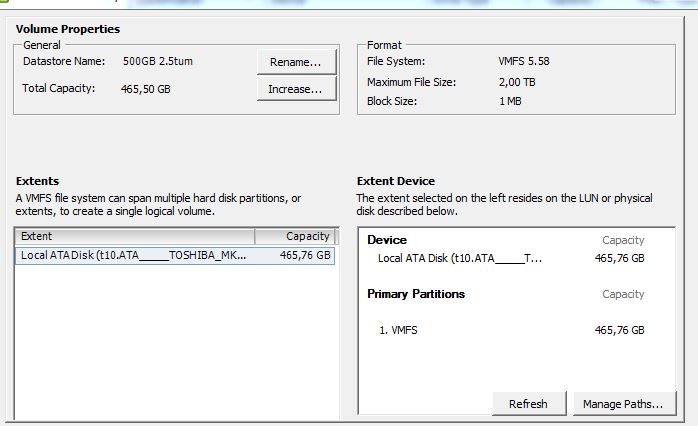
This my data store, It was formated with 1MB block ? is that right, but I didn't get any settings where I could chose a different settings When I come to the boot menu, it boots very quick, butits take about 25 sec to it shows up. See image of my data store //Peter
-
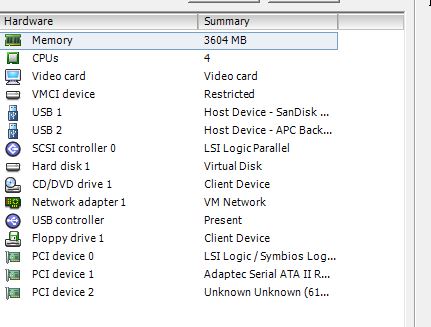
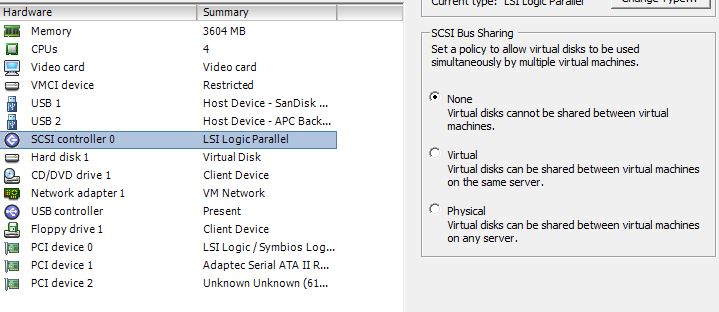
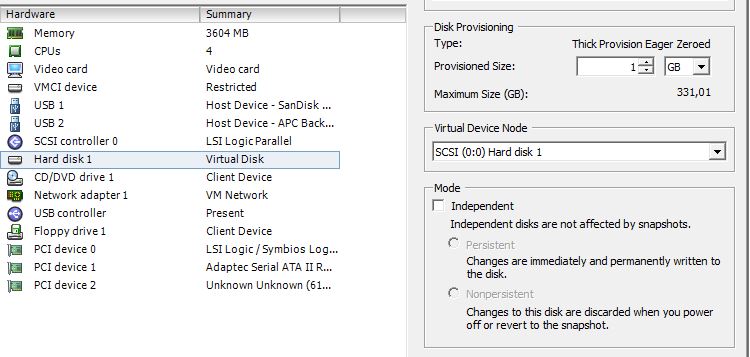
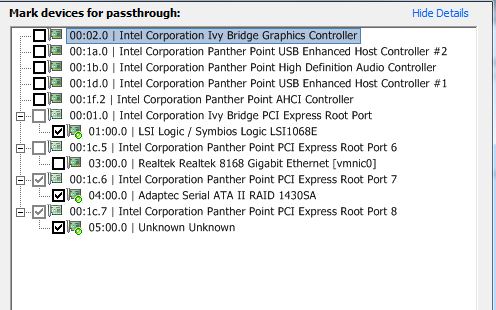
I was using Ubuntu 32bit See some image for my config //Peter
-
I have my data store on sata port on the MB, all other disk for unraid on BR10i & 1430sa It is 2 files in your zip file I uploaded these to my data store ,add i hard disk in VM , and add unRAID.vmdk to this disk. //Peter
-
Hi BetaQuasi Is it normal that it takes about 25 seconds for the boot menu shows up ? if not what can I have done wrong ? //Peter
-
beautiful
-
You can easily mount the VHD file in W7 and make updates to the disk when new version of unraid is available. cool //Peter
-
up and running