





peter_sm
Community Developer
-
Joined
-
Last visited
Everything posted by peter_sm
-
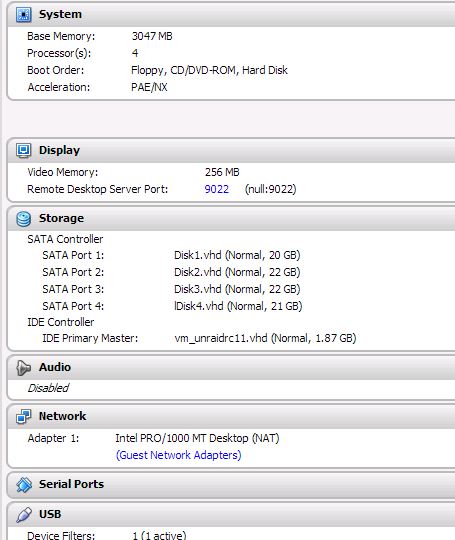
How do I get this booting from my USB vmdk file? see attached image how I have set up my disk. //Peter
-
According to your logs and what you described it seems that the packages (vbox and extension) were not installed properly probably due to a bad download of the packages. If the download is done from the plugin WEBUI it is important not to interrupt it by refreshing the WEBUI - that kills the download and gives a partially downloaded package. You might considering start using a md5 check for the files that is DL , so we know that the file are correct, see other plugin, see below of a example. <FILE Name="/boot/packages/infozip-6.0-i486-1.txz" Run="upgradepkg --install-new"> <URL>http://slackware.cs.utah.edu/pub/slackware/slackware-13.37/slackware/a/infozip-6.0-i486-1.txz</URL> <MD5>4d59c199192a5fc4dc55089edcb66723</MD5> //Peter
-
Thanks, looks great! //P
-
Perhaps this can help http://lime-technology.com/forum/index.php?topic=25099.msg224284#msg224284 //Peter
-
Agree //P
-
No, a alternative to phpvirtualbox
-
Maybe some one can create a new plugin that manage/create/delete machines, like it's done from the command prompt (from the link on post above), then we have a new interface to our VM machines //Peter
-
Just pree cleared my new 2TB disk, any concern ? ======================================================================== 1.14 = unRAID server Pre-Clear disk /dev/sdo = cycle 1 of 1, partition start on sector 64 = Disk Pre-Clear-Read completed DONE = Step 1 of 10 - Copying zeros to first 2048k bytes DONE = Step 2 of 10 - Copying zeros to remainder of disk to clear it DONE = Step 3 of 10 - Disk is now cleared from MBR onward. DONE = Step 4 of 10 - Clearing MBR bytes for partition 2,3 & 4 DONE = Step 5 of 10 - Clearing MBR code area DONE = Step 6 of 10 - Setting MBR signature bytes DONE = Step 7 of 10 - Setting partition 1 to precleared state DONE = Step 8 of 10 - Notifying kernel we changed the partitioning DONE = Step 9 of 10 - Creating the /dev/disk/by* entries DONE = Step 10 of 10 - Verifying if the MBR is cleared. DONE = Disk Post-Clear-Read completed DONE Disk Temperature: 23C, Elapsed Time: 26:13:28 ======================================================================== == WDC WD20EARX-00MMMB0 WD-WCAWZ2744524 == Disk /dev/sdo has been successfully precleared == with a starting sector of 64 ======================================================================== ** Changed attributes in files: /tmp/smart_start_sdo /tmp/smart_finish_sdo ATTRIBUTE NEW_VAL OLD_VAL FAILURE_THRESHOLD STATUS RAW_VALUE Temperature_Celsius = 129 130 0 ok 23 No SMART attributes are FAILING_NOW 0 sectors were pending re-allocation before the start of the preclear. 0 sectors were pending re-allocation after pre-read in cycle 1 of 1. 0 sectors were pending re-allocation after zero of disk in cycle 1 of 1. 0 sectors are pending re-allocation at the end of the preclear, the number of sectors pending re-allocation did not change. 0 sectors had been re-allocated before the start of the preclear. 0 sectors are re-allocated at the end of the preclear, the number of sectors re-allocated did not change. SMART status Info for /dev/sdo smartctl 5.40 2010-10-16 r3189 [i486-slackware-linux-gnu] (local build) Copyright (C) 2002-10 by Bruce Allen, http://smartmontools.sourceforge.net === START OF INFORMATION SECTION === Device Model: WDC WD20EARX-00MMMB0 Serial Number: WD-WCAWZ2744524 Firmware Version: 80.00A80 User Capacity: 2,000,398,934,016 bytes Device is: Not in smartctl database [for details use: -P showall] ATA Version is: 8 ATA Standard is: Exact ATA specification draft version not indicated Local Time is: Fri Mar 1 06:03:28 2013 CET SMART support is: Available - device has SMART capability. SMART support is: Enabled === START OF READ SMART DATA SECTION === SMART overall-health self-assessment test result: PASSED General SMART Values: Offline data collection status: (0x80) Offline data collection activity was never started. Auto Offline Data Collection: Enabled. Self-test execution status: ( 248) Self-test routine in progress... 80% of test remaining. Total time to complete Offline data collection: (39600) seconds. Offline data collection capabilities: (0x7b) SMART execute Offline immediate. Auto Offline data collection on/off support. Suspend Offline collection upon new command. Offline surface scan supported. Self-test supported. Conveyance Self-test supported. Selective Self-test supported. SMART capabilities: (0x0003) Saves SMART data before entering power-saving mode. Supports SMART auto save timer. Error logging capability: (0x01) Error logging supported. General Purpose Logging supported. Short self-test routine recommended polling time: ( 2) minutes. Extended self-test routine recommended polling time: ( 255) minutes. Conveyance self-test routine recommended polling time: ( 5) minutes. SCT capabilities: (0x3035) SCT Status supported. SCT Feature Control supported. SCT Data Table supported. SMART Attributes Data Structure revision number: 16 Vendor Specific SMART Attributes with Thresholds: ID# ATTRIBUTE_NAME FLAG VALUE WORST THRESH TYPE UPDATED WHEN_FAILED RAW_VALUE 1 Raw_Read_Error_Rate 0x002f 200 200 051 Pre-fail Always - 0 3 Spin_Up_Time 0x0027 161 161 021 Pre-fail Always - 8950 4 Start_Stop_Count 0x0032 100 100 000 Old_age Always - 7 5 Reallocated_Sector_Ct 0x0033 200 200 140 Pre-fail Always - 0 7 Seek_Error_Rate 0x002e 100 253 000 Old_age Always - 0 9 Power_On_Hours 0x0032 100 100 000 Old_age Always - 33 10 Spin_Retry_Count 0x0032 100 253 000 Old_age Always - 0 11 Calibration_Retry_Count 0x0032 100 253 000 Old_age Always - 0 12 Power_Cycle_Count 0x0032 100 100 000 Old_age Always - 7 192 Power-Off_Retract_Count 0x0032 200 200 000 Old_age Always - 6 193 Load_Cycle_Count 0x0032 200 200 000 Old_age Always - 13 194 Temperature_Celsius 0x0022 130 120 000 Old_age Always - 22 196 Reallocated_Event_Count 0x0032 200 200 000 Old_age Always - 0 197 Current_Pending_Sector 0x0032 200 200 000 Old_age Always - 0 198 Offline_Uncorrectable 0x0030 100 253 000 Old_age Offline - 0 199 UDMA_CRC_Error_Count 0x0032 200 200 000 Old_age Always - 0 200 Multi_Zone_Error_Rate 0x0008 100 253 000 Old_age Offline - 0 SMART Error Log Version: 1 No Errors Logged SMART Self-test log structure revision number 1 No self-tests have been logged. [To run self-tests, use: smartctl -t] SMART Selective self-test log data structure revision number 1 SPAN MIN_LBA MAX_LBA CURRENT_TEST_STATUS 1 0 0 Not_testing 2 0 0 Not_testing 3 0 0 Not_testing 4 0 0 Not_testing 5 0 0 Not_testing Selective self-test flags (0x0): After scanning selected spans, do NOT read-scan remainder of disk. If Selective self-test is pending on power-up, resume after 0 minute delay. //Peter
-
Here are some log Upgrading local plugin (v0.4.2) to hosting server plugin (v0.5.1) Feb 25 16:39:56 tower rc.virtualbox[25009]: Icon downloaded from icon hosting server Feb 25 16:39:56 tower rc.virtualbox[25012]: Icon copied to emhttp plugin folder Feb 25 16:39:56 tower rc.virtualbox[25014]: New/Updated plugin installation complete Feb 25 16:41:00 tower rc.virtualbox[26970]: Latest VirtualBox Guest Additions (v4.2.6) does not exist in local plugin folder, removing all existing local versions and downloading... Feb 25 16:45:33 tower rc.virtualbox[31643]: Symbolically linked /mnt/cache/VirtualBox/vbox to /root/.VirtualBox Feb 25 16:45:33 tower rc.virtualbox[31644]: VBOX_SYMLINK_LOCATION not valid - Cannot move file to new symlink location Feb 25 16:45:33 tower rc.virtualbox[31645]: Plugin configuration written Feb 25 16:45:56 tower rc.virtualbox[32255]: VBoxManage setproperty websrvauthlibrary null Feb 25 16:45:56 tower rc.virtualbox[32270]: vboxwebsrv service started Feb 25 16:55:36 tower rc.virtualbox[12221]: No Virtual Machines running - nothing to save Feb 25 16:55:36 tower rc.virtualbox[12223]: vboxwebsrv service stopped Feb 25 16:55:42 tower rc.virtualbox[12350]: VBoxManage setproperty websrvauthlibrary null Feb 25 16:55:42 tower rc.virtualbox[12365]: vboxwebsrv service started Feb 25 16:55:42 tower rc.virtualbox[12451]: Starting Virtual Machine: Slack 64 ... Feb 25 16:55:59 tower rc.virtualbox[12542]: All available Virtual Machines from previous session were started Feb 25 16:58:02 tower rc.virtualbox[13979]: Saving state of Virtual Machine: Slack 64 ... Feb 25 16:58:07 tower rc.virtualbox[14033]: All running Virtual Machines were saved Feb 25 16:58:07 tower rc.virtualbox[14035]: vboxwebsrv service stopped Feb 25 16:58:13 tower rc.virtualbox[14162]: VBoxManage setproperty websrvauthlibrary null Feb 25 16:58:13 tower rc.virtualbox[14177]: vboxwebsrv service started Feb 25 16:58:14 tower rc.virtualbox[14264]: Starting Virtual Machine: Slack 64 ... Feb 25 16:58:18 tower rc.virtualbox[14316]: All available Virtual Machines from previous session were started
-
Didn't work 100%, now machine shows up in phpvirtualbox, however copy all files from /boot/custom/vbox to new location, all is working ;-) //Peter
-
Thanks, How about to move all machines from cache to the array, I need to have some protection, what is the best way to do this? can this be a part of the plugin? ;-) //Peter
-
Any one knows if the files in /boot/custom/vbox is just temporary files? It looks like if they are removed, no machine show up in the web GUI (phpvirtualbox) //Peter
-
I manage to fix this, needed to DL the VBoxGuestAdditions_4.2.6.iso from here -> http://download.virtualbox.org/virtualbox/4.2.6/ Then I add this to storage for the VM, then in slackware I mounted this and run the installer, now it works EDIT Works on slackware 32 but not on slackware 14 64bit, is VBoxGuestAdditions_4.2.6.iso not compatible with 64 bit OS ? EFIT 2 Solved; increased the display memory, now everything works Learning by doing //Peter
-
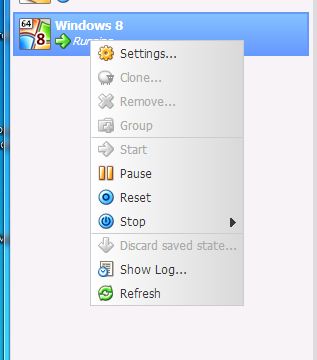
For me my menu looks like this when I started a VM
-
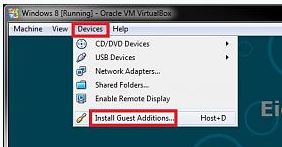
Hi, I have following issues 1: no internet on Slackware 32 & 64 bit, but W8 I have internet 2: no Install Guest Additions both for slack & w8 I cant find where to Install Guest Additions, my bee that is why I have low resolution and mouse lagging ? Any one have a solution to make progress ? Maybe Install Guest Additions should be a part of the plugin? EDIT I found this on google After installing Windows (XP, 7, etc.) on your virtual machine, simply select Devices ? Install Guest Additions... But that is not existing in phpvirtualbox see a image attached //Peter
-
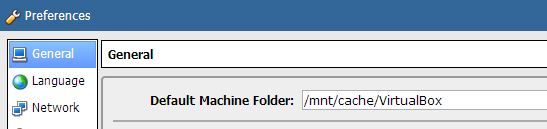
change settings, default is writing to the flash see image
-
OK, I have BR10i, but that would be the same procudure.. ;-) The file type to patch under UEFI is that windows or linux? //Peter
-
Thanks, cane you explain UEFI she'll ? How I can change to that ? // Peter
-
I found a utility for dos, but now I got this errot Failed to initialize PAL Any clue what that means ?? //Peter
-
Start flashing my BR10i card .... Just made a USB bootable with DOS, but the program to flash can't be run under DOS :-( what is the alternative, I do not have any more PC to flash on except my server. //Peter
-
But that is not from the plugin ;-) wrong place to ask perhaps ;-) //Peter
-
drwxrwxrwx 6 root root 32768 2013-01-24 17:32 ../ -rwxrwxrwx 1 root root 21381 2013-02-04 18:42 xpti.dat* -rwxrwxrwx 1 root root 1237 2013-02-04 18:42 compreg.dat* -rwxrwxrwx 1 root root 1818 2013-02-05 19:25 VBoxSVC.log.10* -rwxrwxrwx 1 root root 1818 2013-02-05 20:43 VBoxSVC.log.9* -rwxrwxrwx 1 root root 2189 2013-02-05 20:44 VBoxSVC.log.8* -rwxrwxrwx 1 root root 2584 2013-02-06 17:47 VBoxSVC.log.7* -rwxrwxrwx 1 root root 2039 2013-02-06 20:05 VBoxSVC.log.6* -rwxrwxrwx 1 root root 1818 2013-02-06 20:05 VBoxSVC.log.5* -rwxrwxrwx 1 root root 1818 2013-02-06 20:08 VBoxSVC.log.4* -rwxrwxrwx 1 root root 2190 2013-02-06 20:11 VBoxSVC.log.3* -rwxrwxrwx 1 root root 2584 2013-02-09 13:19 VBoxSVC.log.2* -rwxrwxrwx 1 root root 1817 2013-02-09 13:19 VBoxSVC.log.1* -rwxrwxrwx 1 root root 2431 2013-02-09 15:30 VirtualBox.xml-prev* -rwxrwxrwx 1 root root 2518 2013-02-09 15:31 VirtualBox.xml* drwxrwxrwx 2 root root 32768 2013-02-09 15:31 ./ -rwxrwxrwx 1 root root 4587 2013-02-09 20:31 VBoxSVC.log*
-
Hmm, can it be better to move /boot/custom/vbox to RAM ? so we minimize writing to flash ? //Peter
-
Thanks
-
Is there a newer bios for BR10i? anyone know what to use? LSI SAS1068E chipset 1) LSI SAS 3081-R 2) IBM BR10i 3) Intel SASUC8I Please let me know (PM or post here) what Card you have successfully flashed with the LSI SAS1068E chipset with the provided zip FW:1.32.00.00, BIOS 6.34.00.00 / 20-DEC-10 (LSI P20) Both IT/IR mode available LSI SAS1068E Controllers(P20).zip - 3.8 MB (Windows) LSI SAS1068E Controllers(P20)Linux.zip - 4.5 MB (unRAID) FW:1.33.00.00, BIOS 6.36.00.00 / 22-AUG-11 (LSI P21) Both IT/IR mode available LSI SAS1068E Controllers(P21).rar - 1.46 MB (Windows) LSI SAS1068E Controllers(P21)Linux.rar - 2.02 MB (unRAID)

