





peter_sm
Community Developer
-
Joined
-
Last visited
Everything posted by peter_sm
-
Easyrsa if fixed in 3.0.4 https://github.com/OpenVPN/easy-rsa/archive/v3.0.4.zip However my plugin DL the master branch, so need to wait for they to update the master branch. You can DL the above zip file your openvpn folder and unzip it, then rename the folder to easyrsa and you are good to go. //Peter
-
You can try to modify easyrsa with comments above. Skickat från min iPhone med Tapatalk
-
Is the 2 setting above defaults? Or you changed these ? If so go for defaults. What is your default route interface ? eth0, br0 ? Verify this by the last iptables row(in red) on the log page. You should see your LAN with all settings set to defaults. I have an update to verify this much better in next release! Skickat från min iPhone med Tapatalk
-
easyrsa3 are broken https://github.com/OpenVPN/easy-rsa/issues/168 Older releases can be found here https://github.com/OpenVPN/easy-rsa/releases Skickat från min iPhone med Tapatalk
-
Hi, TLS auto is default :-)
-
Loos like they broken the easyrsa3 ... I see this in my log :-( .
-
Did a fresh installation and all works fine! please check all your settings.
-
I see exactly the same on my configuration. I have almost same config as you. Don’t now how to solve it.... Skickat från min iPhone med Tapatalk
-
Are you connecting from a windows computer ? can you access share with IP address? can you see other client on your LAN? //Peter
-
Can you click on "Restore To Default values" and try again, some settings are not default, just for testing. Its differ from my default. //Peter
-
Please add more info how you configured the server, or you maybe using all default settings?
-
I have the same in my logfile! any solution on this?
-
Big issue to upload large files ,where can I found the guide to configure this dockers to handle large files ? Thanks //Peter
-
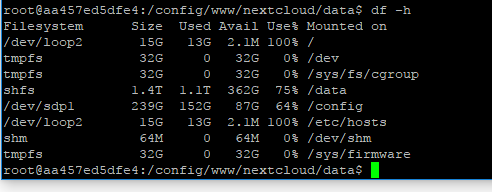
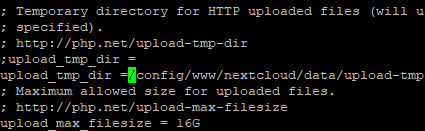
When upload large file I get /etc/hosts full. It looks like it store temporary files there, but I have tested to change some settings, see below. From my php.ini in the nextcloud docker from my config.php

-
Trying to update my docker as well with larger file, but I can't find php.ini? Can you please wrote down all files that you change with path and what changed you did on each? Thanks! Peter
-
Yes
-
I did an update from App Store
-
I updated clover today and I now got same issue. //Peter
-
New Version! Now the web page is disabled when generate server certificates!! Please test and see how it works for you! //Peter
-
Wonder howe that could be done? a check to see if the process is running and disable the buttons while is running ? Anyone have a clue how that could be done ? //Peter
-
New release available , now with an new tab for download of client config files! //Peter
-
When changing settings for the server that needs new client certificate I recommend to "Regenerate the server certificates keys" this will give you a fresh server with all old clients deleted. Will this meet your requirements ? I can look at the download of client file what I can do.
-
Hi, See info on first post and a link ,I will summarize it better in first page when I have time. "Unpack your provider certificate/files to /boot/openvpn (create that folder if it's not exist) , can now be several ovpn files"
-
Look a the syslog about info from the plugin installation
-
You must have a bad USB drive since the openvpn is not installed.

