





peter_sm
Community Developer
-
Joined
-
Last visited
Everything posted by peter_sm
-
The files ta.key should also be there ca.crt 1.17 KB 2017-08-04 07:34 dh.pem 424 B 2017-08-04 07:34 openvpnserver.ovpn 1.08 KB 2017-08-04 07:33 server.crt 4.55 KB 2017-08-04 07:34 server.key 1.70 KB 2017-08-04 07:34 ta.key 636 B 2017-08-04 07:34 Can you check what these files tell you? /var/log# openvpnserver.log openvpnserver-status.log And from command prompt try this and check above log files openvpn --config 'PATH TO'/openvpnserver.ovpn
-
Show also content in the folder you chosen.
-
Check also that all 3 files exist in /boot/package -rwxrwxrwx 1 root root 298004 Mar 2 2016 expect-5.45-x86_64-1.txz* -rwxrwxrwx 1 root root 2808220 May 23 21:14 tcl-8.6.6-x86_64-1.txz* -rwxrwxrwx 1 root root 414732 Jun 21 18:32 openvpn-2.4.3-x86_64-1.txz*
-
Yes Skickat från min iPhone med Tapatalk
-
Have you tried to install to a new different folder name ? .... START button is enabled after you done "Cert/Misc Configuration" and "Server Configuration" Can you post the 2 .cfg file from /boot/config/plugins/openvpnserver And then output from /etc/rc.d/rc.openvpnserver restart //Peter
-
Hi, I did a fresh install and everything is OK. You can start to check your USB for defects. //Peter
-
Now I can reach this page :-) Dont know why ? Log below from command window echo: http: TLS handshake error from 192.168.0.124:3044: tls: first record does not look like a TLS handshake echo: http: TLS handshake error from 192.168.0.124:3045: tls: first record does not look like a TLS handshake echo: http: TLS handshake error from 192.168.0.124:3051: tls: first record does not look like a TLS handshake {"time":"2017-07-05T20:15:40.299571191+02:00","id":"","remote_ip":"192.168.0.124","host":"192.168.0.190:2379","method":"GET","uri":"/","status":200, "latency":15773 7,"latency_human":"157.737µs","bytes_in":0,"bytes_out":611} {"time":"2017-07-05T20:15:40.309907315+02:00","id":"","remote_ip":"192.168.0.124","host":"192.168.0.190:2379","method":"GET","uri":"/app/main-4f8c8f5.min.css","stat us":200, "latency":2101549,"latency_human":"2.101549ms","bytes_in":0,"bytes_out":211930} {"time":"2017-07-05T20:15:40.316068978+02:00","id":"","remote_ip":"192.168.0.124","host":"192.168.0.190:2379","method":"GET","uri":"/app/main-4f8c8f5.min.js","statu s":200, "latency":7971984,"latency_human":"7.971984ms","bytes_in":0,"bytes_out":1412589} {"time":"2017-07-05T20:15:40.622946234+02:00","id":"","remote_ip":"192.168.0.124","host":"192.168.0.190:2379","method":"GET","uri":"/img/controlr-deb9c67.png","stat us":200, "latency":106080,"latency_human":"106.08µs","bytes_in":0,"bytes_out":895} {"time":"2017-07-05T20:15:40.624318823+02:00","id":"","remote_ip":"192.168.0.124","host":"192.168.0.190:2379","method":"GET","uri":"/img/v-f2204e3.png","status":200 , "latency":59988,"latency_human":"59.988µs","bytes_in":0,"bytes_out":83} {"time":"2017-07-05T20:15:40.624488852+02:00","id":"","remote_ip":"192.168.0.124","host":"192.168.0.190:2379","method":"GET","uri":"/img/gbadge-488b433.png","status ":200, "latency":34864,"latency_human":"34.864µs","bytes_in":0,"bytes_out":1816} {"time":"2017-07-05T20:15:40.624527417+02:00","id":"","remote_ip":"192.168.0.124","host":"192.168.0.190:2379","method":"GET","uri":"/img/appstore-4ccd23e.png","stat us":200, "latency":60766,"latency_human":"60.766µs","bytes_in":0,"bytes_out":1804} {"time":"2017-07-05T20:15:40.625604148+02:00","id":"","remote_ip":"192.168.0.124","host":"192.168.0.190:2379","method":"GET","uri":"/img/iphone-hand-7ba5afc.png","s tatus":200, "latency":1232136,"latency_human":"1.232136ms","bytes_in":0,"bytes_out":197241} {"time":"2017-07-05T20:15:40.636783878+02:00","id":"","remote_ip":"192.168.0.124","host":"192.168.0.190:2379","method":"GET","uri":"/img/unraid-32ac546.png","status ":200, "latency":64860,"latency_human":"64.86µs","bytes_in":0,"bytes_out":1571} {"time":"2017-07-05T20:15:40.636798531+02:00","id":"","remote_ip":"192.168.0.124","host":"192.168.0.190:2379","method":"GET","uri":"/img/jbrio-a96fbbd.png","status" :200, "latency":49807,"latency_human":"49.807µs","bytes_in":0,"bytes_out":449} {"time":"2017-07-05T20:15:40.637453264+02:00","id":"","remote_ip":"192.168.0.124","host":"192.168.0.190:2379","method":"GET","uri":"/img/fontawesome-webfont-af7ae50 .woff2","status":200, "latency":738053,"latency_human":"738.053µs","bytes_in":0,"bytes_out":77160} {"time":"2017-07-05T20:15:40.640843515+02:00","id":"","remote_ip":"192.168.0.124","host":"192.168.0.190:2379","method":"GET","uri":"/version","status":200, "latency ":29136,"latency_human":"29.136µs","bytes_in":0,"bytes_out":31} {"time":"2017-07-05T20:15:40.877795465+02:00","id":"","remote_ip":"192.168.0.124","host":"192.168.0.190:2379","method":"GET","uri":"/favicon.ico","status":404, "lat ency":84616,"latency_human":"84.616µs","bytes_in":0,"bytes_out":23} {"time":"2017-07-05T20:16:09.412276212+02:00","id":"","remote_ip":"192.168.0.124","host":"192.168.0.190:2379","method":"POST","uri":"/login","status":200, "latency":22354054,"latency_human":"22.354054ms","bytes_in":33,"bytes_out":175} I: 2017/07/05 20:16:10 unraid.go:106: Getting users ... I: 2017/07/05 20:16:10 unraid.go:108: Got 3 users I: 2017/07/05 20:16:10 unraid.go:109: Getting apps ... I: 2017/07/05 20:16:10 unraid.go:111: Got 19 apps {"time":"2017-07-05T20:16:10.673355964+02:00","id":"","remote_ip":"192.168.0.124","host":"192.168.0.190:2379","method":"GET","uri":"/state/plugins/dynamix.docker.manager/images/binhex-arch-sabnzbdvpn-latest-icon.png","status":200, "latency":12637836,"latency_human":"12.637836ms","bytes_in":0,"bytes_out":16417} {"time":"2017-07-05T20:16:10.673424677+02:00","id":"","remote_ip":"192.168.0.124","host":"192.168.0.190:2379","method":"GET","uri":"/state/plugins/dynamix.docker.manager/images/binhex-arch-rtorrentvpn-latest-icon.png","status":200, "latency":13033491,"latency_human":"13.033491ms","bytes_in":0,"bytes_out":13934} {"time":"2017-07-05T20:16:10.674996648+02:00","id":"","remote_ip":"192.168.0.124","host":"192.168.0.190:2379","method":"GET","uri":"/state/plugins/dynamix.docker.manager/images/linuxserver-mariadb-latest-icon.png","status":200, "latency":14091959,"latency_human":"14.091959ms","bytes_in":0,"bytes_out":11277} {"time":"2017-07-05T20:16:10.675035307+02:00","id":"","remote_ip":"192.168.0.124","host":"192.168.0.190:2379","method":"GET","uri":"/state/plugins/dynamix.docker.manager/images/tobbenb-makemkv-rdp-latest-icon.png","status":200, "latency":14149037,"latency_human":"14.149037ms","bytes_in":0,"bytes_out":5879} {"time":"2017-07-05T20:16:10.67529864+02:00","id":"","remote_ip":"192.168.0.124","host":"192.168.0.190:2379","method":"GET","uri":"/state/plugins/dynamix.docker.manager/images/linuxserver-letsencrypt-latest-icon.png","status":200, "latency":14465996,"latency_human":"14.465996ms","bytes_in":0,"bytes_out":86406} {"time":"2017-07-05T20:16:10.67683093+02:00","id":"","remote_ip":"192.168.0.124","host":"192.168.0.190:2379","method":"GET","uri":"/state/plugins/dynamix.docker.manager/images/sparklyballs-krusader-latest-icon.png","status":200, "latency":16047486,"latency_human":"16.047486ms","bytes_in":0,"bytes_out":377341} {"time":"2017-07-05T20:16:10.678989005+02:00","id":"","remote_ip":"192.168.0.124","host":"192.168.0.190:2379","method":"GET","uri":"/state/plugins/dynamix.docker.manager/images/linuxserver-nextcloud-latest-icon.png","status":200, "latency":495584,"latency_human":"495.584µs","bytes_in":0,"bytes_out":9156} {"time":"2017-07-05T20:16:10.679143732+02:00","id":"","remote_ip":"192.168.0.124","host":"192.168.0.190:2379","method":"GET","uri":"/state/plugins/dynamix.docker.manager/images/jshridha-docker-nzbgetvpn-latest-icon.png","status":200, "latency":608741,"latency_human":"608.741µs","bytes_in":0,"bytes_out":11226} {"time":"2017-07-05T20:16:10.682106734+02:00","id":"","remote_ip":"192.168.0.124","host":"192.168.0.190:2379","method":"GET","uri":"/state/plugins/dynamix.docker.manager/images/linuxserver-openvpn-as-latest-icon.png","status":200, "latency":415778,"latency_human":"415.778µs","bytes_in":0,"bytes_out":7081} {"time":"2017-07-05T20:16:10.682680937+02:00","id":"","remote_ip":"192.168.0.124","host":"192.168.0.190:2379","method":"GET","uri":"/state/plugins/dynamix.docker.manager/images/linuxserver-plex-latest-icon.png","status":200, "latency":604821,"latency_human":"604.821µs","bytes_in":0,"bytes_out":20258} {"time":"2017-07-05T20:16:10.685573645+02:00","id":"","remote_ip":"192.168.0.124","host":"192.168.0.190:2379","method":"GET","uri":"/plugins/dynamix.vm.manager/templates/images/fedora.png","status":200, "latency":265870,"latency_human":"265.87µs","bytes_in":0,"bytes_out":3193} {"time":"2017-07-05T20:16:10.688488605+02:00","id":"","remote_ip":"192.168.0.124","host":"192.168.0.190:2379","method":"GET","uri":"/plugins/dynamix.vm.manager/templates/images/slackware.png","status":200, "latency":425614,"latency_human":"425.614µs","bytes_in":0,"bytes_out":4430} {"time":"2017-07-05T20:16:10.689342719+02:00","id":"","remote_ip":"192.168.0.124","host":"192.168.0.190:2379","method":"GET","uri":"/plugins/dynamix.vm.manager/templates/images/ubuntu.png","status":200, "latency":596838,"latency_human":"596.838µs","bytes_in":0,"bytes_out":2080} {"time":"2017-07-05T20:16:10.689913892+02:00","id":"","remote_ip":"192.168.0.124","host":"192.168.0.190:2379","method":"GET","uri":"/plugins/dynamix.vm.manager/templates/images/lime.png","status":200, "latency":1332189,"latency_human":"1.332189ms","bytes_in":0,"bytes_out":100489} {"time":"2017-07-05T20:16:10.691864542+02:00","id":"","remote_ip":"192.168.0.124","host":"192.168.0.190:2379","method":"GET","uri":"/plugins/dynamix.vm.manager/templates/images/windows.png","status":200, "latency":3105354,"latency_human":"3.105354ms","bytes_in":0,"bytes_out":1634} {"time":"2017-07-05T20:16:10.69520972+02:00","id":"","remote_ip":"192.168.0.124","host":"192.168.0.190:2379","method":"GET","uri":"/plugins/dynamix.vm.manager/templates/images/macos-Sierra.png","status":200, "latency":4666478,"latency_human":"4.666478ms","bytes_in":0,"bytes_out":442089}
-
I have this line in the go file
-
Yes When try to logon from the app I get "No servers available" on the iOS app when using IP port 443 root password Nothing in the syslog
-
Done
-
-
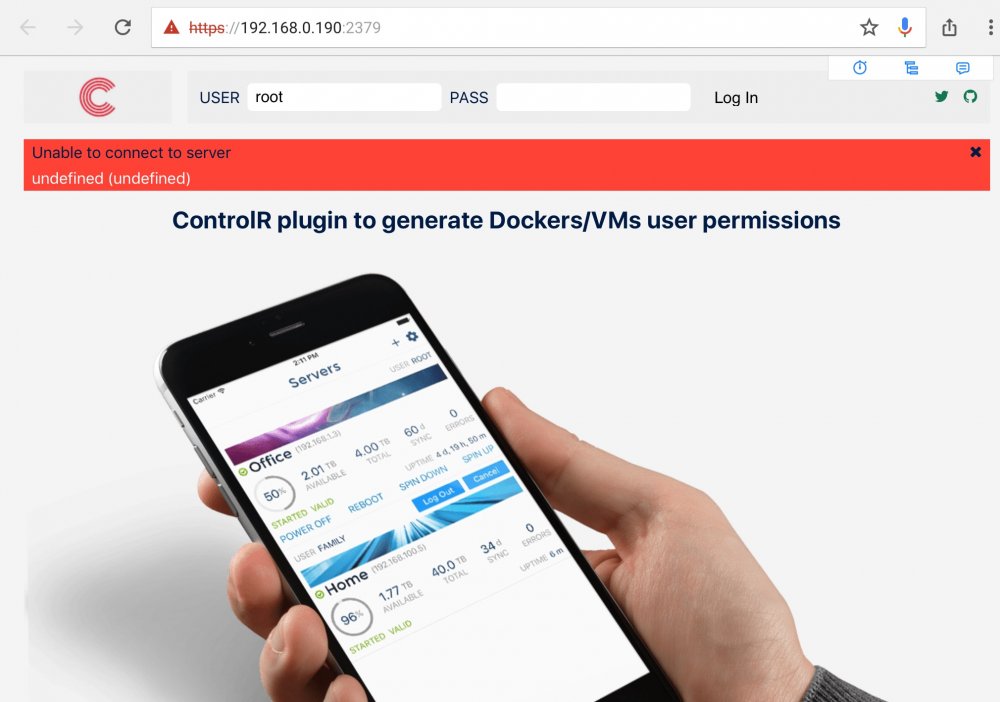
I'm on 6.4 and force to use https for unraid. And I can't longer connect with this app. //Peter
-
From terminal window using putty do rm -r /mnt/openVPNserver
-
Both plugins are updated. Now DL package from https instead
-
Changin CPU topology for me solved kernel panic as well.
-
It looks like the Slackware pages have some issues right now Skickat från min iPhone med Tapatalk
-
I see now that is some issue with default slackware package location .. but did you not get any md5 error during install ? //Peter
-
I'm on 6.4 rc6 When update xml to pc-q35-2.9 I get Kernel Panic! pc-q35-2.7 = OK Any one else got this ? Below is a dump from my VM //Peter
-
Hmmm, can you change to a new path for "Path to store Server, Clients config files and the Easyrsa V3" and start over again?
-
Do you have all the 3 checkboxes checked and green?
-
Did you change many settings ? If so start with default and try again? I never seen this behaviour before .
-
Both Server & Client plugin are now updated with the new OpenVPN package 2.4.3
-
I remember that these new 2.4 features are not added to OpenVPN connect yet. Skickat från min iPhone med Tapatalk
-
I have mine to no. Never tested to enable this . Hmm can be a setting for client that are wrong ? Skickat från min iPhone med Tapatalk
-
If I remember right the extension shall be .ovpn for the config file

