





peter_sm
Community Developer
-
Joined
-
Last visited
Everything posted by peter_sm
-
Yes you have entire LAN accessible trough VPN. Did you do any changes in the default settings ? //Peter
-
letsencrypt
-
No benefit, it's largely down to user preference, yeah I'd be grateful if you posted your config to see what the difference is. Here it is, please feedback what can be better! NgINX docker DHLEVEL = 4096 server { listen 80; server_name server.com web.server.com www.server.com; return 301 https://$server_name$request_uri; #enforce https } server { listen 443 ssl http2 default_server; root /config/www; index index.html index.htm index.php; server_name server.com web.server.com www.server.com ; #add_header Strict-Transport-Security max-age=31536000 always; add_header Strict-Transport-Security "max-age=31536000; includeSubDomains" always; include /config/nginx/proxy.conf; # include /config/nginx/auth.conf; ssl_certificate /config/keys/fullchain.pem; ssl_certificate_key /config/keys/privkey.pem; ssl_dhparam /config/nginx/dhparams.pem; ssl_protocols TLSv1.2; ssl_ciphers HIGH:!aNULL:!MD5:!3DES:!CAMELLIA:!AES128; ssl_prefer_server_ciphers on; ssl_ecdh_curve secp384r1; ssl_session_cache shared:SSL:10m; ssl_session_tickets on; location / { include /config/nginx/auth.conf; try_files $uri $uri/ /index.html /index.php?$args =404; } location /nzbget/ { include /config/nginx/auth.conf; proxy_pass http://192.168.0.190:6789; } location /sabnzbd/ { include /config/nginx/auth.conf; proxy_pass http://192.168.0.190:8080; } location /nextcloud { proxy_pass https://192.168.0.190:446/nextcloud; } }
-
Do you mean settings on OpenVPN Server Cert/Misc Configuration: ? in OpenVPN Server Configuration: there is no path to change. What version are you using ? //Peter
-
Thanks, Will take a look at this...... //Peter
-
Hi, I'm using server.com/nextcloud I never tested nextcloud.server.com. Is there any benefit to do this way instead? Can post the config later ..... //P
-
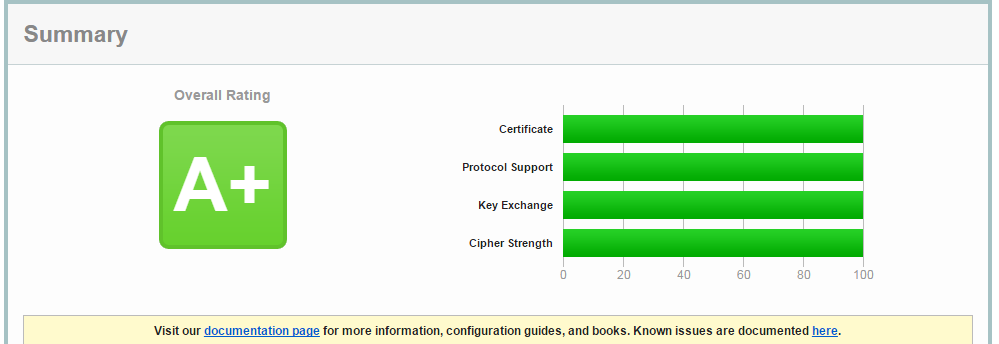
I have this score. nginx + Letsencrypt //Peter
-
i tried sierra and el cap with 6.3 and both boot ok for me. But not tried passing through any gpu at the moment. I think it's the CLOVER that's need to be updated. But it's looks like it's hangs during the identifying of the GPU. Skickat från min iPhone med Tapatalk
-
6.2.1 is OK.. Now back to 6.3.0
-
Anyone running 6.3.0-rc1 with Sierra? I cant boot. Will try do run 6.2.1 again and see if it works.
-
Go for an iMac 14.2 Skickat från min iPhone med Tapatalk
-
I assume you find the guide how to set up the client [emoji57] Skickat från min iPhone med Tapatalk
-
Looks fine when changed text settings to small.
-
Just purchased this app , but it looks strange when looking on several pages, I have an Iphone 5. It looks great so far with all the functions, is an iPAd version coming soon? //Peter
-
We need a video of this ;D
-
Off the top of my head.... :-) How to direct install Sierra from App Store. First you might need to install the patched Clover to work with CPU = Penryn? 1. This step might not be necessary. Open Clover configuration folder on the root of your system drive or EFI Partition using EFI Mounter v3. Copy necessary kexts to /EFI/CLOVER/kexts/Other/. You might not need any kext except HDMIAudio.kext? 2. Download Install macOS Sierra Application from the Mac App Store. When complete the app will be open. 3. Choose system drive for install (Example: Macintosh HD). When complete, the VM will automatically reboot. But you will do a shutdown. 4: Edit XML and change CPU to Penryn. 5: start the VM 6. When Clover boot screen appears, with arrow key go to Boot macOS Install option. Press spacebar to enter Boot Options and choose Without Caches option and/or Inject Kexts option then Boot Mac OS X with selected options. 7. Complete the installation process. When complete, the VM will automatically reboot. 8. When Clover boot screen appears, choose Boot Mac OS X option (Example: Boot Mac OS X from Macintosh HD). The computer will then complete the update. Please try and see if this is a good way. //Peter
-
Yes just done a guide to do a fresh install of Sierra on unRAID. Hope you find it useful. What are the chances we can upgrade an existing install? Very good, I have done it. I can write the steps I did later, if I remember those [emoji848] Skickat från min iPhone med Tapatalk
-
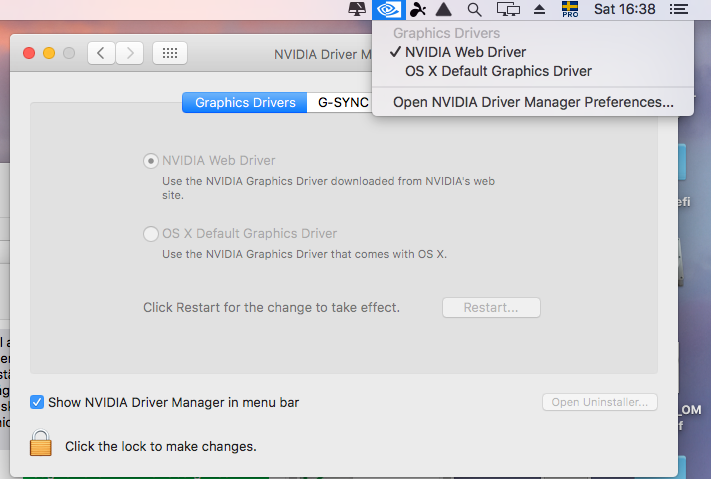
In clover there shall be a boot argument that shall enable use of this driver, check nvda_drv=1 EDIT For me I was loosing HDMI sound with nvidia drivers, even if I reinstalled HDMIAudio-1.1.dmg. Back to OSX Default drivers :-) //Peter
-
Yes, I have my GPU passthrough. Below is the code I use. I also testing a rom file ,but I think that is not necessary. <qemu:commandline> <qemu:arg value='-device'/> <qemu:arg value='ioh3420,bus=pcie.0,addr=1c.0,multifunction=on,port=1,chassis=1,id=root.1'/> <qemu:arg value='-device'/> <qemu:arg value='vfio-pci,host=06:00.0,bus=root.1,addr=00.0,multifunction=on,x-vga=on,romfile=/mnt/appdata/vbios-VIDIA-GeForce-GTX-660/vbios.rom'/> <qemu:arg value='-device'/> <qemu:arg value='vfio-pci,host=06:00.1,bus=root.1,addr=00.1'/> <qemu:arg value='-device'/> <qemu:arg value='isa-applesmc,osk=xxxxx'/> <qemu:arg value='-smbios'/> <qemu:arg value='type=2'/>
-
Hi Peter sorry for late reply. Yes if you want to edit clover. Open the efi partition then goto clover and click open file then goto efi partition then open the config.plist in the clover folder. It doesnt find it itself for some reason. clover installer settings as below. Thanks, but did your clover upgrade packages find your EFI parttions ? //Peter
-
FYI: My GPU is OK with UEFI //Peter
-
There is a link on the first post, check that.
-
You need also the missing file. They shall be in the zip file from pia
-
After you have saved the settings and started the client, did you see any error log?
-
Gridrunner, I have no problem with your guide, I only have another way to boot clover. EDIT Of course I was using seabios :-) But have now converted to your way! But when trying to upgrade clover the installer don't see my EFI partition ( Even if it was mounted). But I did a install to my MAC partition and moved the new EFI folder to my EFI partition and added my modified files (kext, config and aml files). But what settings was you enabled in the installation page of clover. ? //Peter

