





clevoir
Members
-
Joined
-
Last visited
Everything posted by clevoir
-
Yes I've checked the standoffs and noticed that they not the regular spacing.
-
I am not sure if the tape trick is relevant either as I have flashed Dell H200 cards to IT before and not had to use the trick. I can't see any see any harm in disabling the Load Storage ROM option, although the new LSI cards have had their ROM removed. X9-SCM motherboards are around £100 on eBay here in the UK, but thankfully I have been refunded twice so far. I've just bought another motherboard for £50 in Poland to reduce the financial risk. I'll build a bare bones set up as you suggest using a known working PSU, and I have a spare H200 card + install in the case. beyond that I am worried out if the PSU or LSI cards are faulty and the risk to the new motherboard. The difficulty is that I can't risk testing the new PSU or LSI cards in another server for fear of damage. And similarly I am loathed to remove good components from a working server to test either.
-
When the faults with the 1st and 2nd motherboards occurred, LSI cards where connected to the hard drive back plane. I've tested continuity from the outer metal frame of the SFF8087 sockets on the back plane to the server case. I've removed the HBA to back plane cables (SFF8087 to SFF8087, these are genuine Supermicro instead of cheap Chinese copies). Visually there is no damage to suggest shorting to the case metalwork.
-
Gemini reports the following to X9-SCM and LSI 9207 problems. Is this people's experience, in may case the seller had removed the BIOS from the cards? AI Overview When installing an LSI 9207-8i Host Bus Adapter (HBA) into a Supermicro X9SCM (such as the X9SCM-F) motherboard, a "no video" or "no POST" condition is a well-documented hardware conflict. This behavior is almost always caused by an SMBus conflict or an Option ROM (OPROM) memory exhaustion issue. Fix this issue by trying the following steps, ordered from the most likely solutions to general troubleshooting: 1. The SMBus "Tape Trick" (Most Likely Fix) Many enterprise LSI HBAs (especially if they are OEM cross-flashed cards from Dell, HP, or IBM) use PCIe pins B5 and B6 for the System Management Bus (SMBus). When plugged into certain motherboards like the Supermicro X9 series, the card tries to communicate over the SMBus, which conflicts with the motherboard's own management features, freezing the system before it can initiate video or POST. The Fix: Cut a tiny sliver of electrical tape or Kapton tape and carefully cover pins B5 and B6 on the front side of the PCIe connector edge. Note: Turn the card so the components are facing you and the golden pins are pointing down. Pins B5 and B6 are the 5th and 6th pins from the left, starting after the small physical divider notch. 2. Disable Card Option ROM (PCIe OPROM) The Supermicro X9SCM has limited memory allocated for execution during POST. When the LSI 9207-8i tries to load its own boot BIOS (the prompt that says Press Ctrl+C to enter configuration utility), it can exhaust the motherboard's Option ROM space, resulting in a black screen. [1, 2] Remove the LSI 9207-8i card from the system completely. Boot into the Supermicro BIOS using the onboard VGA port. [1, 2] Go to the Advanced menu -> PCIe/PCI/PnP Configuration. Find the specific slot number where you plan to install the LSI card and change its setting from Enabled to Disabled (or change Load Storage Option ROM to Disabled). Save changes, shut down, re-insert the card, and try booting again. Note: Disabling the Option ROM only stops the card from showing its splash screen during boot. Your operating system (TrueNAS, unRAID, Linux) will still see the card and all connected hard drives perfectly. [1] 3. Check the PCIe Slot Selection & Generation The X9SCM motherboard has specific lane restrictions depending on which slots are populated and which CPU generation you are using (Sandy Bridge vs. Ivy Bridge). Try moving the card to a different PCIe slot (e.g., swapping between CPU-controlled slots and PCH-controlled slots). [1, 2] If you can get into the BIOS without the card, try explicitly forcing the PCIe slot speed to Gen 2 or Gen3 instead of leaving it on "Auto". [1] 4. Verify IPMI / Onboard Video Jumper Supermicro boards feature built-in ASPEED graphics tied to the IPMI management system. If the motherboard's onboard video jumper was accidentally shifted or if the BIOS default display adapter changed when a PCIe device was inserted, you might lose video. [1, 2] Check the JPG1 jumper on the X9SCM motherboard. Ensure it is set to pins 1-2 (Enabled) to force the onboard VGA port to output video. [1] If you would like to narrow this down, please let me know: Are you getting any POST beep codes when it turns on? (e.g., 4 short beeps or 1 long beep) Can you successfully access the IPMI web interface to view the remote console or event log? What CPU model is installed on your X9SCM? [1, 2, 3]
-
I've now stripped the case into parts and tested with a multi-meter, I can't find any faults or damaged cables. Moving forward I am going to remove the front panel and USB socket wiring and simply wire my own switch to the power pins of the motherboard instead. The supplier of the 2nd motherboard has refunded my money, but has given no feedback to the fault which doesn't help. This leads me to suspect one or more of the LSI cards as faulty they are LSI 9207-8i, I have another unRaid server with the same motherboard and same cards and it works perfectly. I've had cards fail before, disappear or cause corruption following a storm. but I have never read about them damaging a motherboard. Is this a thing? I've now bought a 3rd motherboard, and I guess I'll have to buy some other cards as I don't want to risk the new motherboard getting damaged?
-
I've received the PSU tester and the new Corsair PSU and my old Antec PSU both test OK. I'm currently awaiting an update from the supplier of the 2nd board, but I am tempted to purchase a board with a x16 slot, something like X10SRi-F, which will allow me to use a separate video card.
-
I have only just returned the 2nd board today so I await the supplier's comments. The Corsair PSU has been used with the modular cables that it was supplied with. The Antec PSU is an older design with fixed cables I'll report back once I have tested the PSU with my new PSU tester.
-
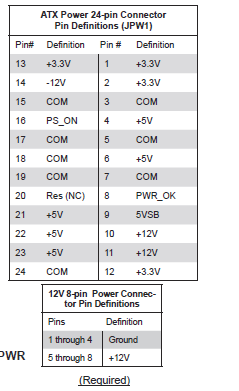
I have spotted that the X9-SCM motherboard needs -12v on pin 14, from reading forums I understand that Corsair PSUs, ATX 3.0 and 3.1 do not support the -12v rail. I wonder if that is my issue, out the case at testing stage BIOS was reporting -12v at -63v. My working board with an older RX850x PSU reports -12v as OK
-
When the video showed as garbled after the board was installed in the server case , I took the board out of the case and removed the HBA cards. I then put it back on the test bench with just CPU and RAM, with the new PSU. Initially it would POST and but away a few attempts, the garbling was getting worse. I then tried to clear CMOS and the board wouldn't POST. I took out the CMOS battery, cleared the BIOS and put in a new battery, this had no effect. I then tried swapping with the Antec PSU, which I have tested OK with my basic PSU tester, but this had no effect either.
-
It's a brand new Corsair RX850x PSU and I used the same modular cables to feed each motherboard. The enclosure is a Inter-Tech 4U IPC 4U-4724 Storage Server Case. I also tried an old Antec 500W PSU that have in my spares box too. I've bought a PSU tester which I should have tomorrow to test that the PSU is working OK. After the first board, I had the 2nd board installed with just the CPU / 2 sticks of RAM installed on a non conductive surface , and it worked faultlessly just showing the BIOS screen. The board power LED was on and the IMPI LED was flashing. Once the board would no longer POST both LED's were no longer lit. The issue started only after the board was mounted in the case, front panel wiring was connected and HBA's were installed, although the video was garbled the LED's were flashing OK on the HBA cards. So the only common components between the boards are PSU / HBA cards and case. I've had HBA cards fail before but it simply caused errors with reading disks, I can't see how they could effect the board unless the board were faulty and couldn't supply enough power to the cards? The HBA cards are used, but bought from a eBay seller who has flashed them to IT and tested before sale. I'll check the case out with a mutimeter to see if I can discover any faults with the front panel wiring. I am tempted to try another board, soak test with just CPU & memory. Then soak test with HBA cards, adding one at the time. Then install in the case but depending on what I find on testing, not use the front panel wiring - I'll wire my own power button. The attraction with this motherboard is that it has 4 PCIe slots which I can used for 3 HBA cards and a NvME card for pool drive. I already have another Unraid server using the same hardware, which has run for 10 years with 20 hard drives and I have only had to replace some HBA cards after they started to report faults after unclean shutdowns after continued power cuts in a storm, even though I have a UPS.
-
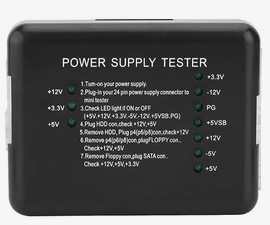
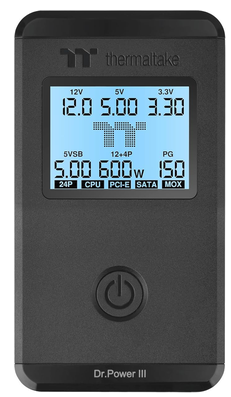
Whilst on test the BIOS reported the -12v was -63V, but the motherboard booted and worked OK on soak test. I have another UnRaid server with the same motherboard and all voltages are shown OK Could I have a duff PSU, on a dumb cheap PSU tester only 1 of the 2 12v LED's are lit? I am looking at a more expensive tester like the Thermaltake Dr. Power III ATX Power Supply Tester that does ATX12v3.1
-
I built a new UnRaid server with Supermicro X9-SCM motherboard / 16GB ECC RAM / Xeon E3-1230v2 CPU and 3 LSI HBA cards. This was built into a 2nd hand 24 bay server case (this was as new as it had never been used) with a new 850W PSU. I bought the motherboard / CPU and memory as a bundle on eBay with a screenshot of the BIOS from a private seller who had used it for a UnRaid server for a number of years. I mounted them in the case with PSU and HBA cards, it would not respond to the power switch and when shorting the motherboard header it would POST but have no video. I returned the motherboard / CPU and memory to the seller for a refund I bought a another Supermicro X9-SCM motherboard from a recycler on eBay sold as tested, a new unopened Xeon E3-1230v2 CPU and 16GB ECC RAM. I had this running with just the motherboard / CPU and memory on a bench for 24 hours OK I've then installed it in the server case with the HBA cards, again the motherboard won't start using the case's power switch. I've shorted the motherboard header and I get garbled video as the board starts up. The LED's on the HBA card are flashing OK I've tried resetting the BIOS, replacing the CMOS battery and resetting the BIOS, and after number of attempts the board will not longer POST at all. There is no power LED lit and the IPMI LED does not flash either. I am at my wits end and I just can't see how installing the motherboard in the server case can cause the motherboards to fail twice in a similar way? I have checked that the motherboard standoffs are in the right location, so that is no shorting to the underside of the motherboard. Perhaps the power button is faulty, but could the connections for the power button / NIC LED's / reset switch and HDD LED be causing damage to the motherboard, I can't see it though? I've returned the motherboard for a refund Could it just be coincidence that 2 motherboard have failed in a similar way, they are old the last one was build in 2012 and may have had a hard life in a data centre. I've tested the PS are OK but just don't know what to do next??? I'm tempted to buy a new motherboard / CPU and memory from one supplier, but wary about installing the server case?
-
I had the very same problem for a very long time, but the latest version fixed it for me. However I can only connect using OpenVPN and it takes some time to establish a connection, I am using AirVPN. If I try and use Wireguard I can't establish a connection at all, despite trying a number different VPN server configs I suggest trying OpenVPN
-
I'm using SabNZBvpn and I am very surprised that the use of OpenVPN reduces the speed this much? I have tried using Wireguard instead but I can't get a working VPN connection, despite trying a number of different site profiles My VPN provide offers configs for Router or SabNZB, I guess I use the SabNZB option?
-
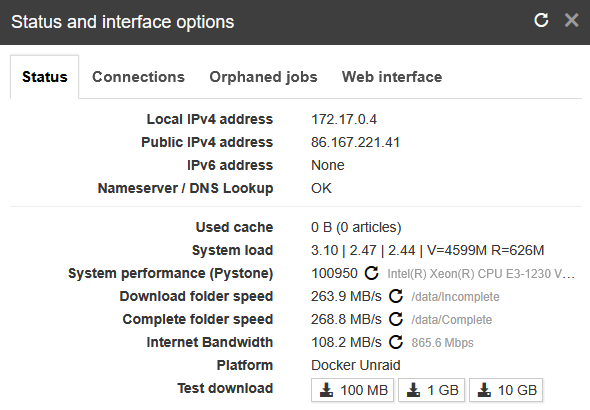
The problem appears to be using VPN, with it switched off I am seeing a greatly increased internet bandwidth and download speed of 84Mbs

-
I have set line speed to 100Mbs and article limit to -1. Articles to request I have tried changing with no effect. I have turrned ff direct unpack too



-
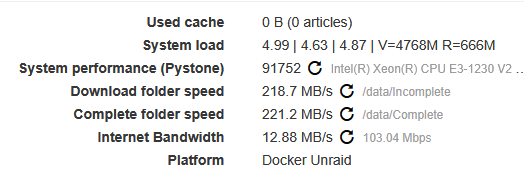
I have recently increased my ISP download speed from 80Mbs to 900Mbs Previously I saw download speeds using SabNZB of 8MB's and now expected to see 100MBs instead, but I am only seeing 30Mbs at most? I installed a NVMe drive and have created a share for SabNZB, this has greatly increased my folder speed but hasn't changed the internet speed reported by SabNZB? I've enabled exclusive shares under Global Shares, but when creating my new share it's set as not exclusive? It's set solely to use the NVMe drive, which is in a new pool that I have created. Using Newleacher to download I am seeing 100Mbs speeds
-
The failed disks were shown as unassigned devices, but when i tried to reassign them to the array, the disks were shown but as soon as i selected them their names disappeared as if they did exist. I saw this before, but this time to rebooted the server, upon reboot i was able to reassign the disks OK So i can see them dropping, i guess either because it's power or the HBA is dropping them I will strip down my server and check all connection when i replace the controllers / cabling
-
After an uneventful few days I have 2 disks failed again! Of the disks that failed last time, these were replaced with larger disks, and I carried out 2 preclears and 3 extended SMART tests each of the failed disks and found no fault. The parity disk 2 that has now failed, it previously failed and I carried out a extended SMART test and found no fault. So I have strong suspicions that it's not a disk problem! My problems started after a power cut, all connections data / power were OK. I wonder if a have controller problem, I read that DELL PERC H200 cards don't like voltage fluctuations? I've started the array without the failed parity disks, added them back in and the array is rebuilding. After last time I have bought new HBA cards and new SFF-8087 to SATA wiring too, I was going to swap this out at the weekend. My plan now is to get the array rebuilt OK and then immediately swap out the cards & wiring See attached diagnostics tower-diagnostics-20260519-1414.zip
-
-
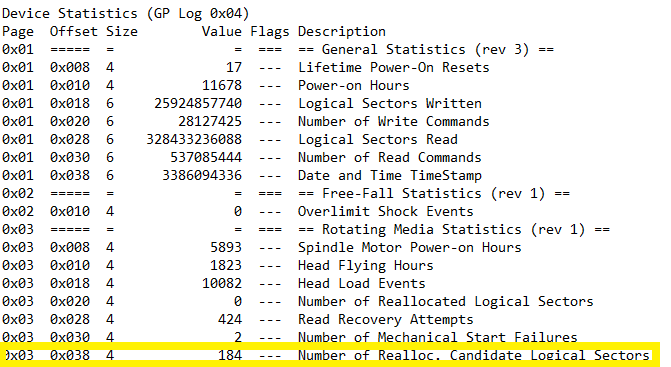
Hi, I am probably overthinking as both drives show 0 reallocated sectors🙂 I have never seen this heading before, is this 184 sectors that can be reallocated if needed, as the current relocated Logical sectors is 0? I've tried searching on Google but can't find anything about Candidate Logical Sectors
-
I can see that that the Reallocated Sector count is 0, but I'm concerned that the Number of Realloc. Candidate Logical Sectors is 184? I have never seen this heading before, and Google doesn't give a lot of information on it either?
-
Perhaps I have misunderstood the report but for the 6TB drive I see? But also


-
These are smart reports for the 2 failed disks, I am doing preclears on both of them now I note for one of the disks it has 184 reallocated sectors, I guess this one is best thrown away? WDC_WD60EFPX-68C5ZN0_WD-WX42D8445KLT-20260514-1606.txt WDC_WD40EFAX-68JH4N1_WD-WX22DB05D97H-20260514-1605.txt
-
I now have disks 7 & 8 rebuilt, and will test the failed disks I'll replace the control cards as precaution too Thanks for your help


