





EdwinZelf
Members
-
Joined
-
Last visited
-
I like it so far 👍 Small question: I still have my first backup running. I notice the vm's get stopped one by one to start each backup. But I am not seeing a start vm in the logs. I expect this will happen after all vm's are backed up? I would have expected a "stop - backup - start" flow. But maybe I am missing something. The "other" vm backup supported backups through snapshots. So no down time. Is that also something you are looking at? 🙏
-
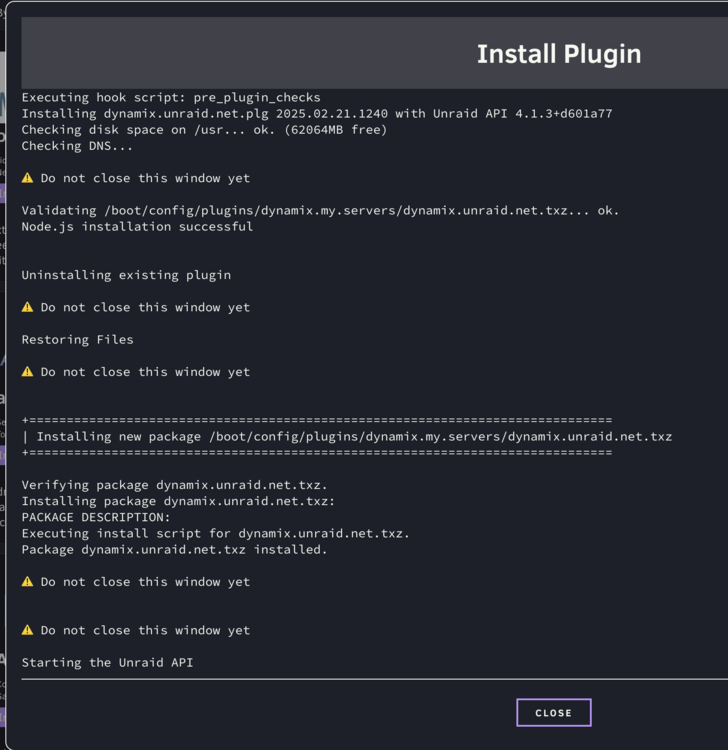
Looked some further and I think i found the issue. I added zsh to unraid as it is my preferred shell. Guess that broke my plugin update/install. I run the following command in a bash shell: /usr/bin/php -q /usr/local/emhttp/plugins/dynamix.plugin.manager/scripts/plugin install https://ca.unraid.net/dl/https://stable.dl.unraid.net/unraid-api/dynamix.unraid.net.plg Now the plugin is successfully installed. I think zsh is used when installing/upgrading from the gui and not forced to use bash. Did I break it? of should the update/install default by itself to use bash?!
-
I tried searching all of the forum, but cannot find a solution. Any help is much appreciated.. I tried to upgrade the connect plugin last week and it failed. Got stuck on "Starting the Unraid API". I had to close the window, as nothing happend. Tried rebooting and updating serverl times, same result. The I removed the plugin, and tried to reinstall. But again stuck at the same task. I probably broke something, but need help to get things working again. atlas-diagnostics-20250227-1512.zip
-
EdwinZelf changed their profile photo
-
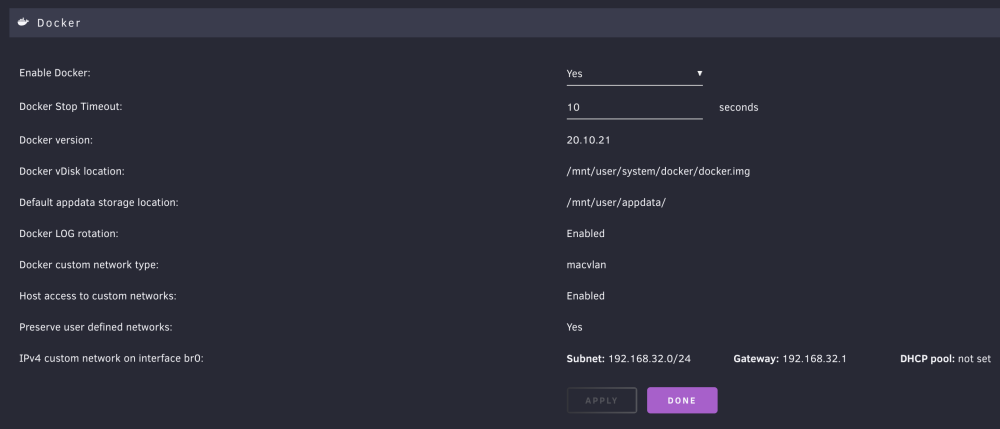
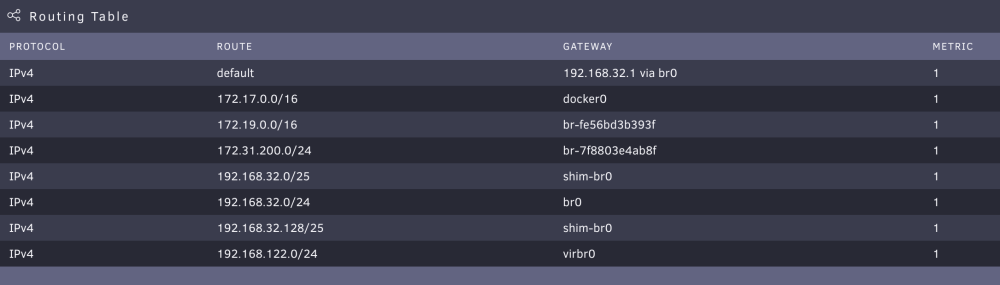
Just noticed my Unifi DHCP is complaing about a duplicate IP address. When looking at ip a on my server, I see its IP twice listed: 12: shim-br0@br0: <BROADCAST,MULTICAST,UP,LOWER_UP> mtu 1500 qdisc noqueue state UP group default qlen 1000 link/ether 56:87:88:2c:2a:07 brd ff:ff:ff:ff:ff:ff inet 192.168.32.20/32 scope global shim-br0 valid_lft forever preferred_lft forever inet6 fd01:86af:55ec:40d9:5487:88ff:fe2c:2a07/64 scope global dynamic mngtmpaddr valid_lft 1654sec preferred_lft 1654sec inet6 fe80::5487:88ff:fe2c:2a07/64 scope link and 8: br0: <BROADCAST,MULTICAST,UP,LOWER_UP> mtu 1500 qdisc noqueue state UP group default qlen 1000 link/ether 00:0a:cd:3e:64:a4 brd ff:ff:ff:ff:ff:ff inet 192.168.32.20/24 scope global br0 valid_lft forever preferred_lft forever My docker settings are like this: Routing table: Why does the shim-br0 use the same IP as the host itself?
-
Cpu encoding plugin gives same result: 2021-09-25T11:56:14:DEBUG:Unmanic.Plugin.encoder_video_hevc_libx265 - Unable to fetch file MIME type
-
Mover now copies one time to the destination folder 👍 https://pastebin.com/MVd1E5Tz
-
Yeps. I have many like these. Way back I used iFlicks to repack mkv to m4v. So iTunes could handle them. If I run ffmpeg -i '{}' -vcodec copy -acodec copy '{}.mkv' to change from m4v to mkv. Then unmanic has no issue. Manual ffmpeg detects meta data fine. Output for ffmpeg -i Ant-Man.m4v -f ffmetadata in.txt is here https://pastebin.com/mvpCCMqW
-
Omg. Ashamed now. Completely missed the m4v error. Sorry about that. I am pretty sure the same container files did get processed by the old unmanic. Not sure why it has difficulty fetching the mime type. I’ll check later if cpu encoding plug-in gives the same error.
-
Just the basics [emoji854] And yes, m4v is included in the file extensions. I will try to run with out the extension plugin later today. Any log files a can look at to see why m4v does not get picked up? Have debug turned on, but no log entry on m4v.
-
Thnx , I’ll be testing later today. Other question: does unmanic skip m4v files? I have a lot of those and the old version of unmanic picked them up and converted them. The new version seems to skip them entirely. Am I missing something?
-
seems GitHub had an issue with building staging

-
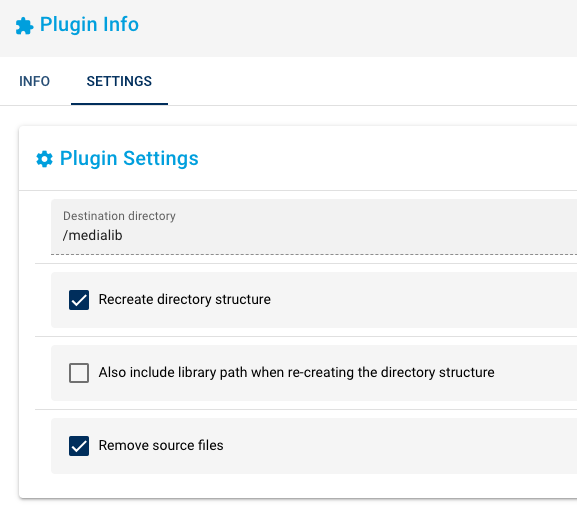
I'm still scared to let unmanic loose on my complete media folder. So I'm playing around and selecting manually what to let unmake have a go at. I manually move movie folder to: /mnt/user/media/unmanic/movie/ this is mounted to /library/movies. I added an extra mount mount point in the docker to /mnt/user/media mounted to /medialib. Last step I added because I'm happy with the results so far, and instead of manually move back converted folders, I gave 'Mover v2' a go. Should the mover plug in not make sure the converted file is moved only once from /tmp to the destination location? not copying to both /medialib/Movies/ and to /library/Movies (which from the log it seems to do twice) I have turned on the "Remove source files". So all the copies from /tmp to /library/Movies are unnecessary as they will be removed. PS, just giving feedback on the plugin, when I let unmanic have access to my main media folder, I won't be using the mover plugin.
-
I was playing with the mover plugin. Seems like the converted file is being copied from /tmp to both source location as to the mover location. Then both old and new file get removed from the source location. Seems like double the I/O / transfer. https://pastebin.com/yjdc41dj And the folder in which the source was located is not removed. Would be nice to have.
-
Love this plugin. I searched this thread an other places, could not find my issue. Hope it's not asked and answered. I installed the folder plugin before deploying most of my containers. I played around with the order and put my db container way on top. As some containers depend on the DB, i put in a wait time on the db container. Now I started using @Squid's great "Appdata Backup/Restore v2" plugin. I make a nightly backup and noticed every morning some containers depending on the DB failed. Looking closely, the backup plugin did not follow the order I had set. some digging later, I discovered my /var/lib/docker/unraid-autostart was completely different then my order in my docker.folder view. I removed the docker.folder plugin, reordered my containers in the standard view, which got me an updated /var/lib/docker/unraid-autostart. After this I reinstalled the docker.folder plugin. Now the start of dockers after a backup follow my preferred order and wait times. Not sure if I should expect changing the order within docker.folder would change the /var/lib/docker/unraid-autostart.
-
For me x264 QSV works fine (mixed GPU and CPU usage) x265 QSV fails with Failure to initialise thread 'Quick Sync Video encoder (Intel Media SDK).


