chrizzo
Members
-
Joined
-
Last visited
Everything posted by chrizzo
-
Hey @dlandon thx a lot, that did the trick. I also changed 'Defaultvers=4' to 'Defaultvers=3'. Thx a lot pal!
-
@dlandon just tried, also no luck Nov 29 21:37:45 Chrizzonet unassigned.devices: Mounting Remote Share 'MYCLOUDEX2ULTRA:/mnt/HD/HD_a2/ha_backup'... Nov 29 21:37:45 Chrizzonet unassigned.devices: Mount NFS command: /sbin/mount -t 'nfs' -o rw,hard,relatime 'MYCLOUDEX2ULTRA.LOCAL:/mnt/HD/HD_a2/ha_backup' '/mnt/remotes/MYCLOUDEX2ULTRA_ha_backup' Nov 29 21:37:45 Chrizzonet unassigned.devices: NFS mount failed: 'mount.nfs: Protocol not supported for MYCLOUDEX2ULTRA.LOCAL:/mnt/HD/HD_a2/ha_backup on /mnt/remotes/MYCLOUDEX2ULTRA_ha_backup'. Nov 29 21:37:45 Chrizzonet unassigned.devices: Remote Share 'MYCLOUDEX2ULTRA.LOCAL:/mnt/HD/HD_a2/ha_backup' failed to mount. I don´t know why... It was running for years now, changed nothing on that WD thing...
-
@dlandon Test seems to be fine: Server '192.168.188.71' responds to a 'ping' Testing SMB... Remote server 'SMB' port 445 is open ** Remote Server is online for SMB Testing NFS... Remote server 'RPC' port 111 is open Remote server 'NFS' port 2049 is open The 'showmount -e' command results: Export list for 192.168.188.71: /mnt/HD/HD_a2/ha_backup * /mnt/HD/HD_a2/nfs_mycloud * NFS versions available: 3 ** Remote Server is online for NFS But wen trying to mount one of them I get Nov 29 21:17:07 Chrizzonet unassigned.devices: NFS mount failed: 'mount.nfs4: Protocol not supported for MYCLOUDEX2ULTRA.LOCAL:/mnt/HD/HD_a2/ha_backup on /mnt/remotes/MYCLOUDEX2ULTRA_ha_backup'. Nov 29 21:17:07 Chrizzonet unassigned.devices: Remote Share 'MYCLOUDEX2ULTRA.LOCAL:/mnt/HD/HD_a2/ha_backup' failed to mount.
-
I do have same problem. Also cannot mount NFS share anymore since I updated to Unraid 7.
-
Opera for everything.
-
Jep, nutze dein LXC-Plugin auch, das ist absolute Sahne. Danke dir an der Stelle für deine Arbeit!
-
Okay, ich stimme bedingt zu. Ich stimme insofern zu, dass es nicht so die beste Idee ist, wenn man sich nicht mit Docker auskennt. Ich baue seit einiger Zeit meine Images über Drone auf Unraid, hatte bisher nie Probleme - Prune ist dein Freund Steht auf jeden Fall auf nächstes auf der Liste, sauberer ist es allemal. Dann hast die Images nicht unbedingt zwischen deinen Prod Containern rumliegen.
-
Oooh jaaa, das "gute" DS Lite Kommt mir sehr bekannt vor... habe mich in der Vergangenheit auch ewig damit rumgeschlagen. Schau mal hier, so hatte ich es dortmals mehr oder weniger gemacht: https://bitreporter.de/fritzbox/zugriff-zum-heimnetz-trotz-ds-lite-ohne-ipv4-adresse/ Auf jeden Fall ist die ganze Thematik auf der Seite gut beschrieben.
-
Warum nicht? Gibt es wirkliche Gründe, die dagegen sprechen? @Mike_84 Wenn du möchtest, kann ich das Repo auf Github forken und dir ein Image auf Dockerhub bereitstellen. Kann dir dann auch erklären, wie du es auf Unraid an den Start bekommen würdest.
-
Meine Lösung war nicht ganz falsch 😁 ich hätte einfach mal ein Windows Neustart machen müssen 🤦🏼♂️ Aber hier nochmal die komplette Lösung:
-
Can confirm that this is working! Had problems three days long with EAC. Whats kind of funny: I almost had everything in my XML. But did not work... so the only thing to do was to really do a Windows restart! Had the last few days really bad mood because of this story... but now everything works again! Thank you!
-
@SimonF you are No1 thx a lot!! Really helped me.
-
Are there any solutions on that topic? Having same problem here with Easy Anti Cheat ☹️
-
I just use the cheapest USB DAC from Amazon, I bought it for around 8euros. And just did a paththrough. Shouldn´t be a problem with your headset on 3.5. In my case I also have a Logitech G533 with USB Dongle, that´s also working.
-
Moin @mgutt, ja, ist schon richtig was du schreibst. Bisher hat EAC einfach keine Probleme an der Stelle gemacht. Habe auch tatsächlich schon einen Thread im Forum von Lost Ark offen. Gehe nur nicht davon aus, dass sich da was bewegen wird. Meistens sind die Devs in solchen Dingen ja flexibel wie ein Amboss, deshalb hatte ich einfach die Hoffnung, dass ihr evtl einen Workaround oder so kennt. Zurück auf Baremetal ist für mich auch absolut keine Option, ich glaube vorher höre ich einfach auf zu zocken 😂 Dafür liebe ich meine Unraid Kiste einfach zu arg 😄
-
Hi zusammen, aktuell habe ich Probleme Spiele zu starten, die Easy Anti Cheat nutzen, Lost Ark zum Beispiel. EAC muss wohl Änderungen vorgenommen haben, denn bis letzte Woche hat es noch problemlos geklappt. es erscheint die Meldung „Cannot run on Virtual Machine“. Habe nun schon versucht „zu verschleiern“, dass es eine VM ist. Wie zum Beispiel durch <kvm> <hidden state='on'/> </kvm> und <feature policy='disable' name='hypervisor'/> Habe diese Lösung hier im Forum gefunden, scheint aber leider nicht (mehr) zu funktionieren. Hat jemand von euch evtl noch einen heißen Tip? Danke Euch!
-
Bei mir spinnt seit der Stable das Dashboard rum, RAM bleibt bei 0,00% nach gewisser Zeit. hatte ich bei allen RC‘s nicht.
-
Think you can ignore it. my system is also absolutely stable, no issues so for.
-
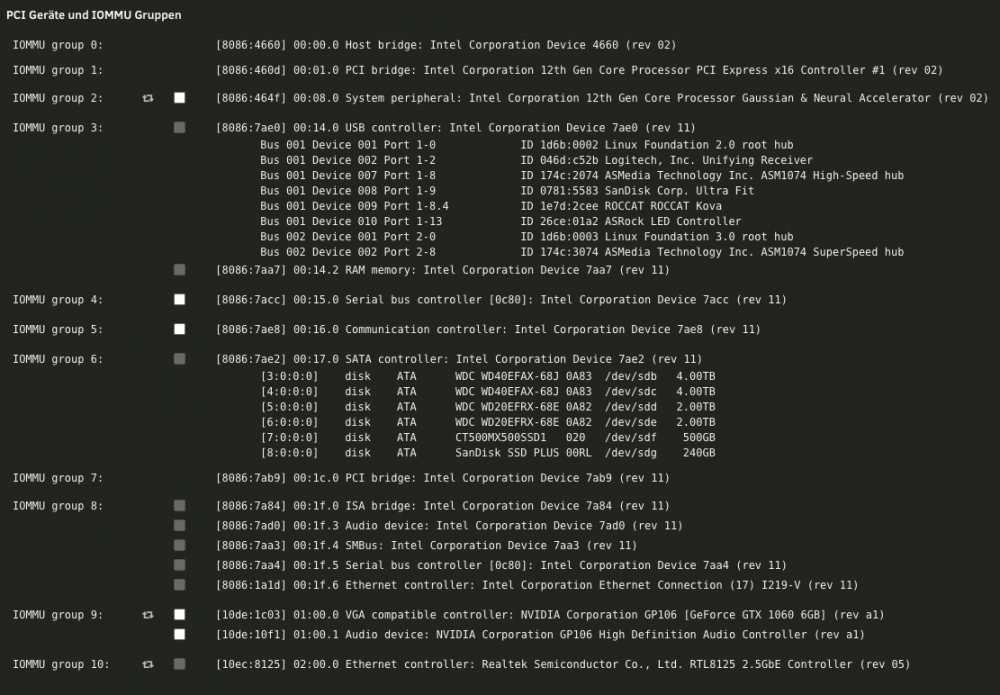
So far I gotta say that everything is working good. I do have a 12900k with ASRock Z690 extreme… only thing what’s bit bad with that board are the IOMMU groups - was not able to isolate audio, I‘m using a USB audio for my Win11 Gaming VM, this is working pretty good. Also both of the NICs are working fine. Also had no system crashes so far. I‘m on Unraid 6.10RC2. Performance is also pretty nice so far. For Dockers and stuff I have set some E-Cores, Win11 Gaming VM is running with P- an E-Cores.
-
Bin eigentlich nur auf dem RC unterwegs, aufgrund der eher neueren und eigentlich noch nicht wirklich unterstützten Hardware => i9 12900k Komme ursprünglich von AMD, wollte wieder zu Intel, hab mich tatsächlich auch gegen den Rat vieler hier entschieden und habe die 12te Generation angestrebt anstatt die 100%ig unterstützte 10te Generation. Ganz nach dem Motto "No Risk, No Fun" - Und early adopter zu sein hat auch so einen gewissen Reiz...
-
Werde den RAM wohl die nächsten Tage mal checken. Komisch ist, dass es bisher an sich immer über Nacht war...
-
Dieses Verhalten stelle ich bei mir auch sehr ähnlich fest. Das WebUI geht bei mir zwar noch mehr oder weniger auf, reagiert aber nicht richtig oder zeigt Blödsinn an. Z.B. Die Anzeigen auf dem Dashboard zeigen nichts mehr an, und bei der Array Übersicht werden keine Platten angezeigt. Nach reboot wieder alles gut. Hatte das jetzt so 2-3x, muss mir auch mal das syslog genauer anschauen. Mein System: i9 12900k auf ASRock Z690Extreme mit 64GB RAM; Unraid 6.10 RC2
-
Naja, viel zu beachten gibt es wahrscheinlich nicht. Habe auch vor 5 Tagen meine Platten auf neue Hardware gehangen - in diesem Fall sogar kompletter Wechsel von AMD nach Intel. Platten zur neuen Hardware gehangen, Array gestartet und gut war. Was evtl. zu beachten wäre, ist, dass du dir evtl. ein Board raussuchen solltest, das dir vernünftige IOMMU Groups hergibt. Ich habe z.B. den Fall, dass ich weder mit überschreiben noch sonst was bei meinem Board die Soundkarte isoliert bekommen habe - dafür muss jetzt halt eine USB Soundkarte herhalten, tut´s aber genauso.
-
Also same here, but with a WIN10 VM - Unraid 6.10.0.rc2
-
Here are the IOMMU Groups: I am trying to get "Audio device: Intel Corporation Device 7ad0" isolated... but no success so far. Tried it with vfio-pci.ids, also with pcie_acs_override=downstream, multi. Do you guys have any ideas? Other things are working fine - also managed to do a GPU Paththrough to Windows10 VM. Some more news: Also both NICS are working - as I only have 1GB Network, both are running of course on 1GB... but both are working.