





W0nderW0lf
Members
-
Joined
-
Last visited
Everything posted by W0nderW0lf
-
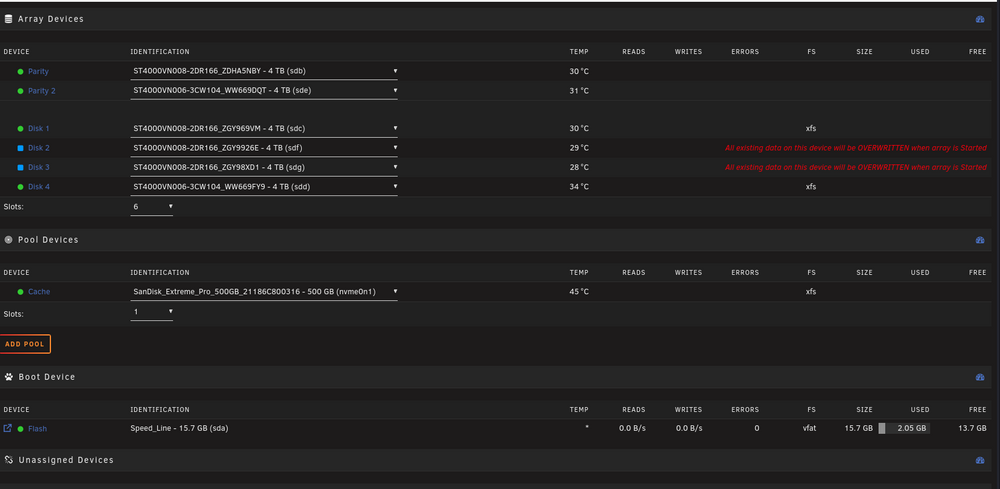
I know the correct disk order now. Both are mountable at least in the "Main" tab. What is UD? Could I just replace disk mount information from an older backup like super.dat + whatelse is necessary? Should I unassign all drives from the array before I do run new config?
-
I just checked a flash backup to find the disk order as it was before. How do I use the "new config"? Do I need to unassign all disk's before I do that?
-
Here it is: nasty-diagnostics-20251121-1224.zip
-
Didn't work. Disk's are being detected as normal but it won't start the array in the previous order. I have a flash backup but I dont know if I can just replace certain files on that stick with array info's like the super.dat
-
Help ! I had my array started in maintenance because I wanted to test if I can launch a VM with at least the SSD Cache installed. Now after replugging everything back, I cannot add my disk's without having 2x4TB erazed.. Why can't I just add those disk's back to the array? I also don't remember in which order they where assigned.
-
Negative... Array needs to be started and havin those started with the drives attached could be risky while flashing the firmware...
-
Hi everybody, I want to firmware update an ASMedia SATA Controller. Unfortunately I dont have an ATX Mainboard with 2 PCI-E ports. Got only 2 Mini-ITX Mainboards with used slots... . So I was curious if I could just run a windows VM in unraid and pass thru a new ASM 1166 Card to a VM to run the flashing tool. Has someone experience with that?
-
Hey @JorgeB I just wanted to mention that you provided the solution. It seems I had to adjust my power management settings for my ryzen and the clockspeed for my RAM... I wondered because it worked for years without issues. It just stopped working properly after adding 2 more disks... Maybe that's the reason the CPU didn't work that well..
-
Thanks for the quick reply! I wonder why I haven't received an email as notification... (I follow that post) BTT: If I understand your post correctly, I have throttle down my clock speed for my RAM? I currently have 2x 3200 MHz 8GB RAM. For my CPU to work properly, I have to lower the speed to ~2400, right? My current CPU is an Ryzen 7 x1700. Would be bummer, but at least it would run for a while, until I have my new system running. edit: Forgot to mention disabling the c-states .. Seems like I really have to turn against ryzen :(
-
Hi again, sorry that I haven't replied back earlier. Was trying troubleshooting a bit. Haven't found a real solution yet. I still have random crashes in different varieties. Either the server is freezing completely, or it's crashing and rebooting, or crashing/rebooting but still not coming up properly again. Really weird symptoms. I experience these issues since I added more disks and upgraded my RAM. (I know the RAM is fine. got 2 different sets of ram and it behaves the same with any one of them. I assume it's either my CPU or the amount of disk drives... However, I managed to get rsyslog on another system running to get a better log view for my unraid system. The times logged dont match the exact time it happened. Maybe need to configure a proper NTP on unraid... The only thing that IMO stands out and is being logged last, are the kernel log's. Here a snippet: kernel.log 2025-06-09T02:08:08+02:00 NASty kernel: </TASK> 2025-06-09T02:08:37+02:00 NASty kernel: rcu: INFO: rcu_preempt detected stalls on CPUs/tasks: 2025-06-09T02:08:37+02:00 NASty kernel: rcu: #01113-....: (239999 ticks this GP) idle=3aac/1/0x4000000000000000 softirq=106882/346221 fqs=48000 2025-06-09T02:08:37+02:00 NASty kernel: rcu: #011(detected by 5, t=240005 jiffies, g=439565, q=292771 ncpus=16) 2025-06-09T02:08:37+02:00 NASty kernel: Sending NMI from CPU 5 to CPUs 13: 2025-06-09T02:08:37+02:00 NASty kernel: NMI backtrace for cpu 13 2025-06-09T02:08:37+02:00 NASty kernel: CPU: 13 UID: 99 PID: 16573 Comm: PMS ReqHandler Tainted: P O 6.12.24-Unraid #1 2025-06-09T02:08:37+02:00 NASty kernel: Tainted: [P]=PROPRIETARY_MODULE, [O]=OOT_MODULE 2025-06-09T02:08:37+02:00 NASty kernel: Hardware name: ASUS System Product Name/CROSSHAIR VI HERO, BIOS 8801 08/30/2024 2025-06-09T02:08:37+02:00 NASty kernel: RIP: 0010:smp_call_function_many_cond+0x329/0x350 2025-06-09T02:08:37+02:00 NASty kernel: Code: 01 48 63 d0 4c 89 e7 e8 a5 01 4c 00 3b 05 0f d8 4c 01 73 1e 48 63 c8 48 8b 13 48 03 14 cd 40 82 36 82 8b 4a 08 80 e1 01 74 04 <f3> 90 eb f4 ff c0 eb c9 48 83 c4 38 5b 5d 41 5c 41 5d 41 5e 41 5f 2025-06-09T02:08:37+02:00 NASty kernel: RSP: 0018:ffffc9000651fb28 EFLAGS: 00000202 2025-06-09T02:08:37+02:00 NASty kernel: RAX: 0000000000000002 RBX: ffff88842ef71300 RCX: 0000000000000001 2025-06-09T02:08:37+02:00 NASty kernel: RDX: ffff88842ecb59e0 RSI: 0000000000000010 RDI: ffff88842ef71308 2025-06-09T02:08:37+02:00 NASty kernel: RBP: 0000000000000001 R08: 0000000000000002 R09: 0000000000000000 2025-06-09T02:08:37+02:00 NASty kernel: R10: 0000000000000000 R11: ffffea000411ad00 R12: ffff88842ef71308 2025-06-09T02:08:37+02:00 NASty kernel: R13: ffff88842eff59e0 R14: 0000000000000001 R15: 0000000000000010 2025-06-09T02:08:37+02:00 NASty kernel: FS: 0000145a8f965b38(0000) GS:ffff88842ef40000(0000) knlGS:0000000000000000 2025-06-09T02:08:37+02:00 NASty kernel: CS: 0010 DS: 0000 ES: 0000 CR0: 0000000080050033 2025-06-09T02:08:37+02:00 NASty kernel: CR2: 000014a7b80bb000 CR3: 0000000241baa000 CR4: 00000000003506f0 2025-06-09T02:08:37+02:00 NASty kernel: Call Trace: 2025-06-09T02:08:37+02:00 NASty kernel: <TASK> 2025-06-09T02:08:37+02:00 NASty kernel: ? __pfx_flush_tlb_func+0x10/0x10 2025-06-09T02:08:37+02:00 NASty kernel: on_each_cpu_cond_mask+0x42/0x70 2025-06-09T02:08:37+02:00 NASty kernel: ? __pfx_flush_tlb_func+0x10/0x10 2025-06-09T02:08:37+02:00 NASty kernel: __flush_tlb_multi+0x5/0x10 2025-06-09T02:08:37+02:00 NASty kernel: flush_tlb_mm_range+0xec/0x160 2025-06-09T02:08:37+02:00 NASty kernel: tlb_flush_mmu_tlbonly+0x70/0x80 2025-06-09T02:08:37+02:00 NASty kernel: tlb_flush_mmu+0x15/0xf0 2025-06-09T02:08:37+02:00 NASty kernel: tlb_finish_mmu+0x2c/0x60 2025-06-09T02:08:37+02:00 NASty kernel: vms_clear_ptes.part.0+0xc9/0x100 2025-06-09T02:08:37+02:00 NASty kernel: vms_complete_munmap_vmas+0x97/0x170 2025-06-09T02:08:37+02:00 NASty kernel: do_vmi_align_munmap+0x15c/0x1a0 2025-06-09T02:08:37+02:00 NASty kernel: do_vmi_munmap+0x13e/0x150 2025-06-09T02:08:37+02:00 NASty kernel: __vm_munmap+0x92/0xd0 2025-06-09T02:08:37+02:00 NASty kernel: __x64_sys_munmap+0x17/0x20 2025-06-09T02:08:37+02:00 NASty kernel: do_syscall_64+0x68/0xe0 2025-06-09T02:08:37+02:00 NASty kernel: entry_SYSCALL_64_after_hwframe+0x76/0x7e 2025-06-09T02:08:37+02:00 NASty kernel: RIP: 0033:0x145aa26856c3 2025-06-09T02:08:37+02:00 NASty kernel: Code: b8 ca 00 00 00 be 01 00 00 00 ba ff ff ff 7f 0f 05 9b c3 48 89 fe bf 02 10 00 00 b8 9e 00 00 00 0f 05 c3 b8 0b 00 00 00 0f 05 <48> 31 ff b8 3c 00 00 00 0f 05 cc cc cc 31 c0 b0 38 49 89 fb 48 89 2025-06-09T02:08:37+02:00 NASty kernel: RSP: 002b:0000145a8f964fc8 EFLAGS: 00000246 ORIG_RAX: 000000000000000b 2025-06-09T02:08:37+02:00 NASty kernel: RAX: ffffffffffffffda RBX: 0000145a8f965b38 RCX: 0000145aa26856c3 2025-06-09T02:08:37+02:00 NASty kernel: RDX: 0000145a8f964fd0 RSI: 0000000000203000 RDI: 0000145a8f763000 2025-06-09T02:08:37+02:00 NASty kernel: RBP: 0000145a8f965bc0 R08: 0000000000000000 R09: 0000000000000000 2025-06-09T02:08:37+02:00 NASty kernel: R10: 0000000000000008 R11: 0000000000000246 R12: 0000000000000003 2025-06-09T02:08:37+02:00 NASty kernel: R13: 0000145a8f9650a8 R14: 0000145a8f965be8 R15: 0000145a8f965b70 2025-06-09T02:08:37+02:00 NASty kernel: </TASK> unraid-logs.zip
-
Hi Folks, I recently added 2 more (new) disk's to my array. Yesterday I added a parity first. Synced fine. Today I wanted to add the next disk to the array and had to wait 7 hours for it to maybe finish?! I don't know if it really finished in a way. When I was trying to connect or interact with the server, everything seemed dead. (It's no real server. Desktop MB with ryzen 7 1700x and now 6x 4TB NAS disks) However I never had an issue in that way. I had to forcefully power off the system because nothing worked. (no ssh, hdmi, network or something else.I cannot find evidence of what happened after the sync might have finished. I restarted the server and now I have to wait until the sync finishes again in a couple of hours... Are there some settings for better logging in case of crashes?
-
No matter what "AI" Container I choose, I always have trouble. When I try Ollama or LocalAI (AIO CPU), I receive docker run -d --name='LocalAI' --net='bridge' --pids-limit 2048 --privileged=true -e TZ="Europe/Berlin" -e HOST_OS="Unraid" -e HOST_HOSTNAME="nasty" -e HOST_CONTAINERNAME="LocalAI" -e 'DEBUG'='false' -l net.unraid.docker.managed=dockerman -l net.unraid.docker.webui='http://[IP]:[PORT:8080]/' -l net.unraid.docker.icon='https://github.com/go-skynet/LocalAI/assets/2420543/0966aa2a-166e-4f99-a3e5-6c915fc997dd?raw=1' -p '8090:8080/tcp' -v '/mnt/user/appdata/local_ai/models':'/build/models':'rw' --gpus=all 'localai/localai:latest-aio-cpu' 12f3b23eb9447ff8fcea20cbe8b3c137f7b1390c8daaf5d12b6327c631b87040 docker: Error response from daemon: could not select device driver "" with capabilities: [[gpu]]. The command failed. I managed to get anythingllm running, but I am not able to get a connection to list some models When I have to configure the local ai / base url I receive the following: [backend] info: [MetaGenerator] fetching custom meta tag settings... [backend] error: Error: The OPENAI_API_KEY environment variable is missing or empty; either provide it, or instantiate the OpenAI client with an apiKey option, like new OpenAI({ apiKey: 'My API Key' }). at new OpenAI (/app/server/node_modules/openai/index.js:53:19) at openAiModels (/app/server/utils/helpers/customModels.js:77:18) at getCustomModels (/app/server/utils/helpers/customModels.js:35:20) at /app/server/endpoints/system.js:955:41 at Layer.handle [as handle_request] (/app/server/node_modules/express/lib/router/layer.js:95:5) at next (/app/server/node_modules/express/lib/router/route.js:149:13) at validatedRequest (/app/server/utils/middleware/validatedRequest.js:20:5) [backend] error: LocalAI:listModels Connection error. [backend] error: LocalAI:listModels Connection error. [backend] error: LocalAI:listModels Connection error. [backend] error: LocalAI:listModels Connection error. [backend] error: LocalAI:listModels Connection error. No matter what URL I enter when I try to use LocalAI http://127.0.0.1:3001/v1 http://localhost:3001/v1 http://<containerIP>:3001/v1 http://127.0.0.1:11434/v1 http://localhost:11434/v1 http://<containerIP>:11434/v1 https://<mydomain>/v1 Any idea why those containers dont want to work for me? I usually only use the default templates and no special settings.
-
I am still not able to start the container properly: Error: SQLite database error attempt to write a readonly database 0: sql_schema_connector::sql_migration_persistence::initialize with namespaces=None at schema-engine/connectors/sql-schema-connector/src/sql_migration_persistence.rs:14 1: schema_core::state::ApplyMigrations at schema-engine/core/src/state.rs:201 ┌─────────────────────────────────────────────────────────┐ │ Update available 5.3.1 -> 5.21.1 │ │ Run the following to update │ │ npm i --save-dev prisma@latest │ │ npm i @prisma/client@latest │ └─────────────────────────────────────────────────────────┘ Error: SQLite database error attempt to write a readonly database 0: sql_schema_connector::sql_migration_persistence::initialize with namespaces=None at schema-engine/connectors/sql-schema-connector/src/sql_migration_persistence.rs:14 1: schema_core::state::ApplyMigrations at schema-engine/core/src/state.rs:201 But my anything.db has read/write for all... -rw-rw-rw- 1 nobody users 0 Nov 4 20:05 .env -rw-rw-r-- 1 nobody users 9959 Nov 4 19:00 .env.example -rw-rw-rw- 1 nobody users 0 Nov 4 20:05 anythingllm.db I tried to remove and recreate multiple times, but still no success... I also tried with root or "privileged" to see if it works.. but it doesnt. edit: Seems like the easiest solution is to chmod 777 on the anythingllm directory.
-
Oh, strange.. I remember that warning but that was almost 4 months ago. I already had it running twice to see how it works, but it seems that it can be a reoccuring "issue"
-
Any idea why I cannot start my AnythingLLM Container? docker: Error response from daemon: failed to create task for container: failed to create shim task: OCI runtime create failed: runc create failed: unable to start container process: error during container init: error mounting "/mnt/user/appdata/anythingllm/.env" to rootfs at "/app/server/.env": mount /mnt/user/appdata/anythingllm/.env:/app/server/.env (via /proc/self/fd/6), flags: 0x5000: not a directory: unknown: Are you trying to mount a directory onto a file (or vice-versa)? Check if the specified host path exists and is the expected type. But when I check: root@nasty:/mnt/user/appdata/anythingllm# ls -la total 0 drwxr-xr-x 1 root root 26 Apr 25 2024 ./ drwxrwxrwx 1 nobody users 210 Sep 21 16:45 ../ drwxr-xr-x 1 nobody users 6 Apr 25 2024 .env/ .env is actually a directory, so why it doesn't recognize?
-
Hi @ll, I am pretty confused about the cache and share management for docker in unraid. At the beginning I had no cache device. I later added an SSD as cache to "improve performance". My docker path locations are: /mnt/user/system/docker/docker.img and /mnt/user/appdata/ My plugins and unraid are always telling me, my files are unprotected, but that doesn't go away when I use the mover. Fix-Common-Problems tells me: Default docker appdata location is not a cache only share. However when I looking for guides, or hints about array and cache management with docker, they either seem out of date, or complicated as hell... https://docs.unraid.net/unraid-os/manual/storage-management/ Where the hell do I see that option? I cant find it in 6.12.10 Or: I dont quite understand the concept for cache in unraid. People seem to move all data to the cache device. (I have an 11TB array and only an 500GB SSD cache). Why should I move my almost 400GB of Nextcloud files to an cache? That doesnt make sense to me. Use the mover to move it to cache and backup again to the array where it already was located? What is the most practical concept of managing large arrays with small cache pools and make use of both without making it to complicated? I seem to just have destroyed my docker environment by moving my docker.img from /mnt/user/system/docker to /mnt/cache/system/docker/docker.img when I enabled docker, all containers where gone... I am close to dumping my unraid setup and move to kubernetes or something else... edit: even this recommended guide seems a bit out of date, since there is no primary and secondary storage, but the prefer option: But it's still not self explainatory for me, because when you disable docker and check the path settings. The recommendation for both paths (docker.img and appdate) is at the cache, but he doesn't seem to change it. So what is the real best practice?
-
And how can I move these unprotected files with the mover so I can switch to another share?
-
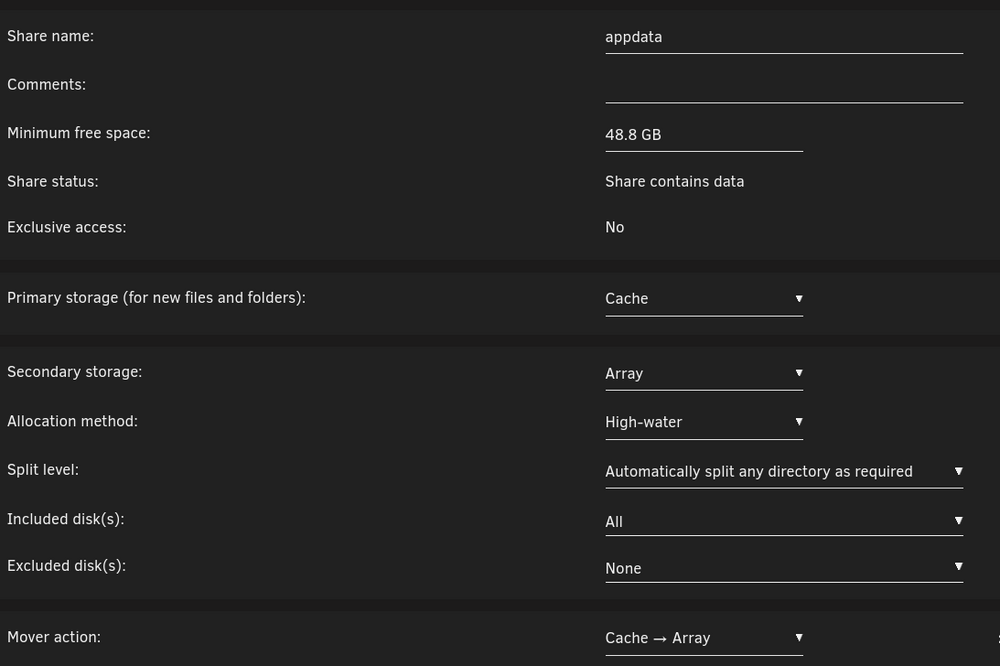
Hello everyone, I have trouble managing my cache and moving it's cached data to its destination. The overall management for cache is as easy as it's complicated. For my understanding, I have to set the cache as a primary cache-only device, which it already is. Furthermore I am unable to move what has been cached to the array. I clicked the move button multiple times, but everything I see is that: :04 nasty emhttpd: shcmd (98): /usr/local/sbin/mover |& logger -t move & Jun 4 20:24:04 nasty emhttpd: shcmd (99): /usr/local/sbin/mover |& logger -t move & Jun 4 20:24:57 nasty emhttpd: shcmd (100): /usr/local/sbin/mover |& logger -t move & Jun 4 20:25:06 nasty emhttpd: shcmd (101): /usr/local/sbin/mover |& logger -t move & I never had the mover tuning plugin installed, but I tried it and it unfortunately didn't work too. What am I doing wrong here?

-
Hat echt keiner das Problem gehabt?
-
Moin alle, ich habe ein Problem mit meinem Server. Ich kann keine Versionen mehr Abfragen. Egal ob Docker Container oder Plugins. An meiner Internetverbindung kann es nicht liegen, da ich weiterhin händisch über force-update oder den App Market updaten kann. Das klappt alles ohne Probleme. Meine Container erreiche ich auch von außerhalb. Das Problem scheint mit dem letzten Update gekommen zu sein.. Wenn ich bei Plugins ein Update-Check mache, kommt folgendes: Checking connectivity ... No response, aborting! Ich habe bereits dieses "Docker-Patch" Plugin installiert, aber das hat nichts gebracht. (Und ja... natürlich habe ich neugestartet) Habt ihr noch eine idee, oder auf 6.12 warten? VG
-
Of course. It is definitely no connection issue on my side, since I can still access running containers from outside my network.
-
But I can still download and install all docker images and plugins in the app market. I don't only have issues requesting versions for docker, but also for plugins. If something on my network would block it, i'd seen it. I have not changed my network config for quite a while now. Only updated my unraid with all it's features that wanted to be updated.
-
Just installed the patch and rebooted. Glad I am not the only one with this problem. Same as @luckyheiko I cannot get updates.
-
I installed it but still the same issue.
-
Hello everyone, I need help with my Server. I usually power my server 1-2 times per month for a day. Today I booted up, logged in, saw update notifications for container, plugins and appstore etc. I installed the updates and went to the docker section and updated those. I started updating container, but I noticed that there are container updates I should receive, but they are not available. When I check status on Docker Updates or Plugin Updates, I receive: Version = not available. Manual Plugin Check: Checking connectivity ... No response, aborting! I have not changed the network config for my Server LAN. When I check the App Store, I can not only see Container, I can also download and deploy container on my server. So here is something not right. What Server is unraid using for checking updates for plugins + container? I added a diagnostics log for you to review if needed. nasty-diagnostics-20230209-1407.zip



