





W0nderW0lf
Members
-
Joined
-
Last visited
Everything posted by W0nderW0lf
-
Jup, ist mir bei meinen recherchen auch aufgefallen. Da gab es mal einen Bericht bei Heise, dass ein bestimmtes Pro modell fehler aufwies. Jedenfalls habe ich die neueste Firmware aus Dezember 2025 über einen guide hier im forum flashen können. Beide modelle die ich betreibe haben die neueste. Hast du mit deiner Samsung im dmesg auch die Meldung wegen der D3 latency und kannst trotzdem rein wechseln? Diese Probleme hat die aber nur im vorderen Port. Hinten im M2B_SP Port hat die weder die Meldung gehabt, noch probleme mit den c-states. Das schwächste glied erwies sich hier als das zuverlässigste was das angeht.
-
Hallo nochmal an alle, ich bin leider nach wie vor am "fighten" mit meinem Server. Irgendwie kann ich mich nicht dazu überwinden dieses MB aufzugeben. Ich hatte mich mal in einem anderen Forum mal schlau gemacht und jemanden gefunden der ein fast identisches setup hat. Der Kollege von dort hat keine probleme mit 2 verbauten SSD's auf nicht unraid systemen (windows/debian) und ohne ASM1166 über c3 hinaus zu kommen. An meinen BIOS Einstellungen gab es ebenfalls nichts zu beanstanden. Er hatte lediglich eine etwas ältere BIOS version im Einsatz. Siehe hier Jedenfalls ist mir irgendwann aufgefallen, dass meine 500GB Sandisk nicht mehr die fitteste ist und schon einiges aufm buckel hat. Das und der magere Speicherplatz gaben mir Grund zu einem Upgrade bzw. austausch. Ich hatte diese platte mal bei meinem Umzug nach vorne (M2A_CPU) verfrachtet und dabei viel mir auf, dass die NVME dort probleme bereitet: [ 64.114914] nvme nvme0: controller is down; will reset: CSTS=0xffffffff, PCI_STATUS=0x10 [ 64.114928] nvme nvme0: Does your device have a faulty power saving mode enabled? [ 64.114932] nvme nvme0: Try "nvme_core.default_ps_max_latency_us=0 pcie_aspm=off pcie_port_pm=off" and report a bug [ 64.127651] nvme0n1: I/O Cmd(0x2) @ LBA 0, 8 blocks, I/O Error (sct 0x3 / sc 0x71) [ 64.127669] I/O error, dev nvme0n1, sector 0 op 0x0:(READ) flags 0x80700 phys_seg 1 prio class 2 [ 64.134823] nvme 0000:02:00.0: enabling device (0000 -> 0002) [ 64.135080] nvme nvme0: Disabling device after reset failure: -19 [ 64.143987] Buffer I/O error on dev nvme0n1, logical block 0, async page read [ 64.152742] Buffer I/O error on dev nvme0n1p1, logical block 0, async page read [ 64.249889] bridge: filtering via arp/ip/ip6tables is no longer available by default. Update your scripts to load br_netfilter if you need this. Mit den hier angebotenen cmdline befehlen bekam ich die Platte auch online. "nvme_core.default_ps_max_latency_us=0 pcie_aspm=off pcie_port_pm=off" Wenn ich in M2A_CPU zwei Samsung NVME (980 oder 990 Pro) installiere, erhalte ich folgende Meldungen: [ 3.224540] nvme 0000:02:00.0: platform quirk: setting simple suspend ## Das macht der nur im M2A_CPU portAußerdem haben beide Samsung's unterschiedliche latencies die eventuell auch ein problem darstellen. Sowohl in M2A_CPU als auch M2B_SP (der hintere port) erhalte folgende D3 entry Meldung [ 3.239673] nvme nvme1: D3 entry latency set to 8 seconds ## 980 NVME [ 3.239673] nvme nvme1: D3 entry latency set to 10 seconds ## 990 ProUnd da frage ich mich, warum zur Hölle braucht d ie Pro 2 sekunden länger als die nicht pro? Jedenfalls lassen sich diese Werte nicht über cmdline Befehle umgehen... Ich habe mich da dumm und dämlich gesucht... Diese Samsung NVME's sind doch eigentlich recht gängig und ich habe auch öfter gelesen das die empfohlen wurden, aber warum haben nicht mehr Leute das problem mit denen? Mit einer Samsung komme ich nicht über C2 hinaus und die halb marode Sandisk schafft das ohne probleme... Selbst wenn ich alle container stoppe, verbraucht die 990 Pro jetzt konstant 9w mehr egal ob vorne oder hinten verbaut. Da war die 1TB 980 noch 4 watt sparsamer, aber trotzdem immer bei 0,01w. Habt ihr das gleiche problem mit Samsung platten?

-
Does someone understand why the ASPM settings dont take effect on my NVME? It stucks in D0. Cannot enter D3, even if I stop my containers. Is there a way to force a different state? APST is enabled and it reaches PS4 in no time. 02:00.0 Non-Volatile memory controller: Samsung Electronics Co Ltd NVMe SSD Controller 980 (DRAM-less) (prog-if 02 [NVM Express]) Flags: PMEClk- DSI- D1- D2- AuxCurrent=0mA PME(D0-,D1-,D2-,D3hot-,D3cold-) Status: D0 NoSoftRst+ PME-Enable- DSel=0 DScale=0 PME- Capabilities: Port #0, Speed 8GT/s, Width x4, ASPM L1, Exit Latency L1 <64us Settings: ASPM L1 Enabled; RCB 64 bytes, LnkDisable- CommClk+ Status: Speed 8GT/s, Width x4 ASPM Capabilities: PCI-PM_L1.2+ PCI-PM_L1.1+ ASPM_L1.2+ ASPM_L1.1+ L1_PM_Substates+ ASPM Settings: PCI-PM_L1.2+ PCI-PM_L1.1+ ASPM_L1.2+ ASPM_L1.1+These are my settings:
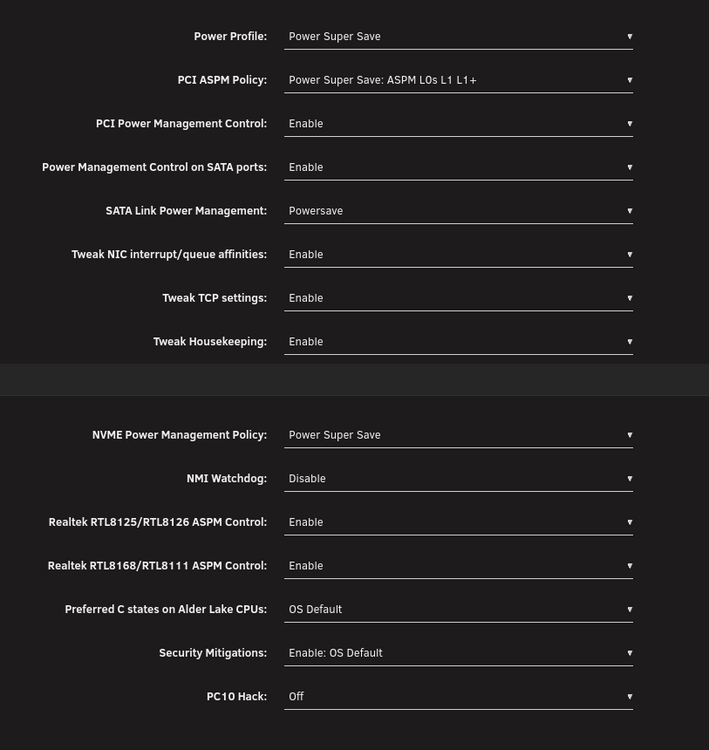
-
I've made some weird observations and need to know if more people have the same issue. I have 2 NVME ports on my ITX board with 11th gen cpu. Before I upgraded from 10th to 11th gen I could only have the back m.2 port running thru my PCH chip leaving me with only C3-state. Now after I've added a second m.2 to the front port, I went from ~17w to 25-29w stuck in C2. Some people mentioned that by having the m.2 directly sitting in the 20 lanes to the CPU, keeps the SSD active for no reason. But I've found out that someone else with the same board, has almost the same setup and no trouble reaching C10 with Windows or Debian. After some investigation on my system, I found some interesting stuff. My ASPM and BIOS settings are fine. [ 3.207150] nvme 0000:02:00.0: platform quirk: setting simple suspend <-- That could mean it could bypass deeper sleep [ 3.207243] nvme nvme1: pci function 0000:02:00.0 [ 3.207255] nvme nvme0: pci function 0000:08:00.0 [ 3.216209] nvme nvme0: 16/0/0 default/read/poll queues [ 3.218728] nvme0n1: p1 [ 3.221735] nvme nvme1: D3 entry latency set to 8 seconds <-- It should enter D3cold or hot after 8 seconds, but it never does. [ 3.231602] nvme nvme1: allocated 64 MiB host memory buffer. [ 3.279170] nvme nvme1: 12/0/0 default/read/poll queues [ 3.286783] nvme1n1: p1 [ 79.541831] nvme nvme0: using unchecked data bufferThis tells me that the NVME is consuming more thant he virtual power state reflects. If it would enter d3 after 8 seconds, it should be here, right? root@NASty:~# cat /sys/class/nvme/nvme1/device/power_state D0 root@NASty:~# nvme get-feature /dev/nvme0 -f 0xc -H get-feature:0x0c (Autonomous Power State Transition), Current value:0x00000001 Autonomous Power State Transition Enable (APSTE): EnabledDoes the power state below reflect that the consumption comes on top of the already drained energy, or print the real time use in the WebUI? Because the PS4 of 0,005w seems to be wrong. root@NASty:~# nvme get-feature -f 2 -H /dev/nvme1 get-feature:0x02 (Power Management), Current value:0x00000004 Workload Hint (WH): 0 - No Workload <--- no workloads, tells me that it idles (with containers active/inactive) Power State (PS): 4 root@NASty:~# smartctl -c /dev/nvme1n1 smartctl 7.5 2025-04-30 r5714 [x86_64-linux-6.12.54-Unraid] (local build) === START OF INFORMATION SECTION === Firmware Updates (0x16): 3 Slots, no Reset required Optional Admin Commands (0x0017): Security Format Frmw_DL Self_Test Optional NVM Commands (0x0055): Comp DS_Mngmt Sav/Sel_Feat Timestmp Log Page Attributes (0x0f): S/H_per_NS Cmd_Eff_Lg Ext_Get_Lg Telmtry_Lg Maximum Data Transfer Size: 512 Pages Warning Comp. Temp. Threshold: 82 Celsius Critical Comp. Temp. Threshold: 85 Celsius Namespace 1 Features (0x10): NP_Fields Supported Power States St Op Max Active Idle RL RT WL WT Ent_Lat Ex_Lat 0 + 5.24W - - 0 0 0 0 0 0 1 + 4.49W - - 1 1 1 1 0 0 2 + 2.19W - - 2 2 2 2 0 6000 3 - 0.0500W - - 3 3 3 3 6000 1500 4 - 0.0050W - - 4 4 4 4 4000 9000ASPM is enabled. 08:00.0 Non-Volatile memory controller: Sandisk Corp SanDisk Extreme Pro / WD Black 2018/SN750/PC SN720 NVMe SSD (prog-if 02 [NVM Express]) LnkCap: Port #0, Speed 8GT/s, Width x4, ASPM L1, Exit Latency L1 <8us LnkCtl: ASPM L1 Enabled; RCB 64 bytes, LnkDisable- CommClk+ 02:00.0 Non-Volatile memory controller: Samsung Electronics Co Ltd NVMe SSD Controller 980 (DRAM-less) (prog-if 02 [NVM Express]) LnkCap: Port #0, Speed 8GT/s, Width x4, ASPM L1, Exit Latency L1 <64us LnkCtl: ASPM L1 Enabled; RCB 64 bytes, LnkDisable- CommClk+I thought that it might be a SSD firmware issue, but I have tested another 1TB drive in place of the Samsung and it behaves the same. Shouldn't I be able to "spin down" the cache too if it aint in use? That would have been nice to find out if the system might be able to get past c2 after I turn em off via the WebUI and check values.
-
[7.2.3] I am desperately trying to find out why my System is unable to pass higher states than PC2 or PC3. I have tested 3 NVME's and all have the same issue in unraid. (I can only have 2 installed The Firmware for the NVME's are up to date. Researching similar behaviour online led to almost the same conclusion, that the kernel or other OS specific settings change the desired power_state for the SSD. I cannot find anything related except for older threads mentioning a bugged samsung firmware and framework's desktop/notebooks or proxmox users... However.. many people use those SSD's as OS or attached storage, but still being able to set the SSD in other states than "D0" My system has ASPM and everything related to native power management enabled. It work's but it cannot reach it's full potential due to hardware not willing to get in to full sleep. If I check the Unraid WebUI or CLI for what's the current power draw, it tells me most of the time it's ~0,005w for each SSD, but being in reality 5-8w, because it's not reflecting the real power draw, but the configured power-state that the NVME is currently supporting. For example: The first line indicates that my Samsung 980 SSD is set to "simple suspend", which can circumvent lower power states, because it believes that it's not waking up fast enough. (See the line "D3 entry latency set to 8 seconds") root@NASty:~# dmesg | grep -i "nvme" [ 3.207150] nvme 0000:02:00.0: platform quirk: setting simple suspend [ 3.207243] nvme nvme1: pci function 0000:02:00.0 [ 3.207255] nvme nvme0: pci function 0000:08:00.0 [ 3.216209] nvme nvme0: 16/0/0 default/read/poll queues [ 3.218728] nvme0n1: p1 [ 3.221735] nvme nvme1: D3 entry latency set to 8 seconds [ 3.231602] nvme nvme1: allocated 64 MiB host memory buffer. [ 3.279170] nvme nvme1: 12/0/0 default/read/poll queues [ 3.286783] nvme1n1: p1 [ 79.541831] nvme nvme0: using unchecked data buffer Nethertheless it supports virtually lower power_states: root@NASty:~# nvme get-feature -f 2 -H /dev/nvme1 get-feature:0x02 (Power Management), Current value:0x00000004 Workload Hint (WH): 0 - No Workload Power State (PS): 4 <------------------------ That's the highest level, see table below root@NASty:~# smartctl -c /dev/nvme1n1 smartctl 7.5 2025-04-30 r5714 [x86_64-linux-6.12.54-Unraid] (local build) Copyright (C) 2002-25, Bruce Allen, Christian Franke, www.smartmontools.org === START OF INFORMATION SECTION === Firmware Updates (0x16): 3 Slots, no Reset required Optional Admin Commands (0x0017): Security Format Frmw_DL Self_Test Optional NVM Commands (0x0055): Comp DS_Mngmt Sav/Sel_Feat Timestmp Log Page Attributes (0x0f): S/H_per_NS Cmd_Eff_Lg Ext_Get_Lg Telmtry_Lg Maximum Data Transfer Size: 512 Pages Warning Comp. Temp. Threshold: 82 Celsius Critical Comp. Temp. Threshold: 85 Celsius Namespace 1 Features (0x10): NP_Fields Supported Power States St Op Max Active Idle RL RT WL WT Ent_Lat Ex_Lat 0 + 5.24W - - 0 0 0 0 0 0 1 + 4.49W - - 1 1 1 1 0 0 2 + 2.19W - - 2 2 2 2 0 6000 3 - 0.0500W - - 3 3 3 3 6000 1500 4 - 0.0050W - - 4 4 4 4 4000 9000 Ignoring the fact that my cache is not really in use, it still keeps holding it up at a higher power state root@NASty:~# cat /sys/class/nvme/nvme1/device/power_state D0 root@NASty:~# nvme get-feature /dev/nvme0 -f 0xc -H get-feature:0x0c (Autonomous Power State Transition), Current value:0x00000001 Autonomous Power State Transition Enable (APSTE): EnabledIn the WebUI I see constant powerdraw, without it being used by Containers, VM's or Plugins. Cachetwo Samsung_SSD_980_1TB_S78HNS0X209115Y - 1 TB (nvme1n1) 0.01 W / 31 °C This value is an estimated guess, since without this NVME installed (just a single one that is not directly bound to the CPU) I consume ~6-8w less. nasty-diagnostics-20260117-2257.zip My System: Z590i 11th gen i9-11900 16GB ram 2xSSD 1xASM1166 6x4TB Seagate ASPM is also enabled on all devices: 08:00.0 Non-Volatile memory controller: Sandisk Corp SanDisk Extreme Pro / WD Black 2018/SN750/PC SN720 NVMe SSD (prog-if 02 [NVM Express]) LnkCap: Port #0, Speed 8GT/s, Width x4, ASPM L1, Exit Latency L1 <8us LnkCtl: ASPM L1 Enabled; RCB 64 bytes, LnkDisable- CommClk+ 02:00.0 Non-Volatile memory controller: Samsung Electronics Co Ltd NVMe SSD Controller 980 (DRAM-less) (prog-if 02 [NVM Express]) LnkCap: Port #0, Speed 8GT/s, Width x4, ASPM L1, Exit Latency L1 <64us LnkCtl: ASPM L1 Enabled; RCB 64 bytes, LnkDisable- CommClk+
-
I've become a little smarter again. There are 2 "power_states" that decide in which state the NVME is located. D3hot and D3cold, which almost says what the conditions stand for. Hot (is on) and cold(low sleep) My SSD's are kept constant in "D0" which ensures the highest consumption despite supposed PS4 stati. The SSD is thus deliberately kept warm because it is feared that it will not wake up in time. root@NASty:~# cat /sys/class/nvme/nvme1/device/power_state D0 ## You notice in dmesg D3 condition is almost never reached [ 3.239673] nvme nvme1: D3 entry latency set to 8 seconds
-
I know that it supports PS4 what's the highest with 0,005w. root@NASty:~# nvme get-feature -f 2 -H /dev/nvme1 get-feature:0x02 (Power Management), Current value:0x00000004 Workload Hint (WH): 0 - No Workload Power State (PS): 4 root@NASty:~# nvme get-feature /dev/nvme1 -f 0xc -H get-feature:0x0c (Autonomous Power State Transition), Current value:0x00000001 Autonomous Power State Transition Enable (APSTE): Enabled Auto PST Entries ................. Entry[ 0] root@NASty:~# smartctl -c /dev/nvme1n1 smartctl 7.5 2025-04-30 r5714 [x86_64-linux-6.12.54-Unraid] (local build) Copyright (C) 2002-25, Bruce Allen, Christian Franke, www.smartmontools.org === START OF INFORMATION SECTION === Firmware Updates (0x16): 3 Slots, no Reset required Optional Admin Commands (0x0017): Security Format Frmw_DL Self_Test Optional NVM Commands (0x0055): Comp DS_Mngmt Sav/Sel_Feat Timestmp Log Page Attributes (0x0f): S/H_per_NS Cmd_Eff_Lg Ext_Get_Lg Telmtry_Lg Maximum Data Transfer Size: 512 Pages Warning Comp. Temp. Threshold: 82 Celsius Critical Comp. Temp. Threshold: 85 Celsius Namespace 1 Features (0x10): NP_Fields Supported Power States St Op Max Active Idle RL RT WL WT Ent_Lat Ex_Lat 0 + 5.24W - - 0 0 0 0 0 0 1 + 4.49W - - 1 1 1 1 0 0 2 + 2.19W - - 2 2 2 2 0 6000 3 - 0.0500W - - 3 3 3 3 6000 1500 4 - 0.0050W - - 4 4 4 4 4000 9000 Supported LBA Sizes (NSID 0x1) Id Fmt Data Metadt Rel_Perf 0 + 512 0 But somehow it still seems prevent the CPU from getting into a deeper sleep. root@NASty:~# lspci -vv | awk '/ASPM/{print $0}' RS= | grep --color -P '(^[a-z0-9:. ]+|ASPM |Disabled;|Enabled;)' 00:01.0 PCI bridge: Intel Corporation Device 4c01 (rev 01) (prog-if 00 [Normal decode]) LnkCap: Port #2, Speed 16GT/s, Width x16, ASPM L1, Exit Latency L1 <16us LnkCtl: ASPM L1 Enabled; RCB 64 bytes, LnkDisable- CommClk+ 00:06.0 PCI bridge: Intel Corporation Device 4c09 (rev 01) (prog-if 00 [Normal decode]) LnkCap: Port #5, Speed 16GT/s, Width x4, ASPM L1, Exit Latency L1 <16us LnkCtl: ASPM L1 Enabled; RCB 64 bytes, LnkDisable- CommClk+ 00:1b.0 PCI bridge: Intel Corporation Tiger Lake-H PCIe Root Port #17 (rev 11) (prog-if 00 [Normal decode]) LnkCap: Port #17, Speed 8GT/s, Width x1, ASPM L0s L1, Exit Latency L0s <1us, L1 <4us LnkCtl: ASPM L0s L1 Enabled; RCB 64 bytes, LnkDisable- CommClk- 00:1b.4 PCI bridge: Intel Corporation Device 43c4 (rev 11) (prog-if 00 [Normal decode]) LnkCap: Port #21, Speed 8GT/s, Width x1, ASPM L0s L1, Exit Latency L0s <1us, L1 <4us LnkCtl: ASPM L0s L1 Enabled; RCB 64 bytes, LnkDisable- CommClk- 00:1c.0 PCI bridge: Intel Corporation Tiger Lake-H PCIe Root Port #1 (rev 11) (prog-if 00 [Normal decode]) LnkCap: Port #1, Speed 8GT/s, Width x1, ASPM L0s L1, Exit Latency L0s <1us, L1 <4us LnkCtl: ASPM L0s L1 Enabled; RCB 64 bytes, LnkDisable- CommClk- 00:1c.4 PCI bridge: Intel Corporation Tiger Lake-H PCI Express Root Port #5 (rev 11) (prog-if 00 [Normal decode]) LnkCap: Port #5, Speed 8GT/s, Width x1, ASPM L0s L1, Exit Latency L0s <1us, L1 <16us LnkCtl: ASPM L1 Enabled; RCB 64 bytes, LnkDisable- CommClk+ 00:1c.7 PCI bridge: Intel Corporation Device 43bf (rev 11) (prog-if 00 [Normal decode]) LnkCap: Port #8, Speed 8GT/s, Width x1, ASPM L0s L1, Exit Latency L0s <1us, L1 <16us LnkCtl: ASPM L1 Enabled; RCB 64 bytes, LnkDisable- CommClk+ 00:1d.0 PCI bridge: Intel Corporation Tiger Lake-H PCI Express Root Port #9 (rev 11) (prog-if 00 [Normal decode]) LnkCap: Port #9, Speed 8GT/s, Width x4, ASPM L1, Exit Latency L1 <16us LnkCtl: ASPM L1 Enabled; RCB 64 bytes, LnkDisable- CommClk+ 00:1d.4 PCI bridge: Intel Corporation Device 43b4 (rev 11) (prog-if 00 [Normal decode]) LnkCap: Port #13, Speed 8GT/s, Width x1, ASPM L0s L1, Exit Latency L0s <1us, L1 <4us LnkCtl: ASPM L0s L1 Enabled; RCB 64 bytes, LnkDisable- CommClk- 01:00.0 SATA controller: ASMedia Technology Inc. ASM1166 Serial ATA Controller (rev 02) (prog-if 01 [AHCI 1.0]) LnkCap: Port #0, Speed 8GT/s, Width x2, ASPM L0s L1, Exit Latency L0s <4us, L1 <64us LnkCtl: ASPM L1 Enabled; RCB 64 bytes, LnkDisable- CommClk+ 02:00.0 Non-Volatile memory controller: Samsung Electronics Co Ltd NVMe SSD Controller 980 (DRAM-less) (prog-if 02 [NVM Express]) LnkCap: Port #0, Speed 8GT/s, Width x4, ASPM L1, Exit Latency L1 <64us LnkCtl: ASPM L1 Enabled; RCB 64 bytes, LnkDisable- CommClk+ 06:00.0 Ethernet controller: Intel Corporation Ethernet Controller I225-V (rev 03) LnkCap: Port #0, Speed 5GT/s, Width x1, ASPM L1, Exit Latency L1 <4us LnkCtl: ASPM L1 Enabled; RCB 64 bytes, LnkDisable- CommClk+ 07:00.0 Network controller: Intel Corporation Wi-Fi 6 AX200 (rev 1a) LnkCap: Port #0, Speed 5GT/s, Width x1, ASPM L1, Exit Latency L1 <8us LnkCtl: ASPM L1 Enabled; RCB 64 bytes, LnkDisable- CommClk+ 08:00.0 Non-Volatile memory controller: Sandisk Corp SanDisk Extreme Pro / WD Black 2018/SN750/PC SN720 NVMe SSD (prog-if 02 [NVM Express]) LnkCap: Port #0, Speed 8GT/s, Width x4, ASPM L1, Exit Latency L1 <8us LnkCtl: ASPM L1 Enabled; RCB 64 bytes, LnkDisable- CommClk+edit: I want to mention: Before I've installed the Samsung NVME I reached C3 with ~17w consumption vs now ~24w. But allegedly the SSD only consumes 0,005w more.
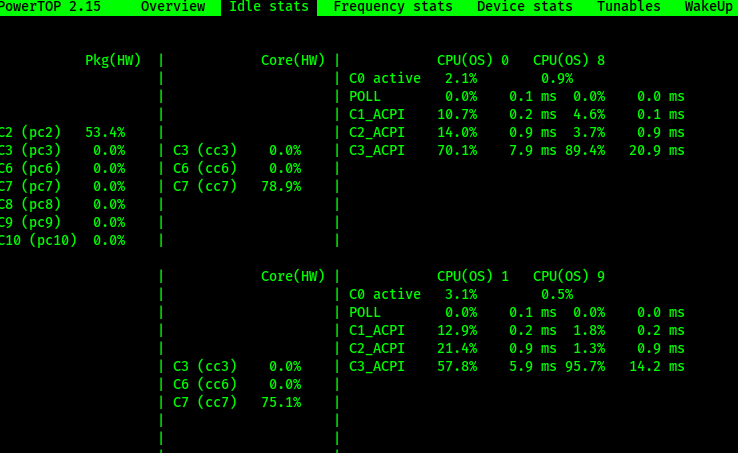
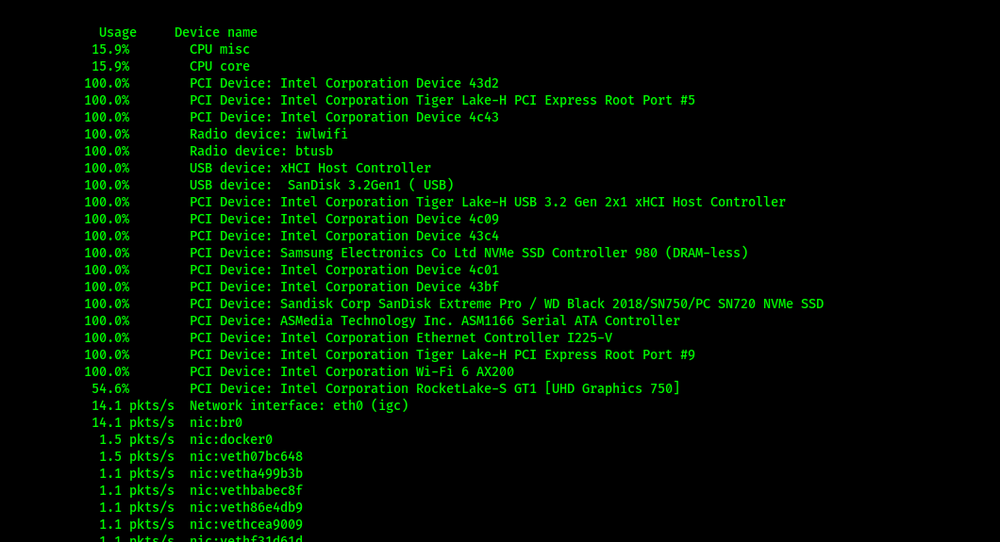
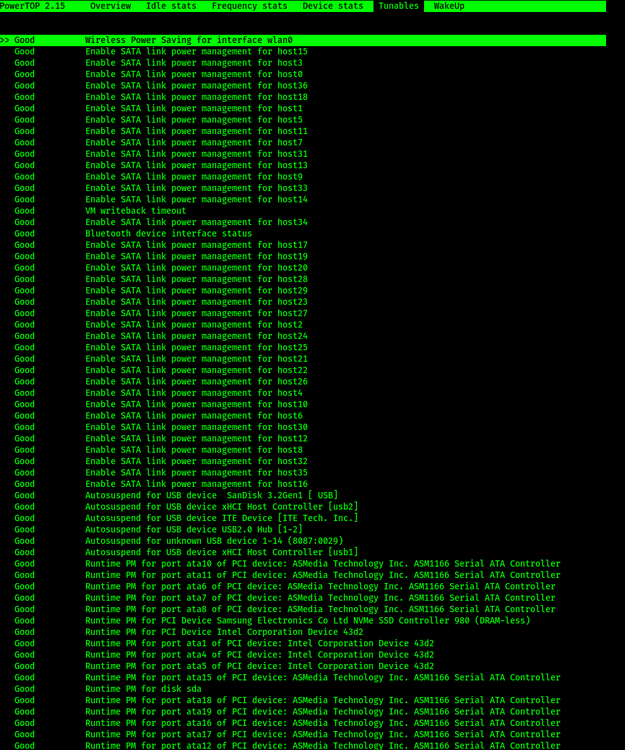
-
I am trying to figure out why my system is unable to reach higher c-states than C2. A couple of days ago I've installed a new CPU and an M.2 samsung ssd. With the CPU upgrade my system could now utilize the front m.2 slot on my ITX MB with LGA 1200 socket. Previously I had only one ssd in the back of the MB that's been managed by the PCH chip. With only one SSD in the back I reached max C3 (but it was at least 17w in idle). Now since the front m.2 slot is sitting directly in the 20 lanes in front of the CPU, it seems to prevent higher c-states whyever... After a lot of digging, I saw someone with the same board and configuration (but unknown OS), I knew it has to be possible for my system to get it to higher c-states ... at least c6. Unfortunately I can't reach out to him.. Nethertheless, I dug a bit through my system and analyzed my whole configs and logs. My BIOS ASPM and power relevant settings are fine. I see that my NVME's have ASPT=(Autonomous Power State Transition) enabled. ASPM L0-L1.2 is on all devices enabled and should work fine. Nothing disabled there. while checking dmesg, I noticed something unusual. root@NASty:~# dmesg | grep -i nvm [ 3.224540] nvme 0000:02:00.0: platform quirk: setting simple suspend ## <<<---- my newly added Samsung 980 SSD [ 3.224642] nvme nvme1: pci function 0000:02:00.0 [ 3.224651] nvme nvme0: pci function 0000:08:00.0 [ 3.234151] nvme nvme0: 16/0/0 default/read/poll queues [ 3.236697] nvme0n1: p1 [ 3.239673] nvme nvme1: D3 entry latency set to 8 seconds ## <<<---- thinks that it takes ages to come back online [ 3.249674] nvme nvme1: allocated 64 MiB host memory buffer. [ 3.297495] nvme nvme1: 12/0/0 default/read/poll queues [ 3.304596] nvme1n1: p1 [ 93.234922] nvme nvme0: using unchecked data buffer2 cache NVME's ... nvme0 being heavily used and nvme1 barely, but this setting is only for the samsung ssd? I've red mixed stuff about Samsung SSD's being/not the most reliable for power saving configurations. I've tried to add a kernel cmdline to the flash, but that didn't seem to prevent the platform quirk. [ 0.000000] Command line: BOOT_IMAGE=/bzimage initrd=/bzroot nvme_core.default_ps_max_latency_us=0 [ 0.053634] Kernel command line: BOOT_IMAGE=/bzimage initrd=/bzroot nvme_core.default_ps_max_latency_us=0 [ 3.376714] nvme 0000:02:00.0: platform quirk: setting simple suspendAny idea how to avoid the quirk being applied? Google AI (my personal AI server isn't currently working.. :D) said the following: 1. What is a "Quirk"? In kernel development, a quirk is a workaround for hardware that does not strictly adhere to industry standards (like ACPI or PCIe specifications). The kernel identifies the device (via its Vendor/Device ID) and essentially says: "I know this hardware crashes with normal power management, so I am applying a special rule." 2. What does "Simple Suspend" mean? Normally, modern NVMe SSDs and PCIe controllers use complex transitions like APST (Autonomous Power State Transition) or D3hot/D3cold to save power. Simple Suspend forces a simplified method of putting the device to sleep. Often, this means the device is not put into the deepest possible sleep mode to ensure it doesn't "disappear" or freeze the system upon waking up. 3. Why does this prevent higher C-states? This is a direct indicator of why your server is not reaching deep C-states (C8–C10): For the CPU (the Package) to enter deep sleep, the entire PCIe chain must signal that it is ready. If the kernel enforces "Simple Suspend" for your NVMe or a controller, the link often remains in a state (e.g., L1 instead of L1.2) that consumes too much power to allow the CPU to transition into C8/C10.
-
Danke erstmal an alle für eure Beteiligung bei dem Thema. Ich bin unentschlossen. Ich muss leider in jedem szenario irgendwie abstriche machen. Entweder der Slot, die Stromkosten, oder das Geld für neue Hardware. Für das Z590i gibts online leider nichts zum Thema C-states oder ähnliche Fälle die ITX Boards betreffen. Für mich wäre es vermutlich am günstigsten wenn ich meinen alten CS380 Tower in Betrieb nehme. Passend dazu bräuchte ich eben noch ein LGA 1200 kompatibles MB... Gibt einige die man bei ebay zu nem akzeptablen Preis ergattern kann. Hätte da einer ne Empfehlung für ein Motherboard das auch tatsächlich für ein Stromersparnis sorgt? ^^ Idealerweise hat das Board auch genug SATA + m.2 Ports.
-
Geht's teurer als 1x700€ pro 20TB Festplatte ? So viel Geld hab ich leider nicht locker für 2 von den dingern. Problem ist leider, dass gerade noch so platz ist für eine simple NVME. Hinter dem Mainboard sitzt direkt das Netzteil.. da gibt's kein spielraum für SATA kabel. Leider liebe ich den Tower zu sehr um was anderes zu nehmen. Das ist jetzt die Frage die ich mir stelle: Ist es jetzt BIOS/UEFI, oder irgendein anderer Chipset Treiber den man vermutlich wieder aufwändig über Windows installieren muss? Ich habe gesehen, die Treiber für mein Board sind von 2022. Ob die auch die chipsets updaten oder nur auf Windows angewandt werden? Was BIOS angeht, habe ich das bereits auf den aktuellsten Stand gebracht. Das scheint schon mal nicht geholfen zu haben. Ich hatte vor der Samsung SSD eine SSD von Kioxia installiert. Ich habe in der annahme das vllt die SSD schuld ist, die platten getauscht. Ich wette mit der ASM1166 komme ich auch nicht weiter als C3, wie vorher auch, nur eben besser als nix... Vermutlich muss ich wirklich einfach die hintere NVME Platte gegen was größeres austauschen und den vorderen m.2 slot frei lassen. Wenn die CPU's nicht ständig andere Sockel bekämen, wäre das vermutlich einfacher Ich muss leider noch eine Weile bei LGA1200 bleiben.
-
Tatsächlich sind das fast 10W die das ausmachen.. wie gesagt, ich war vorher bei 17-20w statt 27-30w jetzt. Ich brauch eigentlich nur das Array und min. 1 ssd das man oben sieht. die 2. SSD wäre ein nice to have gewesen. Dann muss ich mir halt ne 2TB ssd holen und muss dann backups auf anderen storages einrichten... Ich bin mir auch nicht sicher, ob die m.2 ssd nicht das gleiche problem verursachen würde. schließlich wird ja der gleiche slot vorn genutzt.
-
Kagge :D Das Ding ist, dass ich nen kleines build wollte. Hab mir dafür den Tower gedruckt https://modcase.com.au/products/nas Ich bin mir auch unsicher, ob ich vielleicht den vorderen Slot kicken sollte und mir ne größere Platte bei Gelegenheit organisiere und hinten einbaue. Ich hätte gerne wenigstens die C3 oder höher. Mein z590i hat leider nicht genug onboard SATA Aanschlüsse weswegen ich auch einen ASM1166 nutzen muss. Die 500GB SSD war vorher schon drin und da liegt das docker.img + appdata stuff für plex +co. Die 1TB ist wegen meiner nextcloud drin und lässt sich wohl auf Grund des größen unterschied's nicht im normalen cache pool mit betreiben. Somit musste ich damit einen neuen pool bilden.
-
Die Vermutung hatte auch schon @DataCollector in meinem vorherigen Thread. Die Frage ist, ob sich sowas auch im ITX format verhindern lässt, oder habe ich pech gehabt? Ich meine kann man alle slots nutzen und trotzdem C10 erreichen, oder ist die CPU Generation bzw. das Motherboard cursed auf Grund der Designetnscheidung mancher Hersteller?
-
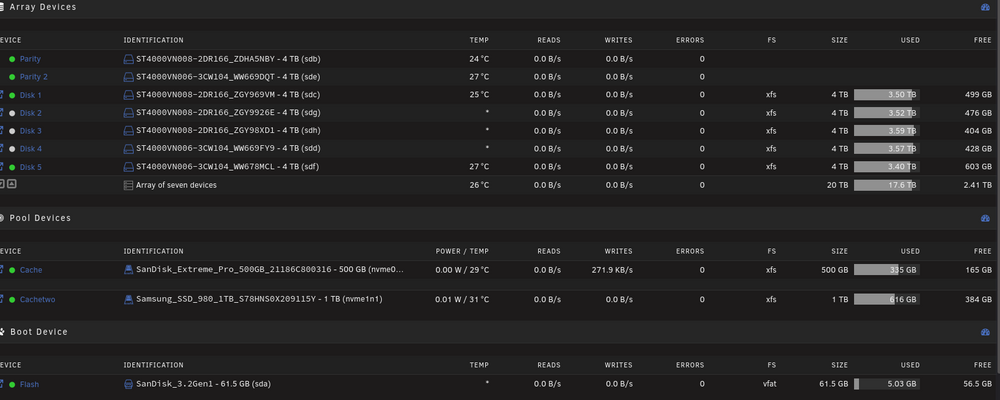
Hi @ll, Ich hatte es vor einer Weile schon mal hier thematisiert, dass meine Strom settings Optimierungsbedarf haben. (Siehe Was letzte setting für strom sparen?) Das hatte auch eine Zeit lang super geklappt. Dann habe ich vor 1-2 Wochen den Entschluss gefasst ein kleines großes Upgrade zu machen. Im Prinzip habe ich den i5-10600 durch den i9-11900 ersetzt in der Hoffnung mehr Leistung bei gleichem Verbrauch zu haben. Zusätzlich dazu konnte ich mit der 11. Generation auch endlich den vorderen m.2 slot meines Mainboards benutzen. Dieser ist nämlich nur mit der 11. Generation ansteuerbar. Jedenfalls hat das Upgrade soweit funktioniert und die HDD's fahren bei inaktivität runter. Meine 2 NVME's bleiben als cache noch online, verbrauchen aber laut UI so gut wie nix. Vor meinem Upgrade lag ich bei 17-22 W (mit C3) Jetzt bin ich mit dem Setup bei 27-29W (mit C2) und höher geht leider nicht mehr. Ich frage mich aber warum. Selbst wenn ich alle Container stoppe und 15 minuten warte, ändert sich nichts daran. Alle settings in auto tweak und allgemein sind auf "powersave" oder "super powersave" gesetzt. Gibt es eventuell noch Möglichkeiten zu sehen was höhere C-States verhindert?
-
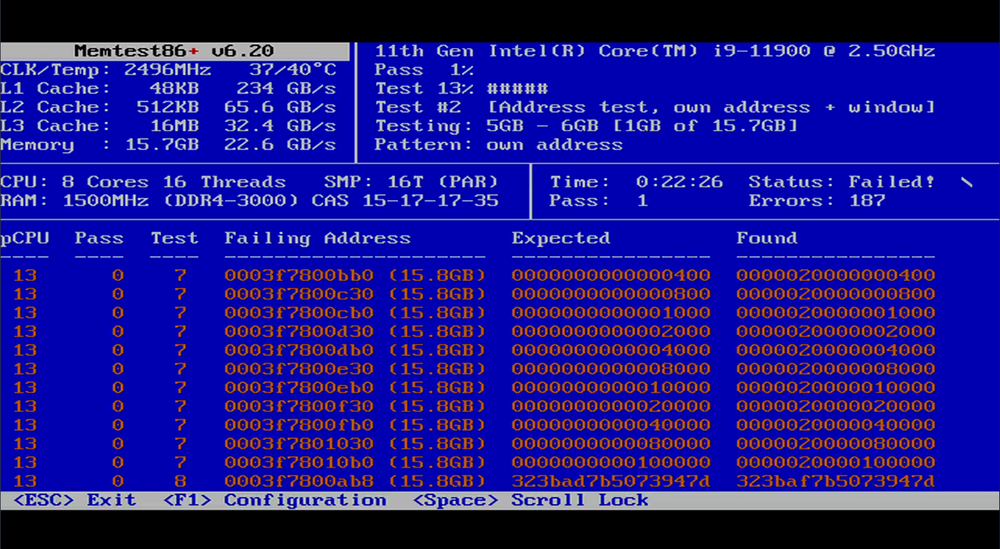
Yep, I know. Luckily I had another pair of working RAM in an older server and now it's working and tests passed.
-
Seems like my ram is A**...
-
Hi @ll, I today upgraded my CPU again and I want to know what's going on with my server. Time I had trouble was after trying to remove an directory (non critical just a temporary one) The UI stopped responding and nothing reacted. UI seemed to time out and manually pressing the power button didn't shut down the server. I had to reset the server. Now after the reset the server started a parity check and immediately started a parity check and found errors... of course it did... in the beginning of the check I stopped all docker containers. After 3 hours my UI suddenly has an timeout. I am again unable to access the UI, but ssh was still working. I tried to start a diagnostics, but the CLI stopped responding. After 10 minutes of waiting I opened another session to check if something has been generated, but nothing ... But now while I write here ssh also begins to timeout. Should I would a couple of hours until the server maybe finishes its parity check, or is my server doomed? I have a jetkvm plugged into the server, but I noticed that the CLI always stops working ~5 minutes after start unless I log in instantly. Is that a bug or a feature? (Have experienced this for years and also before 7.0)
-
Hey Man, I love the design. I have a lot of models. Is it possible to add models by moving files to storage and scann via dashboard or by command?
-
I solved it. My problem was that I seem to have created a partition before I asigned the cache pool. I removed the partition, asigned to the pool and started the array. Sorry for another useless thread.
-
Right now the server is in use. Gonna have to wait till 13:00 I rebooted before I started that topic (but after creating the diagnostics). The array didn't start and wouldn't do so manually. I will try that later again and post the diagnostics here.
-
Hi all, I today upgraded my system's CPU from i5-10600 to i9-11900T, so that I could use 2 NVME instead of 1 because my MB only supports the front NVME slot with 11th gen CPU. For adding a second cache pool, I have to stop the array and add the pool including the new NVME. When I want to start the array with the assigned cache NVME drive, the Dashboard reloads, but the array stays stopped. Taking a look at the log when I press "start" only shows "array already starting" but it won't ... Where in the diagnostics do I find more information that explains why start is prevented? nasty-diagnostics-20251215-0821.zip
-
Ich hatte (vorher) nichts verstellt. Es hatte heute schonmal funktioniert. Seit dem absturz habe ich ein bisschen experimentiert und was verstellt, von daher wäre vermutlich das Ergebnis verfälscht. Die VM ist aber vermutlich unsauber runtergefahren, weil das touchpad von meinem notebook gesponnen hat. Also ich hab mich nur irgendwie in der unraid UI verklickt, aber nicht in der settings meiner VM. nasty-diagnostics-20251211-1811.zip Selbst das Snapshot lässt sich nicht starten ohne das unraid crashed.
-
Hi, seit heute habe ich das merkwürdige Problem, dass unraid "komplett" abstürzt sobald ich eine VM starte. Was passiert wenn ich meine VM starte? Unraid WebGUI ist noch erreichbar, aber unraid meldet das der USB Stick mit unraid nicht mehr funktioniert. Die Lizenz kann dann auch nicht mehr vom stick gelesen werden und fährt automatisch das Array runter. Für das System war das natürlich ein unclean shutdown und macht nach dem reboot erstmal ein parity check. Leider ist es schon sehr aufwendig gewesen die VM her zu richten und frage mich nun wie ich das Ding wieder zum laufen bekomme. Kann man das irgendwie debuggen und gucken was da schief läuft? Ich habe in die diagnostics rein geguckt, aber es ist nichts von vor dem crash bzw. reboot im Log. Würde also wenig bringen die diagnostics hier rein zu pasten. Ich nutze Unraid 7.2.2
-
After reading the entire issue - I would suggest adding a information/warning to your template, mentioning that download with spotizerr-phoenix is only possible, if you have an premium account. Under the bottom line: Dont waste your energy if you only have a free spotify account.
-
Pemissions are all fine. It has nothing to do with the file permissions itself, but an incompatibility with the python code to the spotify endpoint api. See: https://lavaforge.org/spotizerr/spotizerr/issues/16 Seems that I have to adress that on lavaforge.. edit: the issue has been already adressed here: LavaForge: Simple. Fast. LavaForge.Last error: Failed fetching audio key!**Describe the bug** Tried downloading songs after following the setup procedure and it doesn't work. got hit with Last error: Failed fetching audio key! **To Reproduce** Just try to download someth


