





AlainF
Members
-
Joined
-
Last visited
Everything posted by AlainF
-
Hello community, Is there an easy way to monitor/display the TBW values for my SSDs / nvmes without having to install something huge like Unraid Ultimate Dashboard and without having to go thru the various SSDs and nvmes manually? Thanks, Alain
-
Hello, Maybe you could try the user scripts plugin to program a recurring job and use rsync like (example): rsync -avu --delete "/home/user/A" "/home/user/B" ⚠ Warning - please don't use the above as is because there IS deleting of files involved! You should check on rsync's man page / documentation to find the parameters that allow you to implement your use case. Also, bi-directional sync might need running rsync twice in a row, or even multiple times depending on what you're exactly trying to achieve.
-
Hi BlackCat Actually see my post above yours - I managed to solve the issue! Your analysis is correct, this was most probably the issue.
-
Hi all, A quick update on this, I believe I have solved the issue. What I did is: Triple-check my cache settings (Yes, Prefer, Only etc) and the various path mappings for my dockers : OK Stop the docker service Invoke the Mover manually and let it do its job Restart docker and its containers Observe - all good! So I believe I somehow had a misconfiguration at the beginning of my unRAID installation and configuration, and then transferring a few TB worth of data through the cache (rookie mistake), the cache drive filling up, and some "Prefer cache" shares being offloaded to the hard disks because of lack of space. Now, all looks good!
-
Thanks @Tom Sealey ! This pointed me towards the solution. I simply bound the ts-dnsserver docker to a different IP address using the "custom" property for network, and now all is well! Cheers mate!
-
Good day everyone, Running latest unRAID OS "Plus", and latest version of ts-dnsserver. I have recently starting experimenting with ts-dnsserver, and have come accross a problem I can't properly debug or explain. Every so often I notice that when the ts-dnsserver docker is stopped, and try to start it, the start process exits with an "execution error". Checking the logfiles, I find an error message that it cannot bind to port 53 (which is indeed bad for a DNS server 😁 ). Opening a terminal on the unRAID box and listing processes attached to port 53, I see a "dnsmasq" process. Once I kill this process, the ts-dnsserver docker starts again and all works fine. Any ideas? Sorry to not be clearer or more explicit ; if it helps to provide additional data, please let me know which. Thanks in advance, Alain
-
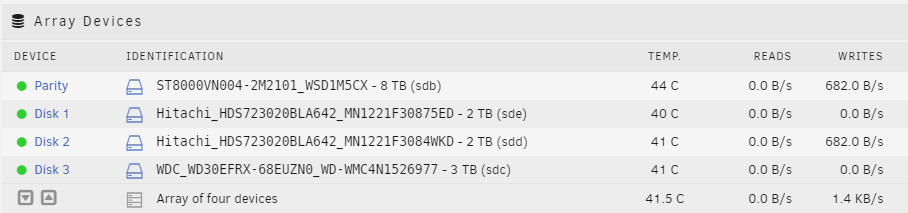
Hello, Without any "planned or known" activity, my array drives get activated every few seconds with very small writes, like in this screenshot: How can I find out what processes / applications / dockers / younameit are responsible for this activity, as it prevents my disks from going to sleep? I checked my configuration and as far as my understanding goes, my "cache" setup and parameters for the shares are correct, and writes should go to the cache drive, not directly to the array... Many thanks, Alain
-
Hello, On my new setup, I currently run a small 256GB Kingston nvme as my sole cache drive. I plan on upgrading this to two 1TB SSD drives that I plan to mirror. After some reading I found out that the Samsung 860 Pro 1TB model offers the highest TBW rating of "consumer" drives, with an announced 1,200 TBW for the 1 TB model. Also, the price on Amazon seems reasonable / acceptable to me. Before I go ahead with the purchase, could anyone confirm this is a good choice, and tell me whether there are other good alternatives to consider? Thanks!
-
Hi! I can’t find the ControlR app in my Apple Appstore in Luxembourg. Is this by decision? thanks!

