





peteknot
Members
-
Joined
-
Removed the TemplateURL fields from the applicable docker configs. Seems to be working now. Thanks!
-
So I turned on Template Authoring in the settings and re-enabled docker. But when I go to edit a container's spec, in advanced mode, I don't see any TemplateURL variables. Below is a snippet of the linuxserver/plex template in advanced mode. "VERSION" is the start of the container's variables.

-
It is definitely just an annoyance to me as I don't want the ports to show back up as then they could be accessed from outside the reverse proxy. So I will try this method. Thanks!
-
Running UnRaid 6.8.3. I have docker containers that I don't want accessible outside of a reverse proxy. So I edited the container and removed the PORTs specified. Everything works fine til I go in and "Check for Updates" followed by "Apply Update". Then the PORTs I removed will be readded to the container's spec. I thought this was just checking the docker repository for a new image. Is this doing something more with checking the templates in "Community Applications" or something? Thanks for the help!
-
I would also expect to see an error under 'System -> Logs'
-
So for the first part. No you don't need different paths. And this is because Sonarr will only be talking to SABnzbd about the category it cares about. So if 'tv-current' had a bunch of items ready to be moved, the Sonarr instance with 'tv-ended' as it's category won't even see them in the results when it queries SABnzbd. As for the second part, in regards to the different machine paths. SABnzbd is going to tell Sonarr where the file is located. But SABnzbd is going to say where the file is in relation to it's setup. That becomes a problem when the paths don't line up because of different machines. If you turn on the advanced settings in Sonarr, then go to download client, there is a part for remote path mappings. So you may be able to configure it through that. But would require reading up on the setup. I have it all on the same machine, so all I needed to do was line up the download paths among the Sonarr/Radarr instances and SABnzbd.
-
I have a similar setup, two copies of Sonarr/Radarr, one for 1080p and one for 4k. The thing is they don't really care about each other, and really don't know they're there. You just need to configure Sonarr to use different categories and then you only need one version of SABnzbd. So you would configure one Sonarr instance to have a "tv-current" category and the other to have "tv-ended" for instance. As long as the "/downloads" path is common amongst the contains, the path to where the downloads get put, the destination path, can be different per instance of Sonarr. Now, if you don't want to just reuse one container, yes, you can easily run multiple copies of this container. Just make sure to set it all up again with different configuration paths. Though consider that means additional load on the computer and an additional VPN connection if you have a limit set by your provider.
-
Have you looked at the important notes on https://hub.docker.com/r/pihole/pihole? It may help to reinstall pihole so that you get the new template with these variables included.
-
I believe this is from the default segregation of docker from the host. I have the same issue. If you give Sonarr a dedicated IP, then the communication between the two should be allowed. I can't find the post but I think it was release 6.4 that added dockers not being able to communicate with the host.
-
Yes, you need to look at the tags tab on the docker hub page. You can see that latest hasn't been updated for 9 days right now. The updates you're seeing on the admin page are PiHole updates. You can update them in the container, but they will only live as long as the container is around. It looks like they've started dev containers of the latest updates, so probably testing it now.
-
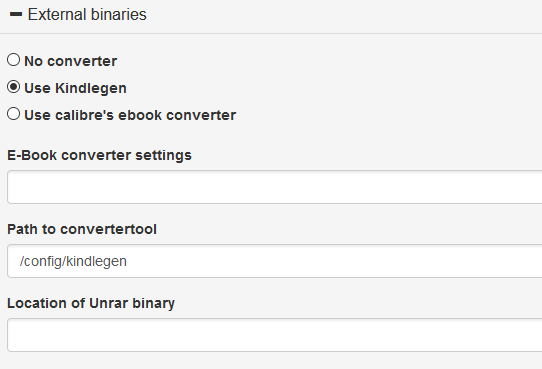
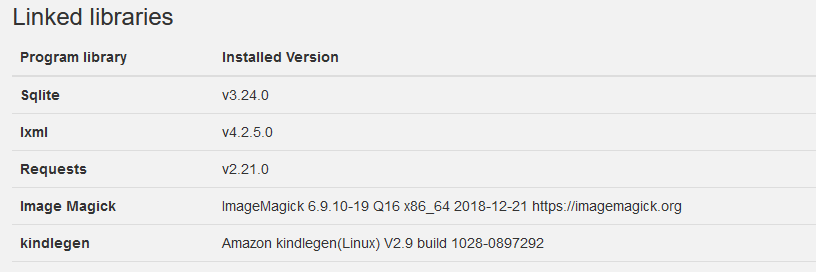
@phorse Here's what I did to get the kindlegen binary working. 1. Downloaded tarball from https://www.amazon.com/gp/feature.html?docId=1000765211 to the docker config folder. 2. Untar'ed it and removed everything from it except for `kindlegen` 3. `chmod 777 kindlegen` 4. `chown nobody:users kindlegen` 5. Changed the external binary's path to /config/kindlegen 6. Confirmed tool showing up in info page Hopefully that gets it working for you. I tested the convert and send feature to my email and it worked fine. Good luck.
-
In the post he is using a containerized version of cloudflared. I personally use https://hub.docker.com/r/rix1337/docker-dnscrypt/ and point pihole to it as the upstream DNS.
-
I think it should be pointed out this is because if you're assigning IPs to your dockers, then UnRaid can't talk to the dockers and would not have DNS, as talked about here: If you want Plex to talk to PiHole, you can set the DNS in the docker config. Under extra parameters, you can put in --dns={PiHole_Address} And that would adjust the DNS settings for Plex.
-
Hey guys, I had a lot of trouble getting this up and running and found out that it was due to some network firewall rules I have in place. I saw from the logs that openvpn was connecting fine and it said that the application had been started but I could not connect. I found after playing around for a few hours that it is my firewall rule that blocks my VLANs from communicating with each other. The rule is explained in greater detail here: https://help.ubnt.com/hc/en-us/articles/115010254227-UniFi-How-to-Disable-InterVLAN-Routing-on-the-UniFi-USG#option 2. I gave this docker (as all my other dockers) it's own IP address and specified the correct LAN_NETWORK. But with this rule enabled, I'm not able to access the docker, eg. services such as Radarr can not use the api to access Sabnzbd. What I'm confused by, and I'm guessing has to do with the IP Rules set up in the container, is why the IP address I'm talking to, contained within the LAN_NETWORK is being changed. I can't see anything obvious from the network logs in the browser about the IP changing and a little stumped on what's going on here. I can't completely remove the rule for security reasons, but may be able to craft some rules before it that allow this traffic if I understood better what was going on. Thanks for the help guys!
-
I don't know the answer to that either. Preferably they would be baked into the docker container. I don't see why you couldn't do them manually, but don't expect them to survive an upgrade then.

