





taeleus
Members
-
Joined
-
Last visited
-
Now I just set the every 12 hours to be just outside of usual play time for my friends. No one is awake at 7am to play, but some join at like 9 am, and our late night crew usually log in after 7pm. I usually try to do 2 restarts a day. 1 overnight, and 1 right before usual high-traffic time (after work/school/what have you) I havent had to manually reboot my zomboid server because of a workshop update or game update since C: There is likely more elegant and intelligent solutions to make it reboot after sensing an update. You can totally set up a user script to run at array start and curl a URL every 5 minutes and set it to trigger "docker restart DOCKERCONTAINERNAME" if the version number changes or something. But I was lazy and wanted a quick "good enough" solution and my users seemed happy with it.
-
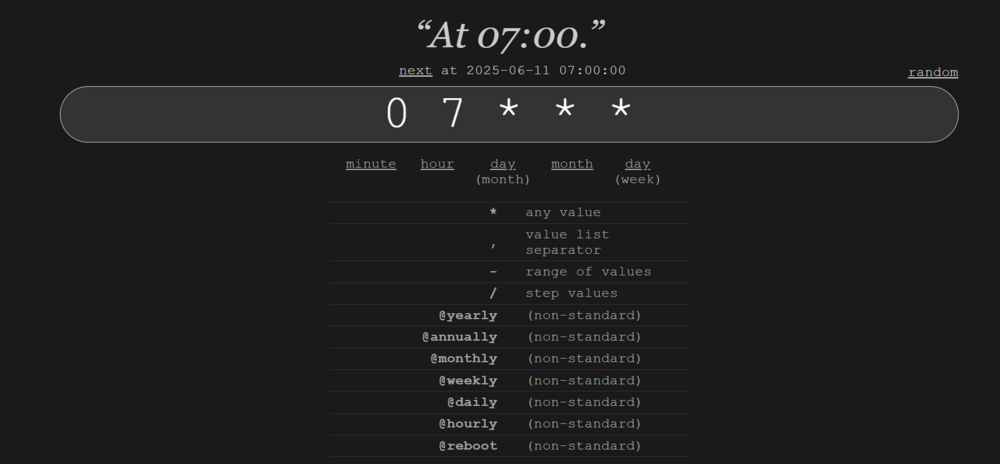
I do the same with Project Zomboid. Basically download the User Scripts plugin, and create a cronjob that essentially restarts that container every x hours. The body of the script itself is literally just "docker restart ProjectZomboid" (Or whatever the name of whatever docker container your wanting to restart) Then use the User Scripts plugin to make it a Cronjob. This should work with any docker container. If your not familiar with Cronjobs then you can calculate them via https://crontab.guru/ For reference, 07*** = 7AM every day Snip from the User Script plugin in Unraid.

-
I wound up using https://hub.docker.com/r/luxusburg/docker-foundry instead which just pipes it through wine.
-
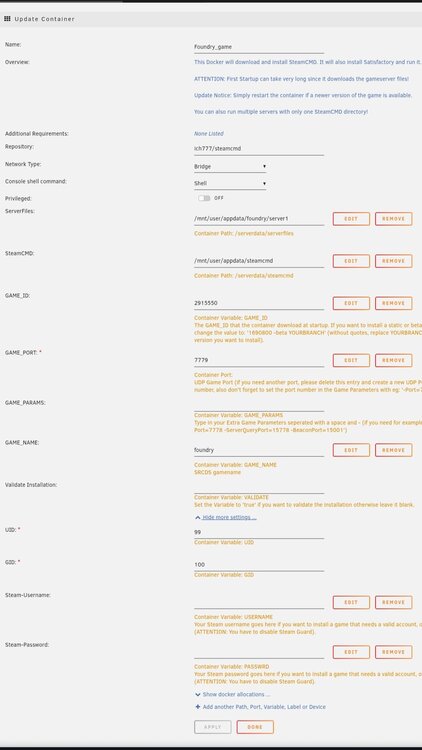
Noticed your not taking on any more requests for making gameserver containers. Big sad but I completely understand. I was curious if anyone could help me spin up one for FOUNDRY on Unraid. I tried with ich777's image in github and set the gameid and all the parameters but it just spins up, says it downloaded the game files, then exits. Checked the app folder and there's no game files. Anyone have any luck creating a FOUNDRY dedicated server container mind helping? I've tried using this https://github.com/ich777/docker-steamcmd-server Images of unraid docker config attached Container logs at the bottom To be clear my toddler and work has me pretty sleep deprived so its very possible Im missing something obvious >.> Logs- /opt/scripts/start-server.sh: line 68: /serverdata/serverfiles/srcds_run: No such file or directory /opt/scripts/start-server.sh: line 68: /serverdata/serverfiles/srcds_run: No such file or directory /opt/scripts/start-server.sh: line 68: /serverdata/serverfiles/srcds_run: No such file or directory Success! App '2915550' fully installed. Unloading Steam API...OK ---Prepare Server--- ---Server ready--- ---Start Server--- ---Ensuring UID: 99 matches user--- usermod: no changes ---Ensuring GID: 100 matches user--- usermod: no changes ---Setting umask to 000--- ---Checking for optional scripts--- ---No optional script found, continuing--- ---Taking ownership of data...--- ---Starting...--- ---Update SteamCMD--- Redirecting stderr to '/serverdata/Steam/logs/stderr.txt' Logging directory: '/serverdata/Steam/logs' [ 0%] Checking for available updates... [----] Verifying installation... UpdateUI: skip show logo Steam Console Client (c) Valve Corporation - version 1745888136 -- type 'quit' to exit -- Loading Steam API...OK Connecting anonymously to Steam Public...OK Waiting for client config...OK Waiting for user info...OK Unloading Steam API...OK ---Update Server--- Redirecting stderr to '/serverdata/Steam/logs/stderr.txt' Logging directory: '/serverdata/Steam/logs' [ 0%] Checking for available updates... [----] Verifying installation... UpdateUI: skip show logo Steam Console Client (c) Valve Corporation - version 1745888136 -- type 'quit' to exit -- Loading Steam API...OK Connecting anonymously to Steam Public...OK Waiting for client config...OK Waiting for user info...OK Success! App '2915550' already up to date. Unloading Steam API...OK ---Prepare Server--- ---Server ready--- ---Start Server--- ---Ensuring UID: 99 matches user--- usermod: no changes ---Ensuring GID: 100 matches user--- usermod: no changes ---Setting umask to 000--- ---Checking for optional scripts--- ---No optional script found, continuing--- ---Taking ownership of data...--- ---Starting...--- ---Update SteamCMD--- Redirecting stderr to '/serverdata/Steam/logs/stderr.txt' Logging directory: '/serverdata/Steam/logs' [ 0%] Checking for available updates... [----] Verifying installation... UpdateUI: skip show logo Steam Console Client (c) Valve Corporation - version 1747702063 -- type 'quit' to exit -- Loading Steam API...OK Connecting anonymously to Steam Public...OK Waiting for client config...OK Waiting for user info...OK Unloading Steam API...OK ---Update Server--- Redirecting stderr to '/serverdata/Steam/logs/stderr.txt' Logging directory: '/serverdata/Steam/logs' [ 0%] Checking for available updates... [----] Verifying installation... UpdateUI: skip show logo Steam Console Client (c) Valve Corporation - version 1747702063 -- type 'quit' to exit -- Loading Steam API...OK Connecting anonymously to Steam Public...OK Waiting for client config...OK Waiting for user info...OK Success! App '2915550' already up to date. Unloading Steam API...OK ---Prepare Server--- ---Server ready--- ---Start Server--- Press ANY KEY to close this window
-
had an account snaffoo First off, I know this is an old thread but I feel this updated information is useful if someone were to try this today. Also, truetype, you are a BOSS for pulling that one off. Saved my buns! (I had stopped the VM service while a VM was running due to looking at an out of date tab that told me they werent >.> and corrupted my libvirt.img so had to rebuild it) Secondly, I can verify your notepad++ recovery of the XML config settings does work, with a caveat. Thirdly, the Caveat. If anyone else attempts this and has an OVMF or OVMF-TPM for their BIOS on the VM, you will run into an issue where simply copying these XML texts over wont be enough. To make a long story short here's what you do to fix that. Follow truetypes instructions exactly like they did, but when you paste the XML into the config for unraid you will do this. ~~Truncated code to make smaller~~ <os> <type arch='x86_64' machine='pc-q35-6.2'>hvm</type> <loader readonly='yes' type='pflash'>/usr/share/qemu/ovmf-x64/OVMF_CODE-pure-efi.fd</loader> <nvram>/etc/libvirt/qemu/nvram/BLAHBLAHBLAHRANDOMHEXVARSHERE_VARS-pure-efi.fd</nvram> </os> ~~Truncated code to make smaller~~ This is what you need to change in the XML. Just remove the OVMF parts. so your left with this <os> <type arch='x86_64' machine='pc-q35-6.2'>hvm</type> </os> After you do that and click build, it will launch the machine, it will then boot into the windows installer (if you still have that setup) but cant install windows because the drive is in GPT format Force shut it down then go and edit the VM. You will notice the BIOS is set to SeaBIOS and is greyed out and wont let you change it. Go into the XML mode and add those two lines back where they were. Click update. It will accept. BUT if you launch the VM now it will fail saying it cant find "/usr/share/qemu/ovmf-x64/OVMF_CODE-pure-efi.fd" or some var to that effect. So were going to go into edit the machine again in GUI mode this time, were going to change the BIOS to OVMF-TPM and click update. Then Edit it ANOTHER time, and this time set it to OVMF and hit update. Viola. your VM will boot up. (If your VM was already OVMF-TPM then try OVMF first and then switch to OVMF-TPM) Not 100% how this black magic fixed it but im guessing something is missing when you build just from XML for OVMF type BIOS VM's that you dont get when XML editing. However, when you get it in the GUI and swap them back and forth, it probably builds/places the files needed in the libvirt.img file allowing it to boot up properly. Fourthly, I am just a humble ADHD nerd who took ALOT of google-fu and combined it all together to get this. So big thanks to all the OG sources. Namely truetype because holy cow. I would have never thought to use a text editor to pry open a .img file. Its like using a shoe to open a can of soup XD Seeing Squid genuinely be surprised made my day.
-
Also I lied. it was a Geforce GTS450. Still trash
-
Thanks for the info! Looks like im SOL. I will keep my eyes peeled for the t400 cards of the sort. its a cobbled together system. Short story? its an i7-4770k. Long story? It WAS an i7-3770 in a lenvo m92p tiny with a dark rock 4 pro slapped on top of it with 3x8tb external HDD's. I just shucked all the drives and got it all configured in unraid and working now in a proper case.
-
So TLDR im trying to get an older card to work with this for plex video transcoding. Im on unraid 6.9.2 trying to use a gtx 420. According to nvidia it requires driver version 390.147 for linux and the lowest the docker goes to is like 470.XX. Is there any way to get the older driver setup on this? Feeling so stuck right now XD I would normally just buy a 1060 off ebay or something like that but theyre going for more than MSRP of new cards because market is cray cray right now haha


