





TimTheSettler
Members
-
Joined
-
Last visited
Everything posted by TimTheSettler
-
I think your plan is a good one. Wait and see and save some money. At some point you'll get annoyed with something. Maybe the CPU is overloaded all the time. Maybe transfer speeds are slow. Maybe you're running out of space. Whatever is bothering you is what should drive your choices.
-
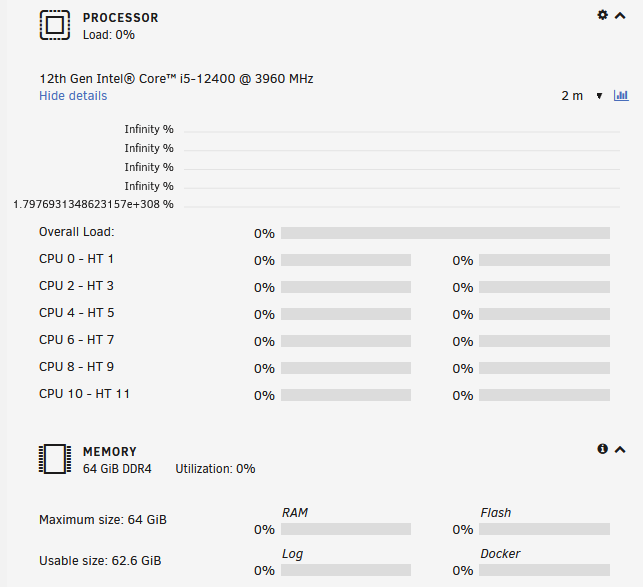
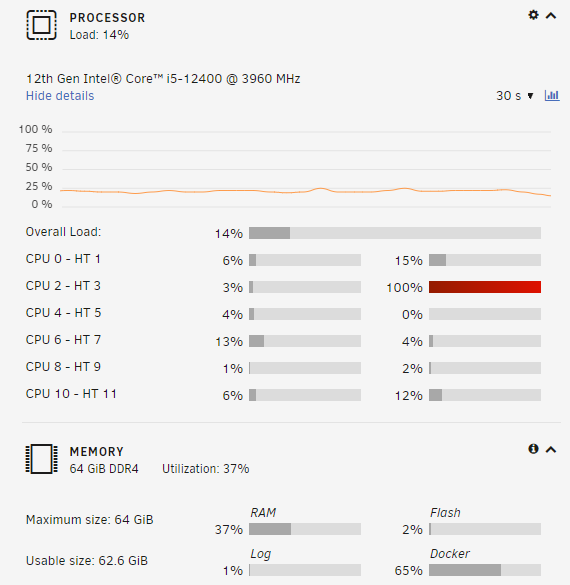
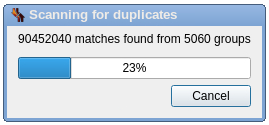
I also have the same problem. It just happened. I've been using Firefox with this server for a few months and everything's been ok until now. The following screenshots show the same server dashboard but with different browsers. The top is Firefox and the bottom is Edge. Both connections are https. The only thing that is different this time is that I'm running a comparison with dupeGuru which seems to be very intensive (and now seems to be frozen). Currently running unRAID 6.10.3. Plan is to upgrade to the latest this weekend. I guess we'll see what happens over the next few days.
-
I had the same question. I tried to repurpose an old machine running Win7. I installed the Unraid OS and gave it a go but it was so old (Core2 Duo with 4GB RAM) that 50% of the CPU and half the memory was in use all the time, even when idle. The first thing to understand is that you don't really "install" the Unraid OS since it sits on its own USB stick. At first I thought this was weird but then I realized that it works nicely because it doesn't really matter what's in the box. My point here is that you should download the Unraid OS and try using your existing hardware. If it works then great but if you find it slow then upgrade the mobo, CPU, and memory. The Unraid OS will use the new hardware. Mobo is around $100, memory is about $150, and CPU is about $150.
-
CPU: Intel i3-10100 RAM: 64GB Parity: 10TB Exos ST10000NM0016 Duration: 14 hours, 32 minutes, 18 seconds. Average speed: 191.1 MB/sec
-
I have three servers in three different locations with each server talking to the other servers through Wireguard. Everything works ok for a few days and then server2 and server3 no longer talk to each other. In the screenshot below you can see that opnsense is denying the communication. The red "deny" log entries are the failed attempts of server2 to talk to server3. The thing is that Wireguard is configured to use port 51822 but it's using 31633. If I disable the tunnel on server2, wait about 10 seconds, and then re-enable it the tunnel connects ok again using the proper port 51822 as you can see below with the blue and green log entries.

-
Hi binhex. I love this docker. Like Niop I'm just waiting for the 1.18.6 update since my syncthing is trying to update itself and getting the error. Anyway, maybe you could change the "Auto Upgrade Interval (hours)" to zero or set the parameter so that syncthing doesn't try to update itself in the future?
-
I have three identical Unraid servers. Each uses syncthing to synchronize all data so that all three are identical. I use appdata backup to keep all the docker containers backed up and, of course, those backups are synchronized to the other servers. I've seen some requests here to change the single backup file into multiple backup files, one for each container. I like this not only because it makes sense and would be easier to identify the backup and its app but syncthing doesn't handle large files nicely. The bigger the file, the longer it takes. https://forum.syncthing.net/t/poor-performance-on-big-file/8934/4
-
I'm not entirely sure where this problem is coming from. I have a few Windows 10 desktop machines. All connect to an unRAID server where I save all my files. I also have an older Windows machine where I back up all of the data from the unRAID server to that older Windows machine. On one of the Windows 10 machines I can open various files from the unRAID server but when I save those files the "last access timestamp" is set to the "max date" (https://en.wikipedia.org/wiki/Year_2038_problem). See the attached file. This causes problems with the synchronization program that I use. If I copy the file from unRAID to this Windows 10 machine and edit it there then the "last access timestamp" is set correctly. I can copy the file back to unRAID where my synchronization program will pick it up. On my other two Windows 10 machines if I open the same files and save them the "last access timestamp" is set correctly. So for some reason one of the Windows 10 machines is "weird". All three Windows 10 machines have the exact same version of Windows (19042.1288) and all three Windows 10 machines have the "last access" turned on (system managed). C:\Users\Tim>fsutil behavior query disablelastaccess DisableLastAccess = 2 (System Managed, Disabled) Is it possible that this is some lingering problem from the Linux 2038 fix in version 5.10 (https://linux.slashdot.org/story/20/10/17/2237236/linux-510-solves-the-year-2038-problem-until-2486) or is there something wrong with this one "weird" Windows machine? There's even a program out there to manually fix this timestamp problem (https://backupchain.com/i/file-date-repair-tool-v1-0-fixes-broken-invalid-time-stamps). The fact that this program exists proves that I'm not the only person to have this problem and yet if you search Google you don't find very much info about it. I'm stumped. Thanks, Tim.

