





Garbonzo
Members
-
Joined
-
Last visited
Everything posted by Garbonzo
-
I have had pretty good luck using sbs20/scanservjs which is pretty easy to setup... I am hoping to find the time to make it my first unraid template worth sharing... I just haven't had the time lately. But you should be able to get it done with google (or pm me if maybe I can help) ..and its 2022 now
-
I have run into the USB id changing as well, and have run across some script-y ways of setting it, but the example is using a synology and some of it I think I could adapt into a user-script that would actually make the docker but that kinda defeats using this template altogether (and adapting it might be right at the "over my head" point as well). My printer unfortunately is not network... so I am limited to USB (unless I can locate a 15yr old USB print server I have in the garage).. anyway, overall I am loving having a cups template to make setting this up a bit cleaner.
-
I realize this is from 6.9x and I am running 6.10 rc2 but I am running up against it doing a parity check after what I believe to be a graceful shutdown/reboot operation from the dashboard panel (or optionally through the dynamix system buttons add-on). The default (I didn't change) timeout was already set to 90. So i am not sure if I need to make it shorter or longer.. Anyway, I will research it more if it keeps happening, I am just trying to understand the order of operations of a reboot and I am very new to unraid. not sure if I should attach diagnostics, as I see the one about was removed... so any insight is appreciated... tia -G
-
Ok, that's a shame. Was trying to keep it out of a VM, but I suppose it's not a big deal. Just trying to keep things simple. But since I am already familiar with using FreeFileSync and Windows drive pool, I will just continue to do so.
-
Lost my settings and save locations on the recent update (to 4.4.0 i believe, but not 100%) but I noticed and fixed them soon enough, and today there was another update (still 4.4.0) which didn't have that same effect. So I guess all well on that front.. Anyway, I have a question/situation and I didn't know where to ask, I am very new to these forums and am having trouble settling into the etiquette, and this involves more of an over-arching philosophical approach: I am running happy enough with these dockers all in a shared custom network. binhex-qbittorrentvpn binhex-sonarr binhex-radarr binhex-prowlarr binhex-jackett (not currently using) EmbyServer (had problems passing my GPU to the binhex-emby and never got it sorted) my inclination is that I should be running the *arrs through the VPN as well... is this something worth doing, and is there a way to do it reasonably with the setup I have OR do I put something like binhex-privoxyvpn (I am a little confused by it atm) into the stack and route through it? I know I still have some reading to do, just looking for some input. and big thanks @binhex for the solid docker images that have made things super approachable for someone only a few months into docker (and even less on unraid) TIA -g Sorry if this isn't the place to post this..
-
I have a USB (5-bay) enclosure with various drives/capacities and would like to use them as a large volume via the unassigned devices plugin if that is a reasonable thing to do... So far, I have been using UD to remote mount a windows drive pool on another machine to achieve this (I use this to backup my "media" from my main unraid array) It's not particularly efficient (not at all) but I didn't have room for a USB3.x card in my old Dell T7500, so it wasn't practical to connect it directly (although really it would have been fine past the initial 20tb+ of syncing, incrementals would be more tolerable. Anyway, with a PCI-x extender, I was able to shoe-horn a USB3 card in there... and am kinda interested in making backup more automated... options / pros and cons / input appreciated. - keep drivepool as is, and move it to a windows vm with it passed through... - use some other vm to manage a new created large volume of the drives and handle the backup (like an OpenMediaVault situation, as I have done that on separate hardware before, and it might be virtualized ok, I haven't looked into it that deep other than a google search for a video of anyone doing it, to no avail) -- best I could theorize is use Unassigned Devices and either script the backup OR use some type of docker with a GUI... but the big question is (not being a huge linux guy) HOW do I create the Large Volume on the USB enclosure? do I just do it via the unraid terminal? what files system will best accomplish this? TIA -g
-
Thanks for the response (I had already typed this yesterday, but wanted to make a couple additions before I posted, and then lost the tab) Anyway, that -R is interesting... I had overlooked that, and when I tried to make the windows run in -s mode and the -c from unraid I kept getting this : iperf3: error - unable to send control message: Bad file descriptor So the -R switch let me see that I am getting between 15-50 re-transmissions when going that direction. I am not sure if that is real or if the windows ver 3.1.3 just doesn't have that info and the ver 3.9 on unraid does (II haven't googled it yet) Anyway, in my other (lost) post, I mentioned that I wouldn't be able to move the card from my windows pc to another machine OR boot to a linux usb until this weekend, but I think I can take things down and do it overnight tonight (wed/thr). So hopefully some file copies from that will tell me a little more, I will plug another ssd in as well to perform the copies from... So if you have any other tips for testing things they are VERY welcome! Thanks again! -G
-
Ok, I am hitting this topic BECAUSE several people here have Dell HN10N cards and have reported good results. I actually happen to be using other dell hardware, but that is irrelevant. Dell Optiplex 7010 (Windows 10) to a Dell Precision T7500 (UnRAID) over the HN10N cards... believing I had everything configured properly with the 1gb nics connected to my switch in the 192.168.111.0/24 subnet and the 10gbs directly connected using the 192.168.112.0/24 subnet. I am averaging in the 110MB/s no matter which ip I transfer files over, and things I have changed in windows trying to simplify it down (like going bare bones with just Client for MS Networks/file & printer sharing/ip4 protocol only) made things worse, not better. I have pulled the plug completely from the 1GB line just to make sure it was using the right wire... and actually replaced the 10GB cat7 cable too... that seemed like it could have been it... it was not. Really, I thought it was Windows trying to use bonding or bridging to something to "help" but it's just not making any sense at this point. SO, can anyone suggest and troubleshooting techniques to "see" what is going on? In both UnRAID and Windows, the connections are "reporting" at 10GB, and I am reading from SSD to SSDs... so I expected to get better than the exact same throughput I was getting over 1GB... (max 120MB/s but average 110-ish... and heck 72 to my un-cached media share) And here is what I am getting to the to ip's from iperf... Any and all insight/help would be appreciated, and if there is somewhere else I should look or post please advise! TIA -g
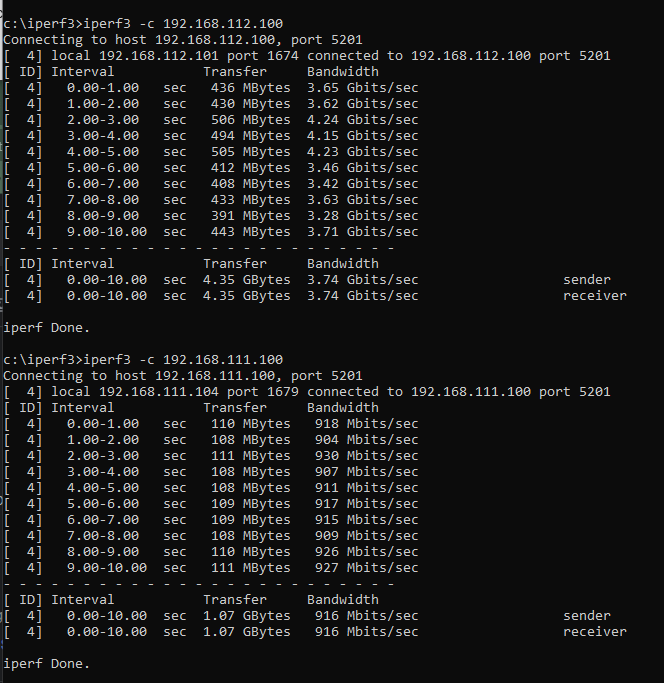
-
I appreciate the response, but Emby had scanned the library completely since this was the first time the media had ever been on the server at all... and I purposefully played new content each time one I moved it to the new folder... it acted like some type of symlink or equivalent, since moving the folder !Media from /mnt/user/z/!Media to just /mnt/user/!Media still worked as long as the /mnt/user/z folder was hanging out there (empty from what I could see in terminal and via WinSCP) but as soon as I actually removed the empty "z" folder, emby broke... so I updated the docker with the correct new path and all was well... Its fine that it all works as expected now... I just REALLY feel like I need to understand why it worked to the extent it did... It seems like it should NOT have. -G
-
First, I apologize if this is in the wrong location. It has to do with HOW unraid handles moved data within itself, but also with Emby/docker and how it apparently still works after a move which makes no sense. I will try to clarify... backstory: I am in the process of moving my dockers and data from OpenMediaVault to UNRAID and I have a situation with Emby that is kinda stumping me. The location My original share created on unraid array was just "z" (I was copying from a windows machine with a drivepool shared as "z" so I was just keeping it simple. Inside of "z" were folders such as "!Media" (/tv /movies etc inside) as well as "Downlaods", "Documents" and a few other folders. So, I am on a clean, new install of undraid, with essentially nothing going on, and I install an Emby docker. Emby /mnt <--> /mnt/user/z/!Media all was fine... then I used Krusader to MOVE /mnt/user/z/!Media to just /mnt/user/!Media (I decided NOT to keep everything in a subdir called "z" but... everything in emby kept working... but in terminal (or remote connected via WinSCP) the folder at /mnt/user/z shows empty.. no symlinks that I could see, nothing. yet... emby still worked fine (after a full reboot of the unraid box no less). So I verified in the docker settings, yes, still set to /mnt/user/z/!Media which is what I don't understand. so... I play something in emby and it still works.. then I deleted (the empty) "z" folder and then it broke emby (the way I expected it to break when I MOVED all of the content in !Media up one level to the user folder... again... I then just fixed the docker settings and let it rebuid/restart (without the /z in the path) and it works as expected... I just REALLY expected that it would have broke WHEN I moved the data, and need to grok why it did not. TIA to anyone that took the time to read this and explain what I am not understand about the way things work (and maybe even where I should have posted this!) -G
