





cpxazn
Members
-
Joined
-
Last visited
-
Thanks, although it took a long time, I was able to recover at least 90% of the data.
-
Lesson learned. Thanks for checking, I had already shipped disk5 back for RMA. Maybe one improvement here would be to improve the message to say that this would wipe parity as well. I thought this would perform something like a preclear before mounting and rebuilding from parity.
-
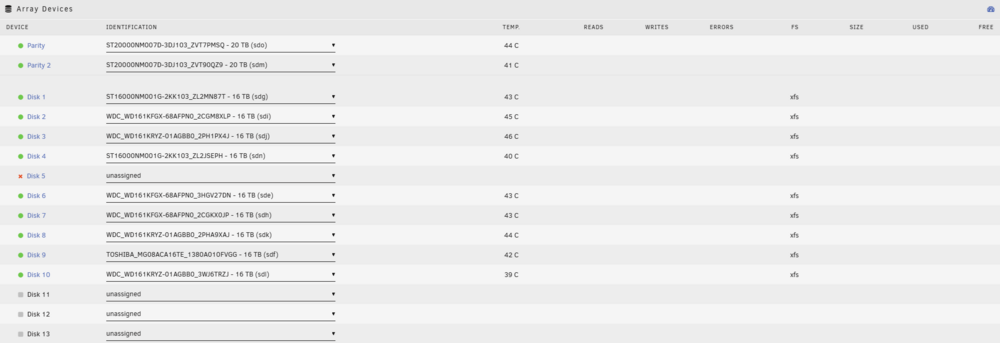
Thanks for your input. I'm preparing for the worst, but just hanging onto a sliver of hope that disk5 is recoverable since I'm still not sure how that data got wiped. I have already replugged the cables for the drives and all drives are showing properly in the array. Parity is setup correctly so shouldn't be an issue there.
-
I'm running Unraid 6.12.10 I had 2 drive failed recently, but also have 2 parity drives disk4 dropped off the array, but came back on it's own, but when array is started, it showed that contents are emulated from parity. I see no SMART errors. disk 5 died, still waiting for replacement drive to arrive In order to fix issue number 1, I tried to retrigger a rebuild from parity, but did something stupid. It was not automatically triggering a rebuild from parity when starting the array, and I saw that disk4 was showing unmountable and it showed a format button. Being the genius that I am, I decided to format the drive, hoping that it would format, mount, then trigger rebuild from parity (I should have just googled how). Clearly I could not be any more wrong. After the format and realizing that parity rebuild did not trigger, I stopped the array, unassigned disk4, started and stopped the array, then reassigned disk4, which then triggered parity rebuild. After the rebuild finished, I noticed that all data on disk4 and disk5 are gone. The data on disk4 was not too important for me, but I would like to recover data from disk5. Now here are a few things that I noticed After formatting disk4, for some reason disk5 is showing that data is wiped as well. Was this a result of me formatting disk4? During the parity rebuild of disk4, I noticed some xfs errors being thrown in syslog for disk4 and disk5 which can be seen in the attached logs. After the rebuild, I unmounted, mounted in maintenance mode, then ran the xfs_repair -v /dev/mdXp1 command for all of the drives, but it did not bring back any of the lost data. Any chance that the data on disk5 is still recoverable? daniel-nas-diagnostics-20241202-2234.zip

-
I caught frigate in the act with docker stats...now to figure out how to fix it CONTAINER ID NAME CPU % MEM USAGE / LIMIT MEM % NET I/O BLOCK I/O PIDS 5f97175ae55c frigate 673.73% 20.16GiB / 31.11GiB 64.80% 980MB / 58.8MB 149MB / 602kB 1238
-
Was looking up some things on google about Home Assistant memory leaks and one post came up about frigate and using vaapi, which I switched to recently because people said it was recommended for encoding. Will try to change it back and see if it stops the hanging.
-
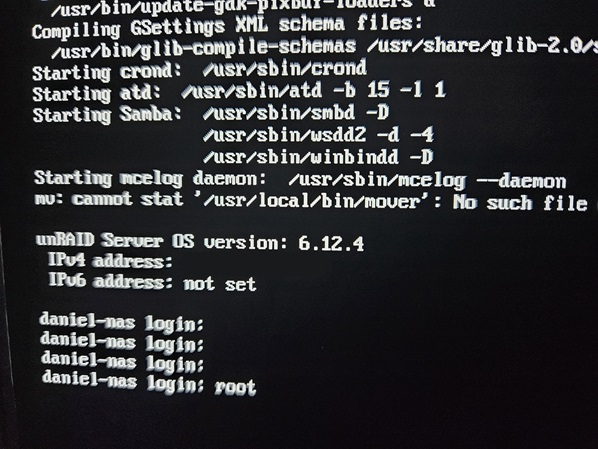
I've had my unraid setup running for quite some time now, but recently started experiencing some lockups where the GUI and shares are not accessible through the network. I have run parity check at least 5 times now and have not been able to complete because the system locks up every time before completion. Since I can't access through the network, I try to login directly on the server itself but it hangs after I input root as the user. I have tried replacing both RAM sticks since I had spares lying around, but the server is still crashing. Originally I was running 6.12.6 when I ran into this problem, but i downgraded back to 6.12.4 because I thought it was the problem, but I'm still experiencing the same issues. I noticed that very rarely, the server will actually recover itself and becomes accessible again. Most of the time when I press the power button to initiate shutdown, it will pass the graceful shutdown period and hang on the force shutdown, and I usually have to hard shutdown. As i was writing this post, I finally got some information on the error because previously, I couldn't find any sort of information related to the issue, but my server actually recovered itself just now, and the Fix Common Issues plugin threw me a useful error. I have 32GB of RAM total so some process must be memory leaking. One change I made recently was adding a VM for Home Assistant, but I have that capped at 4GB of RAM. Not sure if the attached diagnostics logs would be able to help identify which process is causing the problem. daniel-nas-diagnostics-20231223-0924.zip

-
I'm using a PRIME Z790-P WIFI which does have Realtek NIC but not sure if its 8125. Not sure if it makes a difference, but it's not currently hooked up at the moment, I'm actively using the Mellanox ConnectX-2. Currently it has been running parity check for the past day, so can't reproduce and generate any new diag yet.
-
I seem to be having strange problems going from 6.12.4 to 6.12.6. Everything comes up initially. The first issue that I ran into on this version was when I started updating primary/secondary storage for my shares. The whole GUI went unresponsive. I used ssh to initiate shutdown, and it responded with the initiating shutdown message, but never actually shutdown so I had to force shutdown. After that, I rolled back to 6.12.4 and everything was fine again. I upgraded back to 6.12.6 and kicked off a parity check, things started to hang again. Console/logs start throwing nginx gateway errors. I'm no longer able to stop the array. I can no longer SSH, and am unable to finish generating diagnostics logs, which seems to freeze at ip command. I've been using unraid for a couple of years but it's my first time running into these kinds of issues after an upgrade. I'll stick to 6.12.4 for now.
-
I'm having this same problem recently which I never had in the past. In the past, I was able to move file across shares through user directory instantly as long as source and target were both on cache. Now I'm seeing the copy and delete behavior that @johnsanc is mentioning. I've tried both on Windows 11 and Krusader and both have the same issue. Edit: I just did a test without user directory, and tested directly from rootshare/cache/source-dir to rootshare/cache/target-dir, and it's still doing a copy/delete Edit: Also wanted to mention that I was on btrfs (raid5) in the past, but now I'm on zfs (raidz and compression on), in case that makes a difference.
-
Whenever I drag a folder into VLC to queue a playlist, for some reason it triggers rehashing for all files in that directory. I've seen at least 20 b3sum processes get kicked off by this which kills server performance. Is there a reason why the plugin thinks the files have been modified? EDIT: This is with automatic protection enabled. b3sum processes will run even when parity check is running.
-
Good news, exchanged both the motherboard and the processor and I no longer see those errors anymore.
-
Good to know that Micro Center is flexible with returns. I originally had the issues with 6.11.5 which threw kernel errors in syslog before crashing, then I upgraded to 6.12.0-rc5 and now I still get mce errors here and there, but the hard crash usually has no errors associated with it.
-
I think I may just go exchange the CPU and motherboard for a new one at micro center. Hoping they will let me since I already threw away the CPU box.
-
I just checked /var/log/mcelog and I see a bunch of errors. Is there any way to determine whether this is a CPU or Motherboard issue? mcelog: failed to prefill DIMM database from DMI data Kernel does not support page offline interface Hardware event. This is not a software error. MCE 0 CPU 8 BANK 0 TSC c9fa45464b ADDR 149a9c617b87 TIME 1684100730 Sun May 14 17:45:30 2023 MCG status: MCi status: Corrected error MCi_ADDR register valid MCA: Instruction CACHE Level-1 Instruction-Fetch Error STATUS 8400004000040150 MCGSTATUS 0 MCGCAP c16 APICID 20 SOCKETID 0 MICROCODE 113 CPUID Vendor Intel Family 6 Model 183 Step 1 Hardware event. This is not a software error. MCE 0 CPU 8 BANK 0 TSC c9fa486d08 ADDR 3ffffff811e7fe0 TIME 1684100730 Sun May 14 17:45:30 2023 MCG status: MCi status: Corrected error MCi_ADDR register valid MCA: Instruction CACHE Level-1 Instruction-Fetch Error STATUS 8400008000040150 MCGSTATUS 0 MCGCAP c16 APICID 20 SOCKETID 0 MICROCODE 113 CPUID Vendor Intel Family 6 Model 183 Step 1 Hardware event. This is not a software error. MCE 0 CPU 8 BANK 0 TSC cacc37c105 ADDR 149a9c60d3a4 TIME 1684100731 Sun May 14 17:45:31 2023 MCG status: MCi status: Corrected error MCi_ADDR register valid MCA: Instruction CACHE Level-1 Instruction-Fetch Error STATUS 8400008000040150 MCGSTATUS 0 MCGCAP c16 APICID 20 SOCKETID 0 MICROCODE 113 CPUID Vendor Intel Family 6 Model 183 Step 1 Hardware event. This is not a software error. MCE 0 CPU 8 BANK 0 TSC 38baf480b69 TIME 1684101616 Sun May 14 18:00:16 2023 MCG status: MCi status: Corrected error MCA: Instruction CACHE Level-1 Instruction-Fetch Error STATUS 8000004000020150 MCGSTATUS 0 MCGCAP c16 APICID 20 SOCKETID 0 MICROCODE 113 CPUID Vendor Intel Family 6 Model 183 Step 1


