Encore
Members
-
Joined
-
Last visited
-
Hey everyone, I was FINALLY!!!! able to solve my problem. I was facing the exact same issue with a new CPU (Ultra 250K PLUS) as described in the quote: after shutting down an SR-IOV VM, the host iGPU would crash, and I had to reboot or perform a PCIe rescan. I spent over 5 hours with ChatGPT and FINALLY GOT IT WORKING!!!!!!!!!! I had everything we did summarized for posterity, because otherwise I honestly wouldn't remember all of it :D I strongly suspect the main reason was that I was using the same Unraid USB stick that I had used years ago with an older Intel processor, which used GVT-g instead of SR-IOV. So -> if you're having the same problem as me, where the host GPU crashes after SR-IOV passthrough, and you're using the same Unraid stick that you previously used with older Intel CPUs, check the guide below! Here's the write-up from ChatGPT — because I definitely wouldn't be able to put it all back together myself :D ##################### If anyone knows how I can simply hide the "big text" behind a spoiler or something, so that only people who are interested have to expand it, please let me know ^^ BBCode doesn't seem to work. ##################### [spoiler] Intel iGPU SR-IOV with Arrow Lake on Unraid 7.3.2Intel Core Ultra 5 250K Plus · Arrow Lake-S · i915 SR-IOV · VFIO · Windows 11 VM My setupUnraid: 7.3.2 Kernel: 6.18.38-Unraid CPU: Intel Core Ultra 5 250K Plus iGPU: Intel Arrow Lake-S PCI ID: 8086:7d67 iGPU PF: 00:02.0 iGPU VF: 00:02.1 VM: Windows 11The NVIDIA GPU in the system is irrelevant for this guide. The actual problemThe Intel iGPU could basically be split using SR-IOV. After enabling it, the following appeared: 00:02.0 Intel Graphics -> PF 00:02.1 Intel Graphics -> VFThe VF was bound to vfio-pci and passed through to the Windows VM. At first, everything looked good. The problem occurred when shutting down the VM. Sometimes afterwards: lspci -nn -s 00:02would return nothing, or the devices would disappear from /sys. So it wasn't just: 00:02.1that disappeared. The: 00:02.0was gone as well. That was the really interesting part. First suspicion: VFIO/FLRNaturally, the first suspicion was that the VFIO reset of the VF was leaving the iGPU in a broken state. During VM shutdown, the logs showed: vfio-pci 0000:00:02.1: resetting i915 0000:00:02.0: VF1 FLR vfio-pci 0000:00:02.1: reset doneThat looked suspicious at first. So I tested the individual steps manually. Test 1 – Resetting the VF directly echo 1 > /sys/bus/pci/devices/0000:00:02.1/resetResult: i915 0000:00:02.0: VF1 FLRAfterwards, both devices were still present: 00:02.0 00:02.1This made a normal VF FLR alone as the cause rather unlikely. Test 2 – VFIO resetThe VF was bound to vfio-pci and then reset as well. vfio-pci 0000:00:02.1: resetting i915 0000:00:02.0: VF1 FLR vfio-pci 0000:00:02.1: reset doneAgain, afterwards: 00:02.0 00:02.1were still present. Test 3 – VFIO unbindI also tested the unbind separately: echo 0000:00:02.1 > /sys/bus/pci/drivers/vfio-pci/unbindAgain, the PF remained present. At this point, it increasingly looked like the normal VFIO lifecycle alone wasn't causing the problem. Then I started looking into the i915 driverSince Arrow Lake SR-IOV wasn't working out of the box with the standard Unraid i915 driver, I used the Strongtz i915-SR-IOV driver. My kernel was: 6.18.38-UnraidSince the Unraid system itself didn't have a complete kernel build environment, I used the kernel-build container from ich777. The resulting build was: 2026.03.05.6-sriovbuilt against: 6.18.38-UnraidThe build itself worked. The module subsequently reported: version: 2026.03.05.6-sriov vermagic: 6.18.38-Unraid SMP preempt mod_unloadSide issue when loading the moduleI also ran into a separate issue while loading the module. The compressed .ko.xz file could not be loaded directly via insmod: decompression failed with status 6After manually decompressing it, however, the module loaded successfully: xz -dc .../i915.ko.xz > /tmp/i915.ko insmod /tmp/i915.ko force_probe=7d67 enable_guc=3 max_vfs=1The i915 driver then started correctly: Found meteorlake (device ID 7d67) Running in SR-IOV PF modeand: 1 VFs could be associated with this PFSo at least I knew that the custom driver itself was basically working. And then came the interesting partDuring troubleshooting, I eventually took a closer look at what was actually happening when starting and stopping the VM. In: /etc/libvirt/hooks/qemuthere was still old code from my previous Intel GVT-g configuration. The hook contained, among other things, references to: 00:02.0and: mdev_supported_types/i915-GVTg_V5_4The code created a GVT-g mdev when the VM started and removed it when the VM ended. That was pretty obviously wrong for my new SR-IOV setup. So I effectively had two different mechanisms trying to manage the same Intel GPU: GVT-g / mdev + SR-IOV / PF + VFI honestly should have checked this much earlier. Removed the old GVT-g codeI removed only the old GVT-g sections from: /etc/libvirt/hooks/qemuThe relevant code was: "if ($argv[2] 'prepare' && $argv[3] 'begin'){ shell_exec('echo "$(cat /boot/config/plugins/intel-gvt-g/vms.conf | grep "Windows 11" | awk -F\\'[{}]\\' \\'{print $6}\\')" > /sys/devices/pci0000\\:00/0000\\:00\\:02.0/mdev_supported_types/i915-GVTg_V5_4/create'); } if ($argv[2] 'release' && $argv[3] 'end'){ shell_exec('echo 1 > /sys/devices/pci0000\\:00/0000\\:00\\:02.0/"$(cat /boot/config/plugins/intel-gvt-g/vms.conf | grep "Windows 11" | awk -F\\'[{}]\\' \\'{print $6}\\')"/remove'); }"I kept the rest of the hook because it still contains other VFIO-related functions. After that, the VF was created normally again: echo 1 > /sys/bus/pci/devices/0000:00:02.0/sriov_numvfsAnd: 00:02.0 -> i915 00:02.1 -> vfio-pciFirst test afterwardsStarted the VM. Used the VM. Shut down the VM. Afterwards: lspci -nn -s 00:02still showed: 00:02.0 VGA compatible controller: Intel Corporation Arrow Lake-S [8086:7d67] 00:02.1 VGA compatible controller: Intel Corporation Arrow Lake-S [8086:7d67]That was the first really interesting success. Second testI went through the entire cycle again. During shutdown, I once again saw: i915 0000:00:02.0: VF1 FLRBut this time the devices did not disappear. Afterwards: readlink -f /sys/bus/pci/devices/0000:00:02.0/driverreturned: /sys/bus/pci/drivers/i915And: readlink -f /sys/bus/pci/devices/0000:00:02.1/driverreturned: /sys/bus/pci/drivers/vfio-pciAlso: cat /sys/bus/pci/devices/0000:00:02.0/sriov_numvfsreturned: 1So the state after shutting down the VM was exactly what it should be. So what was actually the solution?Here I have to be a little careful. During troubleshooting, I changed several things: Installed the Strongtz i915-SR-IOV driver Compiled the driver against the Unraid kernel Enabled SR-IOV Adjusted the VFIO configuration Performed various reset/unbind tests Found and removed the old GVT-g/libvirt hook Therefore, I cannot say with 100% certainty that the custom i915 build itself was necessary. The decisive A/B difference we observed in the end was: Before i915 SR-IOV + old GVT-g hook ↓ VM shutdown ↓ VF1 FLR ↓ 00:02.0 + 00:02.1 disappearAfter i915 SR-IOV + no old GVT-g hook ↓ VM shutdown ↓ VF1 FLR ↓ 00:02.0 remains 00:02.1 remainsTherefore, my current assessment is: The custom i915 driver was useful and/or necessary for SR-IOV support, but whether that build actually fixed the original shutdown issue has not been proven. What I would check first todayIf someone has the same problem, I would not immediately start compiling the kernel. First, check: grep -niE 'gvt|mdev|i915-GVT|00:02\.0' /etc/libvirt/hooks/qemuIf old GVT-g configuration shows up there: remove or disable it first. Then test the VM again. Only if SR-IOV itself doesn't work would I start looking into the appropriate i915-SR-IOV driver. My working configurationAt the moment, the relevant part looks like this: 00:02.0 -> i915 00:02.1 -> vfio-pciAnd: sriov_numvfs = 1 (up to 7 work)Kernel parameters: intel_iommu=on iommu=pt i915.force_probe=7d67 i915.enable_guc=3 i915.max_vfs=1 module_blacklist=xexe remains disabled because I am using i915 for this configuration. A few more things I learned along the wayA VF FLR is not automatically an errorThis message: i915 0000:00:02.0: VF1 FLRlooks scary at first, but it is expected during a VFIO lifecycle. What matters is what happens afterwards. If: 00:02.0 00:02.1are still present afterwards, the reset apparently completed cleanly. If the PF disappears, look more closelyThe VM receives: 00:02.1But if afterwards: 00:02.0also disappears, I wouldn't simply assume "VFIO reset is broken." In that case, check whether something is touching, unbinding, removing, or reconfiguring the PF itself. Old GVT-g configuration is easy to overlookThis was ultimately the key issue for me. I had mentally written off the old GVT-g configuration a long time ago, but the libvirt hook was still there. That's exactly the kind of old configuration that can be really nasty when switching to SR-IOV, because it may not cause any problems during normal operation. It only kicks in again when the VM is started/stopped. Current statusAfter removing the old GVT-g hook, I tested several complete VM cycles. The relevant state remains: PF: 00:02.0 -> i915 VF: 00:02.1 -> vfio-pciAfter shutting down the VM: 00:02.0 -> present 00:02.1 -> presentAnd the expected: i915 0000:00:02.0: VF1 FLRstill appears in the log. So the original "iGPU disappears after VM shutdown" issue is currently resolved. Addendum: The build containerThe Docker container that I only used for building the kernel is not required at runtime. After successfully building the driver, you can remove it again: docker rm -f i915-sriov-buildI would, however, keep the installed i915-SR-IOV package for now as long as the current SR-IOV configuration depends on it. [/spoiler]

-
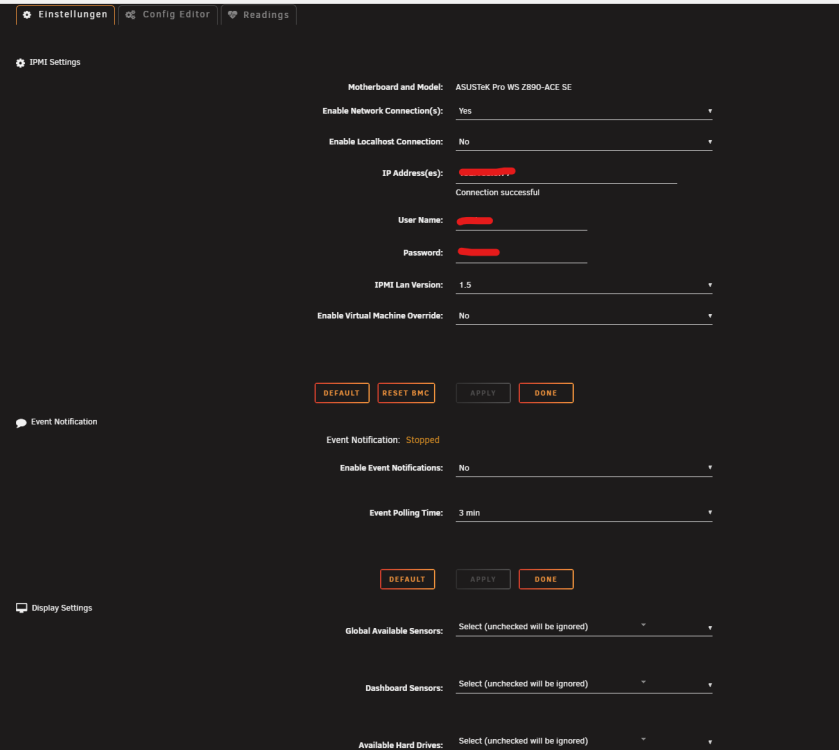
hi quick question. anyone knows, why i have no FAN Controll section? normal fan controll plugins doesnt work - so i tried this plugin, but no fan control section apears im Using ASUS PRO WS Z890-ACE SE Workstation Mainboard Sockel Intel LGA 1851 if no profile i avaliable, how can i contribute? root@NAS:~# ipmifan ipmifan[163503]: Your ASUSTeK motherboard is not supported or setup yet Your ASUSTeK motherboard is not supported or setup yet Active FirmwareGives the build date of the active BMC image Build Date Nov 25 2024 Displays the build time of the active BMC image Build Time 01:45:43 UTC Displays the firmware version of the active BMC image Firmware version 2.02.2 ASMB12-iPKVM Firmware Model: Z890-W880 Firmware Version: 2.2.2 Firmware Build Time: Nov 25 2024 BIOS MB Model: Pro WS Z890-ACE SE BIOS Version: 3305 BIOS Build Time: 07/24/2026 ... 192.168.0.xx: 22,PCIE01 Temp,Temperature,N/A,N/A,C,N/A,N/A,N/A,90.00,95.00,100.00,N/A 192.168.0.xx: 23,PCIE02 Temp,Temperature,N/A,N/A,C,N/A,N/A,N/A,90.00,95.00,100.00,N/A 192.168.0.xx: 24,PCIE03 Temp,Temperature,N/A,N/A,C,N/A,N/A,N/A,90.00,95.00,100.00,N/A 192.168.0.xx: 25,CPU_FAN,Fan,Nominal,720.00,RPM,0.00,360.00,360.00,N/A,N/A,N/A,'OK' 192.168.0.xx: 26,CPU_OPT,Fan,N/A,N/A,RPM,0.00,360.00,360.00,N/A,N/A,N/A,N/A 192.168.0.xx: 27,CHA_FAN1,Fan,Nominal,720.00,RPM,0.00,360.00,360.00,N/A,N/A,N/A,'OK' 192.168.0.xx: 28,CHA_FAN2,Fan,Nominal,600.00,RPM,0.00,360.00,360.00,N/A,N/A,N/A,'OK' 192.168.0.xx: 29,CHA_FAN3,Fan,Nominal,720.00,RPM,0.00,360.00,360.00,N/A,N/A,N/A,'OK' 192.168.0.xx: 30,CHA_FAN4,Fan,Nominal,720.00,RPM,0.00,360.00,360.00,N/A,N/A,N/A,'OK' 192.168.0.xx: 31,CHA_FAN5,Fan,Nominal,600.00,RPM,0.00,360.00,360.00,N/A,N/A,N/A,'OK' 192.168.0.xx: 32,W_PUMP+,Fan,Nominal,5160.00,RPM,0.00,360.00,360.00,N/A,N/A,N/A,'OK' ...
-
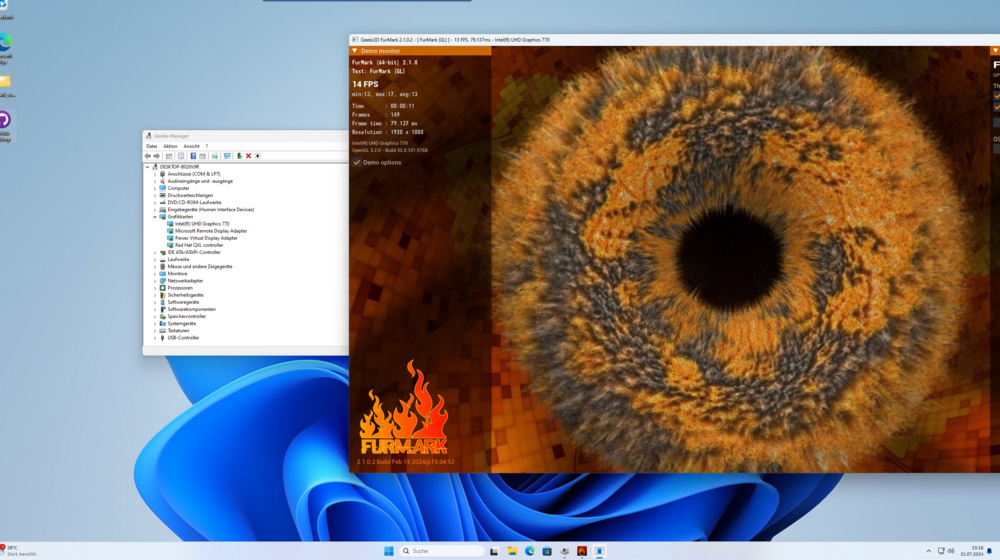
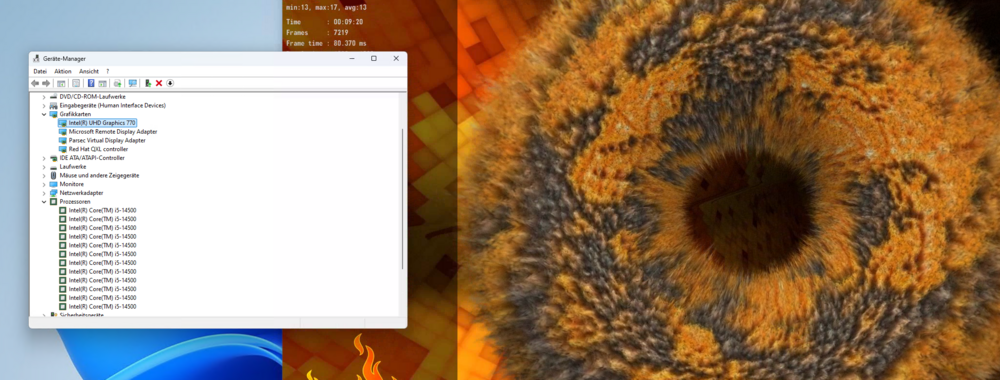
will this work now on 7.3 with i5 14500 ? if i passtrough it to my windows guest, i can install the intel display driver, devicemanager shows all ok, but parsec still uses software renderer and can run furmark etc. edit: ok, worked, but my whole igpu crashs after VM shutdown .. need to do : echo 1 > /sys/bus/pci/rescan in unraid shell + add VFs back (no restart nessesary , worked again after) but after each VM reboot / shutdown, the igpu crashs and i need rescan and readd the VFs, any solution for this?
-
Hey guys, dont ask why :D but supportes unraid viommu? maybe as command line for qemu? or a setting somewhere? running proxmox nested on unraid as host - performance is ok now i want to passtrough a gpu to proxmox and proxmox to a guest. i know i know .. but it is possible? (viommu?)
-
Mar 19 13:27:13 NAS kernel: x86/split lock detection: #AC: CPU 3/KVM/47448 took a split_lock trap at address: 0x7320c96d Mar 19 13:27:35 NAS kernel: i915 0000:00:02.0: VF1 FLR Mar 19 13:29:33 NAS autofan: Highest disk temp is 32C, adjusting fan speed from: 40 (15% @ 1170rpm) to: 55 (21% @ 1298rpm) Mar 19 13:29:33 NAS autofan: Highest disk temp is 32C, adjusting fan speed from: 51 (20% @ 1170rpm) to: 57 (22% @ 1298rpm) Mar 19 13:30:01 NAS docker: Success: Backup of RAM-Disk created. Mar 19 13:32:39 NAS autofan: Highest disk temp is 33C, adjusting fan speed from: 55 (21% @ 1305rpm) to: 70 (27% @ 1464rpm) Mar 19 13:32:39 NAS autofan: Highest disk temp is 33C, adjusting fan speed from: 57 (22% @ 1305rpm) to: 63 (24% @ 1464rpm) Mar 19 13:34:44 NAS kernel: br0: port 3(vnet2) entered disabled state Mar 19 13:34:44 NAS kernel: vnet2 (unregistering): left allmulticast mode Mar 19 13:34:44 NAS kernel: vnet2 (unregistering): left promiscuous mode Mar 19 13:34:44 NAS kernel: br0: port 3(vnet2) entered disabled state Mar 19 13:34:45 NAS kernel: i915 0000:00:02.0: VF1 FLR Mar 19 13:34:47 NAS kernel: vfio-pci 0000:00:02.1: vgaarb: VGA decodes changed: olddecodes=io+mem,decodes=io+mem:owns=none Mar 19 13:34:47 NAS kernel: xe 0000:00:02.1: Your graphics device 4680 is not officially supported Mar 19 13:34:47 NAS kernel: by xe driver in this kernel version. To force Xe probe, Mar 19 13:34:47 NAS kernel: use xe.force_probe='4680' and i915.force_probe='!4680' Mar 19 13:34:47 NAS kernel: module parameters or CONFIG_DRM_XE_FORCE_PROBE='4680' and Mar 19 13:34:47 NAS kernel: CONFIG_DRM_I915_FORCE_PROBE='!4680' configuration options. Mar 19 13:34:47 NAS kernel: i915 0000:00:02.1: [drm] Found ALDERLAKE_S (device ID 4680) display version 12.00 stepping C0 Mar 19 13:34:47 NAS kernel: i915 0000:00:02.1: Running in SR-IOV VF mode Mar 19 13:34:47 NAS kernel: i915 0000:00:02.1: [drm] GT0: GUC: interface version 0.1.17.0 Mar 19 13:34:47 NAS kernel: i915 0000:00:02.1: [drm] VT-d active for gfx access Mar 19 13:34:47 NAS kernel: i915 0000:00:02.1: [drm] Using Transparent Hugepages Mar 19 13:34:47 NAS kernel: i915 0000:00:02.1: [drm] GT0: GUC: interface version 0.1.17.0 Mar 19 13:34:47 NAS kernel: i915 0000:00:02.1: [drm] GT0: GUC: interface version 0.1.17.0 Mar 19 13:34:47 NAS kernel: i915 0000:00:02.1: GuC firmware PRELOADED version 0.0 submission:SR-IOV VF Mar 19 13:34:47 NAS kernel: i915 0000:00:02.1: HuC firmware PRELOADED Mar 19 13:34:47 NAS kernel: i915 0000:00:02.1: [drm] Protected Xe Path (PXP) protected content support initialized Mar 19 13:34:47 NAS kernel: i915 0000:00:02.1: [drm] PMU not supported for this GPU. Mar 19 13:34:47 NAS kernel: [drm] Initialized i915 1.6.0 for 0000:00:02.1 on minor 1 Mar 19 13:34:47 NAS usb_manager: Info: rc.usb_manager vm_action Windows 11 stopped end - Mar 19 13:34:49 NAS kernel: i915 0000:00:02.0: vgaarb: VGA decodes changed: olddecodes=none,decodes=none:owns=io+mem Mar 19 13:34:49 NAS kernel: i915 0000:00:02.2: vgaarb: VGA decodes changed: olddecodes=io+mem,decodes=none:owns=none Mar 19 13:34:49 NAS kernel: i915 0000:00:02.0: vgaarb: VGA decodes changed: olddecodes=none,decodes=io+mem:owns=io+mem Mar 19 13:34:50 NAS kernel: i915 0000:00:02.0: Disabled 2 VFs Mar 19 13:34:50 NAS kernel: Console: switching to colour dummy device 80x25 Mar 19 13:34:51 NAS acpid: input device has been disconnected, fd 11 Mar 19 13:35:45 NAS autofan: Highest disk temp is 34C, adjusting fan speed from: 70 (27% @ 1513rpm) to: 85 (33% @ 1650rpm) Mar 19 13:35:45 NAS autofan: Highest disk temp is 34C, adjusting fan speed from: 63 (24% @ 1513rpm) to: 69 (27% @ 1650rpm) Mar 19 13:35:54 NAS kernel: ------------[ cut here ]------------ Mar 19 13:35:54 NAS kernel: pci 0000:00:02.0: [drm] pm_runtime_get_sync() failed: -13 Mar 19 13:35:54 NAS kernel: WARNING: CPU: 10 PID: 108561 at /usr/src/i915-sriov-dkms/drivers/gpu/drm/i915/intel_runtime_pm.c:171 __intel_runtime_pm_get.isra.0+0x62/0x80 [i915] Mar 19 13:35:54 NAS kernel: Modules linked in: xt_CHECKSUM ipt_REJECT nf_reject_ipv4 ip6table_mangle iptable_mangle vhost_net tun vhost vhost_iotlb tap ipvlan xt_nat xt_tcpudp nf_conntrack_netlink veth xt_conntrack xt_MASQUERADE nfnetlink xfrm_user xfrm_algo ip6table_nat iptable_nat nf_nat nf_conntrack nf_defrag_ipv6 nf_defrag_ipv4 xt_addrtype cfg80211 rfkill md_mod ntfs3 tcp_diag inet_diag i915(O) intel_gtt nct6775 nct6775_core hwmon_vid ip6table_filter ip6_tables iptable_filter ip_tables x_tables efivarfs bridge 8021q garp mrp stp llc zfs(PO) xe intel_rapl_common iosf_mbi x86_pkg_temp_thermal intel_powerclamp coretemp kvm_intel kvm crct10dif_pclmul crc32_pclmul crc32c_intel ghash_clmulni_intel sha512_ssse3 drm_gpuvm sha256_ssse3 drm_exec sha1_ssse3 gpu_sched spl(O) drm_buddy aesni_intel drm_ttm_helper crypto_simd ttm cryptd i2c_algo_bit drm_suballoc_helper sr_mod drm_display_helper joydev cdrom input_leds mei_hdcp mei_pxp rapl drm_kms_helper intel_cstate wmi_bmof r8169 drm mpt3sas nvme i2c_i801 mei_me ahci realtek raid_class Mar 19 13:35:54 NAS kernel: agpgart i2c_smbus intel_uncore libahci scsi_transport_sas led_class mei nvme_core vmd i2c_core fan thermal tpm_crb tpm_tis video tpm_tis_core tpm libaescfb ecdh_generic wmi backlight ecc acpi_tad acpi_pad button Mar 19 13:35:54 NAS kernel: CPU: 10 UID: 99 PID: 108561 Comm: ffmpeg Tainted: P U O 6.12.19-Unraid #1 Mar 19 13:35:54 NAS kernel: Tainted: [P]=PROPRIETARY_MODULE, [U]=USER, [O]=OOT_MODULE Mar 19 13:35:54 NAS kernel: Hardware name: ASUS System Product Name/PRIME B760M-A, BIOS 1661 06/25/2024 Mar 19 13:35:54 NAS kernel: RIP: 0010:__intel_runtime_pm_get.isra.0+0x62/0x80 [i915] Mar 19 13:35:54 NAS kernel: Code: 5d 1a 00 01 4c 8b 6f 50 4d 85 ed 75 03 4c 8b 2f e8 b3 cc 59 e0 44 89 e1 4c 89 ea 48 c7 c7 45 63 58 a1 48 89 c6 e8 fe f8 e6 df <0f> 0b 40 0f b6 f5 48 89 df 5b 5d 41 5c 41 5d e9 ea fe ff ff 66 2e Mar 19 13:35:54 NAS kernel: RSP: 0018:ffffc9000d5c7cf8 EFLAGS: 00010282 Mar 19 13:35:54 NAS kernel: RAX: 0000000000000000 RBX: ffff8881960320a0 RCX: 0000000000000027 Mar 19 13:35:54 NAS kernel: RDX: 0000000000000002 RSI: ffffffff8233aad5 RDI: 00000000ffffffff Mar 19 13:35:54 NAS kernel: RBP: 0000000000000001 R08: 0000000000000000 R09: ffffffff82d96e50 Mar 19 13:35:54 NAS kernel: R10: 00003fffffffffff R11: 0000000000001458 R12: 00000000fffffff3 Mar 19 13:35:54 NAS kernel: R13: ffff888101d441a0 R14: ffff8881004faf80 R15: 0000000000000001 Mar 19 13:35:54 NAS kernel: FS: 0000000000000000(0000) GS:ffff88981f480000(0000) knlGS:0000000000000000 Mar 19 13:35:54 NAS kernel: CS: 0010 DS: 0000 ES: 0000 CR0: 0000000080050033 Mar 19 13:35:54 NAS kernel: CR2: 000015343fb612c8 CR3: 0000000005418006 CR4: 0000000000772ef0 Mar 19 13:35:54 NAS kernel: PKRU: 55555554 Mar 19 13:35:54 NAS kernel: Call Trace: Mar 19 13:35:54 NAS kernel: <TASK> Mar 19 13:35:54 NAS kernel: ? __warn+0x90/0x120 Mar 19 13:35:54 NAS kernel: ? report_bug+0xe2/0x160 Mar 19 13:35:54 NAS kernel: ? __intel_runtime_pm_get.isra.0+0x62/0x80 [i915] Mar 19 13:35:54 NAS kernel: ? handle_bug+0x53/0x80 Mar 19 13:35:54 NAS kernel: ? exc_invalid_op+0x13/0x60 Mar 19 13:35:54 NAS kernel: ? asm_exc_invalid_op+0x16/0x20 Mar 19 13:35:54 NAS kernel: ? __intel_runtime_pm_get.isra.0+0x62/0x80 [i915] Mar 19 13:35:54 NAS kernel: ? __intel_runtime_pm_get.isra.0+0x62/0x80 [i915] Mar 19 13:35:54 NAS kernel: intel_runtime_pm_get+0xf/0x20 [i915] Mar 19 13:35:54 NAS kernel: i915_driver_release+0x22/0x80 [i915] Mar 19 13:35:54 NAS kernel: drm_dev_put+0x39/0x70 [drm] Mar 19 13:35:54 NAS kernel: singleton_release+0x1c/0x30 [i915] Mar 19 13:35:54 NAS kernel: __fput+0x106/0x1d0 Mar 19 13:35:54 NAS kernel: task_work_run+0x67/0x80 Mar 19 13:35:54 NAS kernel: do_exit+0x36c/0x8c0 Mar 19 13:35:54 NAS kernel: ? __pfx_futex_wake_mark+0x10/0x10 Mar 19 13:35:54 NAS kernel: do_group_exit+0x79/0x80 Mar 19 13:35:54 NAS kernel: get_signal+0x61a/0x660 Mar 19 13:35:54 NAS kernel: ? __seccomp_filter+0x83/0x380 Mar 19 13:35:54 NAS kernel: arch_do_signal_or_restart+0x2a/0x1f0 Mar 19 13:35:54 NAS kernel: ? do_futex+0xe6/0x170 Mar 19 13:35:54 NAS kernel: ? __do_sys_futex+0x11f/0x150 Mar 19 13:35:54 NAS kernel: ? syscall_trace_enter+0x61/0x130 Mar 19 13:35:54 NAS kernel: syscall_exit_to_user_mode+0x4f/0x80 Mar 19 13:35:54 NAS kernel: do_syscall_64+0x82/0xe0 Mar 19 13:35:54 NAS kernel: entry_SYSCALL_64_after_hwframe+0x76/0x7e Mar 19 13:35:54 NAS kernel: RIP: 0033:0x15343c898d71 Mar 19 13:35:54 NAS kernel: Code: Unable to access opcode bytes at 0x15343c898d47. Mar 19 13:35:54 NAS kernel: RSP: 002b:00001534327fa720 EFLAGS: 00000246 ORIG_RAX: 00000000000000ca Mar 19 13:35:54 NAS kernel: RAX: fffffffffffffe00 RBX: 0000557bbf63b408 RCX: 000015343c898d71 Mar 19 13:35:54 NAS kernel: RDX: 0000000000000000 RSI: 0000000000000189 RDI: 0000557bbf63b434 Mar 19 13:35:54 NAS kernel: RBP: 00001534327fa760 R08: 0000000000000000 R09: 00000000ffffffff Mar 19 13:35:54 NAS kernel: R10: 0000000000000000 R11: 0000000000000246 R12: 0000000000000000 Mar 19 13:35:54 NAS kernel: R13: 0000000000000000 R14: 0000557bbecb2eb8 R15: 0000557bbf63b434 Mar 19 13:35:54 NAS kernel: </TASK> Mar 19 13:35:54 NAS kernel: ---[ end trace 0000000000000000 ]--- i5 14500 - crashs on windows 11 VM - need to reboot host system to get my igpu back / igpu disapears after some minutes or reboot/shutdown the VM tested a bit with chatgpt: i915.enable_psr=0 i915.enable_rc6=0 i915.runtime_pm=0 doesnt work The new log you provided shows a similar warning related to the i915 driver, specifically the Intel GPU runtime power management function (pm_runtime_get_sync()) failing. The error code -13 indicates a permission issue, which might suggest the driver is encountering a power management issue or there's an issue with accessing the GPU's power states. Here’s a breakdown of the log: Warning: pm_runtime_get_sync() failed: -13: This message indicates that the driver failed to sync the power management state for the GPU. The error code -13 usually indicates a permission issue (EACCESS), meaning that the function couldn't access the necessary resources or permissions to manage the GPU's power state. Driver and Kernel Involved: The log references the i915 driver, which is used for Intel graphics. This is the same driver mentioned in your earlier log. It also mentions the intel_runtime_pm_get function and the i915_driver_release function, which are part of the GPU power management and driver release processes. System Information: The hardware appears to be an ASUS motherboard (PRIME B760M-A) with a BIOS version from June 2024. It’s running Unraid OS (6.12.19-Unraid). Additional Context: The process ffmpeg seems to be running at the time of the error. If you are doing some video processing or utilizing the GPU with ffmpeg, this could be relevant, as ffmpeg may be interacting with the GPU through the driver. Possible Solutions: Here are a few things you could try to resolve or investigate the issue further: Update i915 and Kernel: Check if there are any updates for the i915 driver or the kernel. Sometimes, these power management issues are resolved in newer versions of the kernel or driver patches. Check BIOS Settings: Make sure that your BIOS settings related to power management and Intel graphics are properly configured. This includes ensuring that settings like Intel C-states or GPU power management are not causing conflicts. Verify GPU Access Permissions: Ensure that the process has the necessary permissions to access the GPU. This could involve checking system settings related to user permissions or ensuring that no conflicts are occurring with other processes or drivers. Disable Runtime Power Management for i915: As a test, you can try disabling runtime power management for the i915 driver. This can be done by adding the following kernel parameter: ini Kopieren i915.enable_psr=0 or by blacklisting the intel_pstate driver, depending on your exact setup. Test with Another GPU (if available): If you have a separate GPU available, test with that to see if the issue is related specifically to the Intel integrated GPU. Look for Conflicting Drivers or Modules: Ensure no other conflicting drivers or modules are loaded that could interfere with the i915 driver. You can check this by reviewing your list of loaded modules and ensuring they aren't overlapping in functionality. blacklisting xe driver doesnt work too.
-
on latest BETA 7.1 (Beta 1) plugin seems broken. no virtual gpus can be created, stays at 0 if i set for example 1 or 2 , the site will "stuck" , if i refresh site, still at 0. uninstall - reboot - reinstall - reboot , didnt fix the issue. i5 14500 update needed?
-
any news for SR-IOV working on 14gen intel cpu? / some time ago i readed something about new kernel is nessesary or patches - still get error, that the sr-iov device disapears after some minutes and need to reboot whole server bcs gpu is gone.
-
hatte das selbe problem, die platte wurde mir immer mit nem ROTEN statt grünen punkt angezeigt mit der meldung "deaktiviert". Lösung war bei mir in den einstellungen eine neue Config zu erstellen fürs array, habe dabei aber ausgewählt das array+pool gesichert werden soll (da sonst soweit ich weiß ein rebuild der parrity stattfindet, habe mir zur sicherheit auch vorher die genaue anordung der platten gescreenshotet usw..) danach gings wieder, bin aber zurück zu stable direkt danach gewechselt^^ bei zuweisung behalten auf ja bei den datenträgern -- habe bei mir das array auf nein gehabt und musste danach die parrity neu builden.. ^^

-
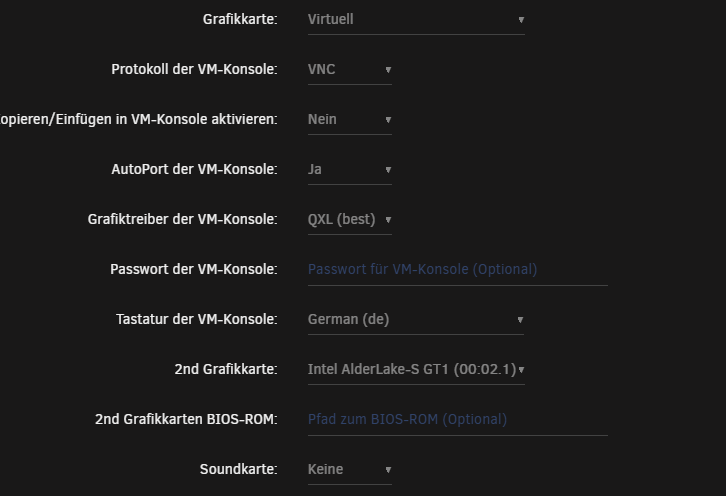
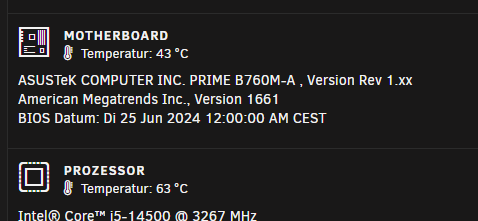
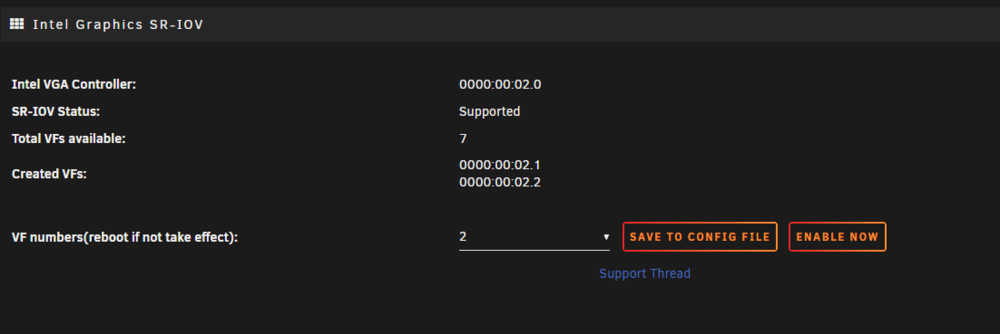
eeeeeeeeeeeeeeeeeeeeeeee @ich777 just tryd now with latest bios update since 30 minutes - all working fine, no magical removed gpu on host system 😮 latest stable unraid, i5 14500 ASUSTeK COMPUTER INC. PRIME B760M-A , Version Rev 1.xx American Megatrends Inc., Version 1661 and i deactivated HD AUDIO + console ports etc on mainboard, powerlimit set to 65W and some fan adjustments, nothing fancy more Edit: Stays stable until i shutdown the VM - after that, GPU disapears. if vm is running -> all good 😮 STRANGE
-
so i will trade my 14500 for an 13gen... cant wait years for support (until ZFS supports kernel 6.11/6.12 13 gen vs 14 gen , no mutch i will loose, right?
-
https://www.phoronix.com/news/Intel-Xe-DRM-Next-Linux-6.12 does that mean, 14gen (i5 14500) SR-IOV is supported soon and i can finaly accelerating my VMs ? ? :X
-
I regret the purchase 💀
-
any news for intel 14gen cpus ? and the i915 disapear after 1-2 minutes / reboot of the vm? 14gen still not stupported?
-
its normal, as i know - same name for me on 14th gen, but transcoding docker jellyfin works fine etc, just sr-iov not working wondering, why its on your 12th gen too. i tested complete fresh unraid usb stick, setted bios/uefi back to default, just enabled virtualisation, iommou groups, sr-iov enabled in bios etc etc. but still same, gpu will be removed from host after like 1 minutes or two , or after reboot, even from host system -> reboot required. hope it will be fixed 2024 or upstreamed to kernel trough intel self.
-
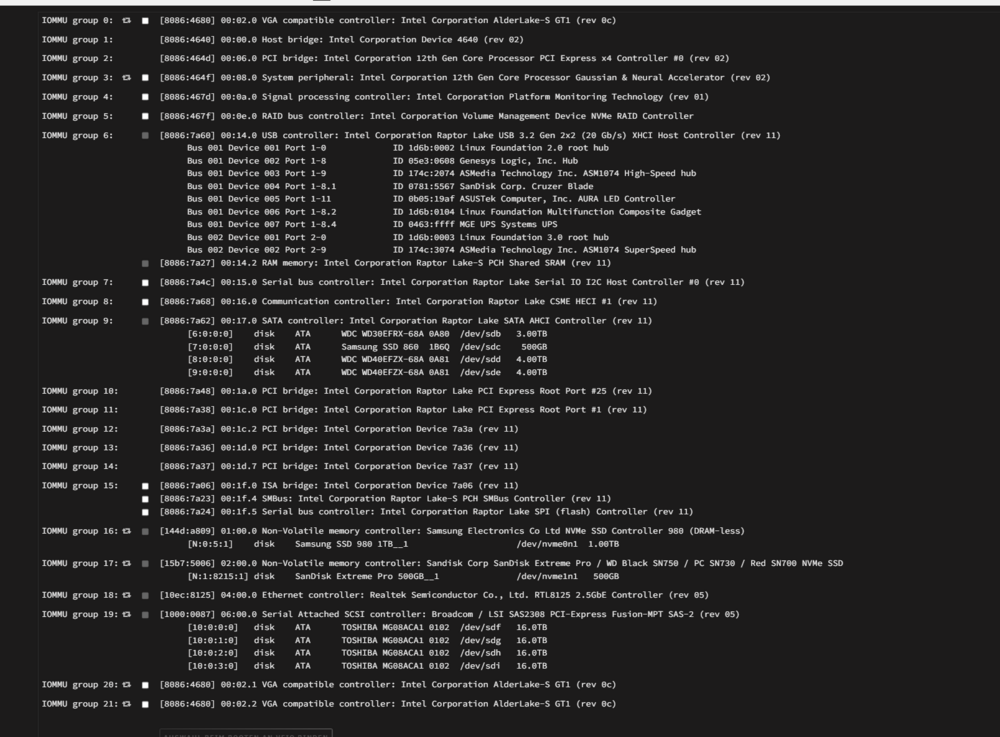
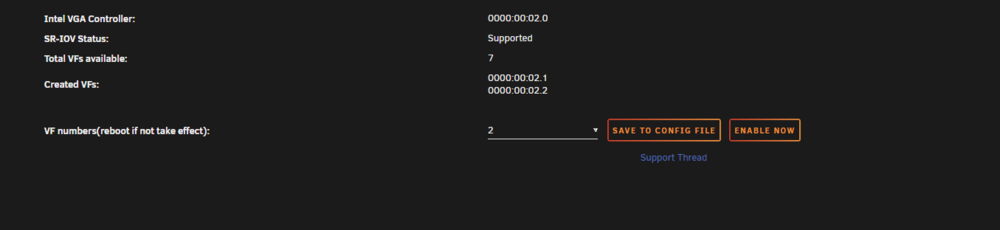
Using latest Unraid i5 14500 B760M-A Motherboard downloaded plugin, activated plugin etc. created the virtual gpus, passtrough it to the vm - so far so good BUT after the vm starts 1-2minutes or if i shutdown the vm, the GPU disapears, even from the host iteself and i need to reboot host machine to bring it back Jun 3 14:05:57 NAS kernel: i915 0000:00:02.0: [drm] GT0: GuC firmware i915/tgl_guc_70.bin version 70.13.1 Jun 3 14:05:57 NAS kernel: i915 0000:00:02.0: [drm] GT0: HuC firmware i915/tgl_huc.bin version 7.9.3 Jun 3 14:05:57 NAS kernel: i915 0000:00:02.0: [drm] GT0: HuC: authenticated for all workloads! Jun 3 14:05:57 NAS kernel: i915 0000:00:02.0: [drm] GT0: GUC: submission enabled Jun 3 14:05:57 NAS kernel: i915 0000:00:02.0: [drm] GT0: GUC: SLPC enabled Jun 3 14:05:57 NAS kernel: i915 0000:00:02.0: [drm] GuC RC: enabled Jun 3 14:05:57 NAS kernel: mei_pxp 0000:00:16.0-fbf6fcf1-96cf-4e2e-a6a6-1bab8cbe36b1: bound 0000:00:02.0 (ops i915_pxp_tee_component_ops [i915]) Jun 3 14:05:57 NAS kernel: i915 0000:00:02.0: [drm] Protected Xe Path (PXP) protected content support initialized Jun 3 14:05:57 NAS kernel: [drm] Initialized i915 1.6.0 20201103 for 0000:00:02.0 on minor 0 Jun 3 14:05:57 NAS kernel: ACPI: video: Video Device [GFX0] (multi-head: yes rom: no post: no) Jun 3 14:05:57 NAS kernel: input: Video Bus as /devices/LNXSYSTM:00/LNXSYBUS:00/PNP0A08:00/LNXVIDEO:00/input/input7 Jun 3 14:05:57 NAS kernel: i915 0000:00:02.0: 7 VFs could be associated with this PF Jun 3 14:05:57 NAS kernel: ata6.00: Enabling discard_zeroes_data Jun 3 14:05:57 NAS kernel: sdc: sdc1 sdc2 sdc3 sdc4 Jun 3 14:05:57 NAS acpid: input device has been disconnected, fd 11 Jun 3 14:05:57 NAS kernel: pci 0000:00:02.0: Removing from iommu group 0 any way to fix this? iommou 0 is the intel gpu tested with passtrough 0000:00:02.1 and 0000:00:02.2 and with the gpu itself (thats the log file, but same issue if i use .1 and .2 - just tested all i can... this are the last lines if using 0000:00:02.2 (group 21) --ignore the filesystem on my ssd n 3 14:48:37 NAS kernel: vfio-pci 0000:00:02.2: vgaarb: changed VGA decodes: olddecodes=io+mem,decodes=io+mem:owns=none Jun 3 14:48:37 NAS kernel: br0: port 4(vnet2) entered blocking state Jun 3 14:48:37 NAS kernel: br0: port 4(vnet2) entered disabled state Jun 3 14:48:37 NAS kernel: device vnet2 entered promiscuous mode Jun 3 14:48:37 NAS kernel: br0: port 4(vnet2) entered blocking state Jun 3 14:48:37 NAS kernel: br0: port 4(vnet2) entered forwarding state Jun 3 14:48:39 NAS kernel: device-mapper: ioctl: 4.47.0-ioctl (2022-07-28) initialised: [email protected] Jun 3 14:48:39 NAS kernel: ata6.00: Enabling discard_zeroes_data Jun 3 14:48:39 NAS kernel: sdc: sdc1 sdc2 sdc3 sdc4 Jun 3 14:48:40 NAS kernel: i915 0000:00:02.0: VF2 FLR Jun 3 14:48:41 NAS kernel: i915 0000:00:02.0: VF2 FLR Jun 3 14:48:41 NAS unassigned.devices: Disk with ID 'Samsung_SSD_860_EVO_500GB_S3Z2NB0K660578V (dev2)' is not set to auto mount. Jun 3 14:48:41 NAS unassigned.devices: Disk with ID 'Samsung_SSD_860_EVO_500GB_S3Z2NB0K660578V (dev2)' is not set to auto mount. Jun 3 14:48:41 NAS unassigned.devices: Disk with ID 'Samsung_SSD_860_EVO_500GB_S3Z2NB0K660578V (dev2)' is not set to auto mount. Jun 3 14:48:41 NAS unassigned.devices: Partition '/dev/sdc2' does not have a file system and cannot be mounted. Jun 3 14:49:34 NAS kernel: ata6.00: Enabling discard_zeroes_data Jun 3 14:49:34 NAS kernel: br0: port 4(vnet2) entered disabled state Jun 3 14:49:34 NAS kernel: device vnet2 left promiscuous mode Jun 3 14:49:34 NAS kernel: br0: port 4(vnet2) entered disabled state Jun 3 14:49:34 NAS kernel: sdc: sdc1 sdc2 sdc3 sdc4 Jun 3 14:49:34 NAS kernel: i915 0000:00:02.0: VF2 FLR Jun 3 14:49:36 NAS unassigned.devices: Disk with ID 'Samsung_SSD_860_EVO_500GB_S3Z2NB0K660578V (dev2)' is not set to auto mount. Jun 3 14:49:36 NAS unassigned.devices: Disk with ID 'Samsung_SSD_860_EVO_500GB_S3Z2NB0K660578V (dev2)' is not set to auto mount. Jun 3 14:49:36 NAS unassigned.devices: Disk with ID 'Samsung_SSD_860_EVO_500GB_S3Z2NB0K660578V (dev2)' is not set to auto mount. Jun 3 14:49:36 NAS kernel: vfio-pci 0000:00:02.2: vgaarb: changed VGA decodes: olddecodes=io+mem,decodes=io+mem:owns=none Jun 3 14:49:36 NAS kernel: i915 0000:00:02.2: Running in SR-IOV VF mode Jun 3 14:49:36 NAS unassigned.devices: Partition '/dev/sdc2' does not have a file system and cannot be mounted. Jun 3 14:49:36 NAS kernel: i915 0000:00:02.2: [drm] GT0: GUC: interface version 0.1.4.1 Jun 3 14:49:36 NAS kernel: i915 0000:00:02.2: [drm] VT-d active for gfx access Jun 3 14:49:36 NAS kernel: i915 0000:00:02.2: [drm] Using Transparent Hugepages Jun 3 14:49:36 NAS kernel: i915 0000:00:02.2: [drm] GT0: GUC: interface version 0.1.4.1 Jun 3 14:49:36 NAS kernel: i915 0000:00:02.2: GuC firmware PRELOADED version 1.4 submission:SR-IOV VF Jun 3 14:49:36 NAS kernel: i915 0000:00:02.2: HuC firmware PRELOADED Jun 3 14:49:36 NAS kernel: i915 0000:00:02.2: [drm] Protected Xe Path (PXP) protected content support initialized Jun 3 14:49:36 NAS kernel: i915 0000:00:02.2: [drm] PMU not supported for this GPU. Jun 3 14:49:36 NAS kernel: [drm] Initialized i915 1.6.0 20201103 for 0000:00:02.2 on minor 2 Jun 3 14:49:36 NAS usb_manager: Info: rc.usb_manager vm_action Windows 11 stopped end - Jun 3 14:49:37 NAS kernel: i915 0000:00:02.0: vgaarb: changed VGA decodes: olddecodes=none,decodes=none:owns=io+mem Jun 3 14:49:37 NAS kernel: i915 0000:00:02.2: vgaarb: changed VGA decodes: olddecodes=io+mem,decodes=none:owns=none Jun 3 14:49:37 NAS kernel: pci 0000:00:02.1: Removing from iommu group 20 Jun 3 14:49:37 NAS kernel: i915 0000:00:02.0: vgaarb: changed VGA decodes: olddecodes=none,decodes=io+mem:owns=io+mem Jun 3 14:49:37 NAS kernel: pci 0000:00:02.2: Removing from iommu group 21 Jun 3 14:49:38 NAS kernel: i915 0000:00:02.0: Disabled 2 VFs Jun 3 14:49:38 NAS kernel: Console: switching to colour dummy device 80x25 Jun 3 14:49:38 NAS acpid: input device has been disconnected, fd 11 Jun 3 14:49:38 NAS kernel: pci 0000:00:02.0: Removing from iommu group 0 nas-diagnostics-20240603-1411.zip