





lance-tek
Members
-
Joined
-
Last visited
Everything posted by lance-tek
-
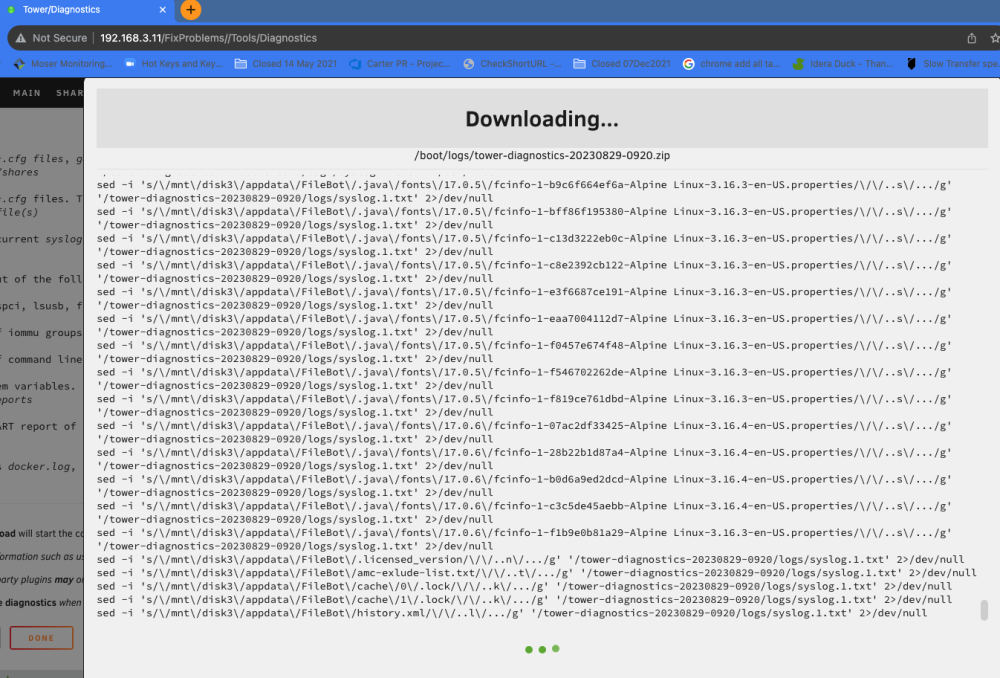
I tried to run a diagnostic report and it seems to have filled my /var/log directory. I'm not linux smart but it appears to be enumerating every file on my server. The report/download has been running all day so far. is this how it should be working? Is there anything I can do to get the report to kick out instead of filling up the directory and then bombing? (I was running the report for troubleshooting a different problem where my array seems to just go offline and require a restart).

-
That's all it took! I ran that command and then restarted my unraid tower and all is working again 🙂 Thanks!!!!
-
I did have some data stored as "cache drive only" so I'm guessing that data would be lost if I just formatted the drive, right?
-
tower-diagnostics-20230410-1424.zip OK, that is attached as is the SMART report 🙂 tower-smart-20230410-1425.zip
-
A week or so ago, we lost power. I'm not sure of the details as I have not been home. Anyway, I'm getting an error for the [btrfs] cache drive... "Unmountable: Wrong or no file system" I started the array in diagnostic mode and ran the check on the cache drive. I haven't changed anything or tried to do anything since I am pretty much a novice and hope to keep the data that might be recoverable... [1/7] checking root items [2/7] checking extents incorrect local backref count on 198720106496 root 5 owner 9032415 offset 0 found 1 wanted 0 back 0x306e28b0 backpointer mismatch on [198720106496 16384] incorrect local backref count on 199878418432 root 5 owner 54485 offset 2778279936 found 1 wanted 0 back 0x5285f6e0 backpointer mismatch on [199878418432 4096] incorrect local backref count on 320401063936 root 5 owner 54485 offset 53953183744 found 1 wanted 0 back 0x5a4a91e0 backpointer mismatch on [320401063936 16384] ERROR: errors found in extent allocation tree or chunk allocation [3/7] checking free space tree [4/7] checking fs roots [5/7] checking only csums items (without verifying data) [6/7] checking root refs [7/7] checking quota groups skipped (not enabled on this FS) Opening filesystem to check... Checking filesystem on /dev/sde1 UUID: 1e82dabf-077d-499b-912c-1a97811288ba found 165126217728 bytes used, error(s) found total csum bytes: 157326020 total tree bytes: 1525940224 total fs tree bytes: 677117952 total extent tree bytes: 557547520 btree space waste bytes: 356864765 file data blocks allocated: 1970767323136 referenced 143412604928 At this point what should I do next?
-
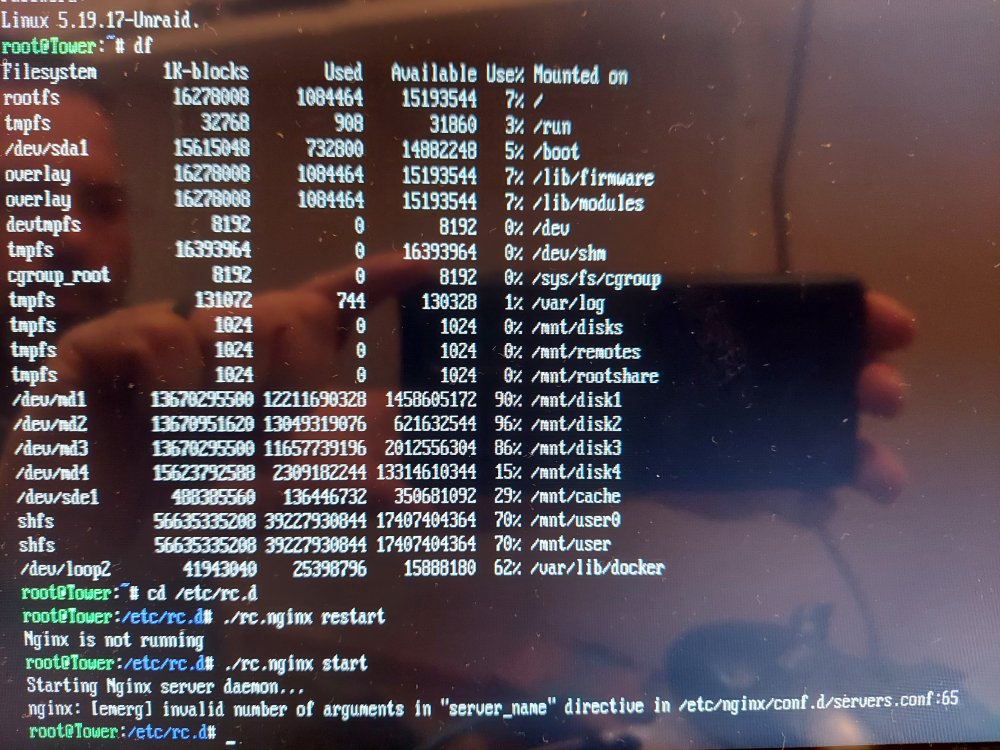
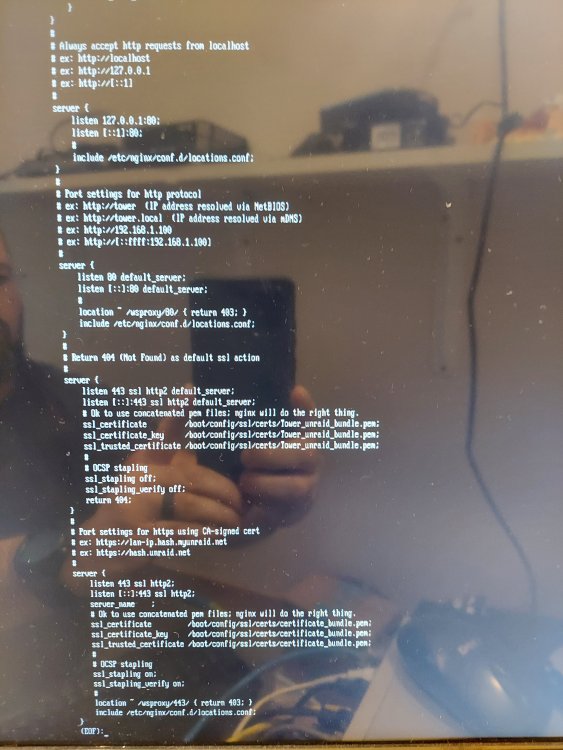
This is probably something I'm just not seeing... BLUF: the webui isn't running on my server. I can't even get to it from the local tower when I try to log in using GUI mode. I recently was trying to upgrade my license from basic so I could have more drives attached. In doing so, I found the "My Servers" piece and enabled it. This allowed me to upgrade and have the license pushed to my USB device. That part worked. But then I started having problems with the webui. First, I had done something to get an unraid cert and that turned on SSL for the web ui. I was able to log in at the console and reboot then start it in GUI mode. From there I was able to see that it was looking for an SSL connection and it gave me the option to turn that off (seemingly). After a couple of reboots things were working fine again, for a bit... I've been scouring the web trying to find how to manually start the webui and I found a thread on here about someone else's struggle and things that worked for them ( I tried to perform the command /etc/rc.d/rc.nginx restart but my results were "Nginx is not running". So I tried Nginx start which told me 'invalid number of options in "server_name" directive in /etc/nginx/conf.d/server.conf:65". So I took a look at the file but I find there is nothing in the server_name. It is just a [tab] followed by a semicolon? What should I edit this line to be? Is that my only problem? How did it get messed up to begin with? Thanks for any help, tower-diagnostics-20221213-1247.zip
-
My Unraid box updated to 6.10.3. Now I am unable to connect to the "time machine" that was working yesterday... I have kept all of the basic settings I even reissued the chown command on the directory that i am using (/mnt/user/timemachine) but I am not able to find the time machine on my mac now. Like others have stated I didn't get it to work in the beginning either. I had to keep messing with it for my mac to discover it. Unfortunately, I didn't keep track of the changes I made that finally got it to show up. I can't mount the smb path to it either. I think it was done by IP in the past (based on the time machine backup app saying it couldn't find it). but I've also tried timemachine.local, timemachine, ip/timemachine.local, ip/timemachine, etc. nothing seems to be working for me. Any thoughts?
-
My question too! I can't get the manual "update" to happen under the maintenance section like I can on my windows VM. I just started using unRaid and was hoping to use the unRaid docker to handle this piece so I can decommission the windows stuff. But my version that I'm currently running is 6.4.54 and I can't restore that backup to the older version. So, though I like the idea, this is currently useless to me without being able to update the unifi controller version in the docker.


