





Jlarimore
Members
-
Joined
-
Last visited
Everything posted by Jlarimore
-
So, I have been remodeling my garage recently (involving throwing breakers quite a bit) which has caused me to notice this problem frequently: Steps to Reproduce: 1) Set up an UPS. 2) Plug Unraid server into UPS. 3) Set Unraid to shutdown on n% UPS power. 4) Shut off power. 5) Wait until UPS batter depletes until at least n% power remaining. 6) Turn power back on. 7) Turn Unraid server on. 8) Attempt to login using webUI. User cannot login to webUI. The browser times out trying to connect. According to my router, the server is there. But, I cannot login to it until I crawl under my house to a nice cool place where the server lives, unplug the machine, take it into the house, plug it into a different network jack, turn the machine on, power it off, and then finally place it back in its home under the house. I've tried flushing power by unplugging the machine and network plug for 30 seconds. No luck. This is super annoying. My guess is this has something to do with the network not properly finding the thing after it gets a new IP address or it's coming back on with some kind of error that won't bypass without keyboard intervention. But, the funny thing is when I bring it into the house, no input is required. It comes right up just fine. -Jim
-
My Nextcloud install atrophied over the last couple years and there wasn't much on there. So, I decided to blow it all away and start fresh on 7.0. I followed SpaceInvaderOne's Nextcloud AIO video which worked great right up until the point I received my initial 48 character admin password for Nextcloud. When I enter said password the screen flickers, the password field clears and has a red highlight (which I assume means it did not accept my password). I have reinstalled from scratch 3 times with the same results after cleaning up the previous docker installs using instructions I found on how to clean up dangling nextcloud docker containers. I can't reset the password as I have not gotten far enough to submit email information. My assumption is that there is a critical bug in Nextcloud AIO v10.3. Is that possible or am I doing something stupid?
-
I moved it to another USB hub and am trying again. Seeing some weird behavior where Nextcloud is unaware of the files on the drive from the previous session. When accessing via Webdav through my windows client I see them. But, nextcloud does not. Any idea why that would happen? My machine is a small ITX build. It's all full with 10 nvme drives. So, trying to use other ports like the USB C.
-
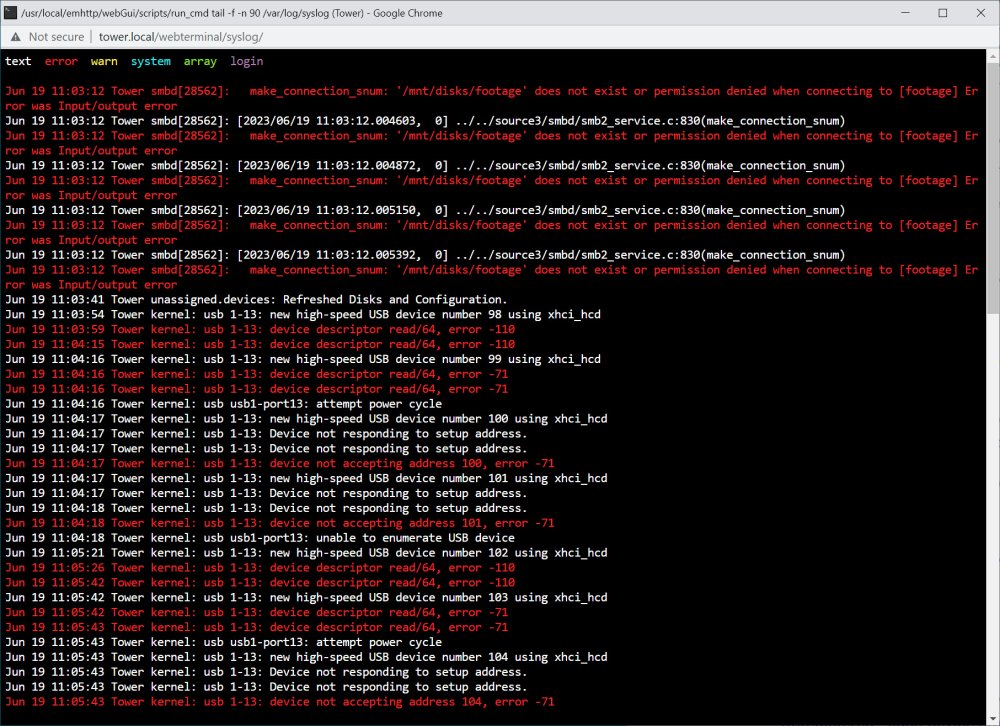
I'm using an unassigned devices NVMe drive outside of my array. I am doing this because it just collects security camera footage and I don't really need or want that to hammer on my parity disk. Unfortunately, the USB device does not seem to want to stay on reliably. It drops, seems to be unable to recover, and I have yet to figure out how to get the drive to reappear in Unraid. (a reboot didn't do it) I would like a drive that is reliable and outside of my array because if it disappears out from under the security camera, footage will back up and bad things will happen. Is there a way to make an external disk maintain a reliable connection to my server?
-
His router is an Arris BGW210-700 supplied by AT&T. Mine is a Google Wifi router. I wouldn't say I trust his router. But, we have the same port forwarding rules set up as far as I can tell. Is there some setting on his router that would prevent internal traffic but not external traffic? I've never heard of such a thing. -Jim
-
I have built two Unraid servers: One for myself and one for my dad. I am seeing a difference between the behavior on the two of them that I cannot explain: I am going to call one pair Computer A and NC A which are on my computers/network. Computer B and NC B are on my dads computers/network. Computer A can successfully mount a disk from both NC A and NC B without issues. (via WebDAV) Computer B can successfully mount a disk from NC A but not NC B. (within it's own network) "Net use" tries for a while and then gives an error 67. Does anyone have any idea why computer B would be able to map a drive outside of its network but not one from within?
-
et tu davfs2! Were you the culprit all this time?
-
The people pulling their hair out with similar issues online makes me pre hurt for what I am about to go through. Is the problem some upload limit with Cloudflare, WebDAV, Swag, Nextcloud? At first I thought Cloudflare was the culprit. But, my limit being closer to 50MB has me leaning WebDAV. I see plenty of guides on how to change that limit via the Windows registry. But, any idea how you up this limit in Unix?
-
I have a remote camera FTPing video files to a beaglebone. In a script, those files get tarred up every 10 minutes and pushed to my Nextcloud server (via WinDAV) on my Unraid server. (in an external storage location) I have verified that the tar files are coming through intact. Once on the server, the script attempts to unpack them and that is where I am running into trouble. In my low res test scenario, there are 3-4 10MB files coming through. When unpacked the 30MB files create 2x10MB intact files and one 7MB partial file. The 40MB file untars into 1x10MB + 1x7MB + 2x0b files. In both cases I hit a ~57MB wall before getting the error "cannot write: no space left on device" and the untar process fails out leaving a mess of incomplete video files. (massive gaps in my surveillance footage) I can tell you there is 8TB allocated to this share and it is adding another 57MB every time the script runs. So, any idea why each session believes it has so little space to work with?
-
It worked! The camera FTPs the videos to the Beaglebone. The Beaglebone mounts the Nextcloud drive and transfers the files via WebDAV.
-
I do have Nextcloud running on the Unraid server and intend to spread any important videos to interested parties by sharing them via Nextcloud. The plan was to relay the files from Camera > Beaglebone > Unraid > Nextcloud (via nextcloud external mount). But, if you are saying it's better to push the files straight to a Nextcloud share via some kind of command line magic as Nextcloud has a bunch of security layers built in, that sounds like a good idea to me. How do you send something to Nextcloud without a GUI? Just mount the nextcloud share via webdav and create a script to move all the files over periodically?
-
Alright, my current thinking is FTP the videos to the Beaglebone and send them or pull them via a Wireguard VPN tunnel from the Beaglebone to the Unraid server. Does that sound like a good approach?
-
Let me explain my setup: My family has a cabin in Colorado. It is in a very remote location and is prone to bear breakins, floods, fires, etc. We need to surveil the place to make ensure it's still standing and not burning through propane due to broken windows/doors etc. We recently got internet access at the cabin and installed a Reolink camera. I have an Unraid server at my place in California. I would love to have the camera FTP its footage to my Unraid server where it can be assessed and easily distributed to all the interested parties. I keep reading that exposing Unraid to the greater internet via an FTP server would be a BAD idea. So, I'm definitely sold on doing this securely. I believe the camera can FTP or SFTP the footage out. But, I'm not sure how I can get Unraid to securely receive the data. I am only familiar with ProFTPd in Unraid and while there seem to be some old guides about how to get ProFTPd to use SFTP, they have deprecated warnings all over them and I am concerned that would be heading down the wrong path. How would you get these files from this camera in Colorado to an Unraid server in California securely? Technically there is also a Beaglebone in Colorado that could operate as an intermediary if this cannot be done directly due to the limited abilities of the camera.
-
Alright found the sysconfig file on my PC cleaned out the bad formatting. Replaced with kernel /bzimage append initrd=/bzroot pcie_aspm=off And we're golden. No more log spam and subsequent system drain! Yay! Thank you guys for all the help. 50w less power usage at idle and CPU temp down 30 degrees. I'm pretty impressed with how much the logging program can tax a 12900k. Glad it's not multithreaded!
-
Found it! Did something like this: kernel /bzimage append initrd=/bzroot append pcie_aspm=off Now the system is not booting. I assume something is wrong with my formatting. What do I do next? Pull the flash drive and edit the config file directly on my Windows PC? How should it read?
-
OK. As I understand it, I am trying to disable some power management feature of my NVME drives by editing some kind of sys config file. Let's pretend for a second I don't really know much about Unix. Where is this file? How do I get to it? Interesting that this problem only presented itself after I replaced the broken parity disk. I wonder if the newer drive has different firmware or hardware components. Appears to be an identical Sabrent 8TB Rocket 4 Plus just like the others.
-
Ohh yeah, look at that: Feb 7 05:06:08 Tower kernel: nvme 0000:14:00.0: [ 0] RxErr Feb 7 05:06:08 Tower kernel: pcieport 0000:00:06.0: AER: Corrected error received: 0000:14:00.0 Feb 7 05:06:08 Tower kernel: nvme 0000:14:00.0: PCIe Bus Error: severity=Corrected, type=Physical Layer, (Receiver ID) Feb 7 05:06:08 Tower kernel: nvme 0000:14:00.0: device [1987:5018] error status/mask=00000001/00006000 Repeated over and over again. I turned off the server completely and when I powered it back on, I noticed that the one core running this process was no longer permanently locked at 100%. It slowly went up from 20% to 100% over the course of about 30 minutes. A little background: This is a machine where the pcie devices consist of 9 nvme drives. These drives have been dying at a pretty staggering rate. 3/9 have died infant mortality deaths. The latest drive that died was the parity drive. I got a replacement drive from the manufacturer, installed it, rebuilt parity successfully, and then noticed this CPU drain. I guess even if there is something wrong, I'd prefer Unraid not melt my system down trying to warn me about it.
-
I currently have two processes that seem to be eating up a constant 10% of my CPU processing power. This is annoying as it's wasting a lot of power and heating up my CPU quite a bit. They run even when the array is stopped and restarts do not get rid of them: They are: rsyslogd irq/123-aerdrv What are these and how do I kill them forever? -Jim
-
No. I keep a pretty close eye on temps. This is all in an ITX form factor. But, one with quite good cooling. (3 noctua 120mm fans) The drives tend to idle at around 30C and get up around 55-60 while under load. (Pretty rare) Like you, I have set up a very read heavy environment. The parity drive likely did a complete write once when it was initialized and then a pretty light workload since. (Probably wrote a few hundred gigs since parity was first achieved)
-
I have an Unraid system consisting of 8x 8TB Sabrent Rocket 4 Plus drives. Counting my parity disk which crapped out today, 3 of the 8 drives have died within 3 months of light use. (Plex server, home assistant VM) The drives that have died so far have all been the ones getting the most use. (Parity disk and most heavily trafficked data disks) This makes me slightly suspicious that Unraid might be at least partially responsible for their infant mortality problems. So far, Sabrent support is replacing the drives as they die. But, I'm quickly becoming an extremely expensive customer, and just want to make sure I'm not doing something silly here. Whatever is going wrong is causing the drives to fail in such a catastrophic way that multiple computer BIOSes cannot detect the drives even exist anymore. (Or in one case the drive would be available so intermittently/briefly that you couldn't even get a SMART report off it.) I know that I'm going against the grain by using nvme drives as my data pool, which is not recommended/supported. But, it's not unsupported because there are like firmware corrupting, catastrophic problems here, right?
-
I built an all nvme ITX unraid server on a z690i with a highpoint technologies AIB allowing 8x nvme drives in my one x16 pcie 5.0 slot. I've filled 8/10 drive bays with 8tb sabrent drives. Expensive. But, crazy fast 80TB tiny NAS of the future. No regrets here.
-
Nope. So far the solution is don't put the machine anywhere you can't hear the fans and listen for the fan cyclone just in case the new AIO pump fails. (I've had that happen before) I sure hope there's a better solution soon.
-
I was building a new machine for my dad with a 7700x which is working great except that I cannot get the CPU temp sensors detected by Dynamix. I found a GPU temperature from manually scanning for sensors but had no luck manually adding that to the sensor list for the plugin. I am assuming I cannot scan for sensors because the chipset and CPU are too new for Unraid or Dynamix to completely understand. But, my issue could also be a problem with Perl since it is no longer installed/enabled via NerdPack. I found it within the Unraid files, so I assume it is now included with the Unraid OS. But, I have no idea if it is available to Unraid by default or not. Does it need to be installed? If there is a way to get temp sensors detected on Unraid, I'd appreciate an updated instruction set.
-
Fast boot betrayed me! I noticed that the 3 second BIOS flash screen was getting cut off in just a split second and we cut to the black screen. So, got me thinking maybe something was going haywire in the boot sequence as it tried to speed through initialization. Disabled fast boot and it's reliably booting headless 5/5. Yay!
-
Oh boy and the ASUS firmware version I updated to cannot be rolled back from. Sigh. Just wonderful. I guess we plow ahead. Any ideas?

