





YoHoNoMo
Members
-
Joined
-
Last visited
-
Behoben, der Server ist wieder im Netzwerk, ganz herzlichen Dank für deine Hilfe (und auch Danke an @Amane)!
-
Das wusste ich vielleicht mal vor zwei oder drei Jahren, als ich den Server aufgesetzt habe, aber jetzt weiß ich darüber gar nichts mehr. Aber ja, das war aus dem Thread zum Stromsparen.
-
Oh Mann, ja, jetzt erinnere ich mich... Das war ein Versuch der VM Netzwerk zu verschaffen. Ich dachte das wäre wieder weg, durch das Wiederherstellen des USB Stick Backups... Vielen Dank! Das wird sofort wieder deaktiviert.
-
Ich danke dir. Die Diagnostics habe ich vor der Änderung an der MAC Einstellung erstellt. Wenn ich das nochmal wiederholen soll mit der MAC- und bonding-Einstellung wiederholen soll, mache ich das gern.
-
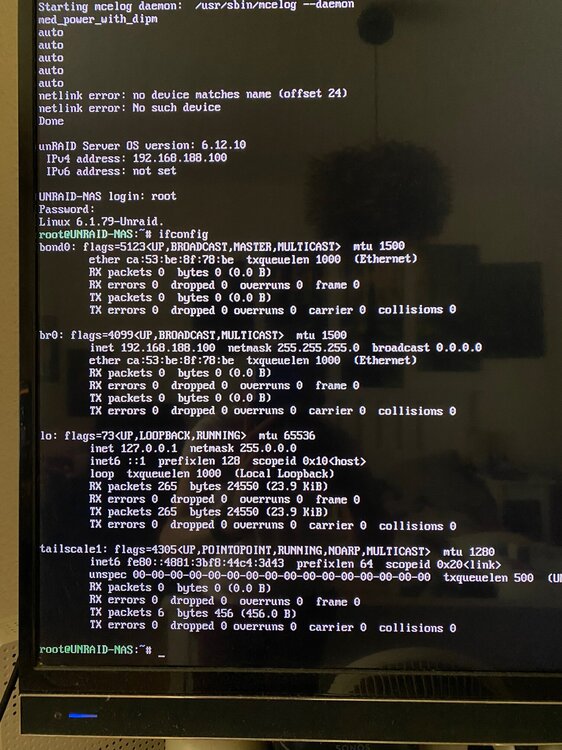
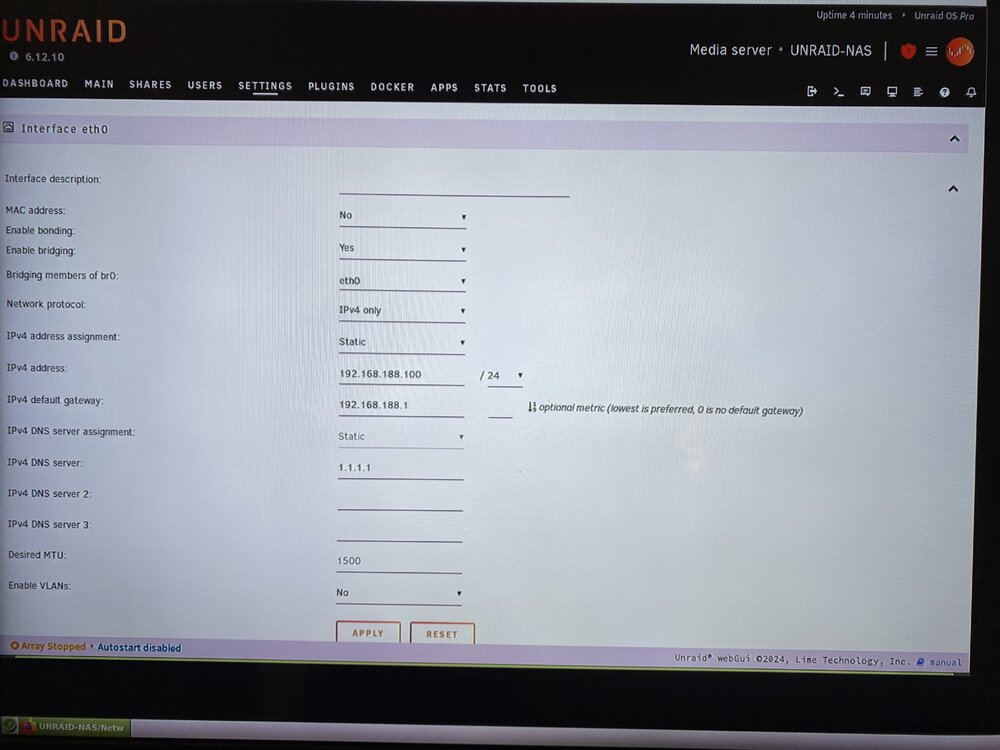
Ich hab's geändert, dadurch wird Bonding aktiviert, active-backup(1) als Modus o.Ä. eingestellt und eth0 zu bond0 hinzugefügt (ich hoffe, ich habe es richtig wiedergegeben). Leider taucht der Server trotzdem nicht im Netzwerk oder in der Übersicht der Fritzbox auf. Geht beides nicht: Destination Host Unreachable. Danke für den Hinweis, ich habe sie oben hinzugefügt. Einen Screenshot davon habe ich angehängt. Ja, das ist richtig so. Das habe ich mal vor Jahren geändert und es durch verschiedene Fritzboxen durchgeschleppt, um mein Netzwerk nicht an allen Geräten neu aufzusetzen. Der Grund war glaube ich ein Konflikt mit dem Kabelmodem, das wir damals hatten und das davor geschaltet war.
-
Hallo liebe Leute, wie im Titel beschrieben, taucht mein Unraid NAS (6.12.10) nach einem Neustart nicht mehr im Netzwerk auf und die Fritzbox zeigt keine Verbindung an dem verwendeten LAN-Port. - Ich habe einen anderen Port an der Fritzbox probiert. - Ich hab die Fritzbox neugestartet. - Ich habe ein Backup aus April auf den USB-Stick geschrieben, aber auch keine Veränderung. Ich war eine Woche ungeplant im Krankenhaus und hatte in der Woche zuvor mit VMs experimentiert, um Windows 11 zum Laufen zu kriegen. Daher rührte die Aufforderung zum Neustart, wenn ich mich recht erinnere. Aber da ich das Backup aus April aufgespielt habe, sollte davon eigentlich nichts mehr übrig sein und alles wie vorher. Über UnraidOS im GUI Mode gebootet, komme ich zumindest am Gerät selbst in die Verwaltung. Unraid Connect zeigt wie erwartet einen Fehler an, aber ich sehe den Intel Ethernet Controller in Unraid unter "devices". Wenn ich den Systemmeldungen beim Boot zusehe, steht am Ende auch die zugewiesene IPv4 Adrersse, aber das hat wahrscheinlich nichts zu bedeuten, da ja keine Verbindung zwischen Router und NAS zu bestehen scheint. Die Lämpchen am Ethernet Port des Servers blinken unregelmäßig, aber er taucht in der Fritzbox Netzwerkübersicht nicht auf. Kann mir jemand eine Richtung weisen, woran das liegen könnte? In den Netzwerk Settings sieht es so aus: unraid-nas-diagnostics-20240803-1448.zip
-
Oh my ... *facepalm* Now it worked, thank you!
-
I do have backups on my array, so recovery is not a must. It's probably no good with some of it being unreadable and starting fresh would be best.
-
mount -v -o rescue=all,ro /dev/nvme0n1p1 /x mount: /x: /dev/nvme0n1p1 already mounted on /temp. dmesg(1) may have more information after failed mount system call. I mounted the NVMe to /temp yesterday working through the Unraid forums and manual. There were a few occassions where Midnight Command was unable to copy some files (msg: Stalling ....). That's why I stopped bothering with the drives and went nuclear on the pool/drives trying to format everything. 😁
-
Because of the backups I "recklessly" did try formatting the pool, that did not work. Than removed the drive and tried formatting the SN570. Didn't succeed either. Thank you very much for looking into my mess! root@UNRAID-NAS:~# btrfs fi show Label: none uuid: d1776af5-1bda-45f7-a369-70e42d89cf09 Total devices 2 FS bytes used 153.51GiB devid 1 size 931.51GiB used 215.06GiB path /dev/nvme0n1p1 devid 2 size 931.51GiB used 82.03GiB path /dev/nvme1n1p1
-
Yesterday 1 of 2 Cache Pool SSDs died (SMART shows failure), but both SSDs show up as "unmountable: unsupported or no file system" (it was btrfs, with a mirrored backup drive - non-technical term, because I don't really remember 😅 I'm pretty sure I set it up after watching a SpaceinvaderOne Tutorial video). I have the appdata and nextcloud folders that are/were on these drives backed up, so I am quite calm. But nonetheless I am at a loss on how to proceed from here. I thought I would be able to use the other drive when one would eventually fail, but ... here I am with both being unmountable. The diagnostics unfortunately were taken after a reboot (because of course ... sorry). But since the Samsung 970 EVO Plus shows a SMART failure and I have the data backed up to the array that probably does not matter? Either way, I'll now know better in the future. 😅 My Cache Pool consisted of these drives: Cache 1: Samsung 970 EVO Plus Cache 2: WD Blue SN570 I have since removed the Samsung SSD from the pool and tried just the WD SN570. I even tried formatting the drive through Unraid but that would start and stop immediately. Any help from a kind stranger to get the probably okay WD SN570 working again would be much appreciated. unraid-nas-diagnostics-20240415-1406.zip
-
I checked again today after updating my binhex containers. Latest updates changed binhex/arch-radarr to version 5.6.1. It is now affected as well.
-
Unraid 6.12.9 is also unaffected with version 5.4.1. Popular docker containers with 5.6(.1) I found: - binhex/arch-prowlarr - binhex/arch-sabnzbd - binhex/arch-sonarr It seems binhex/arch-radarr is unaffected with version 5.4.5.
-
Thank you for the way you are handling the change and keep honouring the lifetime licenses in a user-friendly way! My server has six drives and while I initially bought the Plus license I soon upgraded to the Pro license even though I will probably never need it –– Just because I have been so happy with my purchase. I'm planning to build an Unraid server as a gift for my father this year and had to snatch another lifetime license after reading the announcement. I don't want another subscription in my life, I'm sorry. 🥺 😁 Thank you for allowing users to still buy the old license type, store them for later use and keeping an upgrade path open!
-
Thank you. It is working for now after updating to 6.12.3, but the server has only been running for 3.5 hours, so I will have to wait and see. Should be fixed if it lasts more than 24 hours. I will update the topic tomorrow.



