





Camnomis
Members
-
Joined
-
Last visited
Everything posted by Camnomis
-
Awesome, thanks for your help so far (if there is a way to send virtual beer tokens let me know!) Hopefully this is the last question.... At the moment I have 5 x HDD and 1 x SSD connected to the HBA, which is a x8 PCIe card, I am not sure which slot on the motherboard it is connected to without opening the case and checking but the tech specs say I should have: ● 1 x 8 PCIe Gen3 (x16 connector) FH/HL ● 1 x 8 PCIe Gen3 (x8 connector) FH/HL ● 1 x 4 PCIe Gen3 (x8 connector) FH/HL ● 1 x 1 PCIe Gen3 (x1 connector) FH/HL If I were to add 2 x x4 PCIe to M.2 adapters (a x4 should fit in an x8 slot) I will not exceed the max 16 lanes the CPU can handle, and couple with 2 x Samsung 970 EVO Plus it should theoretically work, I could play it safer with a Dual M.2 PCIe SSD Adapter Card in a x8 or x16 slot which can take two SSD's but there is quite a cost uplift for this approach
-
Thanks, will need to double check the motherboard but I think I’m ok. So next question, if I go down the M.2 route do I then need to consider the SATA vs NVMe options? If I’m future proofing the system should I be looking at an adapter that is NVMe capable rather than SATA? Most of the dual M.2 PCIE cards (I’ll need two drives to enable a level of protection for the cache pool) have a M Key (NVMe) and a B Key (SATA) which is self explanatory, but are the M Key slots compatible with SATA drives? As I’m guessing mixing a NVMe and a SATA SSD would not be very efficient would I need two single M.2 PCIE (either B or M) cards as the cost of a Dual M Key card would be way over budget?
-
I have a Dell T340 with a H310 HBA flashed into IT mode. Connected to this is have several 8TB SAS drives, and I’m led to believe the H310 uses a LSI SAS 2008 chip, which is SAS2, however as I’m using HDD not SSD this is not a problem as there should be no way to hit the throughout bottle neck. I want to add some SSD’s as a cache pool, and have two options 2.5” or M.2. If I use a 2.5” SATA drive I should have no problem connecting it via the H310, it’s only SAS SSDs that it might struggle with? If I go the M.2 route I’d have to get a PCIE SSD adapter like this https://www.ebuyer.com/816612-startech-com-m-2-pcie-ssd-adapter-x4-pcie-3-0-nvme-m-2-pex4m2e1 would this give me a performance increase over the SATA connection given the H310 is connected to PCIE (although 2.0) anyway?
-
Hello! trying to debug an issue I’m having. I have NPM installed, my DNS is sorted, I have a host configured and the SSL certificate has been registered. So I’m preset sure every part of the chain to NPM is working, however when I try to connect to the URL I have configure it times out as unreachable. im guessing it’s an issue between the container and the rest of my UNRAID ecosystem, I’ve tried connecting to other continents and VM hosted applications with no luck. But the logs are not really helpful, is there a way to turn on debug logging to see what js happening within NPM and why it’s not finding the endpoint specified? One thing I’ve noticed is every guide I’ve seen has the container on a custom network type, where as mine is set for bridge. When I switch to something else the SSL service can’t renew certificates so breaks that part of the chain. all advice or suggestions welcome. thanks in advance
-
I've rebuilt my homelab and moved to unraid I had some old drives that I used before I could move my newer drives off the old hardware to the newly created unraid system. Just looking at some of my drives, and their date of manufacture is 2012 (Seagate Constellation) and 2013 (HGST Ultrastar) Safe to say these will be retired as soon as I can move data off them.
-
Looks ace, you got the original file for that? I’d like to make a few tweaks if allowed
-
Thanks the HBA and cables arrived and the drives are now seen in UNRAID (there is still an error message about the cables "not connected, or is improperly connected." but thats a headache for another time as it seems to be working!
-
I want to make sure I don't rush into things, so I hope you don't mind if I pass you by my thinking before I do anything (measure twice/cut once etc) At the moment I have an ESXI server with 6 x 8TB drives in, I am moving to a unraid server which has the capacity for 8 drives. I want to move about 12TB data from ESXi to unraid, I am not planning to move the actual VM's as although its possible from what I've read you need twice the drive size free to do the convert. What I need to do is move the data off the "big" drives before I can use them in unraid, as such I have a 8 x 2TB drives which gives me a total capacity if 16TB (or 14TB if I use one as a parity drive) which should be more than big enough to take the data and then replace the 2TB drives one by one with the 8TB drives. Firstly in this situation I assume its best not to have a parity drive, as A) the data "should" be on the old server so I can run the risk of not having the protection while I transfer the data, and B) by not having a parity drive it "should" be quicker as there is no extra overhead. Secondly, to change the make up of an array pool, would it be best to leave one drive "unassigned" or even not install the drive in the first place, so I can then replace this with an 8TB when it becomes free out of the other system. I've read something that says I need to use the New Config option but this comes with scary warning messages about "reset the array disk configuration". Is there an updated guide to swapping a smaller drive for a bigger one, and would it preserve the data on the array when I do so? TIA
-
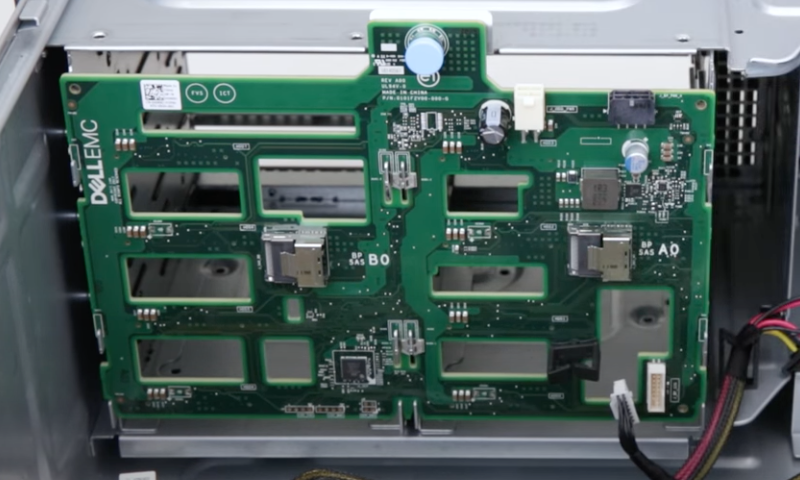
I thought that would have been too easy! AIUI the card I am looking at connects with a SFF8087, so that is one end of the cable sorted. I am guessing that I need the cable to connect to BP SAS A0 and BP SAS B0 in he digram below (which would make sense with the error messages) The storage SAS A0 cable is not connected, or is improperly connected. The storage SAS B0 cable is not connected, or is improperly connected. I believe the other end is Mini SAS (according to this) but searching Mini SAS brings up a multitude of different connector types, but it looks to me as if it is also SFF 8087 which means I would need something like this to connect it up (its a two pack of cables which again with 8 drives I assume I need both)
-
I have heard that name before, alas I am in the UK so shipping would be costly. I will see if there are any local sellers Something like this...... https://www.ebay.co.uk/itm/154325262207?epid=5040542546&hash=item23ee809f7f:g:hAwAAOSwyKlfS6wB or https://www.ebay.co.uk/itm/304226391340?hash=item46d54e552c:g:-EoAAOSwsxJgBCzC Which seem to take the cables I have in my system
-
I have pulled the SAS drives out, leaving just the two SATA drives and still they do not appear to be visible, I think I may be out of my depth already!
-
So as I understand it I need to either buy a PERC raid controller or a SAS HBA and flash it into IT mode. Is there an advantage to buying one or the other? I’m guessing a raid controller will be more expensive (and overkill), but I am not 100% comfortable flashing a HBA into IT mode https://www.dropbox.com/sh/oqymu7nrvub5a5u/AAC0Q2yndsXMtXh8Ily1YKROa?dl=0
-
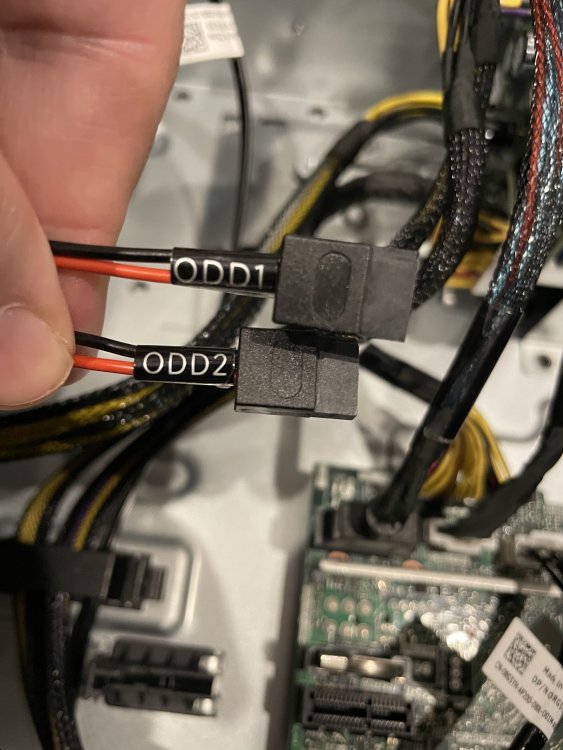
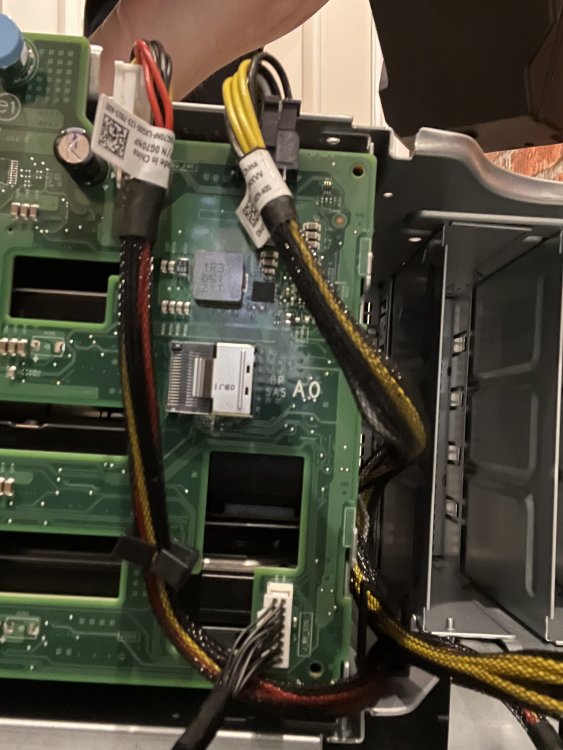
I am replacing a R710 with a T340, as I was hoping to use unraid I purchased a server without a raid controller (was this my first mistake?), as I wanted to reuse the SAS disks I have just swapped them from one system to the other, assuming I could wipe them and start from scratch. However the drives just don't show up, when I go into System BIOS > SATA Settings the only option to me is changing the embedded SATA to either AHCI/RAID or off, everything else is either greyed out, Not Enumerated or N/A I have also tried to throw in a a couple of SATA disks and they are not being detected either, the drives look like they have power (green light) but I can't hear if they are spinning or not. When I go through iDRAC it again shows no disks, however there are log entries saying: So, opening the machine up there are three cables from the Backplane. One goes to the PSU, one to the Motherboard and a third splits into two and are labeled ODD1 and ODD2 which are not plugged into anything. I am hoping the issue is the server had a RAID controller in (A PERC H730P looking at the logs) and the cabling is still setup for this as I am getting the error message: I just don't know if it's the cable that needs replacing, or if the cable that is there needs to be plugged into somewhere else. Can anyone offer any advice?


